اختار اللغة

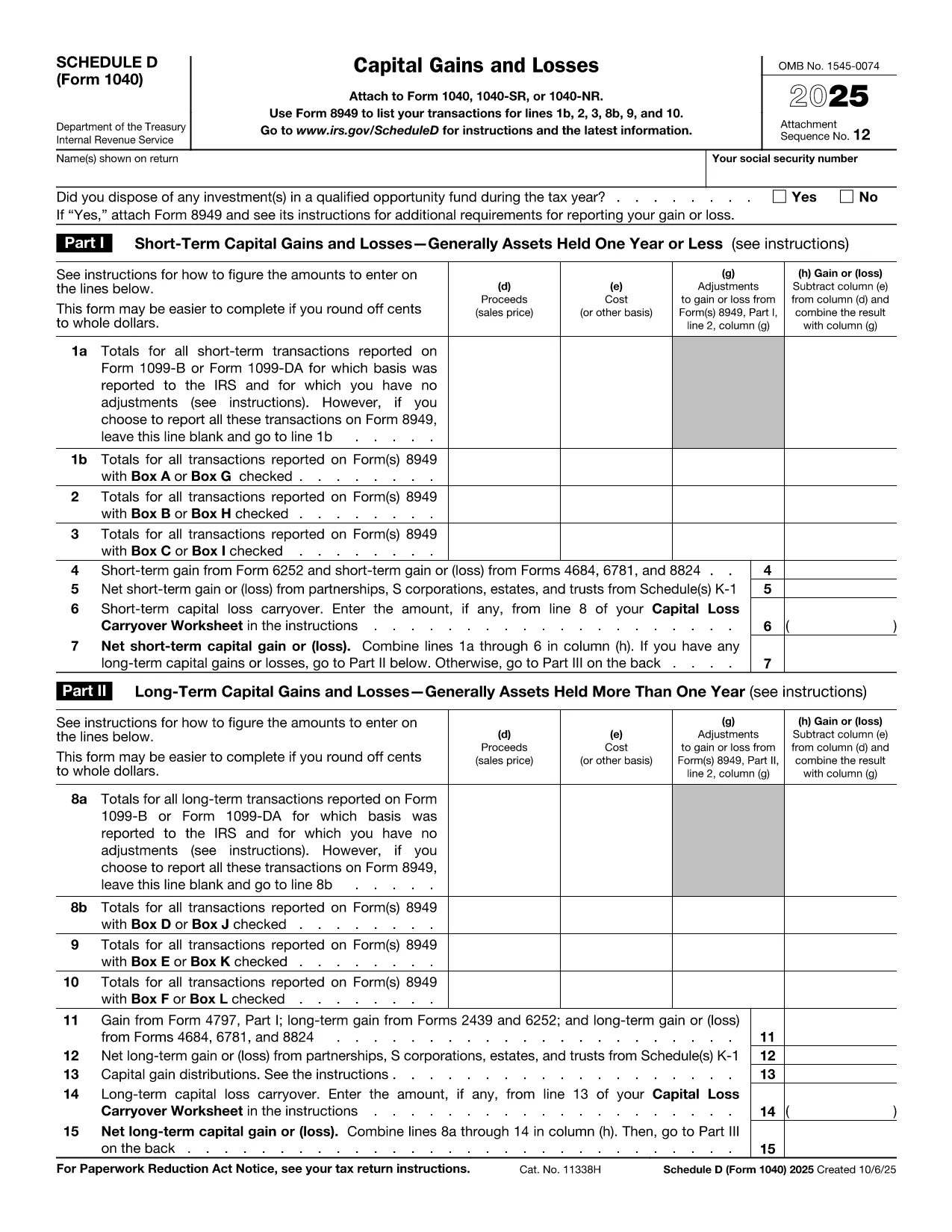
Schedule D (Form 1040SD) is the IRS worksheet used to report capital gains and losses from the sale of stocks, bonds, real estate, and other investment assets. Whether you’re a first‑time filer or a seasoned investor, a correctly completed Schedule D can lower your tax bill and keep the IRS happy.

Formize.com offers a fillable, web‑based PDF version of Schedule D. No need to download a PDF editor – simply click the Fill out this form button, wait for the Formize PDF Filler to load, and start entering your numbers.

What Is Schedule D and Who Needs It?

Schedule D is required when you have:

  • Capital gains from the sale of stocks, mutual funds, or other securities.
  • Capital losses that you want to deduct against gains.
  • Transactions involving collectibles, real estate, or crypto‑currency that are not reported on Form 8949.

If any of these apply to you, you must attach Schedule D to your Form 1040.

How to Fill Out Schedule D Using Formize

Follow the simple steps below to complete the form online. The Formize PDF Filler automatically saves your progress, validates numeric fields, and lets you download a printable PDF when you’re done.

Common Mistakes & Tips for a Clean Submission

Even small errors can delay processing. Keep these tips in mind:

  • Double‑check totals: The sum of short‑term and long‑term gains must match the totals on Form 8949.
  • Use the correct filing status: Your Schedule D totals feed into line 7 of Form 1040.
  • Don’t leave blanks: Enter “0” for any section that does not apply.
  • Review carry‑over losses: If you have a loss carryover from a previous year, include it on line 16.

When you’re ready, click the button below, fill the fields, review your entries, and download the completed Schedule D.

Fill out this form

تعليمات

التعليمات
  • Do I need Schedule D if I only have a few stock trades?

    Yes. Any sale of capital assets that results in a gain or loss must be reported on Schedule D, even if you have only one transaction.

  • Can I use the Formize filler on a mobile device?

    Absolutely. The PDF Filler works in modern browsers on smartphones and tablets, so you can complete Schedule D on the go.

  • What if I made a mistake after downloading the PDF?

    You can reopen the same Formize link, re‑enter the corrected data, and download a new PDF. The filler does not store personal data after you close the session.

  • Is the fillable Schedule D free?

    Yes. Formize offers the PDF filler for Schedule D at no cost. There are no hidden fees or subscription requirements.

  • How do I report a capital loss carryover?

    Enter the carryover amount on line 16 of Schedule D. The Formize filler includes a dedicated field for this entry.

  • Do I still need to attach Form 8949?

    If you have detailed transactions, you must attach Form 8949. Schedule D summarizes the totals from Form 8949.

  • What if my broker provides a 1099‑B with totals already calculated?

    You can copy the totals directly into Schedule D. Ensure the amounts match the 1099‑B and reconcile any differences on Form 8949.

  • Can I e‑file Schedule D using the filled PDF?

    Most tax software accepts the PDF data when you import your return. If your software does not, you can manually enter the numbers from the completed Schedule D.

كيف

كيفية ملء Schedule D PDF مجانًا عبر الإنترنت في 5 خطوات سهلة:

  1. 1
    Click the Fill Out Button
    Press the "Fill out this form" button on the page. This opens the Formize PDF Filler in a new tab.
  2. 2
    Wait for the Filler to Load
    The Formize app loads the Schedule D PDF and makes every field editable. No download or extra software is required.
  3. 3
    Enter Your Information
    Type your capital gains, losses, and other required numbers directly into the highlighted fields. The tool validates numbers as you type.
  4. 4
    Review and Confirm
    Use the built‑in summary to verify totals. Correct any highlighted errors before proceeding.
  5. 5
    Save or Print
    When everything looks good, click "Download PDF" to save a completed Schedule D or print it to attach to your tax return.
Formize تطبيق PDF Filler
حول

استمارات الضرائب

Schedule D PDF هي أحد النماذج الضريبية التي تُستخدم للإبلاغ عن المعلومات المتعلقة بالضرائب إلى مصلحة الضرائب ذات الصلة. هناك أنواع مختلفة من أشكال الضرائب ، بما في ذلك أشكال الضرائب الفيدرالية والولائية والمحلية ، والتي يمكن أن تختلف تبعًا لظروف دافع الضرائب وموقعه.

سمات

حشو PDF

أسهل طريقة لملء نماذج PDF عبر الإنترنت

  • املأ بسرعة Schedule D PDF
    هل تبحث عن طريقة لملء كلمة Schedule D PDF بسرعة عبر الإنترنت؟ من خلال برنامج تعبئة نماذج PDF المجاني عبر الإنترنت ، ستعرف كيفية تحرير وتعبئة مستند pdf هذا في أقل من دقيقة.
  • محرر PDF سهل الاستخدام عبر الإنترنت
    هل سئمت طباعة ملفات PDF حتى تتمكن من تحريرها قبل إعادة مسحها ضوئيًا وإرسالها مرة أخرى؟ تحرير مستندات PDF مجانًا عبر الإنترنت. استخدم محرر pdf على الإنترنت لتوفير الوقت والورق.
  • أدوات رائعة ، جميع المنصات
    هل تتساءل عن كيفية ملء Schedule D PDF على جهاز Mac ، أو ربما كيفية استخدام حشو PDF مجانًا؟ تعمل أدوات PDF الخاصة بنا عبر الإنترنت على جميع الأنظمة الأساسية.
  • تخزين الملفات الآمن
    يتم تخزين ملفات "Schedule D PDF" المكتملة في قاعدة بيانات آمنة تديرها استضافة Amazon Cloud. يمكنك حذف ملفاتك من نظامنا في أي وقت. على أي حال ، يتم حذف هذه الملفات تلقائيًا بعد 24 ساعة.
  • الدردشة مع {كلمة رئيسية}
    قم بالدردشة مع "Schedule D PDF" على Chatize وهو مساعد مجاني لقارئ PDF. اطرح الأسئلة واحصل على الإجابات من "Schedule D PDF". فقط انقر على زر الدردشة مع المستند أعلاه.

حذف جلسة التعبئة

حذف جلسة التعبئة المحددة؟ في هذه الحالة، سيتم فقد تقدمك في إكمال النموذج.

حذف جلسة التحرير

هل تريد حذف جلسة التحرير المحددة؟ في هذه الحالة، سيتم فقدان التقدم الذي أحرزته في إنشاء النموذج وتحريره.