
اختار اللغة

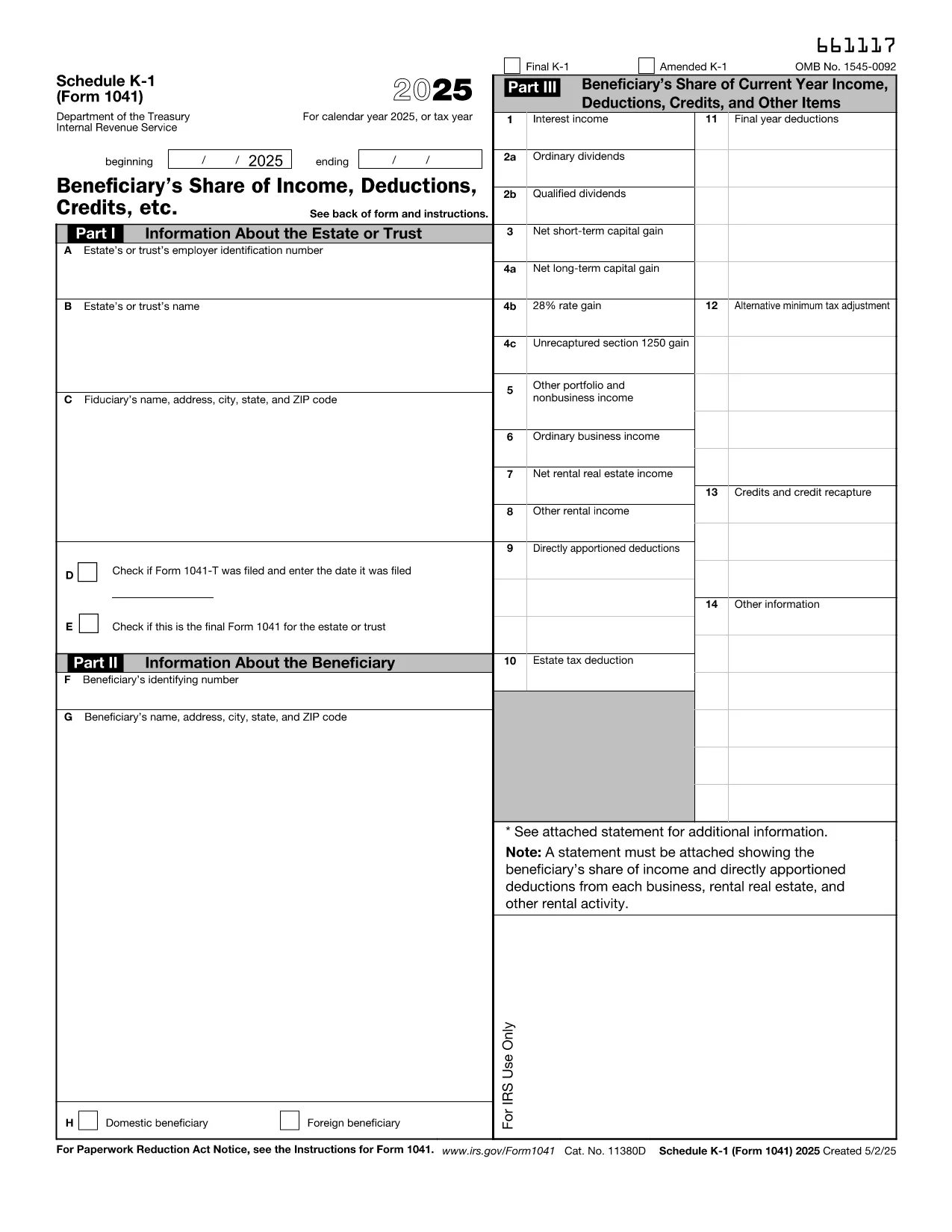
Schedule K‑1 (Form 1041) is the IRS document used by estates and trusts to report each beneficiary’s share of income, deductions, and credits. Our fillable PDF lets you complete the form directly in your browser – no extra software required.

What Is Schedule K‑1 (Form 1041)?

The Schedule K‑1 (Form 1041) accompanies the estate’s income tax return (Form 1041). It breaks down the taxable items that flow through to each beneficiary, such as interest income, capital gains, and charitable deductions. Beneficiaries use the information on the K‑1 to fill out their personal tax returns.

How to Complete the Fillable K‑1 Online

Instead of downloading the PDF and opening it in a separate editor, simply click the "Fill out this form" button on this page. The Formize PDF Filler app will load in seconds, allowing you to:

  • Enter beneficiary details, tax‑year information, and each line item directly on the screen.
  • Validate entries in real‑time, reducing the chance of arithmetic errors.
  • Save your progress and return later, or download a completed, printable PDF.

Common Mistakes & Tips for Estate Beneficiaries

  • Incorrect SSN or EIN: Double‑check the numbers before saving.
  • Missing Box 14 codes: Use the IRS instructions to match each code with the correct amount.
  • Failing to report foreign income: If the estate earned income abroad, it must appear on the K‑1.
  • Not signing the form: The executor’s signature is required for the K‑1 to be valid.

Where to Submit Your Completed K‑1

Beneficiaries attach the Schedule K‑1 to their individual tax returns (Form 1040). The estate’s executor files Form 1041 with the IRS, and each beneficiary includes the K‑1 information on the appropriate lines of their personal return.

If you need additional guidance, refer to the IRS instructions for Schedule K‑1 (Form 1041) or consult a qualified tax professional.

تعليمات

التعليمات
  • Who must receive a Schedule K‑1 (Form 1041)?

    Every person or entity that is a beneficiary of the estate or trust and receives a share of its taxable income must be issued a Schedule K‑1.

  • Can I edit the IRS PDF directly in my browser?

    Yes. By clicking "Fill out this form" you can use Formize’s online PDF filler to edit the form without downloading separate software.

  • What is Box 14 on the K‑1 used for?

    Box 14 contains codes that identify the type of income or deduction (e.g., capital gains, foreign tax credit). The code must match the amount shown in the corresponding box.

  • Do I need to file the K‑1 separately with the IRS?

    No. The Schedule K‑1 is attached to each beneficiary’s individual tax return (Form 1040). The estate files Form 1041 with the IRS.

  • What if the estate has foreign income?

    Foreign income must be reported on the K‑1 and may require additional forms (e.g., Form 1116) on the beneficiary’s return.

  • Is there a deadline for beneficiaries to receive their K‑1?

    The executor must provide Schedule K‑1 to beneficiaries by the due date of the estate’s Form 1041, typically March 15 for calendar‑year estates.

  • Can I correct a mistake after I’ve saved the PDF?

    Yes. Open the saved PDF again with the Formize filler, make the correction, and re‑save or re‑print the updated form.

كيف

كيفية ملء IRS Schedule K-1 estate مجانًا عبر الإنترنت في 4 خطوات سهلة:

  1. 1
    Open the Fillable Form
    Click the "Fill out this form" button on the page. The Formize PDF Filler app will launch in a new window.
  2. 2
    Enter Your Information
    Type the beneficiary’s name, SSN, and each line‑item amount directly into the fields. Real‑time validation will highlight any errors.
  3. 3
    Review & Save
    After completing all sections, review the summary, then click "Save" to download a filled‑out PDF or "Print" to generate a hard copy.
  4. 4
    Submit with Your Tax Return
    Attach the completed Schedule K‑1 to your personal Form 1040 when you file your federal income tax return.
Formize تطبيق PDF Filler
حول

نماذج خدمة الإيرادات الداخلية (IRS).

IRS Schedule K-1 estate هو أحد نماذج الضرائب الرسمية المستخدمة في الولايات المتحدة للإبلاغ عن الدخل والمطالبة بالخصومات والائتمانات وحساب الالتزام الضريبي والوفاء بالالتزامات الأخرى المتعلقة بالضرائب. مصلحة الضرائب الأمريكية هي الوكالة الفيدرالية المسؤولة عن إدارة وتنفيذ قوانين الإيرادات الداخلية في الولايات المتحدة.

فيما يلي بعض الأمثلة على نماذج خدمة الإيرادات الداخلية:

النموذج 1040: هذا هو نموذج إقرار ضريبة الدخل الفردي الأساسي الذي يستخدمه معظم دافعي الضرائب. يتم استخدامه للإبلاغ عن أنواع مختلفة من الدخل، والمطالبة بالخصومات والائتمانات، وحساب الالتزام الضريبي، وتحديد ما إذا كان دافع الضرائب مدينًا بضريبة إضافية أو يحق له استردادها.

النموذج 1099: هناك أشكال مختلفة للنموذج 1099، مثل 1099-MISC, 1099-INT, 1099-DIV، وما إلى ذلك. تُستخدم هذه النماذج للإبلاغ عن الدخل الذي يتلقاه الأفراد أو الشركات من مصادر مختلفة بخلاف التوظيف، مثل العمل الحر الدخل، وإيرادات الفوائد، وإيرادات توزيعات الأرباح، وإيرادات الإيجار.

النموذج W-2: يستخدم أصحاب العمل هذا النموذج للإبلاغ عن الأجور المدفوعة للموظفين والضرائب منقطع عن رواتبهم يستخدم الموظفون المعلومات الموجودة في النموذج W-2 لإكمال إقراراتهم الضريبية الفردية.

النموذج 941: يستخدم أصحاب العمل هذا النموذج للإبلاغ عن ضرائب التوظيف، بما في ذلك ضريبة الدخل الفيدرالية المحتجزة، وضريبة الضمان الاجتماعي، وضريبة الرعاية الطبية، لموظفيهم.

النموذج 1065: يتم استخدام هذا النموذج من قبل الشراكات للإبلاغ عن دخلها وخصوماتها والتزاماتها الضريبية. الشراكات نفسها لا تدفع ضريبة الدخل؛ وبدلا من ذلك، يقوم الشركاء بالإبلاغ عن حصتهم من دخل الشراكة في إقراراتهم الضريبية الفردية.

النموذج 1120: هذا هو نموذج إقرار ضريبة دخل الشركات الذي تستخدمه الشركات C للإبلاغ عن دخلها، الخصومات والمسؤولية الضريبية.

النموذج 990: يتم استخدام هذا النموذج من قبل المؤسسات المعفاة من الضرائب، مثل المنظمات غير الربحية والجمعيات الخيرية، من أجل الإبلاغ عن معلوماتهم المالية وأنشطتهم وامتثالهم لقوانين الضرائب.

النموذج 8862: يتم استخدام هذا النموذج من قبل دافعي الضرائب الذين طالبوا سابقًا بائتمان ضريبة الدخل المكتسب (EITC) ولكن تم رفضه، وأريد الآن المطالبة به مرة أخرى.

هذه مجرد أمثلة قليلة على نماذج IRS العديدة الموجودة للوفاء بالالتزامات المختلفة المتعلقة بالضرائب. تعتمد النماذج المحددة المطلوبة للفرد أو الشركة على ظروفها الفريدة ومصادر دخلها وخصوماتها. يُنصح باستشارة الموقع الإلكتروني الرسمي لدائرة الإيرادات الداخلية (www.irs.gov) أو طلب المشورة الضريبية المتخصصة للحصول على معلومات دقيقة وحديثة بخصوص مصلحة الضرائب الأمريكية المحددة النماذج ذات الصلة بوضعك الضريبي.

سمات

حشو PDF

أسهل طريقة لملء نماذج PDF عبر الإنترنت

  • املأ بسرعة IRS Schedule K-1 estate
    هل تبحث عن طريقة لملء كلمة IRS Schedule K-1 estate بسرعة عبر الإنترنت؟ من خلال برنامج تعبئة نماذج PDF المجاني عبر الإنترنت ، ستعرف كيفية تحرير وتعبئة مستند pdf هذا في أقل من دقيقة.
  • محرر PDF سهل الاستخدام عبر الإنترنت
    هل سئمت طباعة ملفات PDF حتى تتمكن من تحريرها قبل إعادة مسحها ضوئيًا وإرسالها مرة أخرى؟ تحرير مستندات PDF مجانًا عبر الإنترنت. استخدم محرر pdf على الإنترنت لتوفير الوقت والورق.
  • أدوات رائعة ، جميع المنصات
    هل تتساءل عن كيفية ملء IRS Schedule K-1 estate على جهاز Mac ، أو ربما كيفية استخدام حشو PDF مجانًا؟ تعمل أدوات PDF الخاصة بنا عبر الإنترنت على جميع الأنظمة الأساسية.
  • تخزين الملفات الآمن
    يتم تخزين ملفات "IRS Schedule K-1 estate" المكتملة في قاعدة بيانات آمنة تديرها استضافة Amazon Cloud. يمكنك حذف ملفاتك من نظامنا في أي وقت. على أي حال ، يتم حذف هذه الملفات تلقائيًا بعد 24 ساعة.
  • الدردشة مع {كلمة رئيسية}
    قم بالدردشة مع "IRS Schedule K-1 estate" على Chatize وهو مساعد مجاني لقارئ PDF. اطرح الأسئلة واحصل على الإجابات من "IRS Schedule K-1 estate". فقط انقر على زر الدردشة مع المستند أعلاه.

حذف جلسة التعبئة

حذف جلسة التعبئة المحددة؟ في هذه الحالة، سيتم فقد تقدمك في إكمال النموذج.

حذف جلسة التحرير

هل تريد حذف جلسة التحرير المحددة؟ في هذه الحالة، سيتم فقدان التقدم الذي أحرزته في إنشاء النموذج وتحريره.