
اختار اللغة

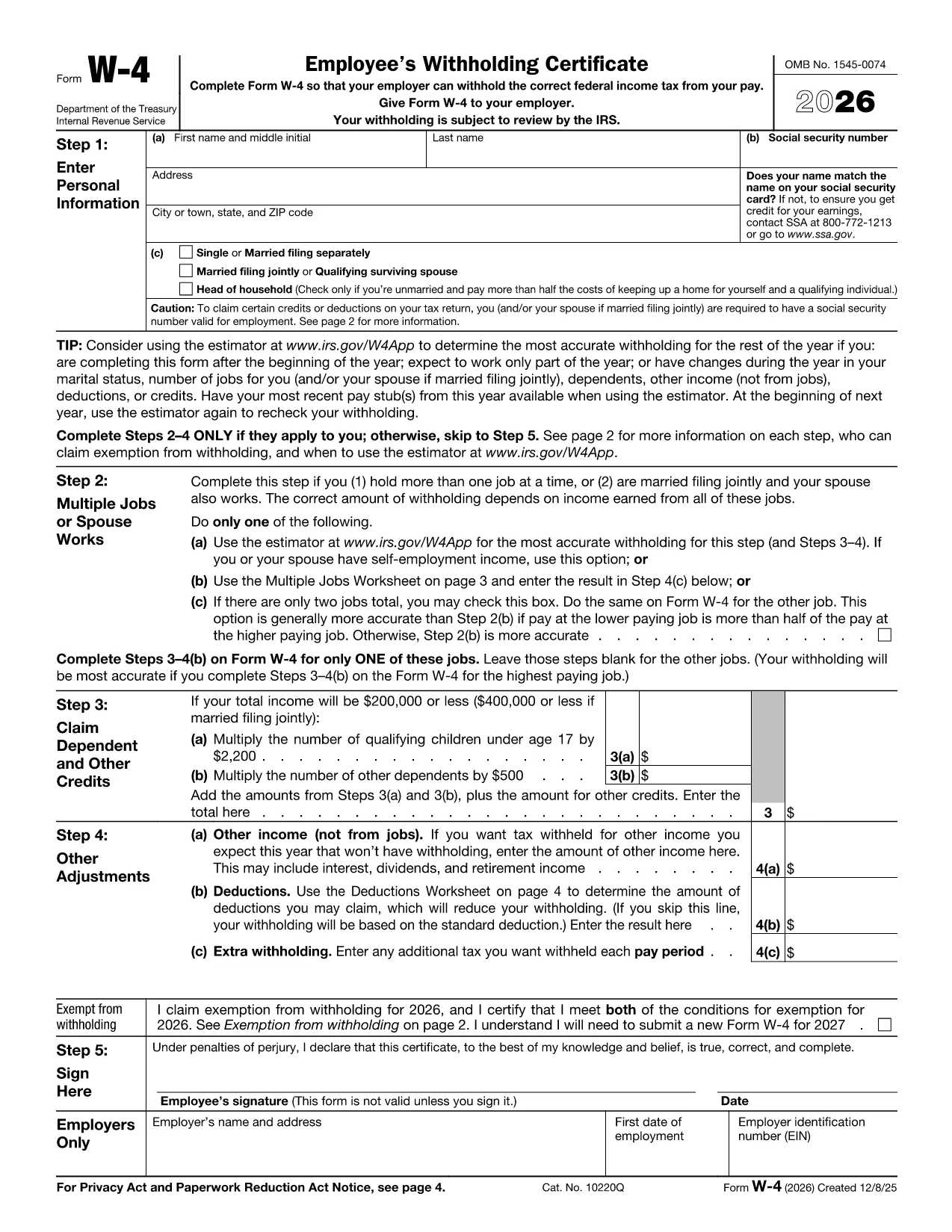
The IRS Form W‑4 (Employee's Withholding Certificate) tells your employer how much federal income tax to withhold from each paycheck. Filling it out correctly can prevent a big tax bill or an unexpected refund at the end of the year.

Our fillable PDF version is hosted on Formize.com, so you can complete the form directly in your browser—no Adobe Acrobat or other editor required.

What Is the W‑4 Form and Who Needs It?

Every new employee, and anyone who wants to adjust their withholding, must submit a completed W‑4 to their employer. The form captures personal information, filing status, dependents, and any extra withholding amounts.

How to Fill Out the W‑4 Online with Formize

Using the Formize PDF Filler is fast and secure. Just click the button below, wait for the filler to load, and start entering your data. All changes are saved automatically.

Common Mistakes to Avoid When Completing Your W‑4

  • Leaving the “0” boxes blank – The IRS treats blank fields as zero, but it’s clearer to type “0”.
  • Incorrect filing status – Choose Single, Married filing jointly, or Head of Household based on your situation.
  • Misreporting dependents – Only claim dependents you are eligible for under IRS rules.
  • Forgetting to sign – An unsigned W‑4 is invalid.

Where to Submit Your Completed W‑4

After you finish, download the completed PDF and give it to your payroll or HR department. Some employers also accept a secure electronic copy uploaded through their HR portal.

If you need help, refer to the IRS W‑4 instructions or talk to a tax professional.

التعليمات
  • Do I need to submit a new W‑4 every year?

    You only need to submit a new W‑4 when your personal or financial situation changes (e.g., marriage, new dependents, or a big salary change).

  • Can I claim more than three dependents on the W‑4?

    Yes. The 2023 redesign removed the three‑dependent limit; you can claim any number of eligible dependents on Line 3.

  • What happens if I leave the extra withholding line blank?

    Leaving the extra withholding line blank means you’re not requesting any additional tax to be taken out of each paycheck.

  • Is the fillable PDF on Formize secure?

    Yes. Formize uses SSL encryption and does not store your personal data after the session ends.

  • Can I edit a W‑4 after I’ve submitted it to my employer?

    You can submit a new W‑4 with updated information at any time. Your employer will replace the old form with the new one.

  • Do I need a signature on the electronic version?

    An electronic signature entered in the Formize filler is considered valid under IRS guidelines.

كيف

كيفية ملء W-4 form مجانًا عبر الإنترنت في 4 خطوات سهلة:

  1. 1
    Click the Fill Out This Form button
    Locate the “Fill out this form” button on the page and click it to launch the Formize PDF Filler.
  2. 2
    Wait for the Formize PDF Filler to load
    The filler loads in a secure iframe; a loading indicator will disappear when it’s ready.
  3. 3
    Enter your information
    Complete each section of the W‑4: personal details, filing status, dependents, and any extra withholding.
  4. 4
    Review and save
    Double‑check all entries, then click “Save” to download the completed PDF or send it directly to your employer.
Formize تطبيق PDF Filler
حول

استمارات الضرائب

W-4 form هي أحد النماذج الضريبية التي تُستخدم للإبلاغ عن المعلومات المتعلقة بالضرائب إلى مصلحة الضرائب ذات الصلة. هناك أنواع مختلفة من أشكال الضرائب ، بما في ذلك أشكال الضرائب الفيدرالية والولائية والمحلية ، والتي يمكن أن تختلف تبعًا لظروف دافع الضرائب وموقعه.

سمات

حشو PDF

أسهل طريقة لملء نماذج PDF عبر الإنترنت

  • املأ بسرعة W-4 form
    هل تبحث عن طريقة لملء كلمة W-4 form بسرعة عبر الإنترنت؟ من خلال برنامج تعبئة نماذج PDF المجاني عبر الإنترنت ، ستعرف كيفية تحرير وتعبئة مستند pdf هذا في أقل من دقيقة.
  • محرر PDF سهل الاستخدام عبر الإنترنت
    هل سئمت طباعة ملفات PDF حتى تتمكن من تحريرها قبل إعادة مسحها ضوئيًا وإرسالها مرة أخرى؟ تحرير مستندات PDF مجانًا عبر الإنترنت. استخدم محرر pdf على الإنترنت لتوفير الوقت والورق.
  • أدوات رائعة ، جميع المنصات
    هل تتساءل عن كيفية ملء W-4 form على جهاز Mac ، أو ربما كيفية استخدام حشو PDF مجانًا؟ تعمل أدوات PDF الخاصة بنا عبر الإنترنت على جميع الأنظمة الأساسية.
  • تخزين الملفات الآمن
    يتم تخزين ملفات "W-4 form" المكتملة في قاعدة بيانات آمنة تديرها استضافة Amazon Cloud. يمكنك حذف ملفاتك من نظامنا في أي وقت. على أي حال ، يتم حذف هذه الملفات تلقائيًا بعد 24 ساعة.
  • الدردشة مع {كلمة رئيسية}
    قم بالدردشة مع "W-4 form" على Chatize وهو مساعد مجاني لقارئ PDF. اطرح الأسئلة واحصل على الإجابات من "W-4 form". فقط انقر على زر الدردشة مع المستند أعلاه.

حذف جلسة التعبئة

حذف جلسة التعبئة المحددة؟ في هذه الحالة، سيتم فقد تقدمك في إكمال النموذج.

حذف جلسة التحرير

هل تريد حذف جلسة التحرير المحددة؟ في هذه الحالة، سيتم فقدان التقدم الذي أحرزته في إنشاء النموذج وتحريره.