
Избери език

Form W‑4P Fillable PDF – Complete Your Pension Withholding Online

  1. Държава САЩ
  2. език Английски
  3. Дейност Данъци
  4. Отдел Служба за събиране на данъци
Form W‑4P Fillable PDF – Complete Your Pension Withholding Online

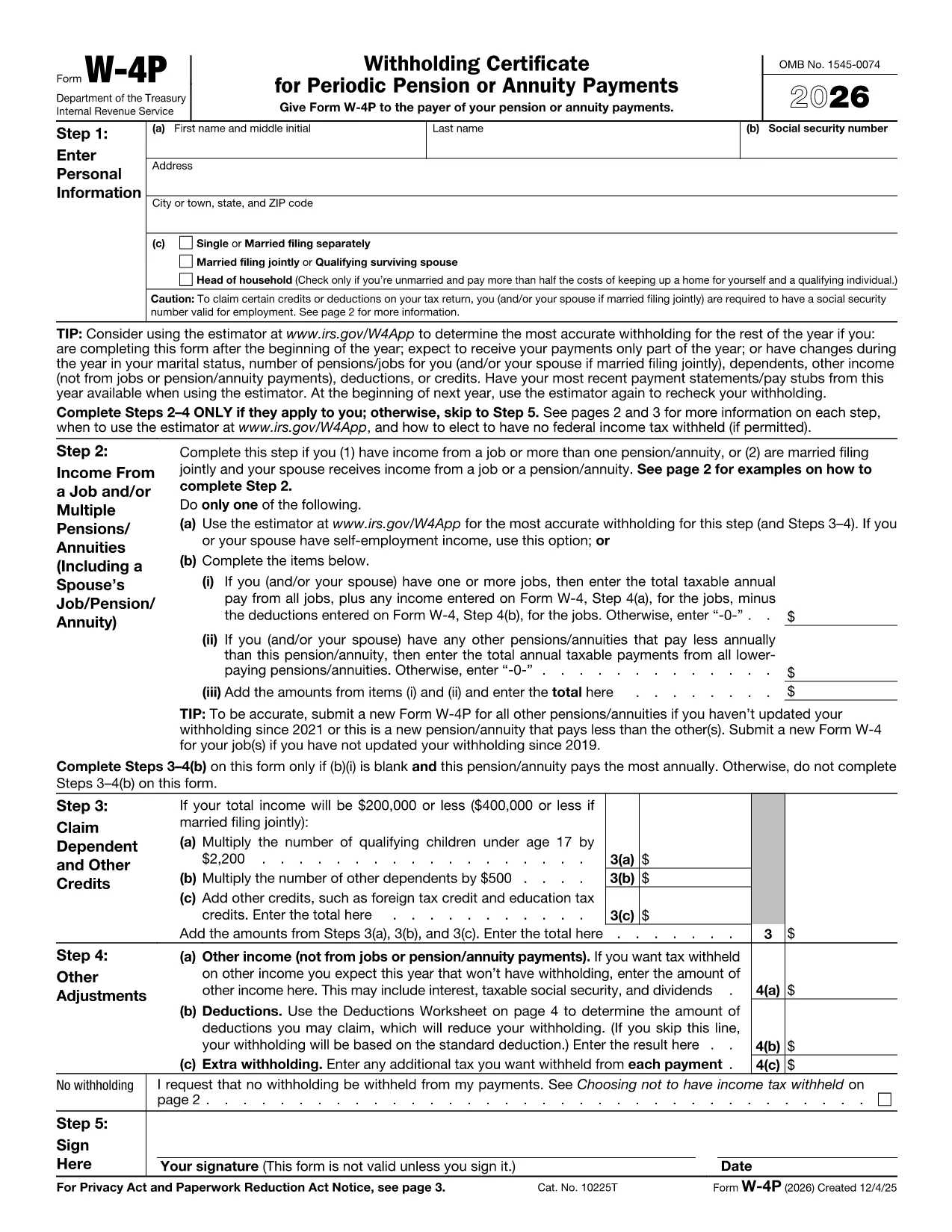
Form W‑4P is the IRS document used to request federal income‑tax withholding from pension, annuity, or other retirement payments. Instead of downloading a static PDF and hunting for a PDF editor, you can fill this form directly in your browser with Formize’s secure PDF Filler app.

What Is Form W‑4P?

The IRS Form W‑4P tells payers how much tax to withhold from retirement distributions. It is required for:

  • Traditional pensions
  • IRA distributions
  • Annuity payments
  • Social Security benefits (if you elect withholding)

Accurate completion helps you avoid an unexpected tax bill or over‑withholding that reduces your cash flow.

How to Fill Out Form W‑4P with Formize

Follow the simple steps below – no PDF software needed.

  1. Click the **"Fill out this form"** button on this page.
  2. Wait a few seconds while the Formize PDF Filler loads the fillable W‑4P template.
  3. Enter your personal information, tax filing status, and the amount you want withheld.
  4. Review the preview, then click **"Save & Download"** to get a completed PDF you can email or print.

The filler saves your data securely in the browser, so you stay in control of your personal details.

Common Mistakes & Tips for Accurate Completion

  • Incorrect filing status: Choose the status that matches your most recent tax return (single, married, etc.).
  • Leaving the withholding amount blank: If you want no tax withheld, write “0” in the appropriate box; otherwise, specify the exact dollar amount.
  • Outdated address: Ensure the mailing address is current; the payer uses this for any correspondence.
  • Signature: After downloading, print and sign the form before sending it to the payer.

Following these tips reduces the risk of processing delays and ensures your retirement income is taxed correctly.

Ready to get started? Click the button below and let Formize handle the heavy lifting.

ЧЗВ
  • Who needs to file Form W‑4P?

    Anyone receiving pension, annuity, IRA distributions, or other retirement income who wants federal tax withheld.

  • Can I claim exemption from withholding on Form W‑4P?

    Yes, if you had no tax liability last year and expect none this year, you can write “Exempt” in the appropriate box.

  • How often should I update Form W‑4P?

    Update it whenever your filing status, number of dependents, or desired withholding amount changes.

  • Do I need to submit a new Form W‑4P each year?

    No, the form remains in effect until you submit a revised version or the payer notifies you otherwise.

  • What happens if I don’t submit Form W‑4P?

    The payer may withhold tax at the default rate (usually 10%), which could be higher than you need.

  • Is the Formize filler secure?

    Yes, all data is processed locally in your browser; nothing is stored on our servers.

  • Can I fill out Form W‑4P on a mobile device?

    Absolutely—Formize’s PDF Filler works on smartphones and tablets with modern browsers.

  • Do I need Adobe Acrobat to use this form?

    No. The online filler replaces Adobe Acrobat; you only need a web browser.

  • Where can I find official instructions for Form W‑4P?

    Visit the IRS page at IRS Instructions for Form W‑4P.

  • What if I make a mistake after submitting?

    Submit a new, corrected Form W‑4P to the payer as soon as possible to avoid incorrect withholding.

КАК ДА

Как да попълните Form W-4P PDF безплатно онлайн в 4 лесни стъпки:

  1. 1
    Open the Fillable Form
    Click the "Fill out this form" button on the page. The Formize PDF Filler app will launch in a new window.
  2. 2
    Enter Your Information
    Fill in all required fields—name, SSN, address, filing status, and the amount you want withheld.
  3. 3
    Review and Save
    Check the preview for errors, then click "Save & Download" to obtain the completed PDF.
  4. 4
    Print and Sign
    Print the downloaded file, sign it, and send it to the payer (pension administrator, annuity provider, etc.).
Приложение Formize PDF Filler
ОТНОСНО

Данъчни формуляри

Form W-4P PDF е един от данъчните формуляри, които са документи, използвани за докладване на информация, свързана с данъци, на съответния данъчен орган. Има различни видове данъчни формуляри, включително федерални, щатски и местни данъчни формуляри, които могат да варират в зависимост от обстоятелствата и местоположението на данъкоплатеца.

ХАРАКТЕРИСТИКА

PDF пълнител

Най-лесният начин да попълните Form W-4P PDF онлайн

  • Бързо попълнете Form W-4P PDF
    Търсите начин бързо да попълните Form W-4P PDF онлайн? С нашия онлайн безплатен инструмент за попълване на PDF формуляри ще знаете как да редактирате и попълвате този PDF документ за по-малко от минута.
  • Лесен за използване онлайн PDF редактор
    Писнало ви е да разпечатвате PDF файлове, за да можете да ги редактирате, преди да сканирате повторно и да ги изпратите обратно? Редактирайте PDF документи безплатно онлайн. Използвайте нашия онлайн pdf редактор, за да спестите време и хартия.
  • Страхотни инструменти, всички платформи
    Чудите се как да попълните Form W-4P PDF на Mac или може би как да използвате PDF пълнител безплатно? Нашите онлайн PDF инструменти работят на всички платформи.
  • Сигурно съхранение на файлове
    Завършените „Form W-4P PDF“ файлове се съхраняват в защитена база данни, управлявана от Amazon Cloud хостинг. Можете да изтриете вашите файлове от нашата система по всяко време. Във всеки случай тези файлове се изтриват автоматично след 24 часа.
  • Чат с Form W-4P PDF
    Разговаряйте с „Form W-4P PDF“ в Chatize, който е безплатен асистент за четене на PDF файлове. Задавайте въпроси и получавайте отговори от „Form W-4P PDF“. Просто щракнете върху бутона Чат с документ по-горе.

Изтриване на сесията за пълнене

Изтриване на избраната сесия за пълнене? В този случай вашият напредък в попълването на формуляра ще бъде загубен.

Изтриване на сесия за редактиране

Изтриване на избраната сесия за редактиране? В този случай вашият напредък в създаването и редактирането на формуляра ще бъде загубен.