
Избери език

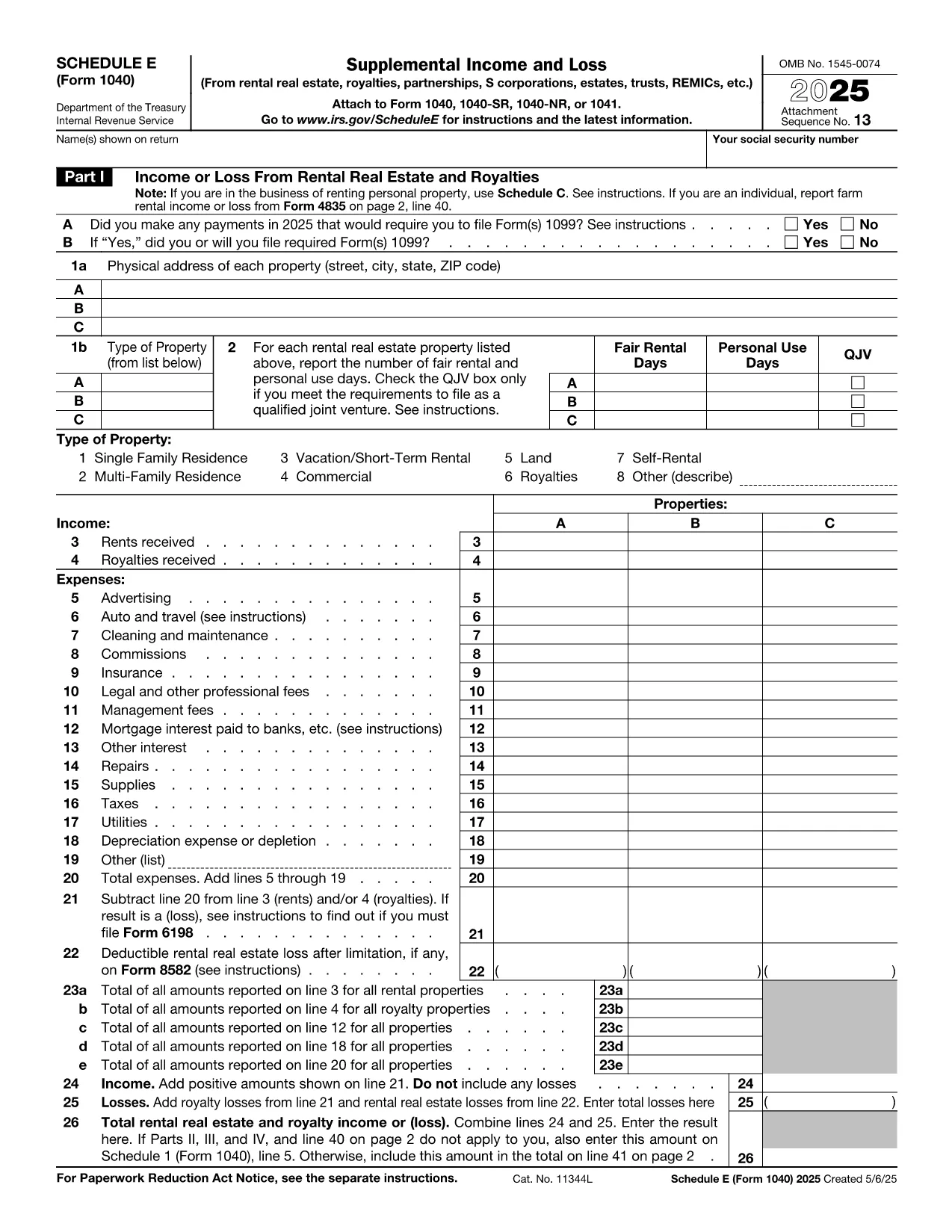
Fillable Schedule E – Tax Form for Investment Property

  1. Държава САЩ
  2. език Английски
  3. Дейност Данъци
  4. Отдел IRS
Fillable Schedule E – Tax Form for Investment Property

Investing in rental real estate? The IRS Schedule E (Form 1040) is the official tax form used to report income, expenses, and depreciation for investment properties. Our fillable PDF version lets you complete the form directly in your browser—no extra software required.

Whether you own a single rental house or a portfolio of apartments, Schedule E captures every deductible expense, from mortgage interest to repairs, helping you lower your taxable income.

What Is Schedule E and Who Needs It?

Schedule E is part of the individual income tax return (Form 1040). It is required for anyone who earns rental income, royalties, or income from a partnership, S‑corp, or trust that is reported on a K‑1. If you own an investment property that generates rent, you must file Schedule E.

Key Sections of the Investment Property Tax Form

  • Part I – Income: Rental income, royalty payments, and other supplemental earnings.
  • Part II – Expenses: Advertising, cleaning, commissions, insurance, legal fees, maintenance, mortgage interest, property taxes, utilities, and depreciation.
  • Part III – Net Profit or Loss: Calculates the total taxable amount that flows to Form 1040 line 8.

How to Complete the Fillable PDF with Formize

Instead of downloading the PDF and opening a separate editor, simply click the "Fill out this form" button below. The Formize PDF Filler app will load in seconds, allowing you to type, select, and calculate directly on the page.

Common Mistakes & Tips for Accurate Filing

  • Double‑check that all expense categories are correctly allocated to each property.
  • Don’t forget to attach Form 4562 for depreciation if you’re claiming it for the first time.
  • Ensure the totals in Part III match the sum of income minus expenses; mismatched totals trigger IRS notices.

Where to Submit Your Completed Form

After filling out Schedule E, attach it to your Form 1040 when you e‑file or mail a paper return to the IRS. Keep a copy for your records in case of an audit.

ЧЗВ
  • Do I need Schedule E if I have only one rental property?

    Yes. Any rental income—whether from one property or many—must be reported on Schedule E.

  • Can I claim home office expenses on Schedule E?

    Home office expenses are reported on Schedule C, not Schedule E. Schedule E is only for rental‑related income and expenses.

  • What if my rental expenses exceed my rental income?

    You can report a net loss on Schedule E, which may offset other income subject to passive activity loss rules.

  • How do I calculate depreciation for my investment property?

    Use Form 4562 to calculate depreciation. The amount is then entered on Schedule E, Part II, line 18.

  • Is the fillable PDF accepted by the IRS?

    Yes. As long as the final PDF is signed and saved, the IRS accepts electronically completed Schedule E.

  • Can I edit the form after I’ve saved it?

    Yes. Open the saved PDF again in the Formize PDF Filler to make changes before final submission.

  • Do I need a digital signature on Schedule E?

    When e‑filing, the electronic signature on your Form 1040 covers Schedule E. For paper filing, sign the Form 1040 signature line.

  • Where can I find instructions for Schedule E?

    The IRS provides detailed instructions at https://www.irs.gov/forms-pubs/about-schedule-e-form-1040.

КАК ДА

Как да попълните tax form investment property безплатно онлайн в 5 лесни стъпки:

  1. 1
    Open the Fillable Form
    Click the "Fill out this form" button on this page. The Formize PDF Filler will launch in a new window.
  2. 2
    Enter Your Information
    Type directly into each field—income, expenses, and property details. Use the tab key to move between sections.
  3. 3
    Review Calculations
    The filler automatically totals income, expenses, and net profit. Verify the numbers before proceeding.
  4. 4
    Save or Export
    When finished, click "Save PDF" to download a completed copy, or choose "Export to Email" to send it directly to your accountant.
  5. 5
    Submit with Your Tax Return
    Attach the saved Schedule E to your Form 1040 when you e‑file or mail your paper return to the IRS.
Приложение Formize PDF Filler
ОТНОСНО

Данъчни формуляри

tax form investment property е един от данъчните формуляри, които са документи, използвани за докладване на информация, свързана с данъци, на съответния данъчен орган. Има различни видове данъчни формуляри, включително федерални, щатски и местни данъчни формуляри, които могат да варират в зависимост от обстоятелствата и местоположението на данъкоплатеца.

ХАРАКТЕРИСТИКА

PDF пълнител

Най-лесният начин да попълните tax form investment property онлайн

  • Бързо попълнете tax form investment property
    Търсите начин бързо да попълните tax form investment property онлайн? С нашия онлайн безплатен инструмент за попълване на PDF формуляри ще знаете как да редактирате и попълвате този PDF документ за по-малко от минута.
  • Лесен за използване онлайн PDF редактор
    Писнало ви е да разпечатвате PDF файлове, за да можете да ги редактирате, преди да сканирате повторно и да ги изпратите обратно? Редактирайте PDF документи безплатно онлайн. Използвайте нашия онлайн pdf редактор, за да спестите време и хартия.
  • Страхотни инструменти, всички платформи
    Чудите се как да попълните tax form investment property на Mac или може би как да използвате PDF пълнител безплатно? Нашите онлайн PDF инструменти работят на всички платформи.
  • Сигурно съхранение на файлове
    Завършените „tax form investment property“ файлове се съхраняват в защитена база данни, управлявана от Amazon Cloud хостинг. Можете да изтриете вашите файлове от нашата система по всяко време. Във всеки случай тези файлове се изтриват автоматично след 24 часа.
  • Чат с tax form investment property
    Разговаряйте с „tax form investment property“ в Chatize, който е безплатен асистент за четене на PDF файлове. Задавайте въпроси и получавайте отговори от „tax form investment property“. Просто щракнете върху бутона Чат с документ по-горе.

Изтриване на сесията за пълнене

Изтриване на избраната сесия за пълнене? В този случай вашият напредък в попълването на формуляра ще бъде загубен.

Изтриване на сесия за редактиране

Изтриване на избраната сесия за редактиране? В този случай вашият напредък в създаването и редактирането на формуляра ще бъде загубен.