Избери език

Fillable G‑28 Form – Notice of Entry of Appearance (PDF)

  1. Държава САЩ
  2. език Английски
  3. Отдел Служби за гражданство и имиграция на САЩ
Fillable G‑28 Form – Notice of Entry of Appearance (PDF)

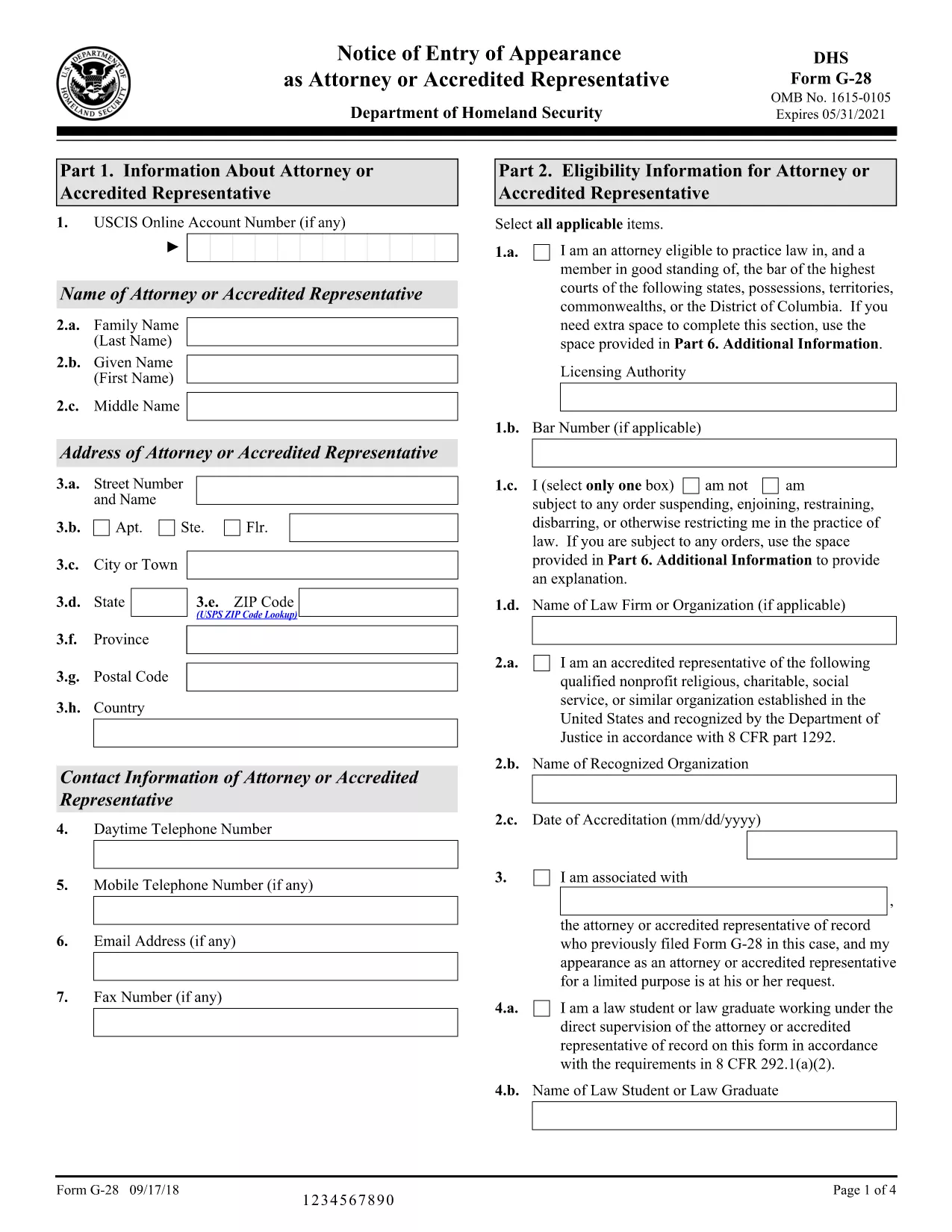
The G‑28, Notice of Entry of Appearance as Attorney or Accredited Representative is the official form used by immigration attorneys and accredited representatives to inform U.S. Citizenship and Immigration Services (USCIS) that they will be representing a client. Traditionally you would download a static PDF, print it, and hand‑write your answers. With Formize, you can fill the fillable G‑28 PDF directly in your browser – faster, error‑free, and without any extra software.

What Is the G‑28 Form?

The G‑28 establishes a legal relationship between the applicant and their legal representative. It is required for most immigration filings, including adjustment of status, asylum, and naturalization applications. The form collects basic information about the attorney or accredited representative, the client, and the case type.

How to Fill Out the G‑28 Online with Formize

Instead of downloading the PDF and opening it in a PDF editor, simply click the "Fill out this form" button on this page. The Formize PDF Filler app will load in seconds, presenting a clean, fillable version of the G‑28. Follow the on‑screen prompts, save your progress, and download the completed PDF ready for submission.

Common Mistakes to Avoid on the G‑28

  • Leaving the signature line blank – the attorney or accredited representative must sign electronically or print and sign.
  • Mismatching case numbers – ensure the case number matches the application you are representing.
  • Incorrect address information – use the mailing address that USCIS will use for all future correspondence.
  • Using the wrong form version – always download the latest G‑28 from the official USCIS site (linked below).

Where to Submit the Completed G‑28

Attach the signed G‑28 to the front of the primary immigration application package or upload it directly through your USCIS online account (myUSCIS). If you are filing by mail, include the completed form with the other supporting documents.

Helpful Resources and FAQs

Below you’ll find answers to the most common questions about the G‑28, plus links to official USCIS guidance.

Инструкции

ЧЗВ
  • Who can file a G‑28 form?

    Only a licensed attorney or an accredited representative (such as a recognized nonprofit organization) may file a G‑28 on behalf of an immigration applicant.

  • Do I need a physical signature on the G‑28?

    USCIS accepts electronic signatures when the form is printed and signed after being filled online. For paper submissions, the attorney must sign the printed form.

  • Can I use the same G‑28 for multiple cases?

    No. Each G‑28 must reference a specific case number and applicant. Submit a separate form for each distinct immigration proceeding.

  • What if I make a mistake after submitting the G‑28?

    File a corrected G‑28 with the updated information and include a brief cover letter explaining the correction.

  • Is the G‑28 required for all USCIS forms?

    The G‑28 is required whenever an attorney or accredited representative is representing a client. Some forms have a built‑in representation section, but the G‑28 is still the standard notice.

  • How often is the G‑28 updated?

    USCIS releases a new version when there are regulatory changes. Always use the latest version from the official USCIS website.

  • Can I fill out the G‑28 on a mobile device?

    Yes. The Formize PDF Filler works on all modern browsers, including mobile Safari and Chrome.

  • Where can I find official instructions for the G‑28?

    The USCIS website provides a detailed instruction sheet linked on the form’s download page.

  • Do I need to pay a fee to submit a G‑28?

    No. The G‑28 itself carries no fee; any fees are associated with the underlying immigration application.

  • What should I do if I lose my completed G‑28?

    You can re‑download the filled PDF from the Formize app if you saved it to your account, or ask your attorney to recreate the form.

КАК ДА

Как да попълните G-28 form безплатно онлайн в 5 лесни стъпки:

  1. 1
    Click the Fill‑Out Button
    On this page, click the "Fill out this form" button. The Formize PDF Filler app will open in a new tab.
  2. 2
    Wait for the Form to Load
    The fillable G‑28 loads instantly. No download or installation is required.
  3. 3
    Enter All Required Information
    Complete each field—attorney details, client details, case number, and signature. The form validates entries in real time.
  4. 4
    Save and Download
    When finished, click "Save & Download" to get a PDF ready for submission to USCIS.
  5. 5
    Submit to USCIS
    Attach the completed G‑28 to your immigration application or upload it via your myUSCIS account.
Приложение Formize PDF Filler
ОТНОСНО

G-28 form шаблон

С традиционния набор от функции за преглед и попълване на PDF документ, съчетан с предимствата на уеб приложение и адаптивно оформление, можете да завършите G-28 form за минути.

ХАРАКТЕРИСТИКА

PDF пълнител

Най-лесният начин да попълните G-28 form онлайн

  • Бързо попълнете G-28 form
    Търсите начин бързо да попълните G-28 form онлайн? С нашия онлайн безплатен инструмент за попълване на PDF формуляри ще знаете как да редактирате и попълвате този PDF документ за по-малко от минута.
  • Лесен за използване онлайн PDF редактор
    Писнало ви е да разпечатвате PDF файлове, за да можете да ги редактирате, преди да сканирате повторно и да ги изпратите обратно? Редактирайте PDF документи безплатно онлайн. Използвайте нашия онлайн pdf редактор, за да спестите време и хартия.
  • Страхотни инструменти, всички платформи
    Чудите се как да попълните G-28 form на Mac или може би как да използвате PDF пълнител безплатно? Нашите онлайн PDF инструменти работят на всички платформи.
  • Сигурно съхранение на файлове
    Завършените „G-28 form“ файлове се съхраняват в защитена база данни, управлявана от Amazon Cloud хостинг. Можете да изтриете вашите файлове от нашата система по всяко време. Във всеки случай тези файлове се изтриват автоматично след 24 часа.
  • Чат с G-28 form
    Разговаряйте с „G-28 form“ в Chatize, който е безплатен асистент за четене на PDF файлове. Задавайте въпроси и получавайте отговори от „G-28 form“. Просто щракнете върху бутона Чат с документ по-горе.

Изтриване на сесията за пълнене

Изтриване на избраната сесия за пълнене? В този случай вашият напредък в попълването на формуляра ще бъде загубен.

Изтриване на сесия за редактиране

Изтриване на избраната сесия за редактиране? В този случай вашият напредък в създаването и редактирането на формуляра ще бъде загубен.