
Zvolte jazyk

Fillable IRS Schedule 2 (Form 1040) – Free PDF

  1. Země USA
  2. Jazyk Angličtina
  3. Aktivita Daně
  4. oddělení IRS
Fillable IRS Schedule 2 (Form 1040) – Free PDF

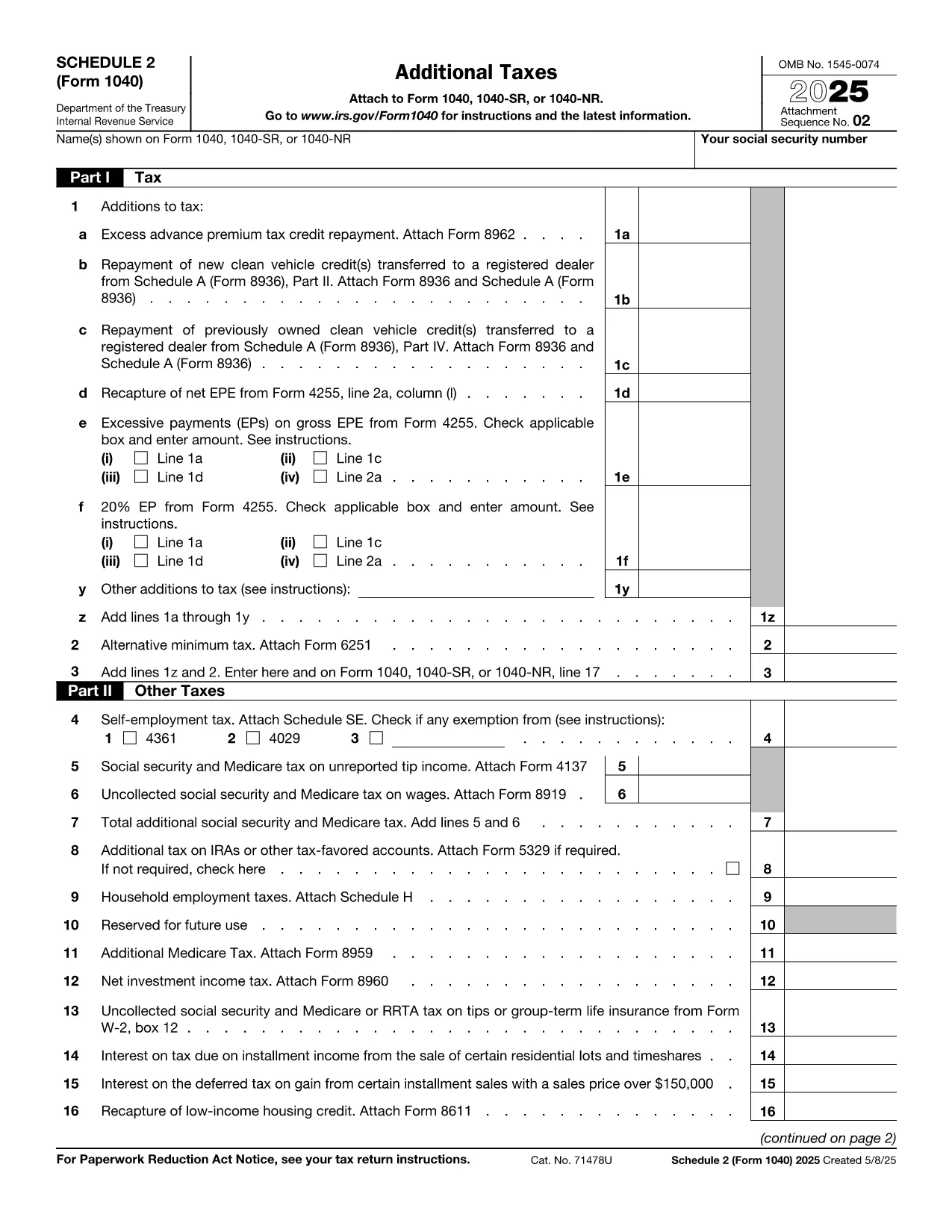
Schedule 2 (Form 1040) is the supplemental tax form used to report additional taxes such as the alternative minimum tax and certain tax credits. Whether you’re an individual taxpayer, a freelancer, or a small‑business owner, completing Schedule 2 correctly can prevent processing delays and potential penalties.

Our fillable PDF version lets you enter data directly in your browser. No need to download a PDF editor—just click the Fill out this form button, and the Formize PDF Filler app will load instantly.

What Is Schedule 2 and Who Needs It?

Schedule 2 is attached to the standard Form 1040. You’ll need it if you have:

  • Alternative Minimum Tax (AMT) liability
  • Excess advance premium tax credit repayment
  • Other taxes such as self‑employment tax, additional Medicare tax, or household employment taxes

How to Fill Out Schedule 2 With Formize

Follow the simple steps below. The Formize PDF Filler automatically saves your entries, so you can review or export the completed form at any time.

Common Mistakes & Tips for Accurate Completion

Avoid these pitfalls:

  • Leaving fields blank – Even if a line does not apply, enter “0” to keep the form balanced.
  • Mismatched totals – Double‑check that the sum of lines 1‑5 matches the total shown on line 6.
  • Wrong tax year – Ensure you are using the Schedule 2 for the correct filing year (e.g., 2023 version).

Where to Submit Your Completed Schedule 2

After filling the form, download the PDF and attach it to your electronic Form 1040 filing through approved tax‑software, or mail it with your paper return to the IRS address listed in the Form 1040 instructions.

Need more help? Review the official IRS instructions linked below or consult a tax professional.

FAQ
  • Do I need Schedule 2 if I only have regular income tax?

    No. Schedule 2 is only required if you have additional taxes such as AMT, self‑employment tax, or excess premium tax credit repayment.

  • Can I edit Schedule 2 after I download it?

    Yes. The Formize PDF Filler lets you save and reopen the file, so you can make changes any time before final submission.

  • Is the fillable PDF version accepted by the IRS?

    Absolutely. As long as the final PDF is printed or submitted electronically with all fields completed, the IRS accepts it.

  • What if I make a mistake after filing?

    You can file an amended return (Form 1040‑X) and include a corrected Schedule 2. Keep a copy of both the original and amended PDFs.

  • Is there a fee to use Formize PDF Filler?

    No. The fillable Schedule 2 is provided free of charge on Formize.com.

  • Do I need special software to open the downloaded PDF?

    No special software is required. Any standard PDF viewer (Adobe Reader, Chrome, Edge) can open the file.

  • How do I know which version of Schedule 2 to use?

    Use the version that matches the tax year you are filing for. This page always links to the latest IRS‑published PDF.

  • Can I fill out Schedule 2 on a mobile device?

    Yes. The Formize PDF Filler works on most modern smartphones and tablets.

JAK

Jak zdarma vyplnit Schedule 2 PDF online v 5 jednoduchých krocích:

  1. 1
    Open the Fillable Form
    Click the bright “Fill out this form” button on this page. The Formize PDF Filler app will launch in a new tab.
  2. 2
    Enter Your Information
    Use your keyboard to type directly into each field. The form automatically saves your progress.
  3. 3
    Review & Validate
    Check each section for accuracy. The built‑in validator highlights missing or mismatched totals.
  4. 4
    Download or Export
    When you are satisfied, click “Download PDF” to save a completed copy, or export to your cloud storage.
  5. 5
    Submit with Your Tax Return
    Attach the completed Schedule 2 to your Form 1040 filing—either electronically via tax software or by mailing a paper return.
Aplikace Formize PDF Filler
O

Daňové formuláře

Schedule 2 PDF je jedním z daňových formulářů, které jsou dokumenty používané k nahlášení informací souvisejících s daněmi příslušnému daňovému úřadu. Existují různé typy daňových formulářů, včetně federálních, státních a místních daňových formulářů, které se mohou lišit v závislosti na okolnostech a umístění poplatníka.

FUNKCE

PDF Filler

Nejjednodušší způsob, jak vyplnit Schedule 2 PDF online

  • Rychle vyplňte Schedule 2 PDF
    Hledáte způsob, jak rychle vyplnit Schedule 2 PDF online? S naším online bezplatným vyplňováním formulářů PDF budete vědět, jak upravit a vyplnit tento dokument PDF za méně než minutu.
  • Snadno použitelný online editor PDF
    Už vás nebaví tisknout soubory PDF, abyste je mohli upravovat, než je znovu naskenujete a odešlete zpět? Upravujte dokumenty PDF zdarma online. Použijte náš online editor PDF, abyste ušetřili čas a papír.
  • Skvělé nástroje, všechny platformy
    Zajímá vás, jak vyplnit Schedule 2 PDF na Macu, nebo možná jak používat PDF filler zdarma? Naše online nástroje PDF fungují na všech platformách.
  • Bezpečné ukládání souborů
    Dokončené soubory „Schedule 2 PDF“ jsou uloženy v zabezpečené databázi spravované hostingem Amazon Cloud. Své soubory můžete z našeho systému kdykoli smazat. V každém případě jsou tyto soubory po 24 hodinách automaticky smazány.
  • Chat s Schedule 2 PDF
    Chatujte s „Schedule 2 PDF“ na Chatize, což je bezplatný pomocník pro čtení PDF. Ptejte se a získejte odpovědi z „Schedule 2 PDF“. Stačí kliknout na tlačítko Chat with Document výše.

Smazat relaci plnění

Smazat vybranou relaci plnění? V takovém případě bude váš postup při vyplňování formuláře ztracen.

Smazat relaci úprav

Smazat vybranou relaci úprav? V tomto případě bude váš postup při vytváření a úpravách formuláře ztracen.