Zvolte jazyk

Fillable I‑130 Petition for Alien Relative (PDF)

  1. Země USA
  2. Jazyk Angličtina
  3. oddělení USCIS
  4. Aktivita Přistěhovalectví
Fillable I‑130 Petition for Alien Relative (PDF)

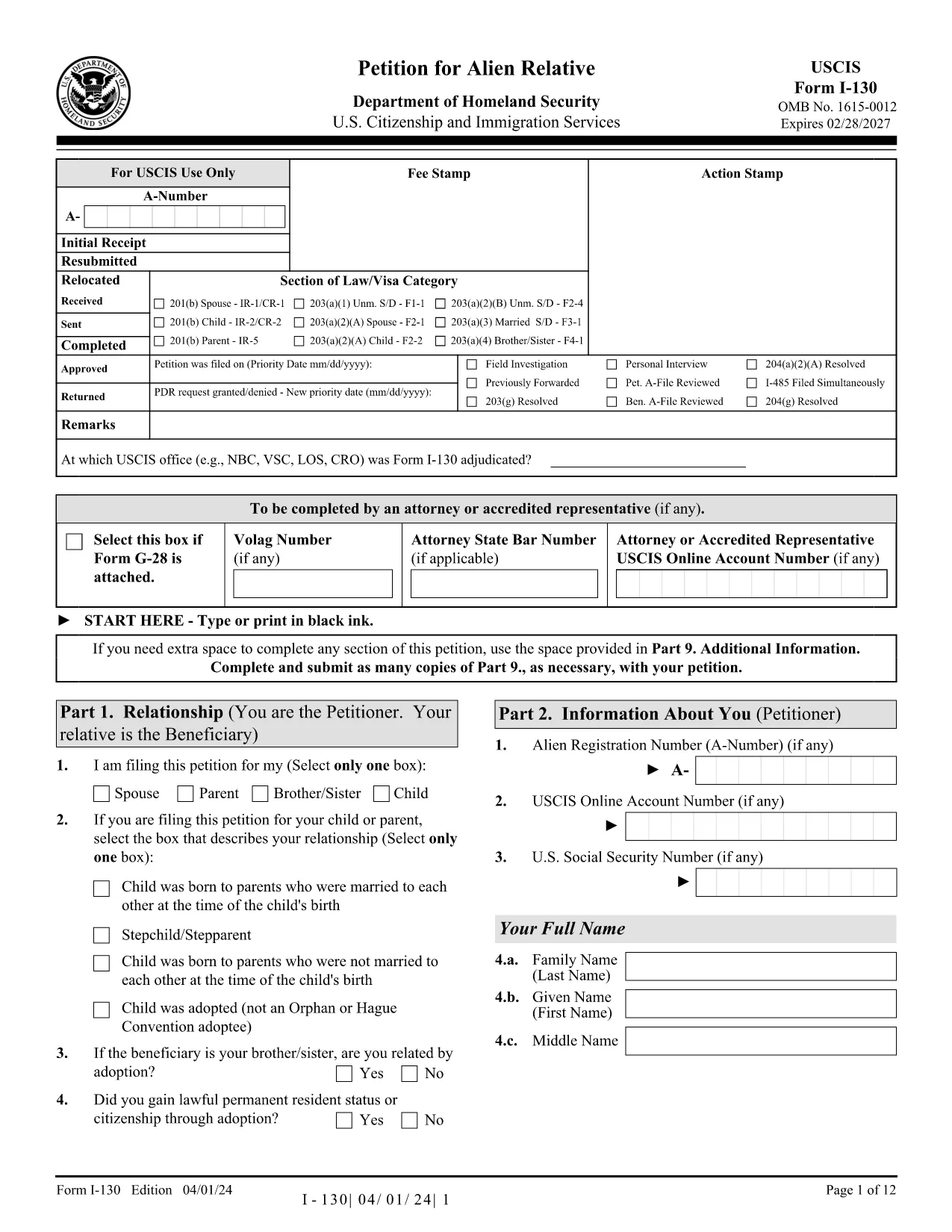
The I‑130, Petition for Alien Relative is the first step for U.S. citizens and permanent residents who want to bring a family member to the United States. With Formize you can fill out the official USCIS PDF directly in your browser—no extra software required.

What Is the I‑130 Form?

The I‑130 establishes a qualifying relationship between the petitioner (U.S. citizen or lawful permanent resident) and the beneficiary (spouse, child, parent, or sibling). Once approved, the beneficiary can apply for an immigrant visa or adjustment of status.

How to Complete the I‑130 Online with Formize

Instead of downloading the PDF and opening it in a separate editor, simply click the "Fill out this form" button below. The Formize PDF Filler app will load in seconds, letting you type, check boxes, and add signatures directly on the page.

Common Mistakes to Avoid

  • Leaving required fields blank – the filler highlights missing information before you submit.
  • Using an outdated version of the form – our link always points to the latest USCIS PDF.
  • Uploading the wrong supporting documents – double‑check the USCIS checklist for your relationship category.

Where to Submit Your Petition

After completing the form, download the filled PDF and mail it to the address listed in the Instructions for Form I‑130. You can also submit electronically through the USCIS online portal if you prefer.

Need More Help?

Review the official USCIS instructions, consult an immigration attorney, or visit the USCIS website for detailed filing fees and processing times.

Fill out this form

FAQ
  • Can I submit the I‑130 form directly from Formize?

    Formize provides a fillable version only. After completing the form you must download the PDF and mail it to USCIS or upload it via the USCIS online portal.

  • Is the Formize version the latest USCIS I‑130?

    Yes. The link always points to the current official PDF from the USCIS website.

  • Do I need a digital signature?

    USCIS still requires a handwritten signature on the printed form. You can add a typed signature in Formize, print, and sign manually.

  • How much does it cost to file an I‑130?

    As of 2024, the filing fee is $535. Check the USCIS fee schedule for any updates.

  • What supporting documents are required?

    Proof of U.S. citizenship or permanent residence, evidence of the qualifying relationship (birth certificates, marriage certificate, etc.), and any required translations.

  • Can I edit the form after I download it?

    Yes, you can reopen the downloaded PDF in any PDF editor, but it’s easier to correct errors before downloading using Formize’s built‑in validation.

  • How long does USCIS take to process an I‑130?

    Processing times vary by relationship category and service center. Typical times range from 6 to 12 months.

JAK

Jak zdarma vyplnit I-130 form online v 3 jednoduchých krocích:

  1. 1
    Click the Fill‑out Button
    Press the "Fill out this form" button on the page. The Formize PDF Filler loads instantly in a new window.
  2. 2
    Wait for the Filler to Load
    The app initializes the official I‑130 PDF. All fields become editable; you can start typing right away.
  3. 3
    Complete, Save, and Download
    Enter all required information, double‑check highlighted errors, then download the completed PDF to print or mail to USCIS.
Aplikace Formize PDF Filler
O

šablona I-130 form

S tradiční sadou funkcí pro prohlížení a vyplňování dokumentu PDF v kombinaci s výhodami webové aplikace a responzivního rozvržení zvládnete I-130 form dokončit během několika minut.

FUNKCE

PDF Filler

Nejjednodušší způsob, jak vyplnit I-130 form online

  • Rychle vyplňte I-130 form
    Hledáte způsob, jak rychle vyplnit I-130 form online? S naším online bezplatným vyplňováním formulářů PDF budete vědět, jak upravit a vyplnit tento dokument PDF za méně než minutu.
  • Snadno použitelný online editor PDF
    Už vás nebaví tisknout soubory PDF, abyste je mohli upravovat, než je znovu naskenujete a odešlete zpět? Upravujte dokumenty PDF zdarma online. Použijte náš online editor PDF, abyste ušetřili čas a papír.
  • Skvělé nástroje, všechny platformy
    Zajímá vás, jak vyplnit I-130 form na Macu, nebo možná jak používat PDF filler zdarma? Naše online nástroje PDF fungují na všech platformách.
  • Bezpečné ukládání souborů
    Dokončené soubory „I-130 form“ jsou uloženy v zabezpečené databázi spravované hostingem Amazon Cloud. Své soubory můžete z našeho systému kdykoli smazat. V každém případě jsou tyto soubory po 24 hodinách automaticky smazány.
  • Chat s I-130 form
    Chatujte s „I-130 form“ na Chatize, což je bezplatný pomocník pro čtení PDF. Ptejte se a získejte odpovědi z „I-130 form“. Stačí kliknout na tlačítko Chat with Document výše.

Smazat relaci plnění

Smazat vybranou relaci plnění? V takovém případě bude váš postup při vyplňování formuláře ztracen.

Smazat relaci úprav

Smazat vybranou relaci úprav? V tomto případě bude váš postup při vytváření a úpravách formuláře ztracen.