
Vælg sprog

Schedule C – Profit or Loss from Business (Fillable PDF)

  1. Land USA
  2. Sprog engelsk
  3. Aktivitet Skatter
  4. Afdeling Internal Revenue Service
Schedule C – Profit or Loss from Business (Fillable PDF)

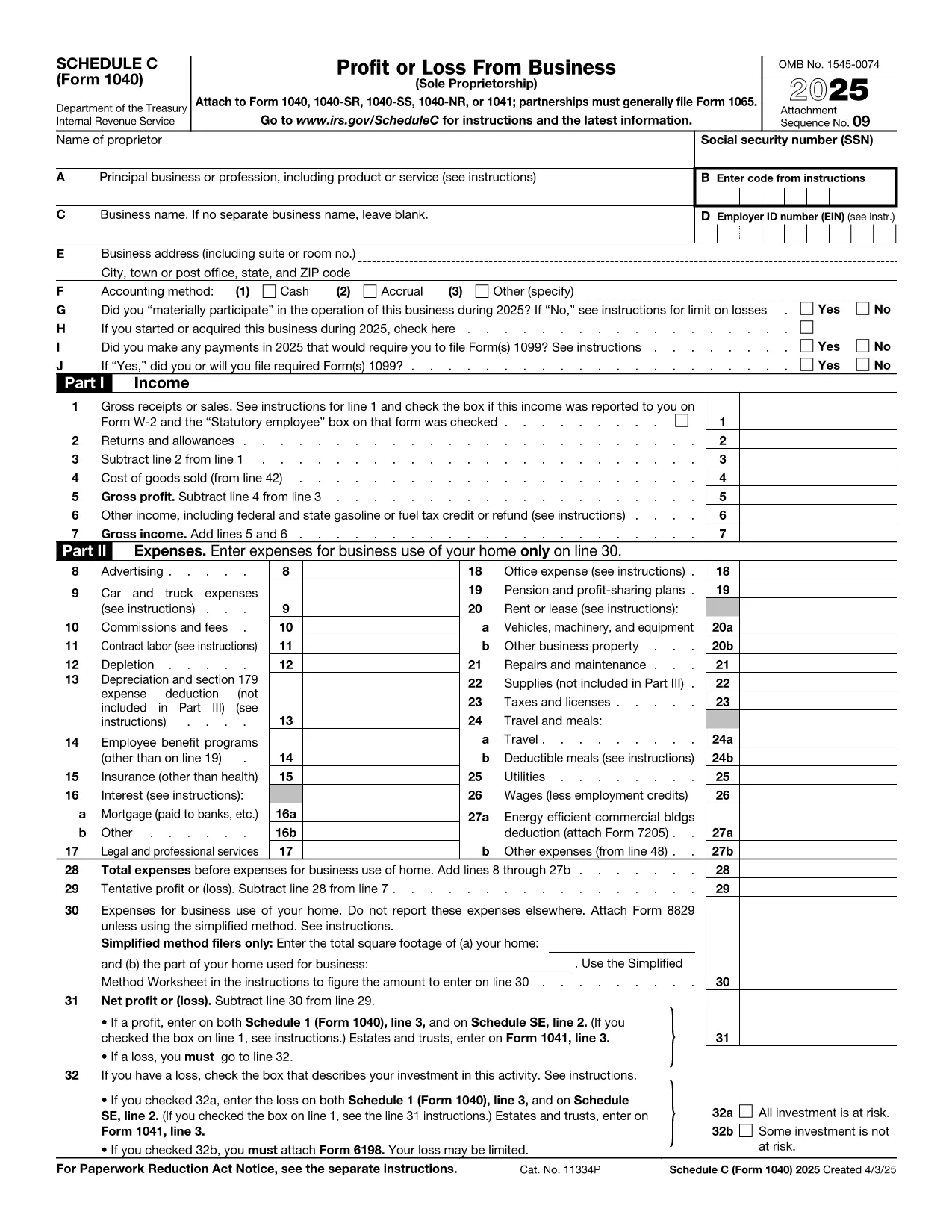
Schedule C (Form 1040) is the IRS form used by sole proprietors, single‑member LLCs, and independent contractors to report profit or loss from a business. Our fillable PDF lets you complete the form directly in your browser—no Adobe Acrobat or printer required.

What Is Schedule C and Who Needs It?

The Schedule C form captures income, expenses, cost of goods sold, and vehicle mileage for a trade or business. If you earned self‑employment income in the last tax year, you’ll likely need to file Schedule C with your Form 1040.

Key Sections of the Schedule C Form

  • Part I – Income: Gross receipts, returns, and other income.
  • Part II – Expenses: Advertising, car expenses, depreciation, supplies, and more.
  • Part III – Cost of Goods Sold: Beginning inventory, purchases, and ending inventory.
  • Part IV – Information About Your Vehicle: Mileage and expenses if you use a car for business.
  • Part V – Other Expenses: Any additional costs not listed in Part II.

How to Fill Out Schedule C Online

Instead of downloading the PDF and opening it in a desktop editor, simply click the “Fill out this form” button below. The Formize PDF Filler app will load in seconds, and you can start entering your numbers right away.

Common Mistakes & Tips

  • Double‑check that all income is reported—missed cash sales can trigger an audit.
  • Keep receipts for every expense; the IRS may request documentation.
  • Use the correct expense categories; mis‑classifying can reduce your deduction.
  • Don’t forget to fill out the vehicle information section if you claim mileage.
  • Review the totals in Part I and Part II to ensure they balance before attaching to Form 1040.

When you’re finished, you can download a completed PDF, print it, or submit it electronically with your tax return.

Instruktioner

FAQ
  • Who must file Schedule C?

    Anyone who earned self‑employment income, operated a sole proprietorship, or had a single‑member LLC taxed as a disregarded entity must file Schedule C with their Form 1040.

  • Can I use Schedule C for multiple businesses?

    Yes. If you run more than one trade or profession, you file a separate Schedule C for each business and attach all of them to your return.

  • What expenses are deductible on Schedule C?

    Ordinary and necessary business expenses such as advertising, rent, utilities, supplies, vehicle costs, depreciation, home‑office expenses, and cost of goods sold are deductible.

  • Do I need a separate EIN for Schedule C?

    An EIN is not required; you can use your Social Security Number. However, an EIN is recommended if you have employees or want to keep personal and business IDs separate.

  • How do I report home‑office expenses?

    Complete Form 8829 to calculate the home‑office deduction, then transfer the amount to Schedule C, line 30.

  • What if I discover an error after filing?

    File Form 1040‑X, Amended U.S. Individual Income Tax Return, and attach a corrected Schedule C showing the updated numbers.

HVORDAN

Sådan udfylder du Schedule C PDF gratis online i 5 nemme trin:

  1. 1
    Click the Fill Out Button
    Press the “Fill out this form” button on this page. The Formize PDF Filler will open in a new tab.
  2. 2
    Wait for the Filler to Load
    The app loads the fillable Schedule C PDF in seconds—no download required.
  3. 3
    Enter Your Information
    Complete each field, following the on‑screen prompts for income, expenses, and vehicle data.
  4. 4
    Review and Validate
    Use the built‑in calculator to verify totals and correct any errors before saving.
  5. 5
    Save, Print or E‑File
    Download the finished PDF, print a hard copy, or attach it to your electronic tax filing.
Formize PDF Filler app
OM

Skatteskemaer

Schedule C PDF er en af ​​skatteformularer, der er dokumenter, der bruges til at indberette oplysninger relateret til skatter til den relevante skattemyndighed. Der er forskellige typer skatteformularer, herunder føderale, statslige og lokale skatteformularer, som kan variere afhængigt af skatteyderens forhold og placering.

FUNKTIONER

PDF Filler

Den nemmeste måde at udfylde Schedule C PDF online

  • Udfyld hurtigt Schedule C PDF
    Leder du efter en måde, hvorpå du hurtigt kan fylde Schedule C PDF online? Med vores online gratis PDF-formularudfylder ved du, hvordan du redigerer og udfylder dette pdf-dokument på mindre end et minut.
  • Let at bruge online PDF-editor
    Træt af at udskrive PDF-filer, så du kan redigere dem, før du scanner igen og sender dem tilbage? Rediger PDF-dokumenter gratis online. Brug vores online pdf-editor for at spare tid og papir.
  • Fantastiske værktøjer, alle platforme
    Er du i tvivl om, hvordan du udfylder Schedule C PDF på en Mac, eller måske hvordan du bruger en PDF-filler gratis? Vores online PDF-værktøjer fungerer på alle platforme.
  • Sikker fillagring
    Fuldførte "Schedule C PDF"-filer gemmes i en sikret database, der administreres af Amazon Cloud-hosting. Du kan til enhver tid slette dine filer fra vores system. Under alle omstændigheder slettes disse filer automatisk efter 24 timer.
  • Chat med Schedule C PDF
    Chat med "Schedule C PDF" på Chatize, som er en gratis PDF-læserassistent. Stil spørgsmål og få svar fra "Schedule C PDF". Bare klik på knappen Chat med dokument ovenfor.

Slet udfyldningssession

Vil du slette den valgte påfyldningssession? I dette tilfælde vil dine fremskridt med at udfylde formularen gå tabt.

Slet redigeringssession

Vil du slette den valgte redigeringssession? I dette tilfælde vil dine fremskridt med at oprette og redigere formularen gå tabt.