Vælg sprog

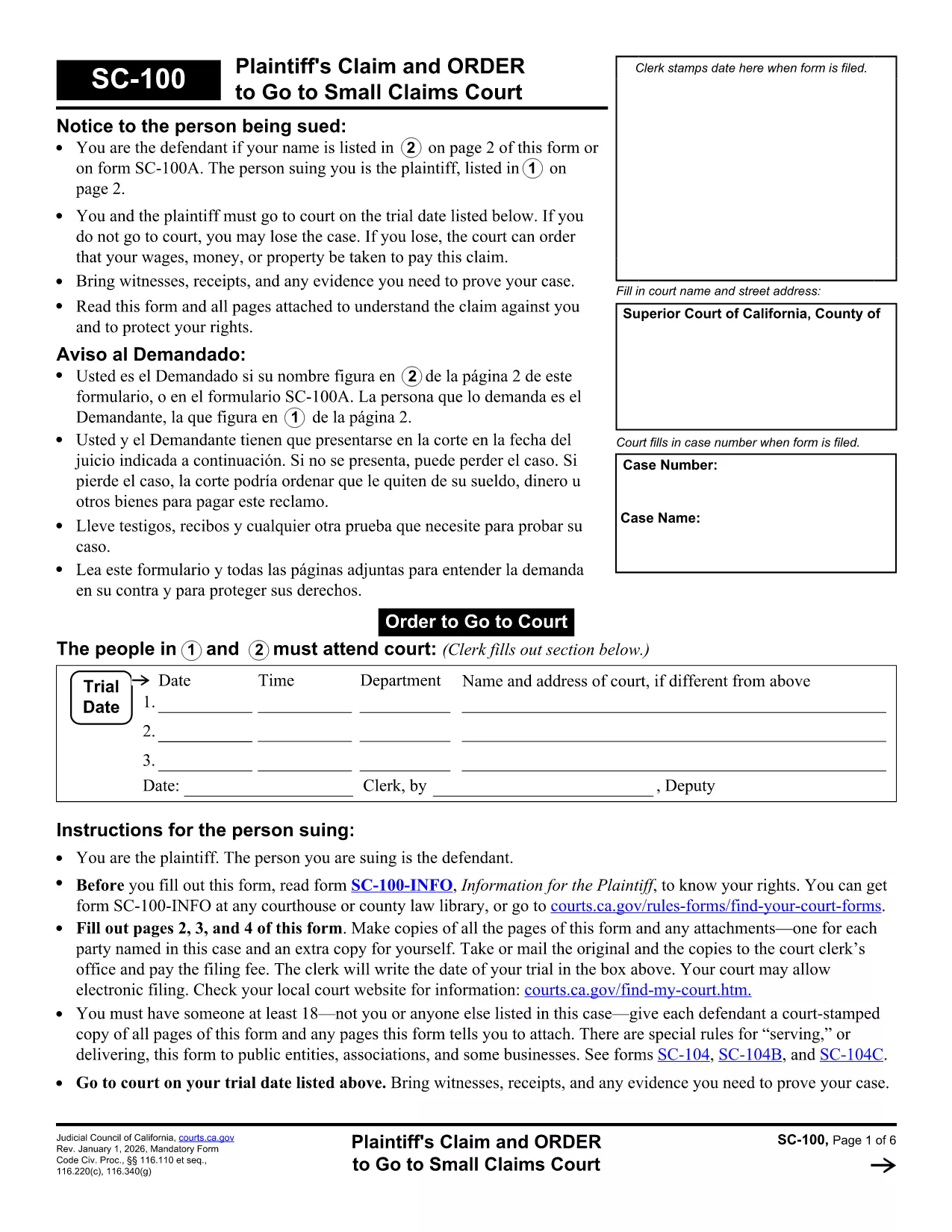
California Small Claims Court Form SC‑100 – Fillable PDF

  1. Sprog engelsk
  2. Land USA
  3. Aktivitet Legal Forms
  4. Afdeling California Courts
  5. Stat Californien
California Small Claims Court Form SC‑100 – Fillable PDF

Looking for a reliable, fillable California legal form to start a small‑claims case? The SC‑100 Plaintiff’s Claim and Order to Go to Small Claims Court is the official document you need. With Formize’s online PDF filler you can complete the form in minutes—no extra software required.

What Is the SC‑100 Form?

The SC‑100 is the standard claim form used by the California Courts for small‑claims cases (up to $10,000). It captures the plaintiff’s details, the defendant’s information, a description of the dispute, and the amount you’re seeking.

How to Fill Out the SC‑100 Online

Follow the simple steps below to complete the form directly in your browser. All fields are interactive, and the form saves your progress automatically.

Common Mistakes to Avoid

  • Leaving any required field blank – the filler will highlight missing information.
  • Incorrectly spelling the defendant’s name or address – double‑check official records.
  • Exceeding the $10,000 limit – claims above this amount must be filed in a different court.

Where to Submit the Completed Form

Once you’ve saved and printed the completed SC‑100, deliver it to the clerk’s office of the appropriate California Superior Court. Some counties also accept electronic filings through their e‑filing portals.

Legal Help & Resources

If you need assistance, visit the California Courts Self‑Help Center or consult a qualified attorney. The form itself is free, and Formize provides the online filler at no cost.

FAQ
  • What is the purpose of the SC‑100 form?

    The SC‑100 is the official claim form for filing a small‑claims case in California Superior Courts. It starts the legal process and tells the court what you’re suing for.

  • Who can use the SC‑100 form?

    Any individual, business, or organization seeking monetary relief of $10,000 or less in a California small‑claims court can use the SC‑100.

  • Is there a filing fee for the SC‑100?

    Yes. Filing fees vary by county, typically ranging from $30 to $75. Check with your local clerk’s office for the exact amount.

  • Can I submit the SC‑100 electronically?

    Many California counties now accept electronic filings through their e‑filing portals. After completing the form, export it as a PDF and upload it according to your county’s guidelines.

  • Do I need a lawyer to fill out the SC‑100?

    No. The SC‑100 is designed for self‑represented litigants. However, if your case is complex, consulting an attorney can help ensure accuracy.

  • What happens if I make a mistake on the form?

    Mistakes can delay your case. Common errors include misspelling names, incorrect amounts, or leaving required fields blank. Review the form carefully before submitting.

  • How long does it take to complete the SC‑100 online?

    Most users finish in 5–10 minutes using the Formize fillable PDF, especially with the real‑time validation that prevents missing information.

  • Is the SC‑100 form free to download?

    Yes. The official PDF is provided by the California Courts at no cost, and Formize’s online filler is also free to use.

HVORDAN

Sådan udfylder du California legal forms gratis online i 5 nemme trin:

  1. 1
    Click the Fill Out Button
    On this page, click the bright “Fill out this form” button. The Formize PDF Filler app will open in a new tab.
  2. 2
    Wait for the Filler to Load
    The fillable PDF loads automatically. All fields become editable; you’ll see a progress bar while the document prepares.
  3. 3
    Enter Your Information
    Type directly into each field—name, address, claim amount, and case details. The filler validates required entries in real time.
  4. 4
    Save and Download
    When you’re finished, click “Save PDF”. The completed SC‑100 downloads to your computer ready for printing or electronic filing.
  5. 5
    Print or E‑File
    Print the saved PDF and bring it to the clerk’s office, or upload it through your county’s e‑filing portal if available.
Formize PDF Filler app
OM

California legal forms skabelon

Med det traditionelle sæt funktioner til at se og udfylde et PDF-dokument, kombineret med fordelene ved en webapplikation og responsivt layout, kan du fuldføre California legal forms på få minutter.

FUNKTIONER

PDF Filler

Den nemmeste måde at udfylde California legal forms online

  • Udfyld hurtigt California legal forms
    Leder du efter en måde, hvorpå du hurtigt kan fylde California legal forms online? Med vores online gratis PDF-formularudfylder ved du, hvordan du redigerer og udfylder dette pdf-dokument på mindre end et minut.
  • Let at bruge online PDF-editor
    Træt af at udskrive PDF-filer, så du kan redigere dem, før du scanner igen og sender dem tilbage? Rediger PDF-dokumenter gratis online. Brug vores online pdf-editor for at spare tid og papir.
  • Fantastiske værktøjer, alle platforme
    Er du i tvivl om, hvordan du udfylder California legal forms på en Mac, eller måske hvordan du bruger en PDF-filler gratis? Vores online PDF-værktøjer fungerer på alle platforme.
  • Sikker fillagring
    Fuldførte "California legal forms"-filer gemmes i en sikret database, der administreres af Amazon Cloud-hosting. Du kan til enhver tid slette dine filer fra vores system. Under alle omstændigheder slettes disse filer automatisk efter 24 timer.
  • Chat med California legal forms
    Chat med "California legal forms" på Chatize, som er en gratis PDF-læserassistent. Stil spørgsmål og få svar fra "California legal forms". Bare klik på knappen Chat med dokument ovenfor.

Slet udfyldningssession

Vil du slette den valgte påfyldningssession? I dette tilfælde vil dine fremskridt med at udfylde formularen gå tabt.

Slet redigeringssession

Vil du slette den valgte redigeringssession? I dette tilfælde vil dine fremskridt med at oprette og redigere formularen gå tabt.