
Vælg sprog

TurboTax Refund Request Form – Fillable PDF

  1. Land USA
  2. Sprog engelsk
  3. Aktivitet Skatter
  4. Afdeling IRS
TurboTax Refund Request Form – Fillable PDF

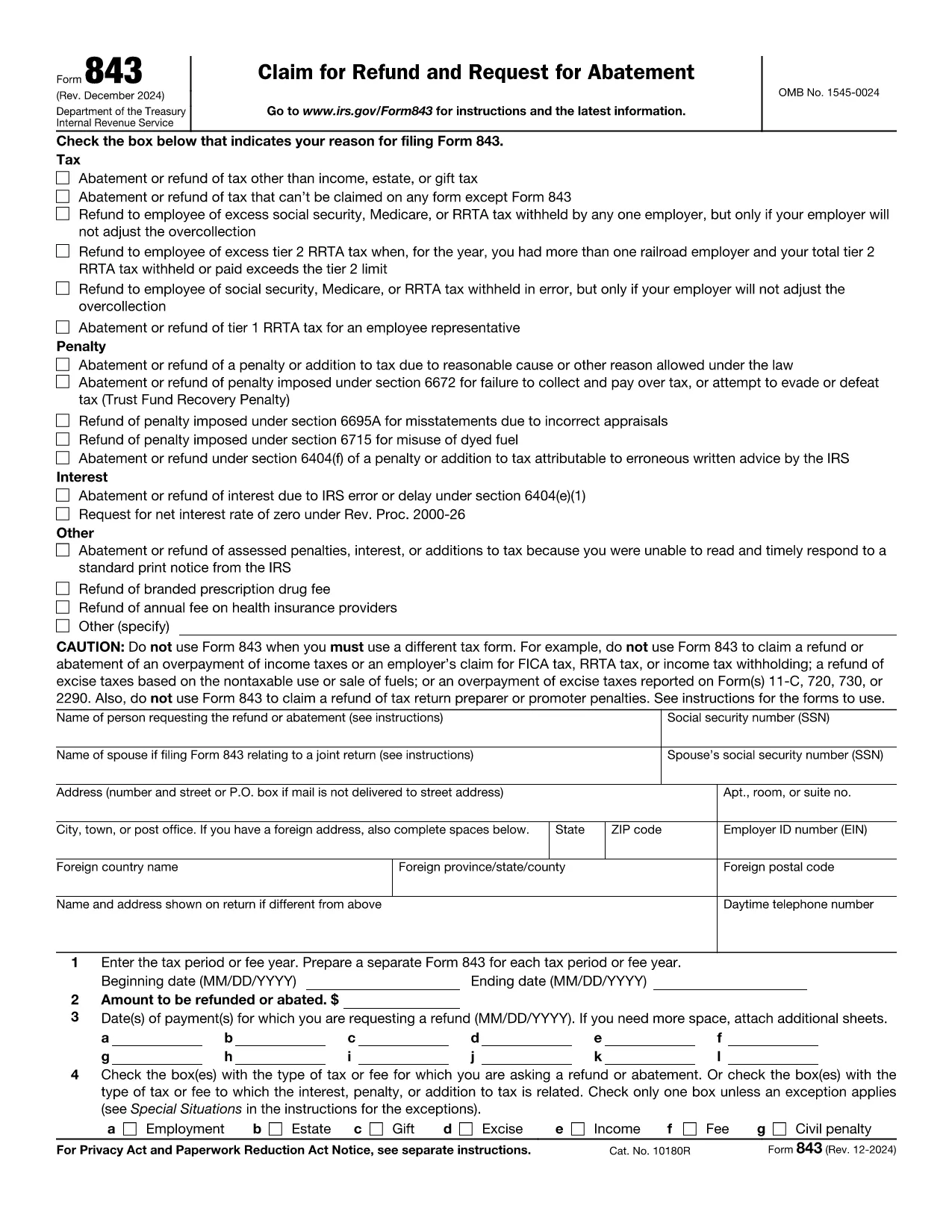
If you filed your taxes with TurboTax and believe you are owed a refund, you’ll need the official IRS Form 843 – Claim for Refund and Request for Abatement. This form is the correct document to request a refund for over‑paid taxes, penalties, or interest.

What Is the TurboTax Refund Request Form?

TurboTax does not issue its own refund form; instead, it guides you to the IRS Form 843. The form is a fillable PDF that can be completed online, printed, and mailed to the IRS. Using Formize’s PDF Filler, you can complete the form directly in your browser without installing any software.

How to Fill Out the Form in Seconds

Follow the simple steps below and let the Formize PDF Filler do the heavy lifting:

  • Click the "Fill out this form" button on this page.
  • Wait a few seconds while the Formize PDF Filler app loads the fillable version of Form 843.
  • Enter your personal information, tax year, and the amount you are claiming.
  • Review the auto‑saved data, then click Submit to download a completed PDF.
  • Print and mail the PDF to the address listed in the instructions, or keep a digital copy for your records.

Common Mistakes to Avoid

  • Wrong tax year: Double‑check the year you are claiming a refund for.
  • Missing signatures: The form must be signed and dated; Formize lets you add a digital signature.
  • Incorrect amounts: Verify the amount you owe the IRS before entering it.
  • Incomplete explanations: Provide a clear reason for the refund request in Part I, line 1.

Where to Submit Your Completed Form

After you download the completed Form 843, mail it to the IRS processing center for your state (see the IRS mailing addresses). Keep a copy for your records and track the mailing if possible.

Need More Help?

TurboTax’s support articles explain when to use Form 843 and how to calculate the amount you’re claiming. For IRS‑specific questions, visit the IRS Help Center. Remember, the Formize PDF Filler works on any device—desktop, tablet, or smartphone.

FAQ
  • Do I need a TurboTax account to use this form?

    No. The refund request uses IRS Form 843, which is independent of TurboTax. You only need your tax return details.

  • Can I submit Form 843 electronically?

    The IRS currently accepts Form 843 only by mail. After filling it online, print and send the completed PDF.

  • How long does the IRS take to process a refund claim?

    Processing times vary, but most refunds are issued within 6‑8 weeks after the IRS receives a complete Form 843.

  • What if I make a mistake on the form?

    You can edit the PDF in Formize before downloading. If you discover an error after mailing, submit a corrected Form 843 with "Amended" noted at the top.

  • Is there a fee to use Formize PDF Filler?

    Formize offers a free basic filler for simple forms like Form 843. No credit card is required.

  • Do I need to include my original tax return?

    Attach a copy of the relevant portion of your tax return (e.g., Schedule A) that shows the amount you’re claiming.

  • Can I request a refund for penalties?

    Yes. Form 843 allows you to claim refunds for penalties and interest, provided you meet the eligibility criteria.

  • What if I filed state taxes with TurboTax?

    State refunds are handled by the respective state tax agency. This form is for federal refunds only.

  • How do I know which IRS address to mail to?

    The IRS mailing address depends on your state. Refer to the "Where to File" page on the IRS website for the correct address.

  • Is a digital signature accepted by the IRS?

    The IRS requires a handwritten signature on paper forms. Use Formize to add a digital signature for review, then print and sign manually before mailing.

HVORDAN

Sådan udfylder du TurboTax refund request form gratis online i 5 nemme trin:

  1. 1
    Click the Fill Button
    Press the "Fill out this form" button on this page to launch the Formize PDF Filler.
  2. 2
    Wait for the App to Load
    The fillable PDF loads in a few seconds—no download or extra software required.
  3. 3
    Enter Your Information
    Complete the required fields: personal details, tax year, refund amount, and reason for the claim.
  4. 4
    Add Your Signature
    Use the digital signature tool in Formize to sign the form securely.
  5. 5
    Download and Submit
    Click "Submit" to download the finished PDF, then print and mail it to the IRS address for your state.
Formize PDF Filler app
OM

Skatteskemaer

TurboTax refund request form er en af ​​skatteformularer, der er dokumenter, der bruges til at indberette oplysninger relateret til skatter til den relevante skattemyndighed. Der er forskellige typer skatteformularer, herunder føderale, statslige og lokale skatteformularer, som kan variere afhængigt af skatteyderens forhold og placering.

FUNKTIONER

PDF Filler

Den nemmeste måde at udfylde TurboTax refund request form online

  • Udfyld hurtigt TurboTax refund request form
    Leder du efter en måde, hvorpå du hurtigt kan fylde TurboTax refund request form online? Med vores online gratis PDF-formularudfylder ved du, hvordan du redigerer og udfylder dette pdf-dokument på mindre end et minut.
  • Let at bruge online PDF-editor
    Træt af at udskrive PDF-filer, så du kan redigere dem, før du scanner igen og sender dem tilbage? Rediger PDF-dokumenter gratis online. Brug vores online pdf-editor for at spare tid og papir.
  • Fantastiske værktøjer, alle platforme
    Er du i tvivl om, hvordan du udfylder TurboTax refund request form på en Mac, eller måske hvordan du bruger en PDF-filler gratis? Vores online PDF-værktøjer fungerer på alle platforme.
  • Sikker fillagring
    Fuldførte "TurboTax refund request form"-filer gemmes i en sikret database, der administreres af Amazon Cloud-hosting. Du kan til enhver tid slette dine filer fra vores system. Under alle omstændigheder slettes disse filer automatisk efter 24 timer.
  • Chat med TurboTax refund request form
    Chat med "TurboTax refund request form" på Chatize, som er en gratis PDF-læserassistent. Stil spørgsmål og få svar fra "TurboTax refund request form". Bare klik på knappen Chat med dokument ovenfor.

Slet udfyldningssession

Vil du slette den valgte påfyldningssession? I dette tilfælde vil dine fremskridt med at udfylde formularen gå tabt.

Slet redigeringssession

Vil du slette den valgte redigeringssession? I dette tilfælde vil dine fremskridt med at oprette og redigere formularen gå tabt.