
Sprache auswählen

TurboTax Refund Request Form (IRS Form 843) – Fillable PDF

  1. Land USA
  2. Sprache Englisch
  3. Aktivität Steuern
  4. Abteilung IRS
TurboTax Refund Request Form (IRS Form 843) – Fillable PDF

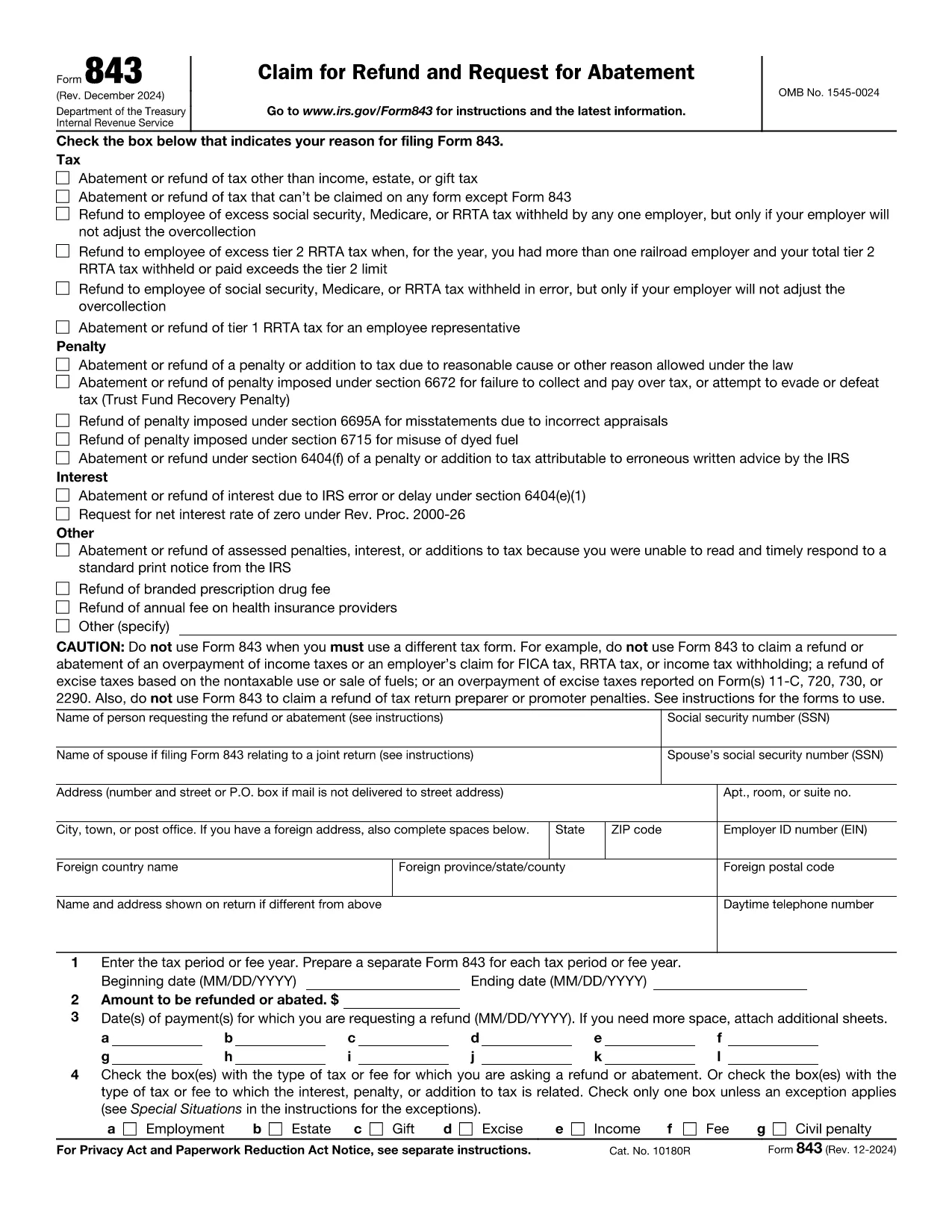
If you filed your taxes with TurboTax and need to claim a refund, the official document you’ll use is IRS Form 843 – Claim for Refund and Request for Abatement. This form lets you request a refund of taxes, penalties, or interest that you believe were incorrectly assessed.

What Is the TurboTax Refund Request Form?

Form 843 is a government‑issued PDF that works with any tax‑preparation software, including TurboTax. It is used for:

  • Refunding over‑paid taxes
  • Requesting an abatement of penalties or interest
  • Correcting a mistake after you’ve filed your return

The form is fully fillable, which means you can type directly into the fields, save your progress, and print or submit electronically.

How to Fill Out the Form Using Formize

Instead of downloading the PDF and opening it in a desktop editor, simply click the button below. The Formize PDF Filler app will load instantly, letting you complete the form in your browser.

Fill out this form

Common Mistakes & Tips for a Successful Refund Claim

  • Incorrect Tax Year: Double‑check that the tax year you’re claiming matches the year on your original TurboTax return.
  • Missing Signature: The form is not valid without a handwritten signature (or a qualified electronic signature).
  • Incomplete Explanation: Provide a clear, concise reason for the refund. Vague statements often lead to delays.
  • Attach Supporting Docs: Include copies of the original return, payment receipts, or any correspondence from the IRS.

Where to Get Help and Submit Your Refund Request

After completing Form 843, you can:

  • Mail it to the IRS address listed in the instructions (usually the address for your state).
  • Submit it through a tax professional who can forward it on your behalf.
  • Contact the IRS Help Line for specific questions.

Remember, TurboTax support can guide you on where to attach Form 843 within the TurboTax interface, but the actual refund claim is processed by the IRS.

FAQ
  • What is IRS Form 843 used for?

    Form 843 is the official claim for refund or request for abatement of taxes, penalties, or interest. It’s the form TurboTax users file when they need a refund after filing.

  • Can I file Form 843 electronically?

    The IRS does not accept Form 843 electronically. You must print, sign, and mail the completed form to the address indicated in the instructions.

  • Do I need a TurboTax account to use this form?

    No. Form 843 is an IRS document that works with any tax‑preparation software. You only need the form if you’re requesting a refund for a return prepared with TurboTax.

  • How long does the IRS take to process a refund claim?

    Processing times vary, but most refunds are issued within 6‑8 weeks after the IRS receives a complete and accurate Form 843.

  • What common errors cause delays?

    Missing signature, wrong tax year, incomplete explanation, and failure to attach supporting documents are the top reasons for delays.

  • Is there a fee to use Formize’s PDF filler?

    Formize offers a free basic filler for most standard fillable PDFs, including Form 843. No credit‑card information is required.

  • Can I request a refund for TurboTax fees using this form?

    Form 843 is for tax‑related refunds, not software fees. For TurboTax fee refunds, contact TurboTax customer support directly.

  • Do I need a tax professional to submit Form 843?

    While not required, a tax professional can help ensure the form is completed correctly and mailed to the proper IRS address.

WIE MAN

So füllen Sie request refund form kostenlos online in 5 einfachen Schritten aus:

  1. 1
    Click the Fill‑Out Button
    Press the "Fill out this form" button on the page. The Formize PDF Filler will open in a new tab.
  2. 2
    Wait for the Formize App to Load
    The filler loads in seconds. You’ll see all fields become editable directly in your browser.
  3. 3
    Enter Your Information
    Complete each required field: taxpayer name, SSN, tax year, amount of refund, and a brief explanation.
  4. 4
    Review and Sign
    Double‑check for errors, then add your handwritten signature (or use an approved electronic signature).
  5. 5
    Save, Print, or Submit
    Save the completed PDF, print it if you need a hard copy, or forward it to your tax professional for mailing to the IRS.
Formize PDF Filler-App
ÜBER

Steuerformulare

request refund form ist eines der Steuerformulare, mit denen Informationen zu Steuern an die zuständige Steuerbehörde gemeldet werden. Es gibt verschiedene Arten von Steuerformularen, einschließlich bundesstaatlicher, bundesstaatlicher und lokaler Steuerformulare, die je nach den Umständen und dem Standort des Steuerzahlers variieren können.

MERKMALE

PDF-Filler

Der einfachste Weg, PDF-Formulare online auszufüllen

  • Füllen Sie schnell request refund form aus
    Suchen Sie nach einer Möglichkeit, request refund form schnell online auszufüllen? Mit unserem kostenlosen Online-PDF-Formularausfüller wissen Sie, wie Sie dieses PDF-Dokument in weniger als einer Minute bearbeiten und ausfüllen.
  • Einfach zu bedienender Online-PDF-Editor
    Haben Sie es satt, PDF-Dateien auszudrucken, damit Sie sie bearbeiten können, bevor Sie sie erneut scannen und zurücksenden? PDF-Dokumente kostenlos online bearbeiten. Nutzen Sie unseren Online-PDF-Editor, um Zeit und Papier zu sparen.
  • Tolle Tools, alle Plattformen
    Sie fragen sich, wie Sie request refund form auf einem Mac ausfüllen oder vielleicht einen kostenlosen PDF-Ausfüller verwenden können? Unsere Online-PDF-Tools funktionieren auf allen Plattformen.
  • Sichere Dateispeicherung
    Fertige "request refund form"-Dateien werden in einer gesicherten Datenbank gespeichert, die vom Amazon Cloud-Hosting verwaltet wird. Sie können Ihre Dateien jederzeit aus unserem System löschen. In jedem Fall werden diese Dateien nach 24 Stunden automatisch gelöscht.
  • Chatten Sie mit request refund form
    Chatten Sie mit „request refund form“ auf Chatize, einem kostenlosen PDF-Leseassistenten. Stellen Sie Fragen und erhalten Sie Antworten von „request refund form“. Klicken Sie einfach oben auf die Schaltfläche Mit Dokument chatten.

Füllsitzung löschen

Die ausgewählte Füllsitzung löschen? In diesem Fall gehen Ihre Fortschritte beim Ausfüllen des Formulars verloren.

Bearbeitungssitzung löschen

Ausgewählte Bearbeitungssitzung löschen? In diesem Fall geht Ihr Fortschritt beim Erstellen und Bearbeiten des Formulars verloren.