
Επιλέξτε γλώσσα

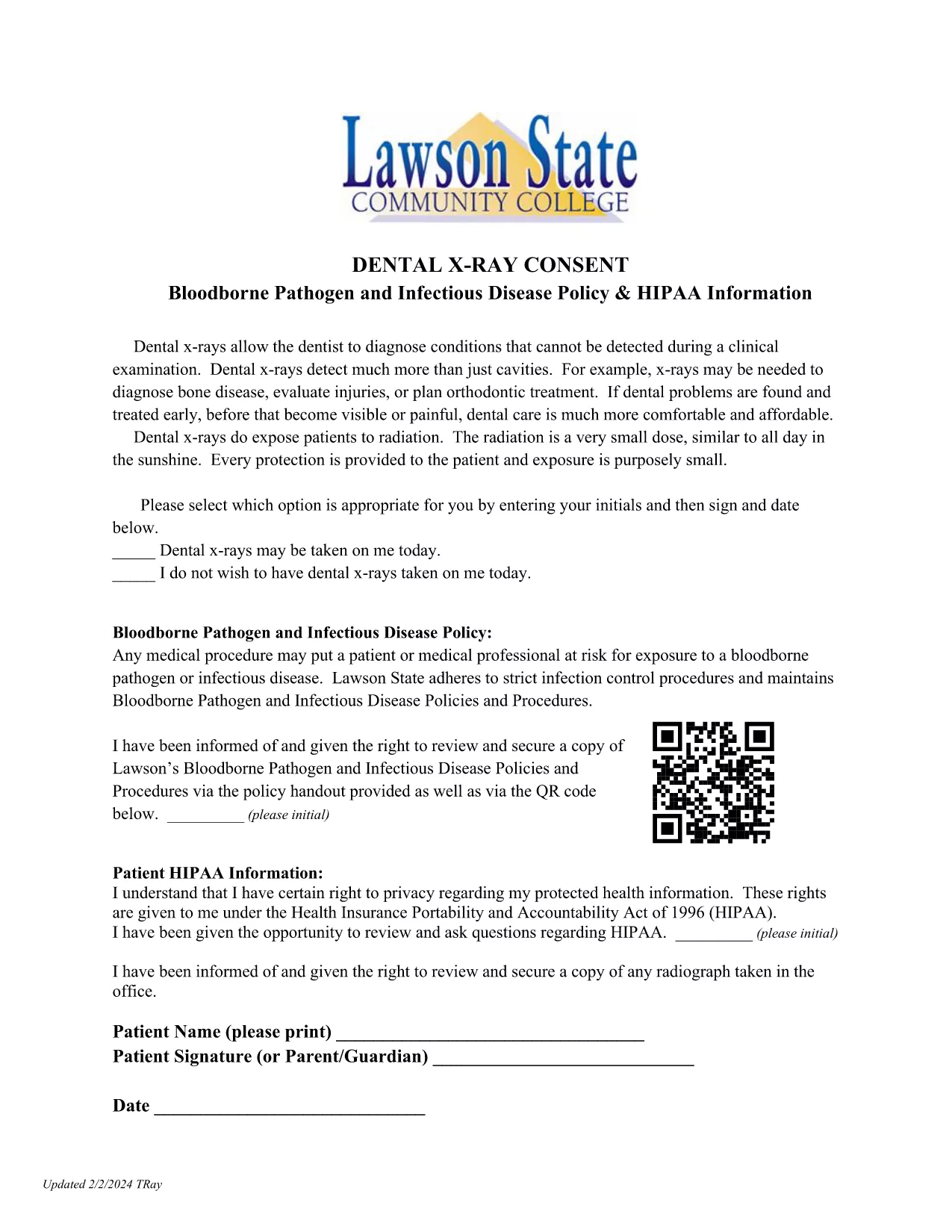
X‑Ray Consent Form – Fillable PDF

  1. Χώρα ΗΠΑ
  2. Γλώσσα Αγγλικά
  3. Δραστηριότητα Medical Consent Forms
  4. Τμήμα Health Services
X‑Ray Consent Form – Fillable PDF

When a diagnostic X‑ray is ordered, healthcare providers must obtain written permission from the patient. An X‑Ray Consent Form is a legal document that confirms the patient understands the procedure, its benefits, and any potential risks.

What Is an X‑Ray Consent Form?

This consent form protects both the patient and the medical facility. It explains why the X‑ray is needed, outlines possible radiation exposure, and asks about pregnancy or other conditions that could affect safety.

Key Elements Required on the Form

  • Patient Information: Full name, date of birth, and ID number.
  • Procedure Description: Clear wording of the X‑ray type and purpose.
  • Risks & Benefits: Brief statement of radiation risks and diagnostic benefits.
  • Pregnancy Disclosure: Mandatory question for women of child‑bearing age.
  • Signature & Date: Patient (or guardian) signs and dates the form.

How to Complete the Form Online with Formize

Forget about printing, scanning, or faxing. With Formize you can fill out the consent form directly in your browser, sign with a finger or mouse, and instantly save the completed PDF to your records.

Below is a quick step‑by‑step guide that walks you through the process.

FAQ
  • Do I need to print the X‑Ray consent form?

    No. Formize lets you fill, sign, and save the consent form entirely online, eliminating paper and the need for a printer.

  • Is the online signature legally binding?

    Yes. Formize uses secure e‑signature technology that complies with HIPAA and state medical‑record regulations.

  • Can a parent sign for a minor?

    Absolutely. The form includes a dedicated section for a parent or legal guardian to provide consent for patients under 18.

  • What if the patient is pregnant?

    The form asks explicitly about pregnancy. If the patient indicates they are pregnant, the provider will review alternative imaging options.

  • How is my data protected?

    All data is encrypted in transit and at rest. Formize adheres to HIPAA‑compliant security standards.

  • Can I store the completed consent in my electronic health record (EHR)?

    Yes. After saving, you can download the PDF and upload it to any EHR system that accepts PDF documents.

  • Is there a cost to use the Formize PDF Filler?

    Formize offers a free tier that includes basic filling and e‑signing. Advanced workflow features are available with a paid subscription.

  • Can I edit the form after I’ve signed it?

    Once signed, the form is locked to preserve its legal integrity. If changes are needed, create a new form instance.

  • What devices are supported?

    The Formize PDF Filler works on desktop browsers, tablets, and smartphones—any device with an internet connection.

  • How do I get a copy of the signed consent for my records?

    After completing the form, click **Download** to save a copy to your device, or use the **Email** option to send it directly to yourself.

ΠΩΣ ΝΑ

Πώς να συμπληρώσετε το X-ray consent form δωρεάν, στο διαδίκτυο με 5 εύκολα βήματα:

  1. 1
    Open the Fillable Form
    Click the **Fill out this form** button on the page. The Formize PDF Filler app will launch in a new tab.
  2. 2
    Enter Patient Details
    Type the patient’s name, date of birth, and any required medical information directly into the highlighted fields.
  3. 3
    Answer the Pregnancy Question
    Select “Yes” or “No” for the pregnancy disclosure. If you answer “Yes,” the form will automatically add a warning note.
  4. 4
    Add Your Signature
    Use your mouse, finger, or a stylus to draw a signature in the signature box. You can also type your name and let Formize generate a signature style.
  5. 5
    Save or Download
    When you’re done, click **Save & Finish**. The completed PDF is stored securely in your Formize account and can be downloaded or shared with your medical provider.
Διαμορφώστε την εφαρμογή Filler PDF
ΣΧΕΤΙΚΆ ΜΕ

πρότυπο X-ray consent form

Με το παραδοσιακό σύνολο λειτουργιών για την προβολή και τη συμπλήρωση ενός εγγράφου PDF, σε συνδυασμό με τα πλεονεκτήματα μιας εφαρμογής ιστού και την αποκριτική διάταξη, μπορείτε να ολοκληρώσετε το X-ray consent form μέσα σε λίγα λεπτά.

ΧΑΡΑΚΤΗΡΙΣΤΙΚΆ

Πλήρωση PDF

Ο ευκολότερος τρόπος για να συμπληρώσετε το X-ray consent form στο διαδίκτυο

  • Συμπληρώστε γρήγορα X-ray consent form
    Αναζητάτε έναν τρόπο να γεμίσετε γρήγορα το X-ray consent form στο διαδίκτυο; Με το ηλεκτρονικό μας δωρεάν συμπλήρωμα φόρμας PDF, θα ξέρετε πώς να επεξεργαστείτε και να συμπληρώσετε αυτό το έγγραφο pdf σε λιγότερο από ένα λεπτό.
  • Εύκολο στη χρήση διαδικτυακό πρόγραμμα επεξεργασίας PDF
    Βαρεθήκατε να εκτυπώνετε αρχεία PDF ώστε να μπορείτε να τα επεξεργαστείτε, πριν τα σαρώσετε ξανά και τα στείλετε πίσω; Επεξεργαστείτε έγγραφα PDF δωρεάν online. Χρησιμοποιήστε το ηλεκτρονικό μας πρόγραμμα επεξεργασίας pdf για να εξοικονομήσετε χρόνο και χαρτί.
  • Υπέροχα εργαλεία, όλες οι πλατφόρμες
    Αναρωτιέστε πώς να συμπληρώσετε το X-ray consent form σε Mac ή μήπως πώς να χρησιμοποιήσετε ένα πρόγραμμα πλήρωσης PDF δωρεάν; Τα διαδικτυακά μας εργαλεία PDF λειτουργούν σε όλες τις πλατφόρμες.
  • Ασφαλής αποθήκευση αρχείων
    Τα ολοκληρωμένα αρχεία "X-ray consent form" αποθηκεύονται σε μια ασφαλή βάση δεδομένων που διαχειρίζεται η φιλοξενία Amazon Cloud. Μπορείτε να διαγράψετε τα αρχεία σας από το σύστημά μας ανά πάσα στιγμή. Σε κάθε περίπτωση, αυτά τα αρχεία διαγράφονται αυτόματα μετά από 24 ώρες.
  • Συζήτηση με X-ray consent form
    Συνομιλήστε με το "X-ray consent form" στο Chatize που είναι ένας δωρεάν βοηθός ανάγνωσης PDF. Κάντε ερωτήσεις και λάβετε απαντήσεις από το "X-ray consent form". Απλώς κάντε κλικ στο κουμπί Συζήτηση με έγγραφο παραπάνω.

Διαγραφή συνεδρίας συμπλήρωσης

Διαγραφή της επιλεγμένης περιόδου συμπλήρωσης; Σε αυτήν την περίπτωση, η πρόοδός σας στη συμπλήρωση της φόρμας θα χαθεί.

Διαγραφή συνεδρίας επεξεργασίας

Διαγραφή της επιλεγμένης συνεδρίας επεξεργασίας; Σε αυτήν την περίπτωση, η πρόοδός σας στη δημιουργία και την επεξεργασία της φόρμας θα χαθεί.