
Επιλέξτε γλώσσα

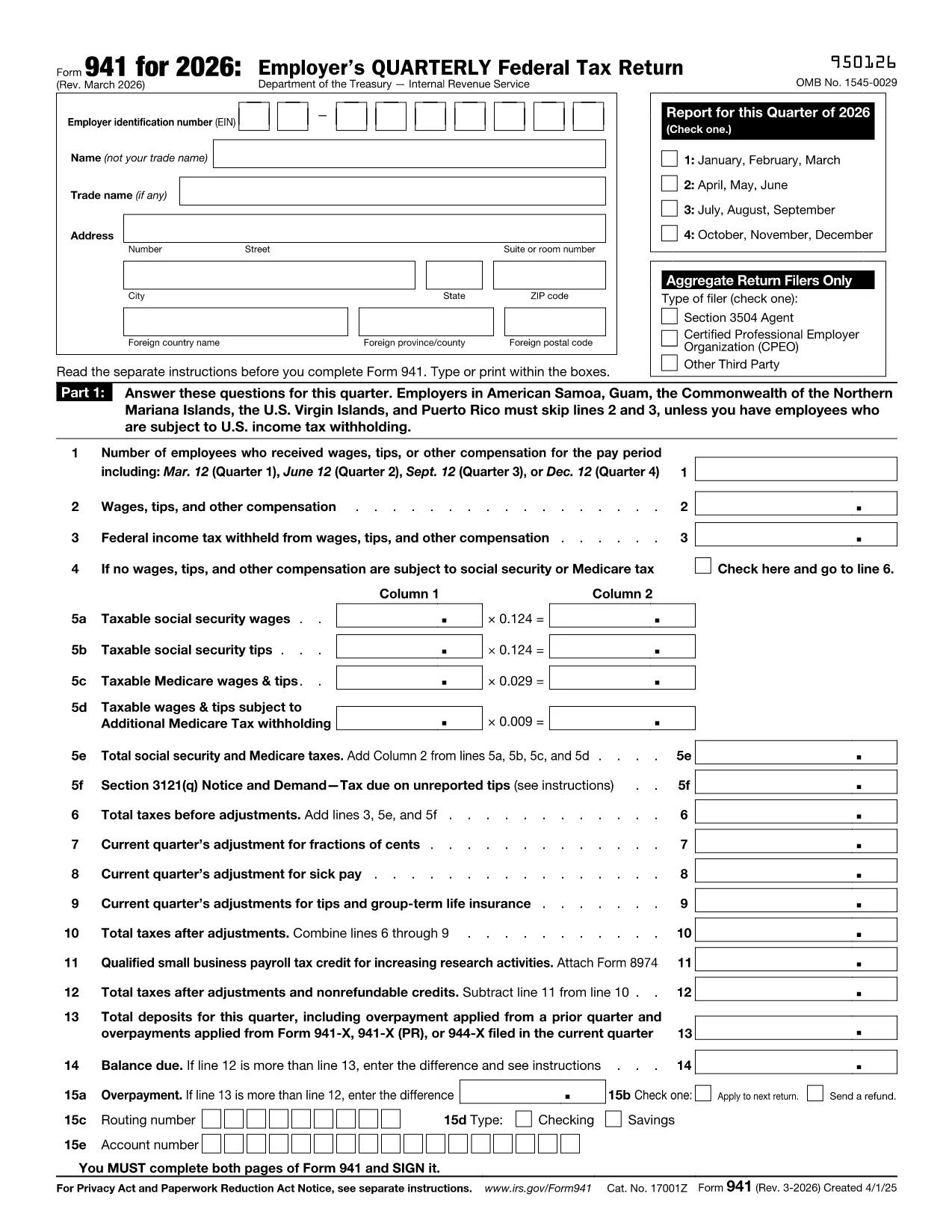
IRS Form 941 – Fillable Tax Form for January 31 Filing

  1. Χώρα ΗΠΑ
  2. Γλώσσα Αγγλικά
  3. Δραστηριότητα Φόροι
  4. Τμήμα IRS
IRS Form 941 – Fillable Tax Form for January 31 Filing

Employers across the United States must file IRS Form 941 every quarter. The third‑quarter filing deadline falls on January 31, making this the most critical tax form of the year for payroll taxes.

Formize provides a secure, fillable PDF version of Form 941 that loads directly in your browser. No Adobe Acrobat, no downloads—just click, fill, and submit.

Our online Formize PDF Filler automatically validates numbers, formats dates, and highlights required fields, helping you avoid costly errors before you send the form to the IRS.

Use the instructions below to complete the form quickly, accurately, and on time.

FAQ
  • When is the deadline for filing Form 941?

    Form 941 is due on the last day of the month following the end of the quarter. For the third quarter, the deadline is January 31.

  • Who must file Form 941?

    All employers who withhold federal income tax, Social Security, or Medicare taxes from employee wages must file Form 941 each quarter.

  • Can I file Form 941 electronically?

    Yes. After completing the fillable PDF with Formize, you can upload the saved file to the IRS e‑file system or submit a paper copy by mail.

  • What common errors should I avoid?

    Watch for incorrect totals, missing employer identification number (EIN), and mismatched tax periods. Our validator flags these before you save.

  • Is there a fee to use the Formize PDF Filler?

    No. The fillable PDF and online filler are completely free for all users.

  • What if I need help after I’ve filled the form?

    Review the IRS instructions linked at the bottom of the page, or contact a qualified tax professional for personalized assistance.

  • Do I need Adobe Acrobat to open the filled form?

    No. The form is saved as a standard PDF that can be opened with any modern web browser or free PDF viewer.

  • Can I save my progress and return later?

    Yes. Use the “Save” button in the Formize filler to download a partially completed PDF, then reopen it later to finish.

ΠΩΣ ΝΑ

Πώς να συμπληρώσετε το IRS Form 941 δωρεάν, στο διαδίκτυο με 5 εύκολα βήματα:

  1. 1
    Click the Fillable Form Button
    Locate the blue “Fill out this form” button on this page and click it. The Formize PDF Filler will open in a new tab.
  2. 2
    Wait for the Formize PDF Filler to Load
    The app loads in seconds. You’ll see the full IRS Form 941 with interactive fields ready for input.
  3. 3
    Enter Your Information
    Type directly into each field. Numbers are auto‑formatted, dates are validated, and required fields are highlighted.
  4. 4
    Review and Validate
    Use the built‑in validation to check for missing or incorrect entries. Correct any warnings before proceeding.
  5. 5
    Save or Submit
    When you’re satisfied, click “Save PDF” to download a completed copy, or print and mail it to the IRS as instructed on the form.
Διαμορφώστε την εφαρμογή Filler PDF
ΣΧΕΤΙΚΆ ΜΕ

Φορολογικά έντυπα

Το IRS Form 941 είναι ένα από τα φορολογικά έντυπα που είναι έγγραφα που χρησιμοποιούνται για την αναφορά πληροφοριών που σχετίζονται με φόρους στην αρμόδια φορολογική αρχή. Υπάρχουν διάφοροι τύποι φορολογικών εντύπων, συμπεριλαμβανομένων ομοσπονδιακών, κρατικών και τοπικών φορολογικών εντύπων, τα οποία μπορεί να διαφέρουν ανάλογα με τις περιστάσεις και την τοποθεσία του φορολογούμενου.

ΧΑΡΑΚΤΗΡΙΣΤΙΚΆ

Πλήρωση PDF

Ο ευκολότερος τρόπος για να συμπληρώσετε το IRS Form 941 στο διαδίκτυο

  • Συμπληρώστε γρήγορα IRS Form 941
    Αναζητάτε έναν τρόπο να γεμίσετε γρήγορα το IRS Form 941 στο διαδίκτυο; Με το ηλεκτρονικό μας δωρεάν συμπλήρωμα φόρμας PDF, θα ξέρετε πώς να επεξεργαστείτε και να συμπληρώσετε αυτό το έγγραφο pdf σε λιγότερο από ένα λεπτό.
  • Εύκολο στη χρήση διαδικτυακό πρόγραμμα επεξεργασίας PDF
    Βαρεθήκατε να εκτυπώνετε αρχεία PDF ώστε να μπορείτε να τα επεξεργαστείτε, πριν τα σαρώσετε ξανά και τα στείλετε πίσω; Επεξεργαστείτε έγγραφα PDF δωρεάν online. Χρησιμοποιήστε το ηλεκτρονικό μας πρόγραμμα επεξεργασίας pdf για να εξοικονομήσετε χρόνο και χαρτί.
  • Υπέροχα εργαλεία, όλες οι πλατφόρμες
    Αναρωτιέστε πώς να συμπληρώσετε το IRS Form 941 σε Mac ή μήπως πώς να χρησιμοποιήσετε ένα πρόγραμμα πλήρωσης PDF δωρεάν; Τα διαδικτυακά μας εργαλεία PDF λειτουργούν σε όλες τις πλατφόρμες.
  • Ασφαλής αποθήκευση αρχείων
    Τα ολοκληρωμένα αρχεία "IRS Form 941" αποθηκεύονται σε μια ασφαλή βάση δεδομένων που διαχειρίζεται η φιλοξενία Amazon Cloud. Μπορείτε να διαγράψετε τα αρχεία σας από το σύστημά μας ανά πάσα στιγμή. Σε κάθε περίπτωση, αυτά τα αρχεία διαγράφονται αυτόματα μετά από 24 ώρες.
  • Συζήτηση με IRS Form 941
    Συνομιλήστε με το "IRS Form 941" στο Chatize που είναι ένας δωρεάν βοηθός ανάγνωσης PDF. Κάντε ερωτήσεις και λάβετε απαντήσεις από το "IRS Form 941". Απλώς κάντε κλικ στο κουμπί Συζήτηση με έγγραφο παραπάνω.

Διαγραφή συνεδρίας συμπλήρωσης

Διαγραφή της επιλεγμένης περιόδου συμπλήρωσης; Σε αυτήν την περίπτωση, η πρόοδός σας στη συμπλήρωση της φόρμας θα χαθεί.

Διαγραφή συνεδρίας επεξεργασίας

Διαγραφή της επιλεγμένης συνεδρίας επεξεργασίας; Σε αυτήν την περίπτωση, η πρόοδός σας στη δημιουργία και την επεξεργασία της φόρμας θα χαθεί.