
Επιλέξτε γλώσσα

Legal Form of Your Entity – Fillable SS‑4 PDF

  1. Χώρα ΗΠΑ
  2. Γλώσσα Αγγλικά
  3. Δραστηριότητα Φόροι
  4. Τμήμα IRS
Legal Form of Your Entity – Fillable SS‑4 PDF

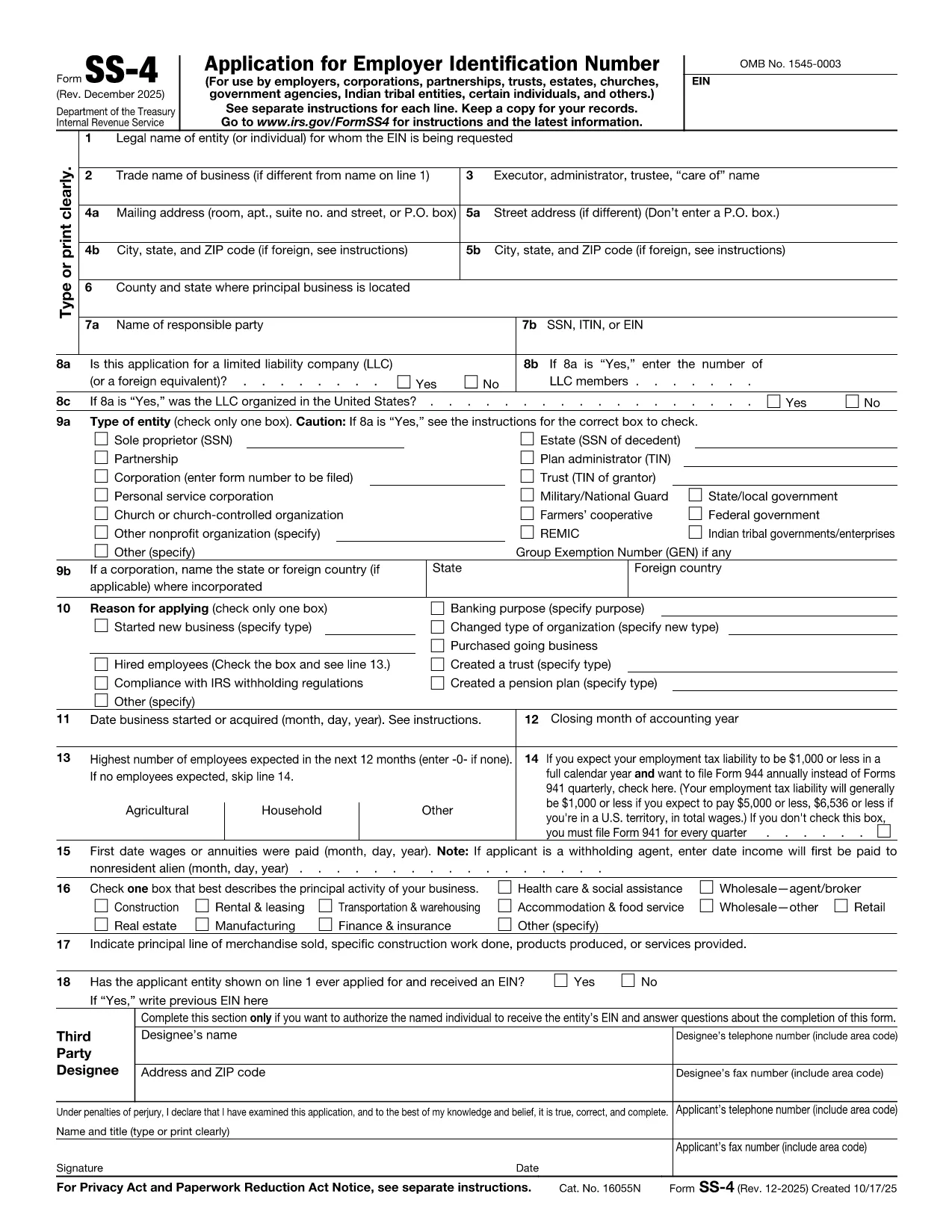
When you start a business, the legal form of your entity (sole proprietorship, partnership, corporation, LLC, etc.) determines tax obligations, liability protection, and filing requirements. The IRS Form SS‑4 is the official application for an Employer Identification Number (EIN) and includes a crucial section where you declare your entity’s legal structure.

What Is the Legal Form of Your Entity?

The legal form describes how your business is organized under state law. Common classifications are:

  • Sole Proprietorship
  • Partnership (general or limited)
  • Corporation (C‑corp or S‑corp)
  • Limited Liability Company (LLC)
  • Non‑profit organization

Choosing the correct legal form on the SS‑4 ensures the IRS processes your EIN correctly and assigns the appropriate tax treatment.

How to Fill Out the SS‑4 Form Online

Instead of downloading the PDF and editing it with a separate editor, simply click the "Fill out this form" button below. The Formize PDF Filler app will load in your browser, letting you complete the form instantly.

  1. Click Fill out this form.
  2. The Formize PDF Filler loads – no installation required.
  3. Enter your business information, paying special attention to Line 9 – Type of Entity.
  4. Save the completed PDF or submit directly to the IRS as instructed.

Common Mistakes to Avoid

  • Leaving Line 9 blank – the IRS cannot assign an EIN without a clear entity type.
  • Choosing the wrong entity code (e.g., selecting "Corporation" for an LLC).
  • Using an outdated address or phone number, which can delay processing.
  • Submitting the form with illegible handwriting – the online filler eliminates this risk.

Where to Submit the Completed Form

After you finish the fillable SS‑4, you can:

  • Mail it to the IRS address listed in the instructions.
  • Fax it using the numbers provided for expedited processing.
  • Apply online through the IRS website (the same EIN can be obtained without the PDF).

FAQs About the SS‑4 Legal Entity Section

Below are the most common questions users ask when completing the legal form portion of the SS‑4.

FAQ
  • What does “Legal Form of Entity” mean on the SS‑4?

    It identifies how your business is organized under state law (e.g., Sole Proprietorship, Partnership, Corporation, LLC). The IRS uses this to assign the correct tax classification.

  • Can I change the legal form after I’ve received an EIN?

    Yes, but you must file the appropriate IRS forms (e.g., Form 8832 for entity classification changes) and update your state registration.

  • Do I need an attorney to complete the legal form section?

    Not necessarily. The SS‑4 provides clear definitions. If you’re unsure which classification fits your business, consult a CPA or legal advisor.

  • Is the fillable SS‑4 PDF accepted for electronic filing?

    The IRS still requires a paper or fax submission for SS‑4, but the fillable PDF ensures your information is legible and complete before you send it.

  • What happens if I select the wrong entity type?

    The IRS may assign an incorrect tax status, leading to filing errors. You’ll need to file Form 1120, 1065, or 1040‑SE accordingly, or request a correction.

  • Can I save my progress and return later?

    Yes. The Formize PDF Filler lets you save a draft to your computer and reopen it at any time before final submission.

  • Is there a fee to use Formize PDF Filler?

    No. Formize provides the fillable PDF experience for free on this page.

  • Do I need a separate EIN for each state where I operate?

    No. One federal EIN covers all states. However, some states may require a separate state tax ID.

  • How long does the IRS take to issue an EIN after I submit the SS‑4?

    If you fax or apply online, you can receive the EIN within minutes. Mail submissions typically take 4‑6 weeks.

  • What if I make a mistake after submitting the SS‑4?

    Contact the IRS Business & Specialty Tax Line at 1‑800‑829‑4933 to correct errors or file an amended SS‑4.

ΠΩΣ ΝΑ

Πώς να συμπληρώσετε το legal form of entity δωρεάν, στο διαδίκτυο με 4 εύκολα βήματα:

  1. 1
    Open the Fillable Form
    Click the “Fill out this form” button on the page. The Formize PDF Filler app will open directly in your browser.
  2. 2
    Enter Your Business Details
    Complete each field, especially Line 9 – Type of Entity. Use the drop‑down menu to select Sole Proprietorship, Partnership, Corporation, LLC, or other.
  3. 3
    Review and Save
    Double‑check all entries for accuracy, then click “Save” to download the completed PDF or use the built‑in “Submit” option if you prefer to fax/mail it.
  4. 4
    Submit to the IRS
    Follow the instructions on the form to mail or fax the PDF, or apply for the EIN online using the same information.
Διαμορφώστε την εφαρμογή Filler PDF
ΣΧΕΤΙΚΆ ΜΕ

Φορολογικά έντυπα

Το legal form of entity είναι ένα από τα φορολογικά έντυπα που είναι έγγραφα που χρησιμοποιούνται για την αναφορά πληροφοριών που σχετίζονται με φόρους στην αρμόδια φορολογική αρχή. Υπάρχουν διάφοροι τύποι φορολογικών εντύπων, συμπεριλαμβανομένων ομοσπονδιακών, κρατικών και τοπικών φορολογικών εντύπων, τα οποία μπορεί να διαφέρουν ανάλογα με τις περιστάσεις και την τοποθεσία του φορολογούμενου.

ΧΑΡΑΚΤΗΡΙΣΤΙΚΆ

Πλήρωση PDF

Ο ευκολότερος τρόπος για να συμπληρώσετε το legal form of entity στο διαδίκτυο

  • Συμπληρώστε γρήγορα legal form of entity
    Αναζητάτε έναν τρόπο να γεμίσετε γρήγορα το legal form of entity στο διαδίκτυο; Με το ηλεκτρονικό μας δωρεάν συμπλήρωμα φόρμας PDF, θα ξέρετε πώς να επεξεργαστείτε και να συμπληρώσετε αυτό το έγγραφο pdf σε λιγότερο από ένα λεπτό.
  • Εύκολο στη χρήση διαδικτυακό πρόγραμμα επεξεργασίας PDF
    Βαρεθήκατε να εκτυπώνετε αρχεία PDF ώστε να μπορείτε να τα επεξεργαστείτε, πριν τα σαρώσετε ξανά και τα στείλετε πίσω; Επεξεργαστείτε έγγραφα PDF δωρεάν online. Χρησιμοποιήστε το ηλεκτρονικό μας πρόγραμμα επεξεργασίας pdf για να εξοικονομήσετε χρόνο και χαρτί.
  • Υπέροχα εργαλεία, όλες οι πλατφόρμες
    Αναρωτιέστε πώς να συμπληρώσετε το legal form of entity σε Mac ή μήπως πώς να χρησιμοποιήσετε ένα πρόγραμμα πλήρωσης PDF δωρεάν; Τα διαδικτυακά μας εργαλεία PDF λειτουργούν σε όλες τις πλατφόρμες.
  • Ασφαλής αποθήκευση αρχείων
    Τα ολοκληρωμένα αρχεία "legal form of entity" αποθηκεύονται σε μια ασφαλή βάση δεδομένων που διαχειρίζεται η φιλοξενία Amazon Cloud. Μπορείτε να διαγράψετε τα αρχεία σας από το σύστημά μας ανά πάσα στιγμή. Σε κάθε περίπτωση, αυτά τα αρχεία διαγράφονται αυτόματα μετά από 24 ώρες.
  • Συζήτηση με legal form of entity
    Συνομιλήστε με το "legal form of entity" στο Chatize που είναι ένας δωρεάν βοηθός ανάγνωσης PDF. Κάντε ερωτήσεις και λάβετε απαντήσεις από το "legal form of entity". Απλώς κάντε κλικ στο κουμπί Συζήτηση με έγγραφο παραπάνω.

Διαγραφή συνεδρίας συμπλήρωσης

Διαγραφή της επιλεγμένης περιόδου συμπλήρωσης; Σε αυτήν την περίπτωση, η πρόοδός σας στη συμπλήρωση της φόρμας θα χαθεί.

Διαγραφή συνεδρίας επεξεργασίας

Διαγραφή της επιλεγμένης συνεδρίας επεξεργασίας; Σε αυτήν την περίπτωση, η πρόοδός σας στη δημιουργία και την επεξεργασία της φόρμας θα χαθεί.