
Επιλέξτε γλώσσα

Fillable IRS Form 4506 – Request Your Tax Transcript Online

  1. Χώρα ΗΠΑ
  2. Γλώσσα Αγγλικά
  3. Δραστηριότητα Φόροι
  4. Τμήμα IRS
Fillable IRS Form 4506 – Request Your Tax Transcript Online

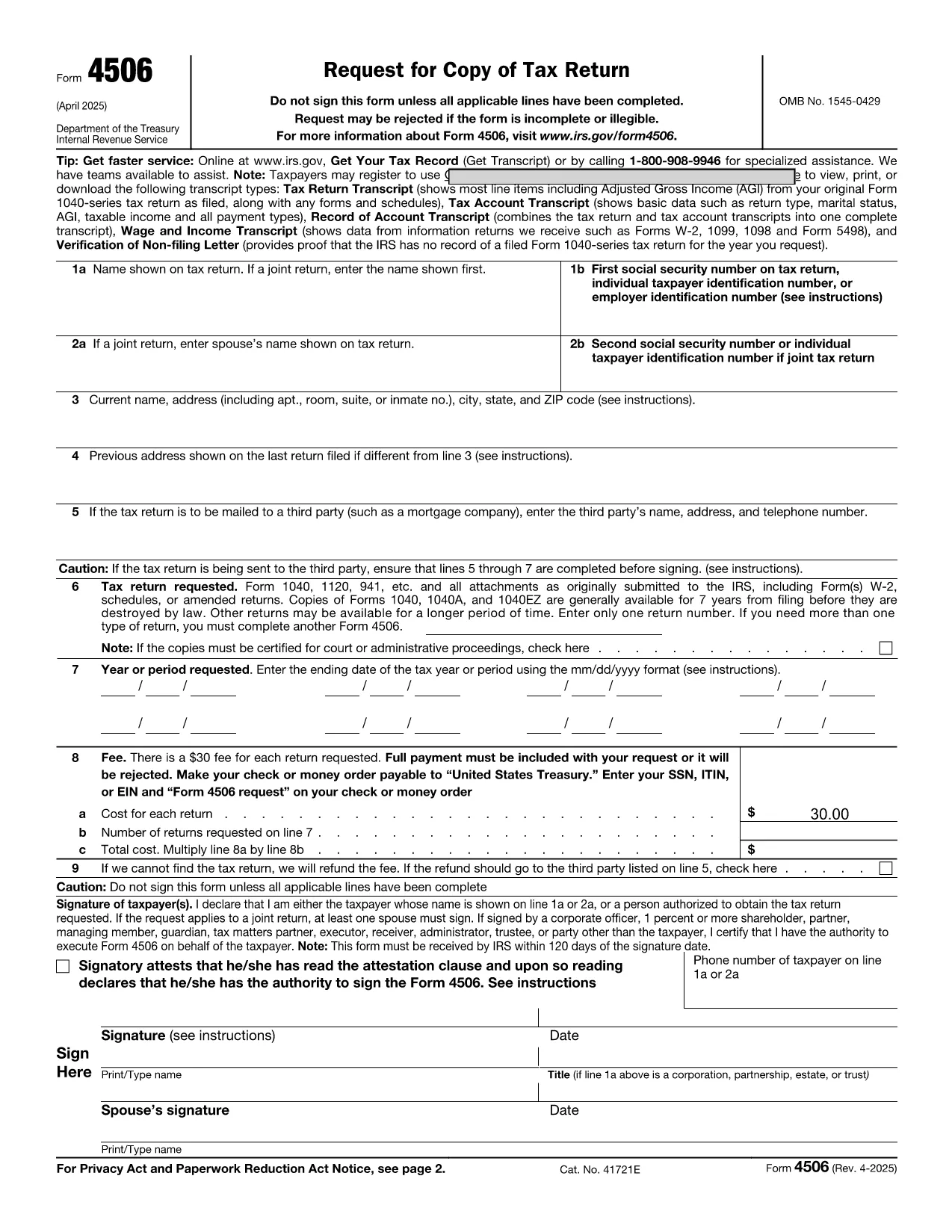
Looking for a fast, secure way to request a copy of your tax transcript? The IRS Form 4506 is the official request form for a tax return transcript, and with Formize you can fill it out directly in your browser—no PDF editor needed.

Why Choose the Online Fillable Form 4506?

Our fillable PDF version is:

  • Instantly accessible—no download or installation.
  • Auto‑save as you type, so you never lose data.
  • Validated fields that flag missing or incorrect entries before you submit.
  • Secure—your information stays encrypted while you work.

Step‑by‑Step Guide to Completing the Form

Follow the simple steps below to fill out Form 4506 online and have it ready for printing or electronic submission.

Common Mistakes & How to Avoid Them

Even a small typo can delay processing. Watch out for:

  • Incorrect Social Security Number or EIN.
  • Missing tax year selection.
  • Unsigned form – the signature field is required.
  • Using an outdated address.

The Formize filler highlights these issues in real‑time, so you can correct them before you finish.

Where to Get Help After Submitting

If you need assistance, the IRS provides phone support for transcript requests (1‑800‑829‑1040). For technical questions about the online filler, refer to the Formize Help Center for troubleshooting tips.

Ready to start? Click the button below, fill out the form in seconds, and print or email it directly to the IRS.

FAQ
  • Do I need to download the PDF to fill out Form 4506?

    No. With Formize you can fill the form directly in your browser. Just click the "Fill out this form" button and the online filler loads automatically.

  • Is the online filler secure?

    Yes. All data is encrypted during the session, and the filler does not store your information after you close the tab.

  • Can I save my progress and continue later?

    The Formize filler offers an auto‑save feature. You can download a partially completed PDF and resume editing later.

  • What if I make a mistake after I’ve printed the form?

    If you notice an error after printing, simply go back to the online filler, correct the mistake, and download a new PDF.

  • How long does the IRS take to process Form 4506?

    Processing typically takes 10‑15 business days after the IRS receives the completed form.

  • Do I need a signature on the online form?

    Yes. The filler includes an electronic signature field that meets IRS requirements for printed submissions.

  • Can I submit the PDF electronically to the IRS?

    The IRS currently accepts mailed paper copies for Form 4506. Keep the PDF for your records after printing.

  • What if I have a question about the form’s instructions?

    Refer to the instruction page attached to the PDF or call the IRS at 1‑800‑829‑1040 for help.

ΠΩΣ ΝΑ

Πώς να συμπληρώσετε το request form online δωρεάν, στο διαδίκτυο με 5 εύκολα βήματα:

  1. 1
    Click the Fillable Form Button
    Press the "Fill out this form" button on the page. The Formize PDF Filler app will open in a new tab.
  2. 2
    Enter Your Information
    Type directly into each field. The filler validates entries in real time, ensuring all required data is captured.
  3. 3
    Review and Sign
    Use the built‑in signature field to sign electronically, then double‑check for any highlighted errors.
  4. 4
    Download or Print
    When you’re satisfied, click "Download PDF" to save a copy or "Print" to send a hard copy to the IRS.
  5. 5
    Submit to the IRS
    Mail the printed form to the address listed in the instructions, or attach the PDF to an online request if the IRS permits.
Διαμορφώστε την εφαρμογή Filler PDF
ΣΧΕΤΙΚΆ ΜΕ

Φορολογικά έντυπα

Το request form online είναι ένα από τα φορολογικά έντυπα που είναι έγγραφα που χρησιμοποιούνται για την αναφορά πληροφοριών που σχετίζονται με φόρους στην αρμόδια φορολογική αρχή. Υπάρχουν διάφοροι τύποι φορολογικών εντύπων, συμπεριλαμβανομένων ομοσπονδιακών, κρατικών και τοπικών φορολογικών εντύπων, τα οποία μπορεί να διαφέρουν ανάλογα με τις περιστάσεις και την τοποθεσία του φορολογούμενου.

ΧΑΡΑΚΤΗΡΙΣΤΙΚΆ

Πλήρωση PDF

Ο ευκολότερος τρόπος για να συμπληρώσετε το request form online στο διαδίκτυο

  • Συμπληρώστε γρήγορα request form online
    Αναζητάτε έναν τρόπο να γεμίσετε γρήγορα το request form online στο διαδίκτυο; Με το ηλεκτρονικό μας δωρεάν συμπλήρωμα φόρμας PDF, θα ξέρετε πώς να επεξεργαστείτε και να συμπληρώσετε αυτό το έγγραφο pdf σε λιγότερο από ένα λεπτό.
  • Εύκολο στη χρήση διαδικτυακό πρόγραμμα επεξεργασίας PDF
    Βαρεθήκατε να εκτυπώνετε αρχεία PDF ώστε να μπορείτε να τα επεξεργαστείτε, πριν τα σαρώσετε ξανά και τα στείλετε πίσω; Επεξεργαστείτε έγγραφα PDF δωρεάν online. Χρησιμοποιήστε το ηλεκτρονικό μας πρόγραμμα επεξεργασίας pdf για να εξοικονομήσετε χρόνο και χαρτί.
  • Υπέροχα εργαλεία, όλες οι πλατφόρμες
    Αναρωτιέστε πώς να συμπληρώσετε το request form online σε Mac ή μήπως πώς να χρησιμοποιήσετε ένα πρόγραμμα πλήρωσης PDF δωρεάν; Τα διαδικτυακά μας εργαλεία PDF λειτουργούν σε όλες τις πλατφόρμες.
  • Ασφαλής αποθήκευση αρχείων
    Τα ολοκληρωμένα αρχεία "request form online" αποθηκεύονται σε μια ασφαλή βάση δεδομένων που διαχειρίζεται η φιλοξενία Amazon Cloud. Μπορείτε να διαγράψετε τα αρχεία σας από το σύστημά μας ανά πάσα στιγμή. Σε κάθε περίπτωση, αυτά τα αρχεία διαγράφονται αυτόματα μετά από 24 ώρες.
  • Συζήτηση με request form online
    Συνομιλήστε με το "request form online" στο Chatize που είναι ένας δωρεάν βοηθός ανάγνωσης PDF. Κάντε ερωτήσεις και λάβετε απαντήσεις από το "request form online". Απλώς κάντε κλικ στο κουμπί Συζήτηση με έγγραφο παραπάνω.

Διαγραφή συνεδρίας συμπλήρωσης

Διαγραφή της επιλεγμένης περιόδου συμπλήρωσης; Σε αυτήν την περίπτωση, η πρόοδός σας στη συμπλήρωση της φόρμας θα χαθεί.

Διαγραφή συνεδρίας επεξεργασίας

Διαγραφή της επιλεγμένης συνεδρίας επεξεργασίας; Σε αυτήν την περίπτωση, η πρόοδός σας στη δημιουργία και την επεξεργασία της φόρμας θα χαθεί.