
Seleccione el idioma

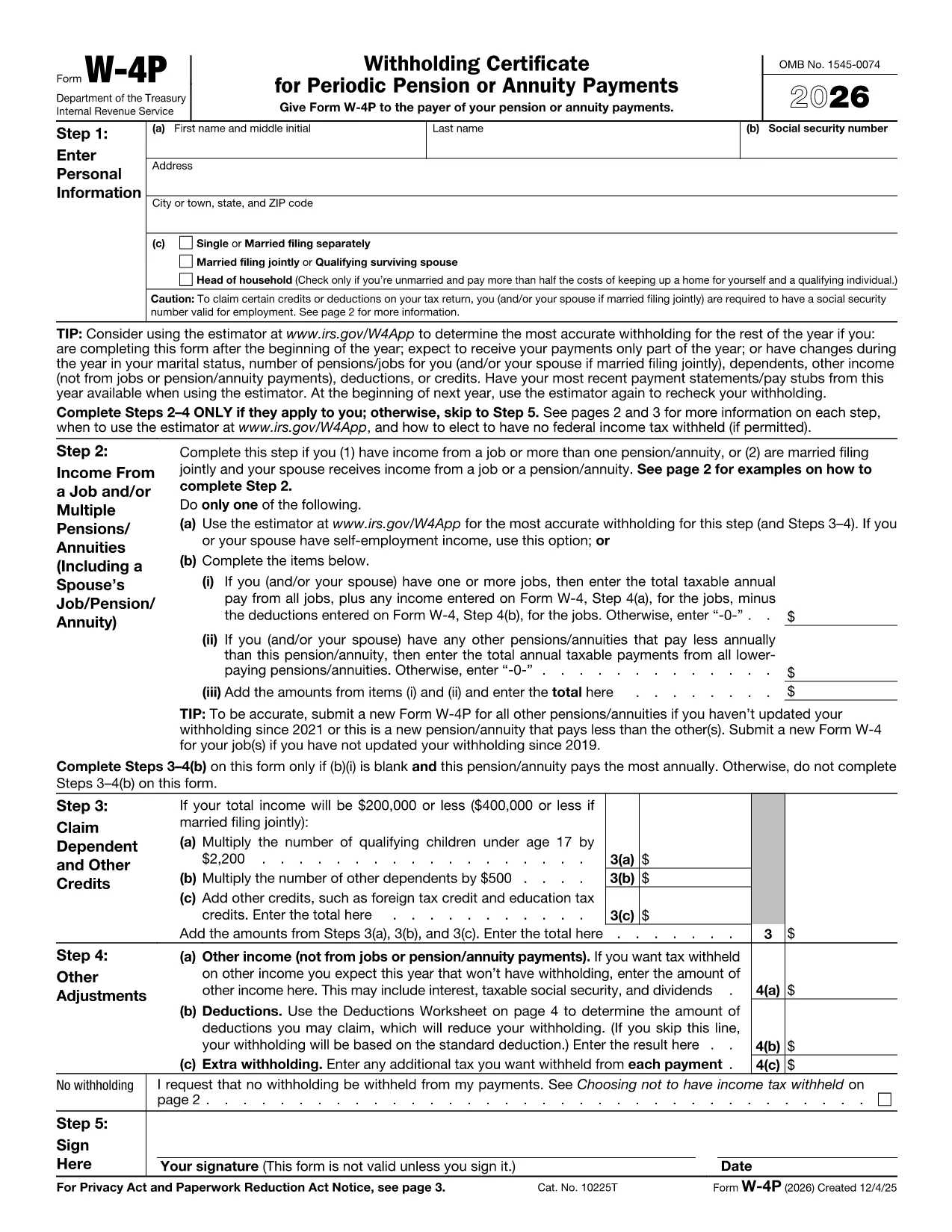
Form W‑4P Fillable PDF – Complete Your Pension Withholding Online

  1. País EE.UU
  2. Idioma Inglés
  3. Actividad Impuestos
  4. Departamento Servicio de ingresos internos
Form W‑4P Fillable PDF – Complete Your Pension Withholding Online

Form W‑4P is the IRS document used to request federal income‑tax withholding from pension, annuity, or other retirement payments. Instead of downloading a static PDF and hunting for a PDF editor, you can fill this form directly in your browser with Formize’s secure PDF Filler app.

What Is Form W‑4P?

The IRS Form W‑4P tells payers how much tax to withhold from retirement distributions. It is required for:

  • Traditional pensions
  • IRA distributions
  • Annuity payments
  • Social Security benefits (if you elect withholding)

Accurate completion helps you avoid an unexpected tax bill or over‑withholding that reduces your cash flow.

How to Fill Out Form W‑4P with Formize

Follow the simple steps below – no PDF software needed.

  1. Click the **"Fill out this form"** button on this page.
  2. Wait a few seconds while the Formize PDF Filler loads the fillable W‑4P template.
  3. Enter your personal information, tax filing status, and the amount you want withheld.
  4. Review the preview, then click **"Save & Download"** to get a completed PDF you can email or print.

The filler saves your data securely in the browser, so you stay in control of your personal details.

Common Mistakes & Tips for Accurate Completion

  • Incorrect filing status: Choose the status that matches your most recent tax return (single, married, etc.).
  • Leaving the withholding amount blank: If you want no tax withheld, write “0” in the appropriate box; otherwise, specify the exact dollar amount.
  • Outdated address: Ensure the mailing address is current; the payer uses this for any correspondence.
  • Signature: After downloading, print and sign the form before sending it to the payer.

Following these tips reduces the risk of processing delays and ensures your retirement income is taxed correctly.

Ready to get started? Click the button below and let Formize handle the heavy lifting.

PREGUNTAS MÁS FRECUENTES
  • Who needs to file Form W‑4P?

    Anyone receiving pension, annuity, IRA distributions, or other retirement income who wants federal tax withheld.

  • Can I claim exemption from withholding on Form W‑4P?

    Yes, if you had no tax liability last year and expect none this year, you can write “Exempt” in the appropriate box.

  • How often should I update Form W‑4P?

    Update it whenever your filing status, number of dependents, or desired withholding amount changes.

  • Do I need to submit a new Form W‑4P each year?

    No, the form remains in effect until you submit a revised version or the payer notifies you otherwise.

  • What happens if I don’t submit Form W‑4P?

    The payer may withhold tax at the default rate (usually 10%), which could be higher than you need.

  • Is the Formize filler secure?

    Yes, all data is processed locally in your browser; nothing is stored on our servers.

  • Can I fill out Form W‑4P on a mobile device?

    Absolutely—Formize’s PDF Filler works on smartphones and tablets with modern browsers.

  • Do I need Adobe Acrobat to use this form?

    No. The online filler replaces Adobe Acrobat; you only need a web browser.

  • Where can I find official instructions for Form W‑4P?

    Visit the IRS page at IRS Instructions for Form W‑4P.

  • What if I make a mistake after submitting?

    Submit a new, corrected Form W‑4P to the payer as soon as possible to avoid incorrect withholding.

CÓMO

Cómo completar Form W-4P PDF gratis, en línea en 4 sencillos pasos:

  1. 1
    Open the Fillable Form
    Click the "Fill out this form" button on the page. The Formize PDF Filler app will launch in a new window.
  2. 2
    Enter Your Information
    Fill in all required fields—name, SSN, address, filing status, and the amount you want withheld.
  3. 3
    Review and Save
    Check the preview for errors, then click "Save & Download" to obtain the completed PDF.
  4. 4
    Print and Sign
    Print the downloaded file, sign it, and send it to the payer (pension administrator, annuity provider, etc.).
Aplicación Formize PDF Filler
SOBRE

Formularios de impuesto

Form W-4P PDF es uno de los formularios de impuestos que son documentos utilizados para reportar información relacionada con los impuestos a la autoridad fiscal correspondiente. Hay varios tipos de formularios de impuestos, incluidos los formularios de impuestos federales, estatales y locales, que pueden variar según las circunstancias y la ubicación del contribuyente.

CARACTERÍSTICAS

Relleno de PDF

La forma más fácil de llenar formularios PDF en línea

  • Rellene rápidamente Form W-4P PDF
    ¿Está buscando una manera de llenar rápidamente Form W-4P PDF en línea? Con nuestro rellenador de formularios PDF gratuito en línea, sabrá cómo editar y rellenar este documento PDF en menos de un minuto.
  • Editor de PDF en línea fácil de usar
    ¿Cansado de imprimir archivos PDF para poder editarlos antes de volver a escanearlos y enviarlos de vuelta? Edite documentos PDF gratis en línea. Utilice nuestro editor de pdf en línea para ahorrar tiempo y papel.
  • Excelentes herramientas, todas las plataformas.
    ¿Se pregunta cómo completar Form W-4P PDF en una Mac, o tal vez cómo usar un relleno de PDF gratis? Nuestras herramientas de PDF en línea funcionan en todas las plataformas.
  • Almacenamiento seguro de archivos
    Los archivos "Form W-4P PDF" completados se almacenan en una base de datos segura administrada por Amazon Cloud hosting. Puede eliminar sus archivos de nuestro sistema en cualquier momento. En cualquier caso, estos archivos se eliminan automáticamente después de 24 horas.
  • Chatea con {palabra clave}
    Chatea con "Form W-4P PDF" en Chatize, que es un asistente de lectura de PDF gratuito. Haga preguntas y obtenga respuestas de "Form W-4P PDF". Simplemente haga clic en el botón Chatear con documento de arriba.

Eliminar sesión de llenado

¿Eliminar la sesión de llenado seleccionada? En este caso, se perderá su progreso al completar el formulario.

Eliminar sesión de edición

¿Eliminar la sesión de edición seleccionada? En este caso, se perderá su progreso en la creación y edición del formulario.