
Seleccione el idioma

Fillable IRS Form 8863 – Education Credit (American Opportunity & Lifetime Learning)

  1. País EE.UU
  2. Idioma Inglés
  3. Actividad Impuestos
  4. Departamento IRS
Fillable IRS Form 8863 – Education Credit (American Opportunity & Lifetime Learning)

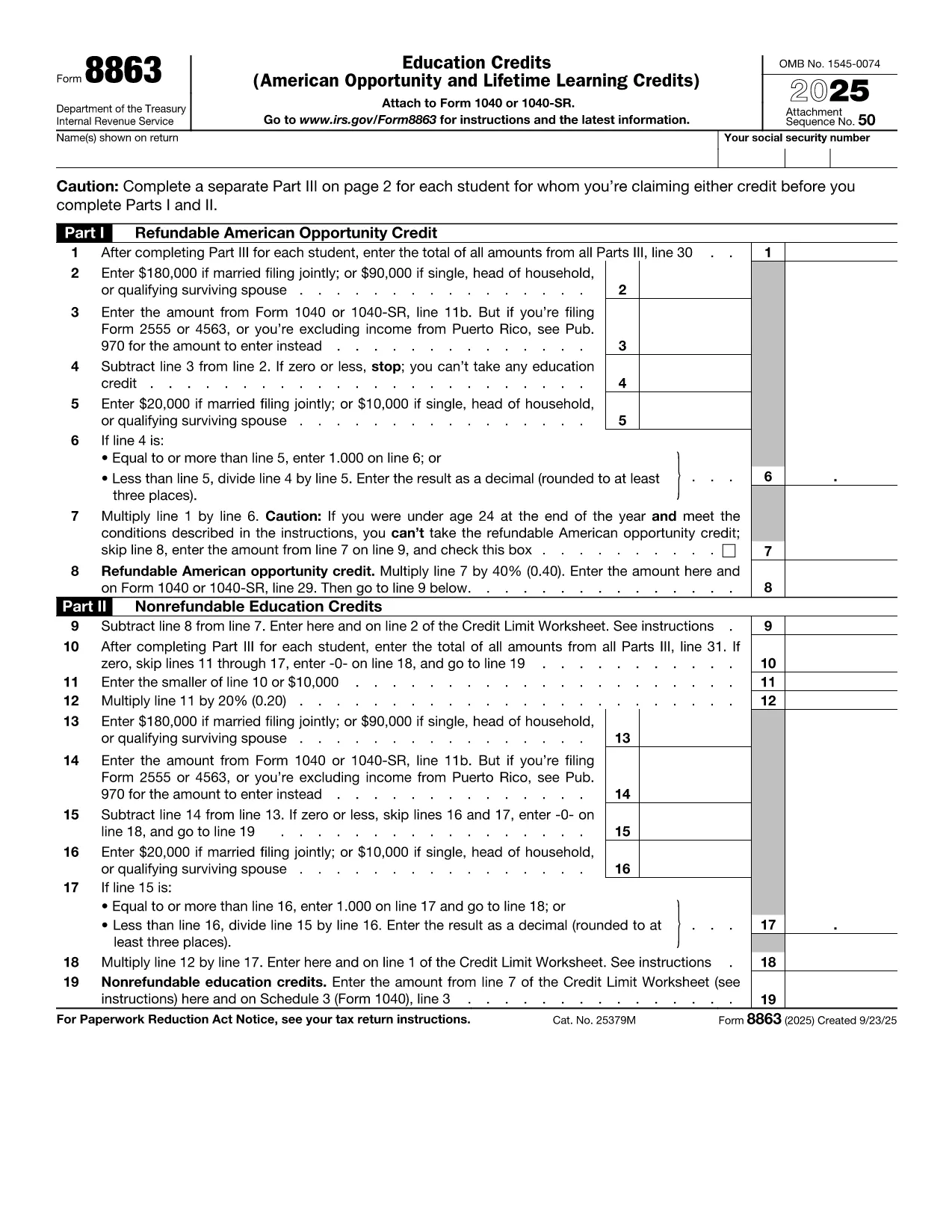
IRS Form 8863 is the official document used to claim the American Opportunity Credit and the Lifetime Learning Credit. Whether you’re a student, a parent, or a lifelong learner, this fillable PDF lets you enter the required information directly in your browser—no extra software needed.

What Is IRS Form 8863?

Form 8863 calculates the amount of education‑related tax credits you may be eligible for. The credit can reduce your tax bill by up to $2,500 per eligible student. The form is filed with your annual Form 1040 and requires details such as qualified tuition, required fees, and the student's enrollment status.

How to Complete the Form Using Formize

Instead of downloading the PDF and opening a separate editor, simply click the **"Fill out this form"** button below. The Formize PDF Filler app loads instantly, allowing you to type, save, and export the completed form in seconds.

Common Mistakes & Tips for a Smooth Submission

  • Incorrect Social Security Numbers: Double‑check each SSN; a single digit error can cause processing delays.
  • Missing Tuition Receipts: Keep Form 1098‑T or school statements handy while you fill out the credit sections.
  • Eligibility Overlap: You cannot claim both the American Opportunity Credit and the Lifetime Learning Credit for the same student in the same year.
  • Signature Requirement: The form must be signed. Use Formize’s electronic signature feature before downloading the final PDF.

When you’re ready, click the button, fill out each field, and download the completed PDF. Attach it to your tax return and enjoy the credit you deserve!

Fill out this form

PREGUNTAS MÁS FRECUENTES
  • Can I claim both the American Opportunity Credit and the Lifetime Learning Credit for the same student?

    No. You must choose one credit per student per tax year. The American Opportunity Credit generally offers a higher amount, but the Lifetime Learning Credit can be used for a broader range of courses.

  • Do I need to attach Form 8863 if I’m filing electronically?

    When you e‑file, the information from Form 8863 is entered directly into the tax software. However, keeping a completed copy for your records is recommended.

  • What qualifies as “qualified tuition and related expenses”?

    Qualified expenses include tuition, required enrollment fees, and course materials needed for attendance. Room, board, and transportation are not eligible.

  • How many students can I claim credits for on a single Form 8863?

    You can claim credits for multiple eligible students on the same Form 8863, each listed on a separate line in Part I.

  • Is there a deadline to submit Form 8863?

    Form 8863 must be filed with your federal income tax return, typically by April 15 of the filing year, unless you obtain an extension.

  • What if I made a mistake after filing?

    You can file an amended return using Form 1040‑X and attach a corrected Form 8863.

CÓMO

Cómo completar education tax credit form gratis, en línea en 3 sencillos pasos:

  1. 1
    Open the Fillable Form
    Click the **"Fill out this form"** button above. The Formize PDF Filler app will load directly in your browser.
  2. 2
    Enter Your Information
    Type in all required fields—student details, tuition amounts, and credit calculations. Use the navigation tabs to move between sections.
  3. 3
    Save, Sign, and Download
    When all fields are complete, add your electronic signature, then click **Download PDF**. Save the file and attach it to your tax return.
Aplicación Formize PDF Filler
SOBRE

Formularios de impuesto

education tax credit form es uno de los formularios de impuestos que son documentos utilizados para reportar información relacionada con los impuestos a la autoridad fiscal correspondiente. Hay varios tipos de formularios de impuestos, incluidos los formularios de impuestos federales, estatales y locales, que pueden variar según las circunstancias y la ubicación del contribuyente.

CARACTERÍSTICAS

Relleno de PDF

La forma más fácil de llenar formularios PDF en línea

  • Rellene rápidamente education tax credit form
    ¿Está buscando una manera de llenar rápidamente education tax credit form en línea? Con nuestro rellenador de formularios PDF gratuito en línea, sabrá cómo editar y rellenar este documento PDF en menos de un minuto.
  • Editor de PDF en línea fácil de usar
    ¿Cansado de imprimir archivos PDF para poder editarlos antes de volver a escanearlos y enviarlos de vuelta? Edite documentos PDF gratis en línea. Utilice nuestro editor de pdf en línea para ahorrar tiempo y papel.
  • Excelentes herramientas, todas las plataformas.
    ¿Se pregunta cómo completar education tax credit form en una Mac, o tal vez cómo usar un relleno de PDF gratis? Nuestras herramientas de PDF en línea funcionan en todas las plataformas.
  • Almacenamiento seguro de archivos
    Los archivos "education tax credit form" completados se almacenan en una base de datos segura administrada por Amazon Cloud hosting. Puede eliminar sus archivos de nuestro sistema en cualquier momento. En cualquier caso, estos archivos se eliminan automáticamente después de 24 horas.
  • Chatea con {palabra clave}
    Chatea con "education tax credit form" en Chatize, que es un asistente de lectura de PDF gratuito. Haga preguntas y obtenga respuestas de "education tax credit form". Simplemente haga clic en el botón Chatear con documento de arriba.

Eliminar sesión de llenado

¿Eliminar la sesión de llenado seleccionada? En este caso, se perderá su progreso al completar el formulario.

Eliminar sesión de edición

¿Eliminar la sesión de edición seleccionada? En este caso, se perderá su progreso en la creación y edición del formulario.