
Seleccione el idioma

Fillable IRS Schedule B – Qualified Dividends Tax Form

  1. País EE.UU
  2. Idioma Inglés
  3. Actividad Impuestos
  4. Departamento IRS
Fillable IRS Schedule B – Qualified Dividends Tax Form

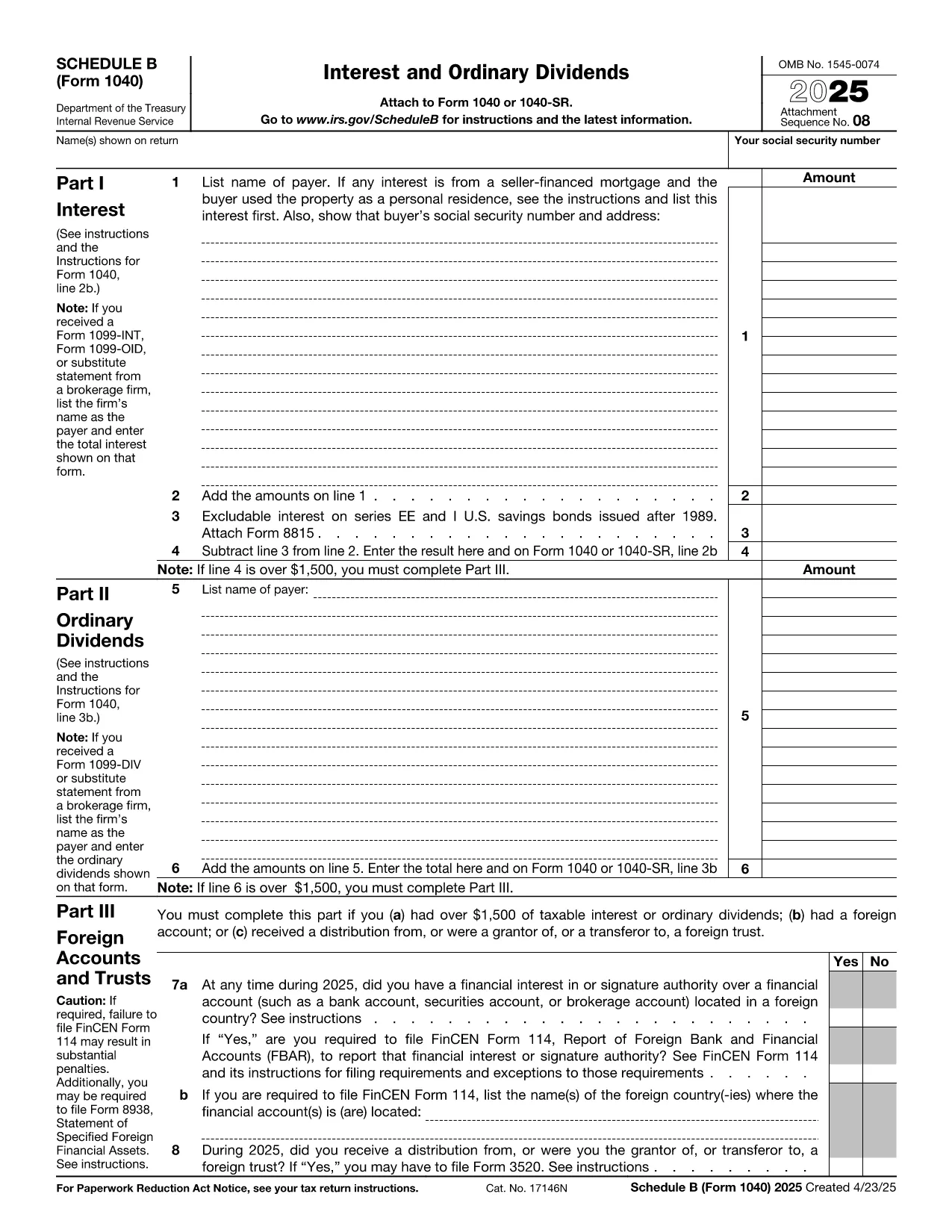
When you receive dividend income, the IRS requires you to report it on Schedule B (Form 1040). The section for qualified dividends determines the lower tax rate you may qualify for. Our fillable PDF lets you complete Schedule B directly in your browser—no Adobe Acrobat or printer required.

What Is Schedule B and Why It Matters

Schedule B is part of the individual income tax return (Form 1040). It captures interest and ordinary dividend income. The qualified dividends line (line 3b on Form 1040) is calculated from the amounts you enter on Schedule B, helping you benefit from the reduced 0%, 15% or 20% tax rates.

How to Fill Out the Qualified Dividends Section

Follow these simple steps after you click the "Fill out this form" button:

  1. The Formize PDF Filler loads the IRS Schedule B PDF in a secure editor.
  2. Enter your name, Social Security Number, and tax year at the top of the form.
  3. Locate Part II – Ordinary Dividends. For each payer, type the amount of dividends received in the "Amount" column.
  4. Identify which dividends are qualified. Check the box next to each qualified entry or type "Yes" in the provided field.
  5. Review the totals automatically calculated by the filler and transfer the qualified dividend total to Form 1040 line 3b.

Common Mistakes to Avoid

  • Omitting a payer: Every dividend source must be listed; missing one can trigger an audit.
  • Mis‑classifying ordinary dividends as qualified: Only dividends meeting IRS criteria qualify for the lower rate.
  • Leaving fields blank: The online filler highlights empty required fields before you can save.
  • Using the wrong tax year PDF: Ensure you select the Schedule B for the correct filing year.

Where to Submit Your Completed Form

After you finish, download the completed PDF and attach it to your electronic Form 1040 filing through approved tax‑software, or print and mail it with your paper return to the appropriate IRS address for your state.

Get the Fillable Form Instantly

Simply click the "Fill out this form" button below. The Formize PDF Filler app will open in seconds, letting you start entering data right away. No download, no installation—just a fast, secure way to file your qualified dividends correctly.

PREGUNTAS MÁS FRECUENTES
  • What is the difference between ordinary and qualified dividends?

    Ordinary dividends are taxed at your regular income tax rate, while qualified dividends meet specific IRS criteria and are taxed at the lower 0%, 15%, or 20% rates.

  • Do I need Schedule B if I only have qualified dividends?

    Yes. If your total ordinary dividends exceed $1,500, or you have any qualified dividends, the IRS requires you to file Schedule B.

  • Can I file Schedule B electronically?

    Absolutely. After completing the fillable PDF, you can upload the PDF to any IRS‑approved e‑file software or attach it to a paper return.

  • Is the Formize filler secure?

    Formize uses SSL encryption and stores your data only in your browser session. No information is saved on our servers unless you choose to download the file.

  • What if I make a mistake after submitting?

    You can file an amended return using Form 1040‑X and attach a corrected Schedule B. The fillable PDF makes corrections quick and accurate.

  • Do I need to attach Schedule B if I file using tax‑software?

    Most tax‑software packages automatically generate Schedule B based on the data you enter. You can still use the fillable PDF for a manual review or paper filing.

  • How do I know if my dividends are qualified?

    Dividends are qualified if they are paid by U.S. corporations or qualified foreign corporations and you meet the holding‑period requirement (typically more than 60 days).

  • Is there a fee to use the Formize PDF Filler?

    No. The fillable PDF is offered free of charge on Formize.com.

CÓMO

Cómo completar qualified dividends tax form gratis, en línea en 4 sencillos pasos:

  1. 1
    Open the Fillable Form
    Click the "Fill out this form" button on the page. The Formize PDF Filler app loads the Schedule B PDF in your browser.
  2. 2
    Enter Your Information
    Fill in your name, SSN, and tax year at the top, then add each dividend payer and amount in Part II.
  3. 3
    Mark Qualified Dividends
    For each dividend, indicate whether it is qualified by checking the box or typing "Yes" in the provided field.
  4. 4
    Review and Save
    Use the built‑in validation to correct any empty required fields, then download or print the completed Schedule B.
Aplicación Formize PDF Filler
SOBRE

Formularios de impuesto

qualified dividends tax form es uno de los formularios de impuestos que son documentos utilizados para reportar información relacionada con los impuestos a la autoridad fiscal correspondiente. Hay varios tipos de formularios de impuestos, incluidos los formularios de impuestos federales, estatales y locales, que pueden variar según las circunstancias y la ubicación del contribuyente.

CARACTERÍSTICAS

Relleno de PDF

La forma más fácil de llenar formularios PDF en línea

  • Rellene rápidamente qualified dividends tax form
    ¿Está buscando una manera de llenar rápidamente qualified dividends tax form en línea? Con nuestro rellenador de formularios PDF gratuito en línea, sabrá cómo editar y rellenar este documento PDF en menos de un minuto.
  • Editor de PDF en línea fácil de usar
    ¿Cansado de imprimir archivos PDF para poder editarlos antes de volver a escanearlos y enviarlos de vuelta? Edite documentos PDF gratis en línea. Utilice nuestro editor de pdf en línea para ahorrar tiempo y papel.
  • Excelentes herramientas, todas las plataformas.
    ¿Se pregunta cómo completar qualified dividends tax form en una Mac, o tal vez cómo usar un relleno de PDF gratis? Nuestras herramientas de PDF en línea funcionan en todas las plataformas.
  • Almacenamiento seguro de archivos
    Los archivos "qualified dividends tax form" completados se almacenan en una base de datos segura administrada por Amazon Cloud hosting. Puede eliminar sus archivos de nuestro sistema en cualquier momento. En cualquier caso, estos archivos se eliminan automáticamente después de 24 horas.
  • Chatea con {palabra clave}
    Chatea con "qualified dividends tax form" en Chatize, que es un asistente de lectura de PDF gratuito. Haga preguntas y obtenga respuestas de "qualified dividends tax form". Simplemente haga clic en el botón Chatear con documento de arriba.

Eliminar sesión de llenado

¿Eliminar la sesión de llenado seleccionada? En este caso, se perderá su progreso al completar el formulario.

Eliminar sesión de edición

¿Eliminar la sesión de edición seleccionada? En este caso, se perderá su progreso en la creación y edición del formulario.