Vali keel

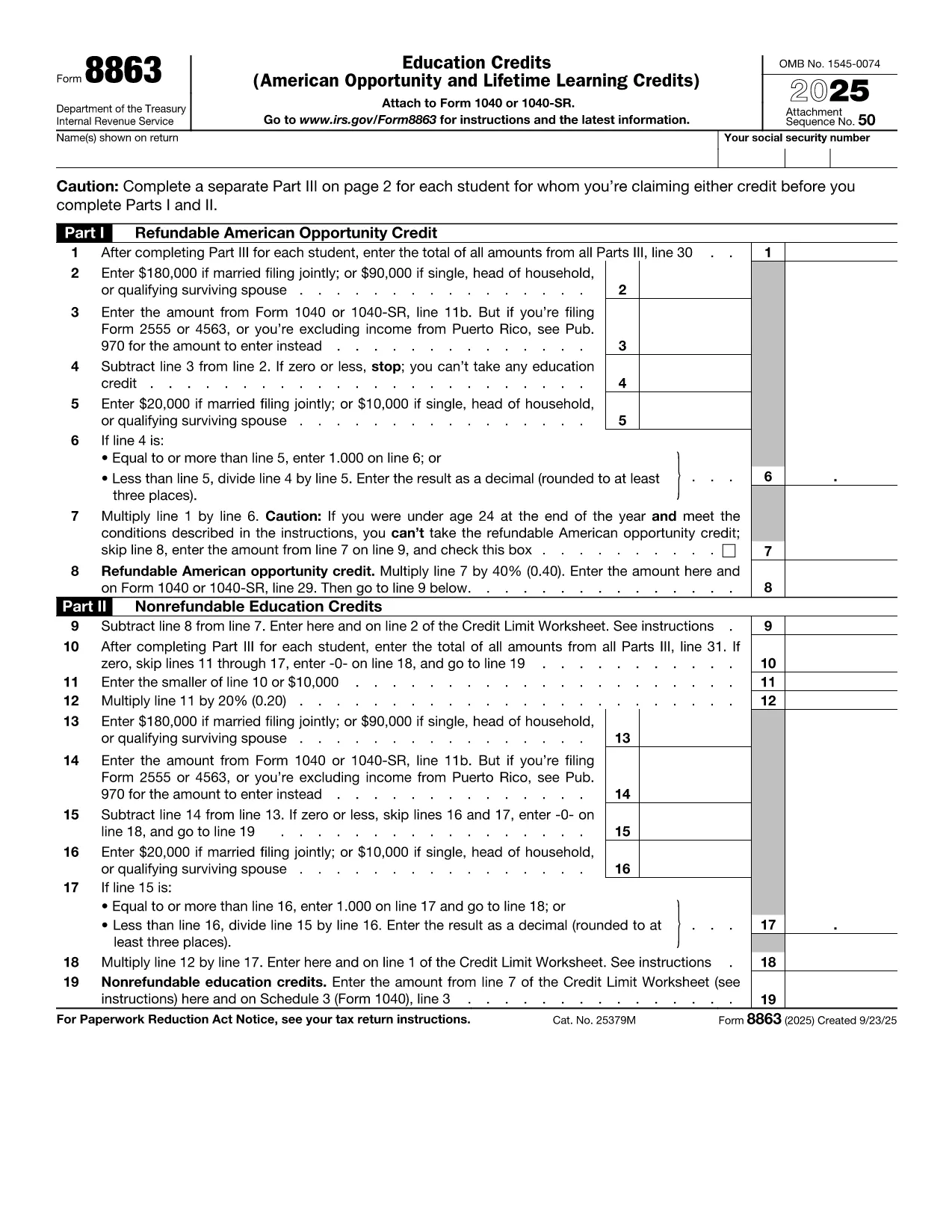
IRS Form 8863 – Education Credits for College Students

  1. Riik USA
  2. Keel Inglise
  3. Tegevus Maksud
  4. osakond IRS
Täitke see vorm
IRS Form 8863 – Education Credits for College Students

College tuition can be a big expense, but the IRS offers tax credits that can put money back in your pocket. IRS Form 8863Education Credits (American Opportunity and Lifetime Learning) – is the official form you need to claim these credits. With Formize, you can fill out the PDF directly in your browser, save time, and avoid printing errors.

What Is IRS Form 8863?

Form 8863 is used to claim two major education tax credits:

  • American Opportunity Credit (AOC) – up to $2,500 per eligible student for the first four years of post‑secondary education.
  • Lifetime Learning Credit (LLC) – up to $2,000 per tax return for any level of post‑secondary education, including courses to improve job skills.

The form is required for both credits and must be attached to your Form 1040 when you file.

How to Fill Out the Form Using Formize

Instead of downloading the PDF and opening a separate editor, simply click the "Fill out this form" button on this page. The Formize PDF Filler app will load in seconds, letting you:

  1. Enter personal information, school details, and qualified expenses.
  2. Automatically calculate the credit amount.
  3. Save your progress or download a completed PDF to attach to your tax return.

The process is secure, free, and works on any device.

Eligibility Requirements for College Students

To qualify for the credits on Form 8863, you must meet these criteria:

  • Be enrolled at an eligible educational institution.
  • Be pursuing a degree or recognized credential (AOC) or taking any post‑secondary course (LLC).
  • Have qualified tuition and related expenses paid during the tax year.
  • Not have exceeded the income limits for the credit.

Common Mistakes to Avoid

  • Incorrect Social Security Number: Double‑check both yours and the student’s SSN.
  • Double‑claiming expenses: You can’t claim the same expenses for both the AOC and the Lifetime Learning Credit.
  • Leaving fields blank: Even if a question doesn’t apply, write “0” or “N/A” to avoid processing delays.
  • Missing signatures: Form 8863 requires the taxpayer’s signature; an unsigned form will be rejected.

Where to Submit the Completed Form

After you finish, download the filled PDF and attach it to your Form 1040 when filing electronically or by mail. If you e‑file, the PDF is automatically included with your return. For paper filing, mail the complete Form 1040 package to the IRS address listed in the IRS mailing instructions.

If you need additional help, consult the IRS Form 8863 instructions or contact your college’s financial aid office.

KKK
  • Which credit is better for me, the American Opportunity Credit or the Lifetime Learning Credit?

    The AOC offers a larger maximum credit ($2,500) but only for the first four years of college and requires at least half‑time enrollment. The LLC is smaller ($2,000) but can be used for any post‑secondary education, including part‑time courses.

  • Can I claim both credits in the same year?

    No. You must choose either the American Opportunity Credit or the Lifetime Learning Credit for each student in a tax year.

  • Do scholarships reduce the amount I can claim?

    Yes. Only qualified tuition and related expenses that are not covered by scholarships or grant money are eligible for the credit.

  • What if I make a mistake on the form after filing?

    You can file an amended return using Form 1040‑X. Attach a corrected Form 8863 and explain the changes.

  • Is there a deadline for submitting Form 8863?

    Form 8863 must be filed with your 2023 tax return, which is due April 15, 2024 (or the extended deadline if you filed for an extension).

  • Do I need a separate Form 8863 for each child in college?

    Yes. Each eligible student requires its own Form 8863 to claim the education credits.

  • Can I use Formize on a mobile device?

    Absolutely. The Formize PDF Filler works on smartphones and tablets, letting you complete the form anywhere.

  • Where can I find the official IRS instructions for Form 8863?

    Visit the IRS website at https://www.irs.gov/forms-pubs/about-form-8863 for the full instruction booklet.

KUIDAS

5 lihtsa sammuga veebis tasuta college student tax form täitmine:

  1. 1
    Click the Fill‑out Button
    Press the blue “Fill out this form” button on this page. The Formize PDF Filler app will open in a new tab.
  2. 2
    Enter Your Information
    Complete every required field—personal data, school name, tuition paid, and any scholarships received.
  3. 3
    Review Calculations
    Formize automatically calculates the American Opportunity or Lifetime Learning credit based on the numbers you entered.
  4. 4
    Save or Download
    When you’re satisfied, click “Save” to store the form in your browser or “Download” to get a completed PDF ready for filing.
  5. 5
    Attach to Your Tax Return
    Include the filled Form 8863 with your Form 1040 when you e‑file or mail your paper return to the IRS.
PDF-täiterakenduse vormindamine
UMBES

Maksuvormid

college student tax form on üks maksuvormidest, mida kasutatakse üksikisiku või ettevõtte tulude, mahaarvamiste ja maksukohustuste kohta teabe esitamiseks asjaomasele maksuhaldurile. Need vormid on vajalikud maksuseaduste täitmiseks ja maksukohustuste täitmiseks. Maksuvormid erinevad olenevalt riigist ja kehtivatest maksunõuetest. Siin on mõned levinumad maksuvormide tüübid.

Individuaalsed maksuvormid: üksikud maksumaksjad kasutavad neid vorme oma isikliku sissetuleku ja mahaarvamiste, krediitide ja maksuvabastuste esitamiseks. Näited hõlmavad 1040 vormi Ameerika Ühendriikides või Self-Assessment Tax Return vormi Ühendkuningriigis.

Ärimaksu vormid: ettevõtted, seltsingud või füüsilisest isikust ettevõtjad kasutavad ettevõtte tulude, kulude ja muu maksudega seotud teabe esitamiseks ettevõtte tulumaksu vorme. Näited hõlmavad C-vormingut (ärikasum või -kahjum) Ameerika Ühendriikides või vorm CT600 (ettevõtte maksudeklaratsioon) Ühendkuningriigis.

Palgamaksu vormid: neid vorme kasutavad tööandjad oma töötajate palgatšekkidest kinnipeetud palkade, palkade ja maksude teatamiseks. Näiteks on vorm W-2 Ameerika Ühendriikides või vorm P60 Ühendkuningriigis.

Müügimaksuvormid: ettevõtted kasutavad müügimaksu vorme maksustatavatelt kaupadelt või teenustelt kogutud käibemaksu aruandmiseks ja tasumiseks. Konkreetsed müügimaksu vormid erinevad jurisdiktsiooni järgi.

Käibemaksu (KM) vormid: käibemaksu vorme kasutatakse riikides, kus kehtestatakse käibemaks müügilt kogutud käibemaksu teatamiseks ja maksmiseks ning ostude käibemaksukrediidi taotlemiseks. Näiteks võib tuua käibedeklaratsiooni vormid, mida kasutatakse paljudes riikides.

Prognoositud maksuvormid: hinnangulisi maksuvorme kasutatakse selliste tulude hinnanguliste maksude teatamiseks ja maksmiseks, mida kinni ei peeta (nt füüsilisest isikust ettevõtja tulu või investeerimistulu).

Need on vaid mõned näited paljudest olemasolevatest maksuvormidest. Nõutavad konkreetsed vormid sõltuvad teie riigi või jurisdiktsiooni maksuseadustest ja -määrustest. Oluline on tutvuda maksuhalduri juhistega või küsida professionaalset nõu, et teha kindlaks, millised vormid on teie olukorras kohaldatavad.

FUNKTSIOONID

PDF täiteaine

Lihtsaim viis märksõna college student tax form veebis täitmiseks

  • Täitke kiiresti college student tax form
    Kas otsite viisi college student tax form kiireks veebis täitmiseks? Meie veebipõhise tasuta PDF-vormi täitja abil saate teada, kuidas seda PDF-dokumenti vähem kui minutiga redigeerida ja täita.
  • Lihtne kasutada veebipõhist PDF-redaktorit
    Kas olete tüdinenud PDF-failide printimisest, et saaksite neid enne uuesti skannimist ja tagasisaatmist redigeerida? Redigeerige PDF-dokumente võrgus tasuta. Kasutage meie veebipõhist PDF-redaktorit, et säästa aega ja paberit.
  • Suurepärased tööriistad, kõik platvormid
    Kas soovite teada, kuidas Macis täita college student tax form või kuidas kasutada tasuta PDF-täitjat? Meie veebipõhised PDF-tööriistad töötavad kõigil platvormidel.
  • Turvaline failide salvestusruum
    Lõpetatud failid „college student tax form” salvestatakse turvatud andmebaasi, mida haldab Amazon Cloudi hostimine. Saate oma failid meie süsteemist igal ajal kustutada. Igal juhul kustutatakse need failid 24 tunni pärast automaatselt.
  • Vestelge kasutajaga college student tax form
    Vestelge kasutajaga „college student tax form” saidil Chatize, mis on tasuta PDF-i lugeja abiline. Esitage küsimusi ja saage vastused märksõnalt „college student tax form”. Klõpsake ülaloleval nupul Vestle dokumendiga.

Kustuta täitmise seanss

Kas kustutada valitud täitmisseanss? Sellisel juhul läheb teie edu vormi täitmisel kaotsi.

Kustuta redigeerimisseanss

Kas kustutada valitud redigeerimisseanss? Sel juhul lähevad teie edu vormi loomisel ja redigeerimisel kaotsi.