
Vali keel

IRS Form 8655 – Automatic Extension for Exempt Organizations (Fillable PDF)

  1. Riik USA
  2. Keel Inglise
  3. Tegevus Maksud
  4. osakond IRS
Täitke see vorm
IRS Form 8655 – Automatic Extension for Exempt Organizations (Fillable PDF)

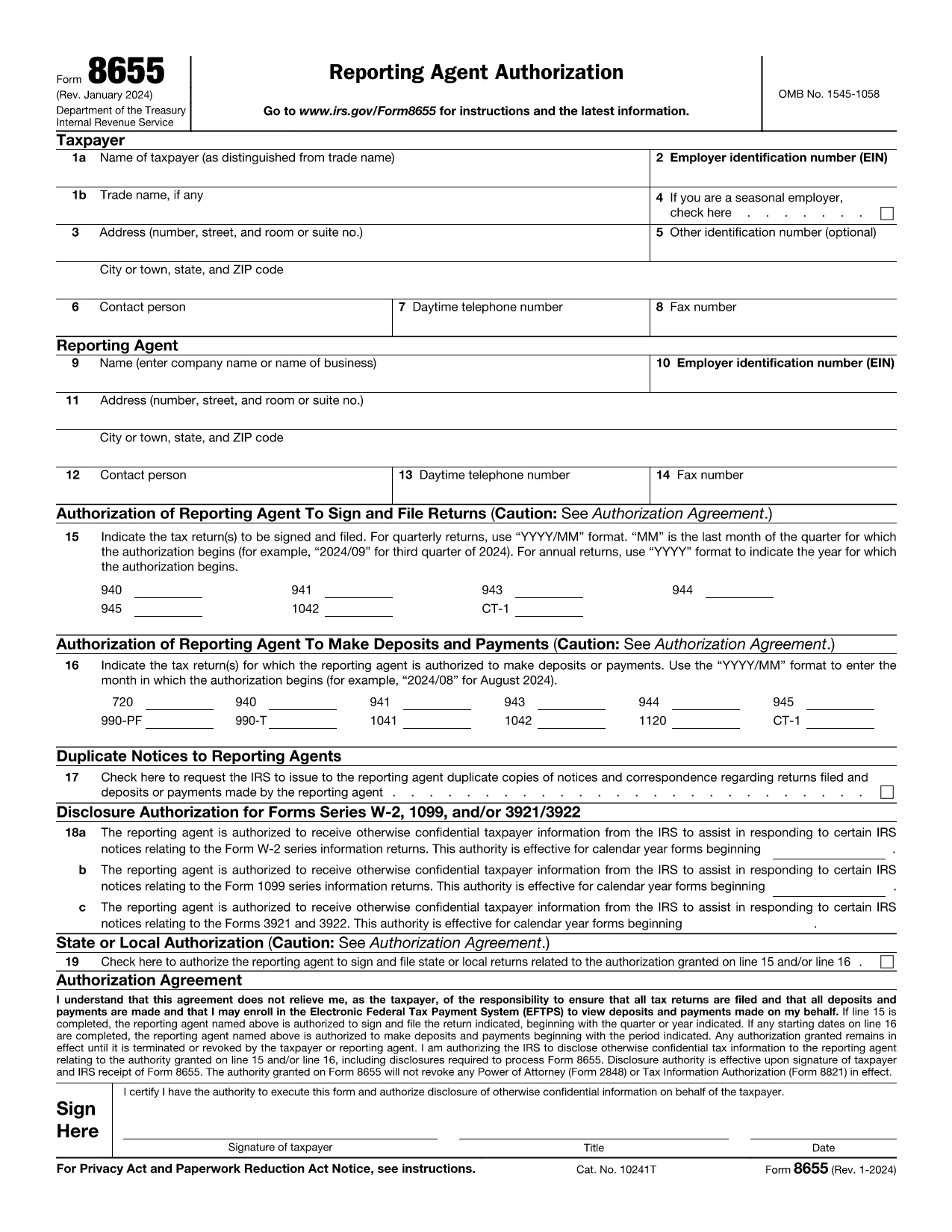
What Is Form 8655?

Form 8655, Application for Automatic Extension of Time To File an Exempt Organization Return, is used by tax‑exempt organizations to request an automatic six‑month filing extension for their annual return (Form 990, 990‑EZ, or 990‑PF). The IRS grants the extension automatically when the form is filed correctly and on time.

How to Complete Form 8655 Online

Instead of downloading the PDF and opening it in a desktop editor, you can fill the form directly on this page:

  1. Click the blue "Fill out this form" button below.
  2. Wait a few seconds while the Formize PDF Filler app loads securely in your browser.
  3. Enter the required information in the fillable fields. The app saves your data automatically.
  4. When you’re done, click Save & Download to get a completed PDF that you can print or e‑file.

All data stays on your device; Formize does not store personal information.

Common Mistakes to Avoid

  • Incorrect EIN: Double‑check the Employer Identification Number; a typo will delay the extension.
  • Missing Signature: The authorized officer must sign the form. The online filler lets you add a digital signature.
  • Wrong Tax Year: Ensure the tax year you are extending matches the year on your original return.
  • Late Submission: File the form before the original due date (including any extensions) to qualify for the automatic extension.

Where to Submit the Form

After completing Form 8655, mail or fax it to the address listed in the instructions for your type of return. Most organizations mail it to:

Internal Revenue Service
P.O. Box 7604
Ben Franklin Station
Washington, DC 20044-7604

Or fax to: 855‑214‑7520 (if applicable). Keep a copy for your records.

Ready to start? Click the button below and fill out Form 8655 instantly.

KKK
  • Who can use Form 8655?

    Any tax‑exempt organization that files Form 990, 990‑EZ, or 990‑PF and needs a six‑month extension.

  • Do I need to attach Form 8655 to my original return?

    No. Form 8655 is filed separately. It must be submitted before the original due date of the return.

  • Can I e‑file Form 8655?

    Yes. After completing the fillable PDF you can upload the file through the IRS e‑file system for exempt organizations.

  • What happens if I miss the extension deadline?

    The IRS will not grant an automatic extension, and penalties may apply for late filing of the original return.

  • Is a digital signature accepted on Form 8655?

    A handwritten signature is preferred, but a clear electronic signature created in the Formize filler is accepted by the IRS.

  • Do I need to pay a fee to use Formize’s PDF filler?

    No. The online filler is free for this form and does not require any subscription.

  • Can I edit the form after I download it?

    Yes, but you must keep the completed version as the official record. Any further edits would require a new submission.

  • Where can I find the official instructions for Form 8655?

    The IRS provides detailed instructions on the same page as the PDF: https://www.irs.gov/instructions/i8655

  • What is the filing deadline for Form 8655?

    Form 8655 must be filed on or before the original due date (including extensions) of the organization’s annual return.

  • Do I need to include any supporting documents?

    No additional documents are required with Form 8655, but keep your return and supporting records handy in case the IRS requests them.

KUIDAS

5 lihtsa sammuga veebis tasuta Form 8655 täitmine:

  1. 1
    Click the Fill Out Button
    Press the "Fill out this form" button on the page to launch the Formize PDF Filler.
  2. 2
    Wait for the Filler to Load
    A few seconds later the fillable form appears in your browser—no download needed.
  3. 3
    Enter Your Information
    Complete all required fields. The app validates data in real time.
  4. 4
    Add a Signature
    Use the built‑in signature field to sign electronically.
  5. 5
    Save and Download
    Click "Save & Download" to get a completed PDF you can print or e‑file.
PDF-täiterakenduse vormindamine
UMBES

Maksuvormid

Form 8655 on üks maksuvormidest, mida kasutatakse maksudega seotud teabe esitamiseks asjaomasele maksuhaldurile. Maksuvorme on erinevat tüüpi, sealhulgas föderaal-, osariigi ja kohalikud maksuvormid, mis võivad olenevalt maksumaksja olukorrast ja asukohast erineda.

FUNKTSIOONID

PDF täiteaine

Lihtsaim viis märksõna Form 8655 veebis täitmiseks

  • Täitke kiiresti Form 8655
    Kas otsite viisi Form 8655 kiireks veebis täitmiseks? Meie veebipõhise tasuta PDF-vormi täitja abil saate teada, kuidas seda PDF-dokumenti vähem kui minutiga redigeerida ja täita.
  • Lihtne kasutada veebipõhist PDF-redaktorit
    Kas olete tüdinenud PDF-failide printimisest, et saaksite neid enne uuesti skannimist ja tagasisaatmist redigeerida? Redigeerige PDF-dokumente võrgus tasuta. Kasutage meie veebipõhist PDF-redaktorit, et säästa aega ja paberit.
  • Suurepärased tööriistad, kõik platvormid
    Kas soovite teada, kuidas Macis täita Form 8655 või kuidas kasutada tasuta PDF-täitjat? Meie veebipõhised PDF-tööriistad töötavad kõigil platvormidel.
  • Turvaline failide salvestusruum
    Lõpetatud failid „Form 8655” salvestatakse turvatud andmebaasi, mida haldab Amazon Cloudi hostimine. Saate oma failid meie süsteemist igal ajal kustutada. Igal juhul kustutatakse need failid 24 tunni pärast automaatselt.
  • Vestelge kasutajaga Form 8655
    Vestelge kasutajaga „Form 8655” saidil Chatize, mis on tasuta PDF-i lugeja abiline. Esitage küsimusi ja saage vastused märksõnalt „Form 8655”. Klõpsake ülaloleval nupul Vestle dokumendiga.

Kustuta täitmise seanss

Kas kustutada valitud täitmisseanss? Sellisel juhul läheb teie edu vormi täitmisel kaotsi.

Kustuta redigeerimisseanss

Kas kustutada valitud redigeerimisseanss? Sel juhul lähevad teie edu vormi loomisel ja redigeerimisel kaotsi.