
زبان را انتخاب کنید

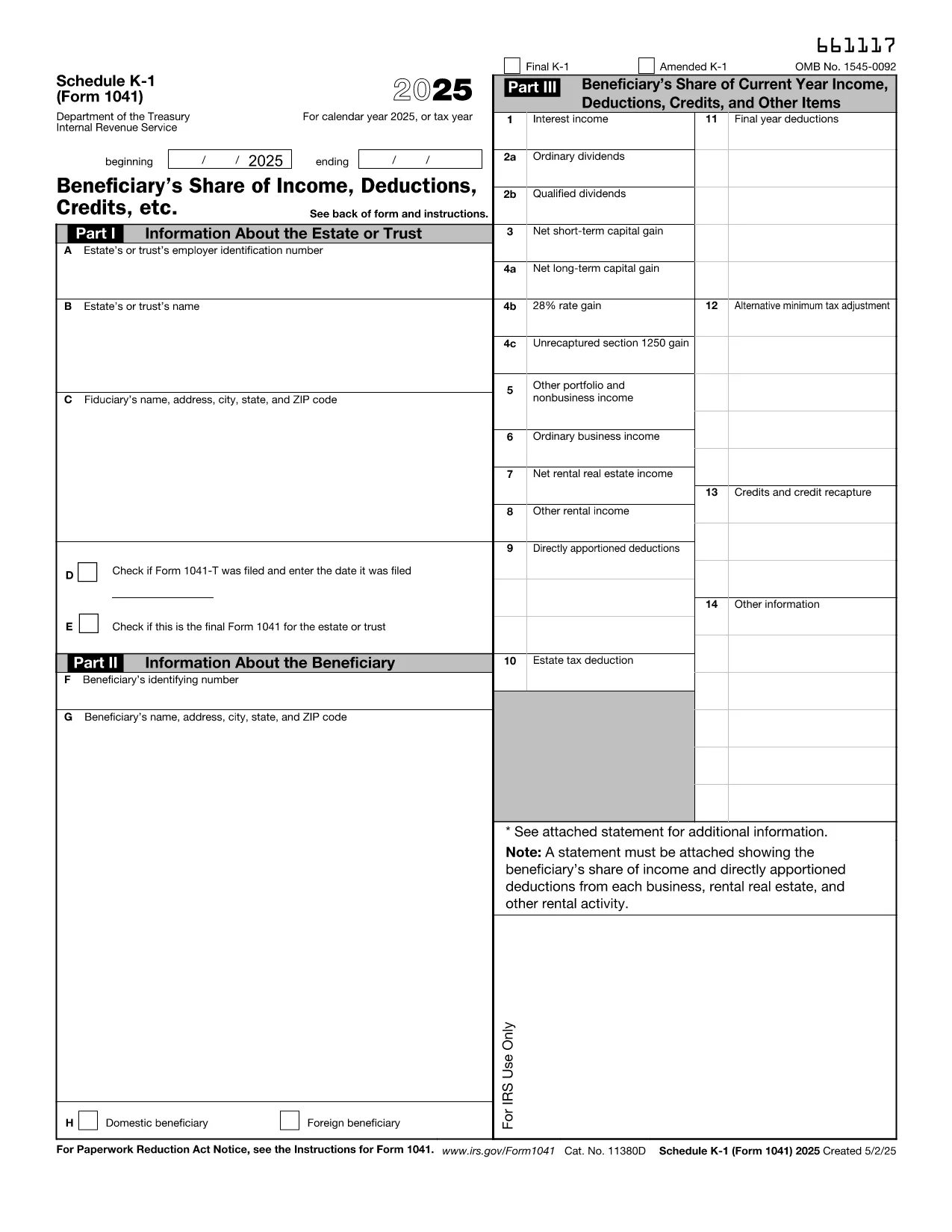
Fillable IRS Schedule K‑1 (Estate) – Form 1041

  1. کشور ایالات متحده آمریکا
  2. زبان انگلیسی
  3. فعالیت مالیات
  4. بخش خدمات درآمد داخلی
این فرم را پر کنید
Fillable IRS Schedule K‑1 (Estate) – Form 1041

Schedule K‑1 (Form 1041) is the IRS document used by estates and trusts to report each beneficiary’s share of income, deductions, and credits. Our fillable PDF lets you complete the form directly in your browser – no extra software required.

What Is Schedule K‑1 (Form 1041)?

The Schedule K‑1 (Form 1041) accompanies the estate’s income tax return (Form 1041). It breaks down the taxable items that flow through to each beneficiary, such as interest income, capital gains, and charitable deductions. Beneficiaries use the information on the K‑1 to fill out their personal tax returns.

How to Complete the Fillable K‑1 Online

Instead of downloading the PDF and opening it in a separate editor, simply click the "Fill out this form" button on this page. The Formize PDF Filler app will load in seconds, allowing you to:

  • Enter beneficiary details, tax‑year information, and each line item directly on the screen.
  • Validate entries in real‑time, reducing the chance of arithmetic errors.
  • Save your progress and return later, or download a completed, printable PDF.

Common Mistakes & Tips for Estate Beneficiaries

  • Incorrect SSN or EIN: Double‑check the numbers before saving.
  • Missing Box 14 codes: Use the IRS instructions to match each code with the correct amount.
  • Failing to report foreign income: If the estate earned income abroad, it must appear on the K‑1.
  • Not signing the form: The executor’s signature is required for the K‑1 to be valid.

Where to Submit Your Completed K‑1

Beneficiaries attach the Schedule K‑1 to their individual tax returns (Form 1040). The estate’s executor files Form 1041 with the IRS, and each beneficiary includes the K‑1 information on the appropriate lines of their personal return.

If you need additional guidance, refer to the IRS instructions for Schedule K‑1 (Form 1041) or consult a qualified tax professional.

دستورالعمل ها

سوالات متداول
  • Who must receive a Schedule K‑1 (Form 1041)?

    Every person or entity that is a beneficiary of the estate or trust and receives a share of its taxable income must be issued a Schedule K‑1.

  • Can I edit the IRS PDF directly in my browser?

    Yes. By clicking "Fill out this form" you can use Formize’s online PDF filler to edit the form without downloading separate software.

  • What is Box 14 on the K‑1 used for?

    Box 14 contains codes that identify the type of income or deduction (e.g., capital gains, foreign tax credit). The code must match the amount shown in the corresponding box.

  • Do I need to file the K‑1 separately with the IRS?

    No. The Schedule K‑1 is attached to each beneficiary’s individual tax return (Form 1040). The estate files Form 1041 with the IRS.

  • What if the estate has foreign income?

    Foreign income must be reported on the K‑1 and may require additional forms (e.g., Form 1116) on the beneficiary’s return.

  • Is there a deadline for beneficiaries to receive their K‑1?

    The executor must provide Schedule K‑1 to beneficiaries by the due date of the estate’s Form 1041, typically March 15 for calendar‑year estates.

  • Can I correct a mistake after I’ve saved the PDF?

    Yes. Open the saved PDF again with the Formize filler, make the correction, and re‑save or re‑print the updated form.

چگونه

نحوه پر کردن IRS Schedule K-1 estate به صورت رایگان و آنلاین در 4 با مراحل آسان:

  1. 1
    Open the Fillable Form
    Click the "Fill out this form" button on the page. The Formize PDF Filler app will launch in a new window.
  2. 2
    Enter Your Information
    Type the beneficiary’s name, SSN, and each line‑item amount directly into the fields. Real‑time validation will highlight any errors.
  3. 3
    Review & Save
    After completing all sections, review the summary, then click "Save" to download a filled‑out PDF or "Print" to generate a hard copy.
  4. 4
    Submit with Your Tax Return
    Attach the completed Schedule K‑1 to your personal Form 1040 when you file your federal income tax return.
برنامه PDF Filler را فرم‌بندی کنید
در باره

فرم های مالیات فدرال

IRS Schedule K-1 estate یکی از فرم‌های مالیات فدرال است که اسنادی است که برای گزارش و ثبت مالیات بر درآمد فدرال در سرویس درآمد داخلی (IRS) در ایالات متحده استفاده می‌شود. این فرم‌ها توسط افراد، مشاغل و سازمان‌ها برای گزارش درآمد، کسورات و سایر اطلاعات مرتبط لازم برای محاسبه بدهی مالیاتی فدرال خود استفاده می‌شود.

رایج ترین فرم مالیات فدرال فرم 1040 است که توسط مالیات دهندگان فردی برای گزارش مالیات بر درآمد شخصی خود استفاده می شود. سایر فرم‌های پرکاربرد عبارتند از فرم 1065 برای مشارکت، فرم 1120 برای شرکت‌ها و فرم 990 برای سازمان‌های معاف از مالیات.

فرم‌های مالیاتی فدرال معمولاً مالیات دهندگان را ملزم می‌کند که منابع درآمدی مختلفی مانند دستمزد، حقوق، و انعام و همچنین درآمد حاصل از سرمایه‌گذاری، املاک اجاره‌ای و سایر منابع را گزارش کنند. این فرم ها همچنین به مالیات دهندگان این امکان را می دهد که برای هزینه های مختلف، مانند کمک های خیریه، بهره وام مسکن و هزینه های مراقبت های بهداشتی، کسر و اعتبار درخواست کنند.

مهم است که فرم های مالیات فدرال را به طور دقیق و به موقع ارسال کنید، زیرا عدم انجام این کار می تواند منجر به جریمه ها و هزینه های بهره از IRS شود.

امکانات

پرکننده PDF

ساده ترین راه برای پر کردن فرم های PDF به صورت آنلاین

  • به سرعت IRS Schedule K-1 estate را پر کنید
    به دنبال راهی برای پر کردن سریع IRS Schedule K-1 estate آنلاین هستید؟ با پرکننده فرم PDF رایگان آنلاین ما، می‌دانید چگونه این سند pdf را در کمتر از یک دقیقه ویرایش و پر کنید.
  • آسان برای استفاده از ویرایشگر PDF آنلاین
    آیا از چاپ فایل‌های پی‌دی‌اف خسته شده‌اید تا بتوانید آن‌ها را قبل از اسکن مجدد و ارسال مجدد، ویرایش کنید؟ اسناد PDF را به صورت آنلاین به صورت رایگان ویرایش کنید. از ویرایشگر pdf آنلاین ما برای صرفه جویی در زمان و کاغذ استفاده کنید.
  • ابزارهای عالی، همه پلتفرم ها
    آیا نمی دانید که چگونه IRS Schedule K-1 estate را در مک پر کنید، یا شاید چگونه از پرکننده PDF به صورت رایگان استفاده کنید؟ ابزارهای PDF آنلاین ما روی همه پلتفرم ها کار می کنند.
  • ذخیره سازی امن فایل
    فایل‌های تکمیل‌شده «IRS Schedule K-1 estate» در یک پایگاه داده ایمن که توسط میزبانی ابری آمازون مدیریت می‌شود، ذخیره می‌شوند. شما می توانید فایل های خود را در هر زمان از سیستم ما حذف کنید. در هر صورت این فایل ها پس از 24 ساعت به صورت خودکار پاک می شوند.
  • چت با IRS Schedule K-1 estate
    با «IRS Schedule K-1 estate» در Chatize که یک دستیار PDF خوان رایگان است، گپ بزنید. سوال بپرسید و از "IRS Schedule K-1 estate" پاسخ بگیرید. فقط روی دکمه Chat With Document در بالا کلیک کنید.

حذف جلسه پر کردن

جلسه پر کردن انتخاب شده را حذف کنید؟ در این صورت پیشرفت شما در تکمیل فرم از بین خواهد رفت.

حذف جلسه ویرایش

جلسه ویرایش انتخابی حذف شود؟ در این صورت پیشرفت شما در ایجاد و ویرایش فرم از بین خواهد رفت.