
زبان را انتخاب کنید

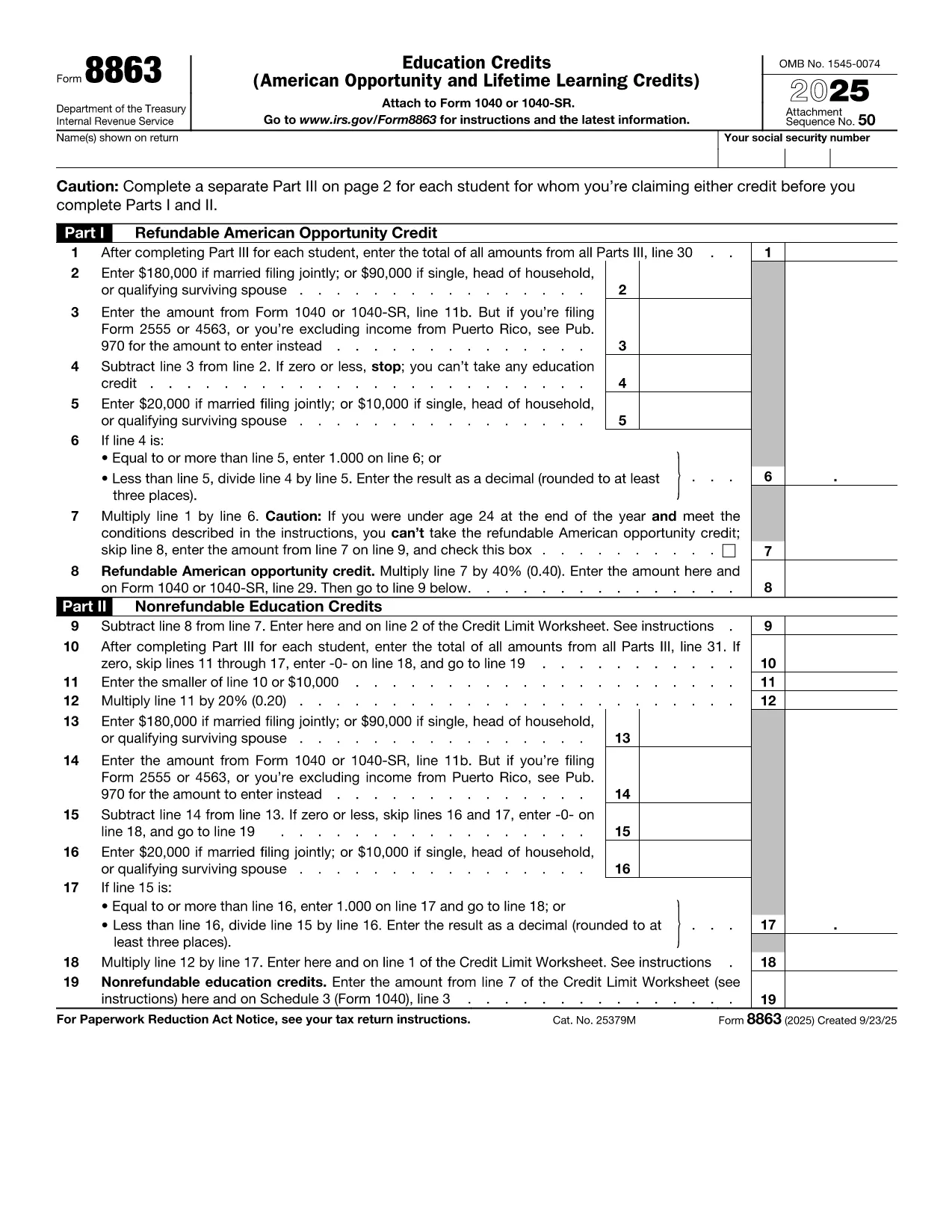
Fillable IRS Form 8863 – Education Credit (American Opportunity & Lifetime Learning)

  1. کشور ایالات متحده آمریکا
  2. زبان انگلیسی
  3. فعالیت مالیات
  4. بخش IRS
این فرم را پر کنید
Fillable IRS Form 8863 – Education Credit (American Opportunity & Lifetime Learning)

IRS Form 8863 is the official document used to claim the American Opportunity Credit and the Lifetime Learning Credit. Whether you’re a student, a parent, or a lifelong learner, this fillable PDF lets you enter the required information directly in your browser—no extra software needed.

What Is IRS Form 8863?

Form 8863 calculates the amount of education‑related tax credits you may be eligible for. The credit can reduce your tax bill by up to $2,500 per eligible student. The form is filed with your annual Form 1040 and requires details such as qualified tuition, required fees, and the student's enrollment status.

How to Complete the Form Using Formize

Instead of downloading the PDF and opening a separate editor, simply click the **"Fill out this form"** button below. The Formize PDF Filler app loads instantly, allowing you to type, save, and export the completed form in seconds.

Common Mistakes & Tips for a Smooth Submission

  • Incorrect Social Security Numbers: Double‑check each SSN; a single digit error can cause processing delays.
  • Missing Tuition Receipts: Keep Form 1098‑T or school statements handy while you fill out the credit sections.
  • Eligibility Overlap: You cannot claim both the American Opportunity Credit and the Lifetime Learning Credit for the same student in the same year.
  • Signature Requirement: The form must be signed. Use Formize’s electronic signature feature before downloading the final PDF.

When you’re ready, click the button, fill out each field, and download the completed PDF. Attach it to your tax return and enjoy the credit you deserve!

Fill out this form

سوالات متداول
  • Can I claim both the American Opportunity Credit and the Lifetime Learning Credit for the same student?

    No. You must choose one credit per student per tax year. The American Opportunity Credit generally offers a higher amount, but the Lifetime Learning Credit can be used for a broader range of courses.

  • Do I need to attach Form 8863 if I’m filing electronically?

    When you e‑file, the information from Form 8863 is entered directly into the tax software. However, keeping a completed copy for your records is recommended.

  • What qualifies as “qualified tuition and related expenses”?

    Qualified expenses include tuition, required enrollment fees, and course materials needed for attendance. Room, board, and transportation are not eligible.

  • How many students can I claim credits for on a single Form 8863?

    You can claim credits for multiple eligible students on the same Form 8863, each listed on a separate line in Part I.

  • Is there a deadline to submit Form 8863?

    Form 8863 must be filed with your federal income tax return, typically by April 15 of the filing year, unless you obtain an extension.

  • What if I made a mistake after filing?

    You can file an amended return using Form 1040‑X and attach a corrected Form 8863.

چگونه

نحوه پر کردن education tax credit form به صورت رایگان و آنلاین در 3 با مراحل آسان:

  1. 1
    Open the Fillable Form
    Click the **"Fill out this form"** button above. The Formize PDF Filler app will load directly in your browser.
  2. 2
    Enter Your Information
    Type in all required fields—student details, tuition amounts, and credit calculations. Use the navigation tabs to move between sections.
  3. 3
    Save, Sign, and Download
    When all fields are complete, add your electronic signature, then click **Download PDF**. Save the file and attach it to your tax return.
برنامه PDF Filler را فرم‌بندی کنید
در باره

فرم های مالیات فدرال

education tax credit form یکی از فرم‌های مالیات فدرال است که اسنادی است که برای گزارش و ثبت مالیات بر درآمد فدرال در سرویس درآمد داخلی (IRS) در ایالات متحده استفاده می‌شود. این فرم‌ها توسط افراد، مشاغل و سازمان‌ها برای گزارش درآمد، کسورات و سایر اطلاعات مرتبط لازم برای محاسبه بدهی مالیاتی فدرال خود استفاده می‌شود.

رایج ترین فرم مالیات فدرال فرم 1040 است که توسط مالیات دهندگان فردی برای گزارش مالیات بر درآمد شخصی خود استفاده می شود. سایر فرم‌های پرکاربرد عبارتند از فرم 1065 برای مشارکت، فرم 1120 برای شرکت‌ها و فرم 990 برای سازمان‌های معاف از مالیات.

فرم‌های مالیاتی فدرال معمولاً مالیات دهندگان را ملزم می‌کند که منابع درآمدی مختلفی مانند دستمزد، حقوق، و انعام و همچنین درآمد حاصل از سرمایه‌گذاری، املاک اجاره‌ای و سایر منابع را گزارش کنند. این فرم ها همچنین به مالیات دهندگان این امکان را می دهد که برای هزینه های مختلف، مانند کمک های خیریه، بهره وام مسکن و هزینه های مراقبت های بهداشتی، کسر و اعتبار درخواست کنند.

مهم است که فرم های مالیات فدرال را به طور دقیق و به موقع ارسال کنید، زیرا عدم انجام این کار می تواند منجر به جریمه ها و هزینه های بهره از IRS شود.

امکانات

پرکننده PDF

ساده ترین راه برای پر کردن فرم های PDF به صورت آنلاین

  • به سرعت education tax credit form را پر کنید
    به دنبال راهی برای پر کردن سریع education tax credit form آنلاین هستید؟ با پرکننده فرم PDF رایگان آنلاین ما، می‌دانید چگونه این سند pdf را در کمتر از یک دقیقه ویرایش و پر کنید.
  • آسان برای استفاده از ویرایشگر PDF آنلاین
    آیا از چاپ فایل‌های پی‌دی‌اف خسته شده‌اید تا بتوانید آن‌ها را قبل از اسکن مجدد و ارسال مجدد، ویرایش کنید؟ اسناد PDF را به صورت آنلاین به صورت رایگان ویرایش کنید. از ویرایشگر pdf آنلاین ما برای صرفه جویی در زمان و کاغذ استفاده کنید.
  • ابزارهای عالی، همه پلتفرم ها
    آیا نمی دانید که چگونه education tax credit form را در مک پر کنید، یا شاید چگونه از پرکننده PDF به صورت رایگان استفاده کنید؟ ابزارهای PDF آنلاین ما روی همه پلتفرم ها کار می کنند.
  • ذخیره سازی امن فایل
    فایل‌های تکمیل‌شده «education tax credit form» در یک پایگاه داده ایمن که توسط میزبانی ابری آمازون مدیریت می‌شود، ذخیره می‌شوند. شما می توانید فایل های خود را در هر زمان از سیستم ما حذف کنید. در هر صورت این فایل ها پس از 24 ساعت به صورت خودکار پاک می شوند.
  • چت با education tax credit form
    با «education tax credit form» در Chatize که یک دستیار PDF خوان رایگان است، گپ بزنید. سوال بپرسید و از "education tax credit form" پاسخ بگیرید. فقط روی دکمه Chat With Document در بالا کلیک کنید.

حذف جلسه پر کردن

جلسه پر کردن انتخاب شده را حذف کنید؟ در این صورت پیشرفت شما در تکمیل فرم از بین خواهد رفت.

حذف جلسه ویرایش

جلسه ویرایش انتخابی حذف شود؟ در این صورت پیشرفت شما در ایجاد و ویرایش فرم از بین خواهد رفت.