
زبان را انتخاب کنید

IRS Form 8949 – Fillable PDF for Reporting House Sale Gains

  1. کشور ایالات متحده آمریکا
  2. زبان انگلیسی
  3. فعالیت مالیات
  4. بخش IRS
این فرم را پر کنید
IRS Form 8949 – Fillable PDF for Reporting House Sale Gains

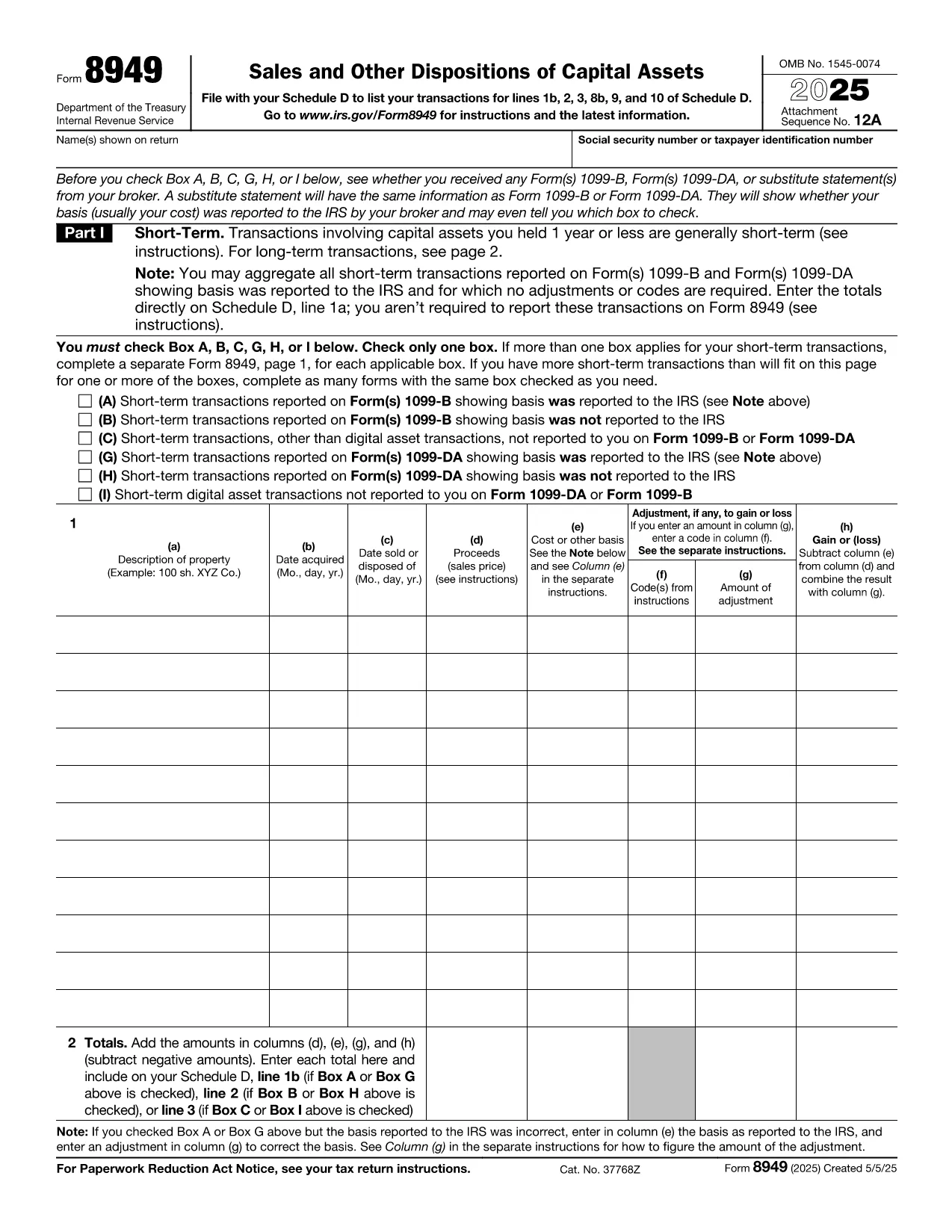
When you sell a primary residence or an investment property, the IRS requires you to report the transaction on Form 8949. This fillable PDF makes it easy to capture capital‑gain details, calculate taxable amounts, and attach the form to your Schedule D filing.

Why You Need Form 8949 After Selling a Home

The IRS Form 8949 is the official document for reporting sales of capital assets, including real estate. Even if you qualify for the home‑sale exclusion, you must still list the transaction on Form 8949 and then transfer the net gain (or loss) to Schedule D.

Key Sections of the Form Explained

  • Part I – Short‑Term Transactions: Use this section if you owned the property for one year or less.
  • Part II – Long‑Term Transactions: Most home sales fall here because the ownership period exceeds one year.
  • Column (a) – Description of Property: Enter the address of the house sold.
  • Column (b) – Date Acquired: Provide the purchase date (or construction date).
  • Column (c) – Date Sold: The closing date of the sale.
  • Column (d) – Proceeds: Gross amount received (usually from Form 1099‑S).
  • Column (e) – Cost or Adjusted Basis: Purchase price plus improvements, minus depreciation.
  • Column (f) – Adjustments: Any codes for exclusions, like the $250,000 (or $500,000) home‑sale exclusion.
  • Column (g) – Gain or (Loss): The calculator will auto‑populate when you fill the previous columns.

Common Mistakes to Avoid

  • Leaving Column (f) blank when the exclusion applies.
  • Using the wrong acquisition date (e.g., the date of a major renovation instead of the original purchase).
  • Reporting the sale on the wrong part of the form (short‑term vs. long‑term).
  • Forgetting to attach Form 8949 to Schedule D, which can delay processing.

How to Submit Your Completed Form

After you finish the fillable PDF, save it as a PDF file and attach it to your tax return when you file electronically through approved tax‑software, or print and mail it with your paper return. The Formize PDF Filler ensures the data is saved correctly, so you won’t have to re‑type anything.

Ready to start? Just click the button below and the Formize PDF Filler will load the fillable version of IRS Form 8949 directly in your browser.

سوالات متداول
  • Do I need to file Form 8949 if I qualify for the home‑sale exclusion?

    Yes. Even if the entire gain is excluded, the IRS still requires you to list the sale on Form 8949 and then mark the exclusion in Column (f).

  • What is the difference between Part I and Part II of Form 8949?

    Part I reports short‑term capital gains (property held ≤1 year). Part II reports long‑term gains (property held >1 year), which is most common for home sales.

  • Can I use the same Form 8949 for multiple property sales?

    Yes. List each property on a separate line within the appropriate part of the form.

  • How do I calculate the adjusted basis for my house?

    Start with the purchase price, add capital improvements, and subtract any depreciation claimed (if the home was partially rented).

  • What code should I use for the $250,000/$500,000 exclusion?

    Enter code “B” in Column (f) and write “Home‑sale exclusion” in the accompanying description.

  • Do I need to attach Form 1099‑S with my return?

    If you received Form 1099‑S from the closing agent, attach it. It provides the gross proceeds that you report on Form 8949.

  • Is the fillable PDF compatible with Mac and Windows?

    Yes. The Formize PDF Filler works in any modern browser on macOS, Windows, Linux, and mobile devices.

  • What should I do if I discover an error after filing?

    Amend your return using Form 1040‑X and attach a corrected Form 8949 with the proper figures.

چگونه

نحوه پر کردن tax form after selling house به صورت رایگان و آنلاین در 5 با مراحل آسان:

  1. 1
    Click the Fill‑out Button
    Press the “Fill out this form” button on the page. The Formize PDF Filler app will open in a new tab.
  2. 2
    Wait for the Filler to Load
    The app loads the fillable IRS Form 8949 instantly. No download or extra software is needed.
  3. 3
    Enter Your Information
    Complete each column (description, dates, proceeds, basis, adjustments). The calculator auto‑fills the gain/loss column.
  4. 4
    Review and Save
    Double‑check for errors, then click “Save PDF”. Your completed form is ready to attach to Schedule D.
  5. 5
    Submit with Your Tax Return
    Upload the saved PDF to your e‑file software or print and mail it with your paper return.
برنامه PDF Filler را فرم‌بندی کنید
در باره

فرم های مالیاتی

tax form after selling house یکی از فرم‌های مالیاتی است که برای گزارش اطلاعات مربوط به مالیات به سازمان مالیاتی مربوطه استفاده می‌شود. انواع مختلفی از فرم های مالیاتی از جمله فرم های مالیات فدرال، ایالتی و محلی وجود دارد که بسته به شرایط و موقعیت مالیات دهندگان می تواند متفاوت باشد.

امکانات

پرکننده PDF

ساده ترین راه برای پر کردن فرم های PDF به صورت آنلاین

  • به سرعت tax form after selling house را پر کنید
    به دنبال راهی برای پر کردن سریع tax form after selling house آنلاین هستید؟ با پرکننده فرم PDF رایگان آنلاین ما، می‌دانید چگونه این سند pdf را در کمتر از یک دقیقه ویرایش و پر کنید.
  • آسان برای استفاده از ویرایشگر PDF آنلاین
    آیا از چاپ فایل‌های پی‌دی‌اف خسته شده‌اید تا بتوانید آن‌ها را قبل از اسکن مجدد و ارسال مجدد، ویرایش کنید؟ اسناد PDF را به صورت آنلاین به صورت رایگان ویرایش کنید. از ویرایشگر pdf آنلاین ما برای صرفه جویی در زمان و کاغذ استفاده کنید.
  • ابزارهای عالی، همه پلتفرم ها
    آیا نمی دانید که چگونه tax form after selling house را در مک پر کنید، یا شاید چگونه از پرکننده PDF به صورت رایگان استفاده کنید؟ ابزارهای PDF آنلاین ما روی همه پلتفرم ها کار می کنند.
  • ذخیره سازی امن فایل
    فایل‌های تکمیل‌شده «tax form after selling house» در یک پایگاه داده ایمن که توسط میزبانی ابری آمازون مدیریت می‌شود، ذخیره می‌شوند. شما می توانید فایل های خود را در هر زمان از سیستم ما حذف کنید. در هر صورت این فایل ها پس از 24 ساعت به صورت خودکار پاک می شوند.
  • چت با tax form after selling house
    با «tax form after selling house» در Chatize که یک دستیار PDF خوان رایگان است، گپ بزنید. سوال بپرسید و از "tax form after selling house" پاسخ بگیرید. فقط روی دکمه Chat With Document در بالا کلیک کنید.

حذف جلسه پر کردن

جلسه پر کردن انتخاب شده را حذف کنید؟ در این صورت پیشرفت شما در تکمیل فرم از بین خواهد رفت.

حذف جلسه ویرایش

جلسه ویرایش انتخابی حذف شود؟ در این صورت پیشرفت شما در ایجاد و ویرایش فرم از بین خواهد رفت.