
زبان را انتخاب کنید

Fillable IRS Schedule E (Tax Form E) – Free Online PDF

  1. کشور ایالات متحده آمریکا
  2. زبان انگلیسی
  3. فعالیت مالیات
  4. بخش IRS
این فرم را پر کنید
Fillable IRS Schedule E (Tax Form E) – Free Online PDF

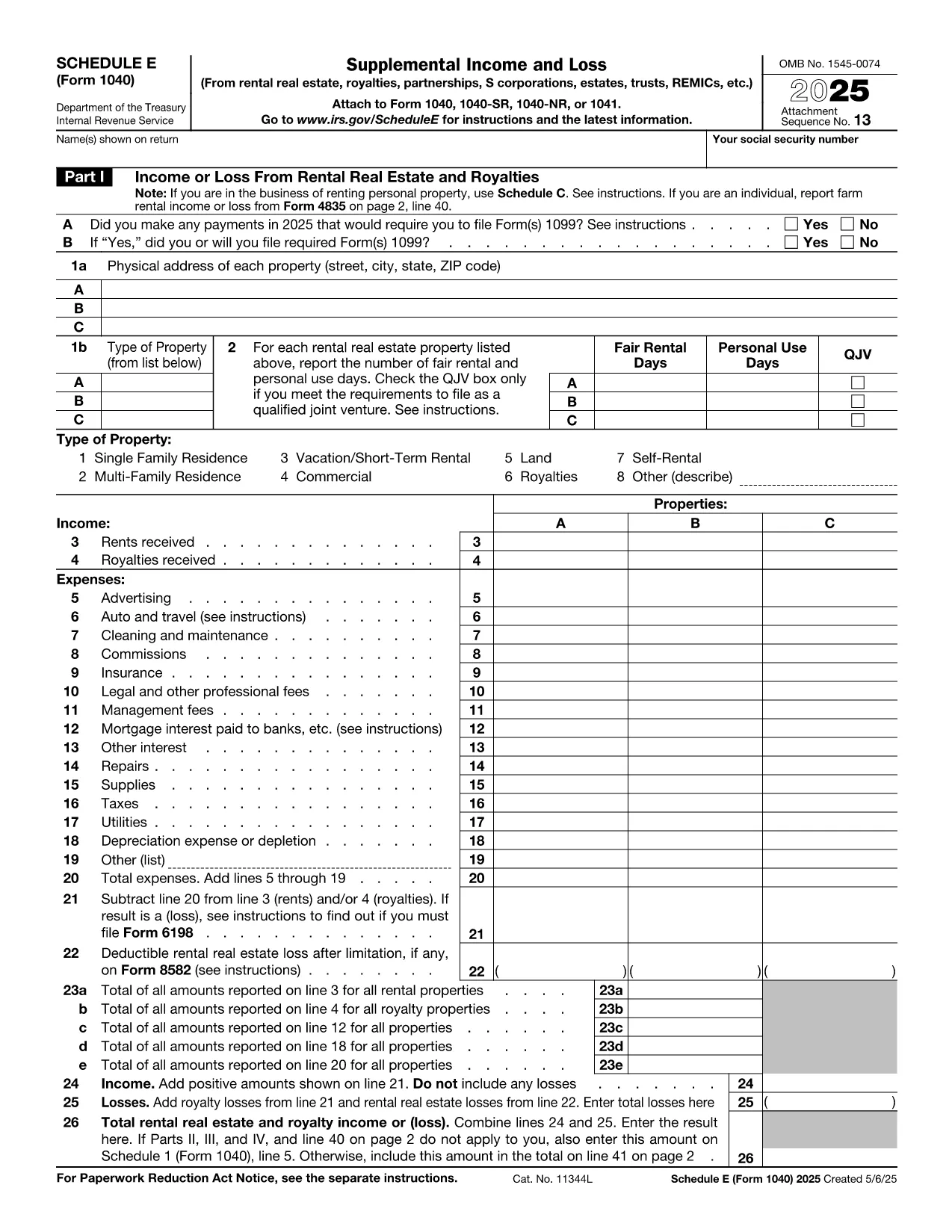
Schedule E (Form 1040‑SE) is the IRS tax form used to report supplemental income and loss from rentals, royalties, partnerships, S‑corporations, estates, trusts, and more. Filling it out correctly can affect your tax liability, so having a reliable, fillable PDF makes the process faster and error‑free.

What is IRS Schedule E?

Schedule E is part of the individual income tax return (Form 1040). It captures income or loss from:

  • Rental real estate and royalties
  • Partnerships and S‑corporations (K‑1 information)
  • Trusts and estates
  • Other sources of supplemental income

The form is required for any taxpayer who received a Schedule K‑1 or earned rental income during the tax year.

How to fill out Schedule E online with Formize

Instead of downloading the PDF and opening a separate editor, simply click the “Fill out this form” button on this page. The Formize PDF Filler app loads in your browser, letting you enter data directly into the fillable fields.

Common mistakes to avoid

  • Entering the wrong tax year in the header – always verify the year at the top.
  • Mixing up Part I (Rental) and Part II (Partnerships) sections – keep each source separate.
  • Leaving required fields blank – the Formize validator highlights missing entries before you save.
  • Incorrectly reporting depreciation – use IRS Publication 946 for guidance.

Where to submit Schedule E

Schedule E is attached to your Form 1040 when you e‑file or mail a paper return. The completed PDF can be saved, printed, and included with your other tax documents.

Need help with Schedule E?

For detailed instructions, see the IRS’s official Schedule E instructions. If you have specific questions about your K‑1 or rental calculations, consult a qualified tax professional.

سوالات متداول
  • Do I need to download any software to use the fillable Schedule E?

    No. The Formize PDF Filler runs entirely in your web browser, so there’s nothing to install.

  • Can I edit the form after I’ve saved it?

    Yes. Open the saved PDF again with Formize or any standard PDF editor to make changes.

  • Is the fillable Schedule E accepted by the IRS?

    Yes. The PDF follows the exact IRS layout, so the printed version is identical to the official paper form.

  • What if I make a mistake while filling the form?

    Use the “Undo” button or simply click into the field and correct the entry. The validator will flag any remaining errors before you save.

  • Do I need a tax professional to complete Schedule E?

    Many taxpayers can complete it themselves, but complex partnership, royalty, or depreciation calculations may benefit from professional advice.

  • Is my data stored on Formize’s servers?

    No. Formize processes the PDF locally in your browser; nothing is uploaded or stored on external servers.

چگونه

نحوه پر کردن tax form e به صورت رایگان و آنلاین در 5 با مراحل آسان:

  1. 1
    Open the fillable form
    Click the “Fill out this form” button below. The Formize PDF Filler app will open in a new browser tab.
  2. 2
    Enter your information
    Type directly into each field. Use the navigation pane to jump to Part I, Part II, etc.
  3. 3
    Validate and save
    When you finish, click “Validate” to let Formize check for missing required fields, then press “Save” to download the completed PDF.
  4. 4
    Print or attach
    Print the saved PDF to attach to a paper return, or keep the file for electronic filing with your tax software.
  5. 5
    Secure your data
    All data stays in your browser; Formize does not store personal information on its servers.
برنامه PDF Filler را فرم‌بندی کنید
در باره

فرم های مالیاتی

tax form e یکی از فرم‌های مالیاتی است که برای گزارش اطلاعات مربوط به مالیات به سازمان مالیاتی مربوطه استفاده می‌شود. انواع مختلفی از فرم های مالیاتی از جمله فرم های مالیات فدرال، ایالتی و محلی وجود دارد که بسته به شرایط و موقعیت مالیات دهندگان می تواند متفاوت باشد.

امکانات

پرکننده PDF

ساده ترین راه برای پر کردن فرم های PDF به صورت آنلاین

  • به سرعت tax form e را پر کنید
    به دنبال راهی برای پر کردن سریع tax form e آنلاین هستید؟ با پرکننده فرم PDF رایگان آنلاین ما، می‌دانید چگونه این سند pdf را در کمتر از یک دقیقه ویرایش و پر کنید.
  • آسان برای استفاده از ویرایشگر PDF آنلاین
    آیا از چاپ فایل‌های پی‌دی‌اف خسته شده‌اید تا بتوانید آن‌ها را قبل از اسکن مجدد و ارسال مجدد، ویرایش کنید؟ اسناد PDF را به صورت آنلاین به صورت رایگان ویرایش کنید. از ویرایشگر pdf آنلاین ما برای صرفه جویی در زمان و کاغذ استفاده کنید.
  • ابزارهای عالی، همه پلتفرم ها
    آیا نمی دانید که چگونه tax form e را در مک پر کنید، یا شاید چگونه از پرکننده PDF به صورت رایگان استفاده کنید؟ ابزارهای PDF آنلاین ما روی همه پلتفرم ها کار می کنند.
  • ذخیره سازی امن فایل
    فایل‌های تکمیل‌شده «tax form e» در یک پایگاه داده ایمن که توسط میزبانی ابری آمازون مدیریت می‌شود، ذخیره می‌شوند. شما می توانید فایل های خود را در هر زمان از سیستم ما حذف کنید. در هر صورت این فایل ها پس از 24 ساعت به صورت خودکار پاک می شوند.
  • چت با tax form e
    با «tax form e» در Chatize که یک دستیار PDF خوان رایگان است، گپ بزنید. سوال بپرسید و از "tax form e" پاسخ بگیرید. فقط روی دکمه Chat With Document در بالا کلیک کنید.

حذف جلسه پر کردن

جلسه پر کردن انتخاب شده را حذف کنید؟ در این صورت پیشرفت شما در تکمیل فرم از بین خواهد رفت.

حذف جلسه ویرایش

جلسه ویرایش انتخابی حذف شود؟ در این صورت پیشرفت شما در ایجاد و ویرایش فرم از بین خواهد رفت.