زبان را انتخاب کنید

Fillable G‑28 Form – Notice of Entry of Appearance (PDF)

  1. کشور ایالات متحده آمریکا
  2. زبان انگلیسی
  3. بخش خدمات شهروندی و مهاجرت ایالات متحده
این فرم را پر کنید
Fillable G‑28 Form – Notice of Entry of Appearance (PDF)

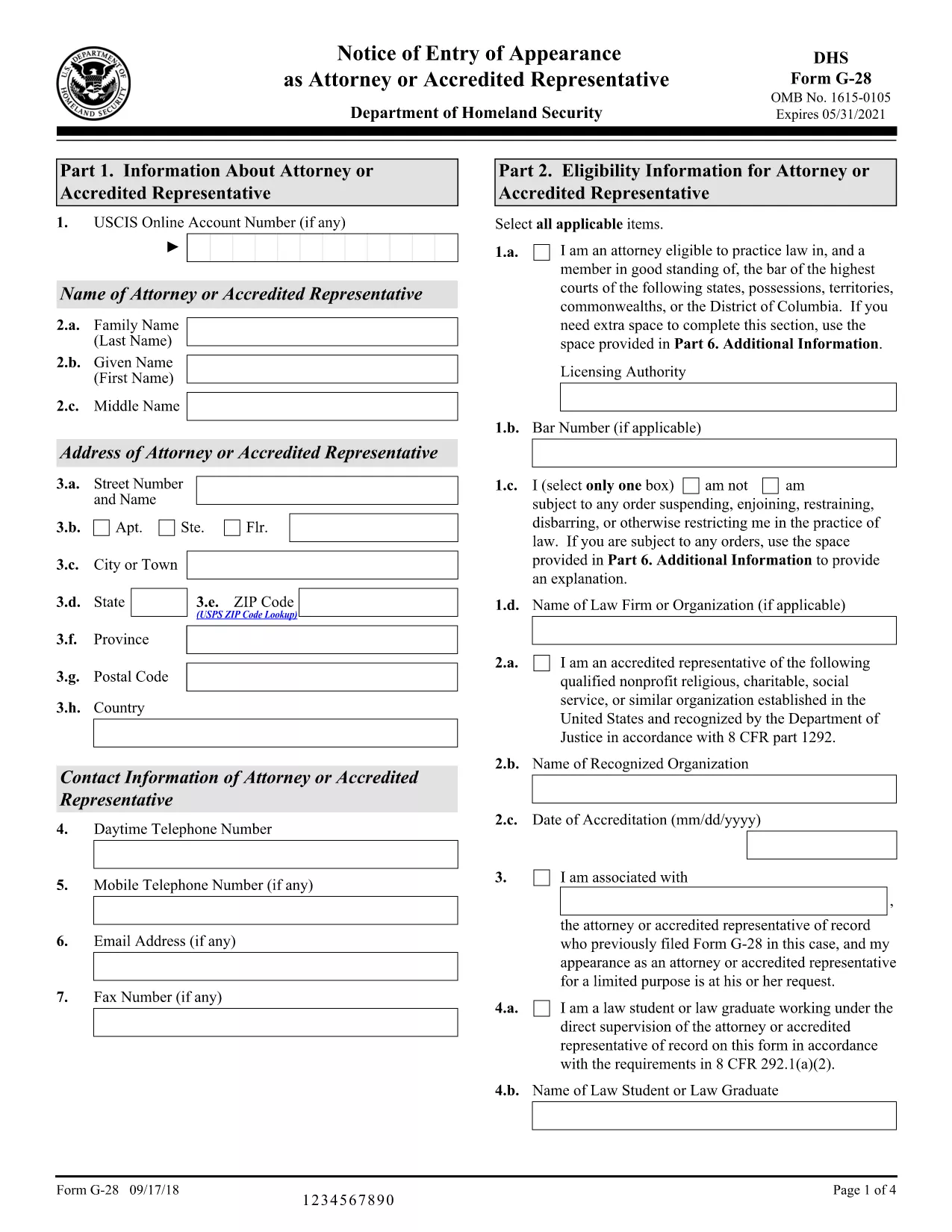
The G‑28, Notice of Entry of Appearance as Attorney or Accredited Representative is the official form used by immigration attorneys and accredited representatives to inform U.S. Citizenship and Immigration Services (USCIS) that they will be representing a client. Traditionally you would download a static PDF, print it, and hand‑write your answers. With Formize, you can fill the fillable G‑28 PDF directly in your browser – faster, error‑free, and without any extra software.

What Is the G‑28 Form?

The G‑28 establishes a legal relationship between the applicant and their legal representative. It is required for most immigration filings, including adjustment of status, asylum, and naturalization applications. The form collects basic information about the attorney or accredited representative, the client, and the case type.

How to Fill Out the G‑28 Online with Formize

Instead of downloading the PDF and opening it in a PDF editor, simply click the "Fill out this form" button on this page. The Formize PDF Filler app will load in seconds, presenting a clean, fillable version of the G‑28. Follow the on‑screen prompts, save your progress, and download the completed PDF ready for submission.

Common Mistakes to Avoid on the G‑28

  • Leaving the signature line blank – the attorney or accredited representative must sign electronically or print and sign.
  • Mismatching case numbers – ensure the case number matches the application you are representing.
  • Incorrect address information – use the mailing address that USCIS will use for all future correspondence.
  • Using the wrong form version – always download the latest G‑28 from the official USCIS site (linked below).

Where to Submit the Completed G‑28

Attach the signed G‑28 to the front of the primary immigration application package or upload it directly through your USCIS online account (myUSCIS). If you are filing by mail, include the completed form with the other supporting documents.

Helpful Resources and FAQs

Below you’ll find answers to the most common questions about the G‑28, plus links to official USCIS guidance.

دستورالعمل ها

سوالات متداول
  • Who can file a G‑28 form?

    Only a licensed attorney or an accredited representative (such as a recognized nonprofit organization) may file a G‑28 on behalf of an immigration applicant.

  • Do I need a physical signature on the G‑28?

    USCIS accepts electronic signatures when the form is printed and signed after being filled online. For paper submissions, the attorney must sign the printed form.

  • Can I use the same G‑28 for multiple cases?

    No. Each G‑28 must reference a specific case number and applicant. Submit a separate form for each distinct immigration proceeding.

  • What if I make a mistake after submitting the G‑28?

    File a corrected G‑28 with the updated information and include a brief cover letter explaining the correction.

  • Is the G‑28 required for all USCIS forms?

    The G‑28 is required whenever an attorney or accredited representative is representing a client. Some forms have a built‑in representation section, but the G‑28 is still the standard notice.

  • How often is the G‑28 updated?

    USCIS releases a new version when there are regulatory changes. Always use the latest version from the official USCIS website.

  • Can I fill out the G‑28 on a mobile device?

    Yes. The Formize PDF Filler works on all modern browsers, including mobile Safari and Chrome.

  • Where can I find official instructions for the G‑28?

    The USCIS website provides a detailed instruction sheet linked on the form’s download page.

  • Do I need to pay a fee to submit a G‑28?

    No. The G‑28 itself carries no fee; any fees are associated with the underlying immigration application.

  • What should I do if I lose my completed G‑28?

    You can re‑download the filled PDF from the Formize app if you saved it to your account, or ask your attorney to recreate the form.

چگونه

نحوه پر کردن G-28 form به صورت رایگان و آنلاین در 5 با مراحل آسان:

  1. 1
    Click the Fill‑Out Button
    On this page, click the "Fill out this form" button. The Formize PDF Filler app will open in a new tab.
  2. 2
    Wait for the Form to Load
    The fillable G‑28 loads instantly. No download or installation is required.
  3. 3
    Enter All Required Information
    Complete each field—attorney details, client details, case number, and signature. The form validates entries in real time.
  4. 4
    Save and Download
    When finished, click "Save & Download" to get a PDF ready for submission to USCIS.
  5. 5
    Submit to USCIS
    Attach the completed G‑28 to your immigration application or upload it via your myUSCIS account.
برنامه PDF Filler را فرم‌بندی کنید
در باره

قالب G-28 form

با مجموعه‌ای از ویژگی‌های سنتی برای مشاهده و پر کردن یک سند PDF، همراه با مزایای یک برنامه وب و طرح‌بندی واکنش‌گرا، می‌توانید G-28 form را در چند دقیقه تکمیل کنید.

امکانات

پرکننده PDF

ساده ترین راه برای پر کردن فرم های PDF به صورت آنلاین

  • به سرعت G-28 form را پر کنید
    به دنبال راهی برای پر کردن سریع G-28 form آنلاین هستید؟ با پرکننده فرم PDF رایگان آنلاین ما، می‌دانید چگونه این سند pdf را در کمتر از یک دقیقه ویرایش و پر کنید.
  • آسان برای استفاده از ویرایشگر PDF آنلاین
    آیا از چاپ فایل‌های پی‌دی‌اف خسته شده‌اید تا بتوانید آن‌ها را قبل از اسکن مجدد و ارسال مجدد، ویرایش کنید؟ اسناد PDF را به صورت آنلاین به صورت رایگان ویرایش کنید. از ویرایشگر pdf آنلاین ما برای صرفه جویی در زمان و کاغذ استفاده کنید.
  • ابزارهای عالی، همه پلتفرم ها
    آیا نمی دانید که چگونه G-28 form را در مک پر کنید، یا شاید چگونه از پرکننده PDF به صورت رایگان استفاده کنید؟ ابزارهای PDF آنلاین ما روی همه پلتفرم ها کار می کنند.
  • ذخیره سازی امن فایل
    فایل‌های تکمیل‌شده «G-28 form» در یک پایگاه داده ایمن که توسط میزبانی ابری آمازون مدیریت می‌شود، ذخیره می‌شوند. شما می توانید فایل های خود را در هر زمان از سیستم ما حذف کنید. در هر صورت این فایل ها پس از 24 ساعت به صورت خودکار پاک می شوند.
  • چت با G-28 form
    با «G-28 form» در Chatize که یک دستیار PDF خوان رایگان است، گپ بزنید. سوال بپرسید و از "G-28 form" پاسخ بگیرید. فقط روی دکمه Chat With Document در بالا کلیک کنید.

حذف جلسه پر کردن

جلسه پر کردن انتخاب شده را حذف کنید؟ در این صورت پیشرفت شما در تکمیل فرم از بین خواهد رفت.

حذف جلسه ویرایش

جلسه ویرایش انتخابی حذف شود؟ در این صورت پیشرفت شما در ایجاد و ویرایش فرم از بین خواهد رفت.