زبان را انتخاب کنید

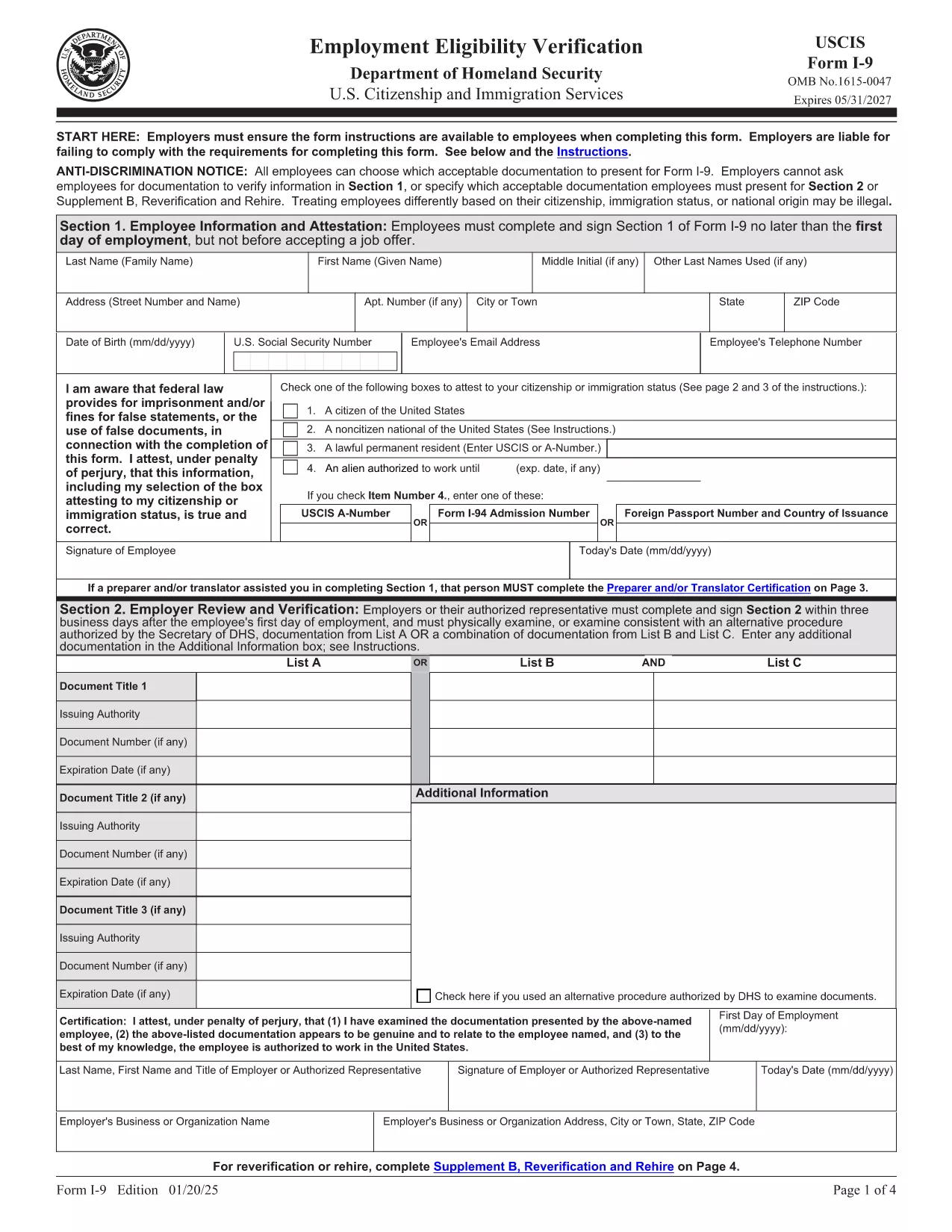
Fillable I‑9 Employment Eligibility Verification Form

  1. کشور ایالات متحده آمریکا
  2. زبان انگلیسی
  3. بخش خدمات شهروندی و مهاجرت ایالات متحده
این فرم را پر کنید
Fillable I‑9 Employment Eligibility Verification Form

The Form I‑9 (Employment Eligibility Verification) is required for every new employee hired in the United States. Employers must verify both identity and work authorization within three business days of hiring. Our fillable PDF version lets you complete the form quickly, securely, and without the hassle of downloading a separate editor.

What Is the I‑9 Form and Why You Need It

The I‑9 is issued by the U.S. Citizenship and Immigration Services (USCIS). It ensures that all employees are legally authorized to work in the U.S. Failure to complete the form correctly can result in fines and penalties for both employer and employee.

How to Fill Out the I‑9 Form Online with Formize

Instead of downloading the PDF and opening it in a PDF editor, simply click the "Fill out this form" button on this page. The Formize PDF Filler app will load in your browser, allowing you to type, check boxes, and add signatures directly on the form.

Common Mistakes & Tips for a Perfect I‑9 Submission

  • Do not leave any required fields blank. Every box marked with an asterisk must be completed.
  • Use the correct document codes. Refer to the USCIS instructions for List A, B, and C documents.
  • Sign and date the form. Both employee and employer signatures are mandatory.
  • Keep the form on file for three years. Store it securely and separate from the employee’s personnel file.

When you’re ready, click the button below, fill the form, and download the completed PDF for your records.

سوالات متداول
  • Is the I‑9 form required for all new hires?

    Yes. Every employee hired after November 6, 1986 must complete Form I‑9, regardless of citizenship or work status.

  • Can I use a scanned copy of a handwritten I‑9?

    No. The form must be completed electronically or on a legible, printable PDF. Handwritten forms that are scanned are not acceptable.

  • How long must I keep the I‑9 on file?

    Employers must retain the I‑9 for three years after the date of hire, or one year after employment ends, whichever is later.

  • What documents can I use for verification?

    You may present either one document from List A (identity + employment authorization) or a combination of one document from List B (identity) and one from List C (employment authorization).

  • Do I need to re‑verify an employee’s work authorization?

    Only if the employee’s work‑authorization document has an expiration date. Re‑verification must be done before the document expires.

  • Can I fill out the I‑9 on a mobile device?

    Yes. The Formize PDF Filler works on most modern browsers, including mobile Safari and Chrome, allowing you to complete the form on a phone or tablet.

  • Is there a fee to use Formize’s PDF filler?

    Formize offers a free basic filler for standard PDFs like the I‑9. No credit‑card information is required to complete the form.

  • What should I do if I make a mistake on the I‑9?

    Correct errors by striking through the incorrect entry, entering the correct information, and initialing the change. Do not erase or use white‑out.

  • Do I need to submit the I‑9 to USCIS?

    No. The I‑9 is kept by the employer for inspection by authorized government officials, such as the Department of Labor or ICE, upon request.

  • Is the PDF version of the I‑9 the same as the paper version?

    Yes. The official USCIS PDF is an exact replica of the paper form and meets all legal requirements when completed correctly.

چگونه

نحوه پر کردن I-9 form به صورت رایگان و آنلاین در 5 با مراحل آسان:

  1. 1
    Open the Fillable I‑9 Form
    Click the "Fill out this form" button on the page. The Formize PDF Filler app loads in your browser.
  2. 2
    Enter Employee Information
    Complete Section 1 with the employee’s name, address, date of birth, and Social Security Number. Select the appropriate citizenship status.
  3. 3
    Upload or Type Document Details
    In Section 2, choose the document type (List A, B, or C) and enter the document numbers, expiration dates, and issuing authority.
  4. 4
    Add Signatures
    Both the employee and the employer must sign and date the form. Use the signature tool in the Formize app.
  5. 5
    Save and Download
    When all fields are completed, click "Save" then "Download" to store the finished PDF on your computer or cloud storage.
برنامه PDF Filler را فرم‌بندی کنید
در باره

قالب I-9 form

با مجموعه‌ای از ویژگی‌های سنتی برای مشاهده و پر کردن یک سند PDF، همراه با مزایای یک برنامه وب و طرح‌بندی واکنش‌گرا، می‌توانید I-9 form را در چند دقیقه تکمیل کنید.

امکانات

پرکننده PDF

ساده ترین راه برای پر کردن فرم های PDF به صورت آنلاین

  • به سرعت I-9 form را پر کنید
    به دنبال راهی برای پر کردن سریع I-9 form آنلاین هستید؟ با پرکننده فرم PDF رایگان آنلاین ما، می‌دانید چگونه این سند pdf را در کمتر از یک دقیقه ویرایش و پر کنید.
  • آسان برای استفاده از ویرایشگر PDF آنلاین
    آیا از چاپ فایل‌های پی‌دی‌اف خسته شده‌اید تا بتوانید آن‌ها را قبل از اسکن مجدد و ارسال مجدد، ویرایش کنید؟ اسناد PDF را به صورت آنلاین به صورت رایگان ویرایش کنید. از ویرایشگر pdf آنلاین ما برای صرفه جویی در زمان و کاغذ استفاده کنید.
  • ابزارهای عالی، همه پلتفرم ها
    آیا نمی دانید که چگونه I-9 form را در مک پر کنید، یا شاید چگونه از پرکننده PDF به صورت رایگان استفاده کنید؟ ابزارهای PDF آنلاین ما روی همه پلتفرم ها کار می کنند.
  • ذخیره سازی امن فایل
    فایل‌های تکمیل‌شده «I-9 form» در یک پایگاه داده ایمن که توسط میزبانی ابری آمازون مدیریت می‌شود، ذخیره می‌شوند. شما می توانید فایل های خود را در هر زمان از سیستم ما حذف کنید. در هر صورت این فایل ها پس از 24 ساعت به صورت خودکار پاک می شوند.
  • چت با I-9 form
    با «I-9 form» در Chatize که یک دستیار PDF خوان رایگان است، گپ بزنید. سوال بپرسید و از "I-9 form" پاسخ بگیرید. فقط روی دکمه Chat With Document در بالا کلیک کنید.

حذف جلسه پر کردن

جلسه پر کردن انتخاب شده را حذف کنید؟ در این صورت پیشرفت شما در تکمیل فرم از بین خواهد رفت.

حذف جلسه ویرایش

جلسه ویرایش انتخابی حذف شود؟ در این صورت پیشرفت شما در ایجاد و ویرایش فرم از بین خواهد رفت.