
Choisir la langue

Request EIN Form (IRS Form SS‑4) – Fillable PDF

  1. De campagne Etats-Unis
  2. Langue Anglais
  3. Activité Impôts
  4. département IRS
Request EIN Form (IRS Form SS‑4) – Fillable PDF

Request EIN Form (IRS Form SS‑4) – Fillable PDF

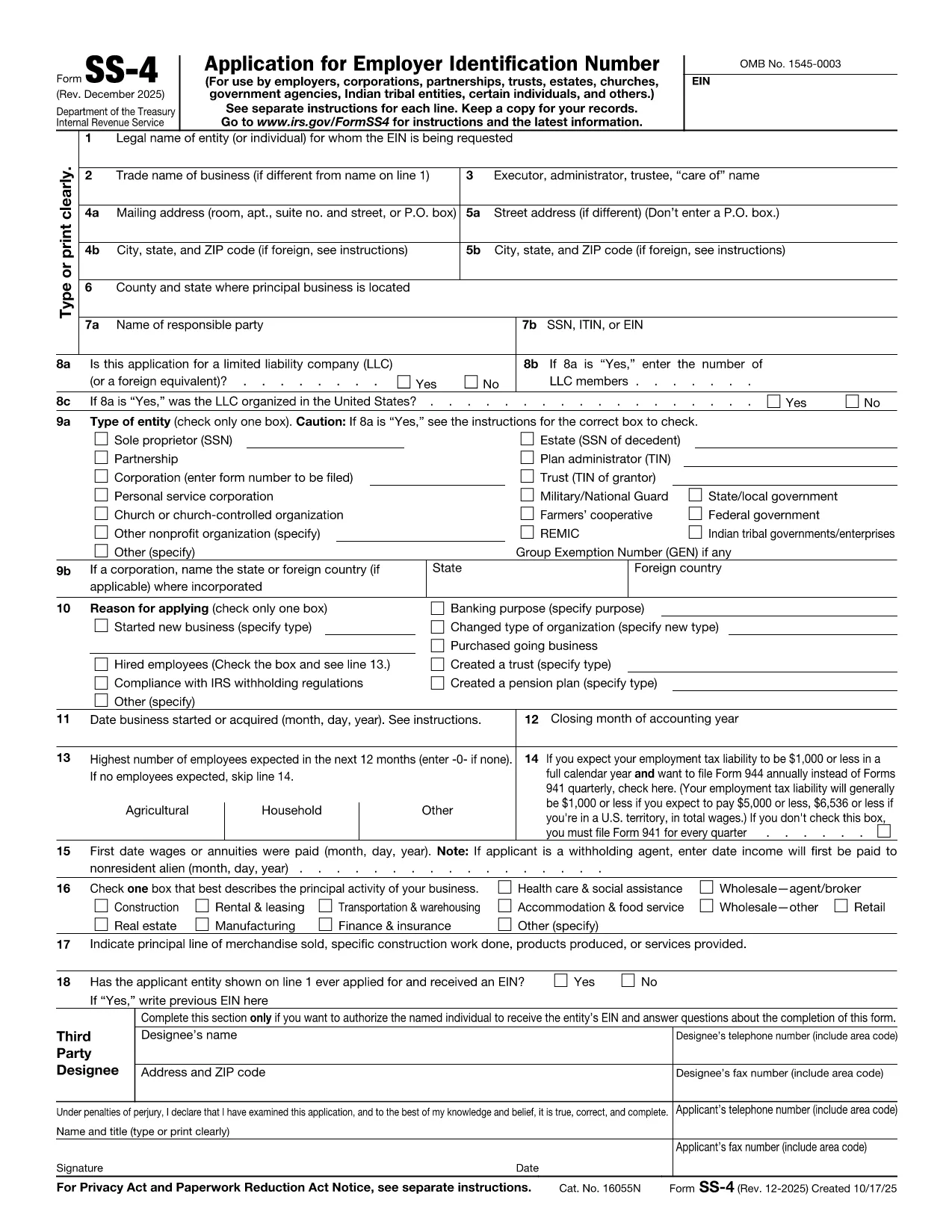
Need an Employer Identification Number (EIN) for your new business, nonprofit, or LLC? The Request EIN Form – officially known as IRS Form SS‑4 – is the gateway to obtaining your federal tax ID. Our fillable PDF version lets you complete the form in seconds, without printing, scanning, or using a separate PDF editor.

What Is the Request EIN Form (Form SS‑4)?

Form SS‑4 is the application the Internal Revenue Service (IRS) requires to issue an EIN. An EIN works like a Social Security Number for businesses and is needed for tax filing, opening bank accounts, hiring employees, and more.

How to Complete the Request EIN Form Online

Instead of downloading the PDF and opening it in a separate editor, simply click the "Fill out this form" button on this page. The Formize PDF Filler app will load directly in your browser, presenting an intuitive, field‑by‑field interface.

Common Mistakes to Avoid When Filling Out Form SS‑4

  • Leaving required fields blank: The IRS will reject an incomplete application.
  • Using the wrong entity type: Choose the correct box for corporation, partnership, sole proprietorship, etc.
  • Mismatching the business name and legal name: Ensure both match your official registration documents.
  • Incorrect phone or fax numbers: Double‑check digits before submitting.

Where to Submit the Completed Form

After you finish the fillable PDF, you have two options:

  1. Submit online: Use the IRS EIN Online Assistant for immediate processing.
  2. Mail or fax: Print the completed form and send it to the address or fax number listed in the instructions (see the PDF’s last page).

Benefits of Using Formize Fillable PDF

  • Instant loading – no software download.
  • Auto‑save feature protects against accidental loss.
  • Built‑in validation helps you avoid common errors.
  • Secure, encrypted connection keeps your data private.

Get your EIN faster and with confidence. Click the button below, fill out the form, and submit it the way you prefer.

FAQ
  • What is an EIN and why do I need it?

    An Employer Identification Number (EIN) is a nine‑digit number the IRS assigns to identify a business for tax purposes. You need it to file taxes, open a business bank account, hire employees, and apply for licenses.

  • Can I get an EIN without a fillable PDF?

    Yes, you can apply online through the IRS EIN Assistant or mail a paper Form SS‑4. The fillable PDF simply makes data entry faster and reduces errors.

  • Is the Formize PDF Filler free to use?

    Yes, the Formize PDF Filler app is free for basic fillable‑PDF tasks, including completing Form SS‑4 on our site.

  • How long does it take to receive an EIN after submitting the form?

    If you apply online, you receive your EIN immediately after validation. Paper submissions typically take 4‑6 weeks.

  • What should I do if I make a mistake on the completed form?

    If you used the online filler, you can simply edit the field and re‑save before submitting. For paper filings, cross out the error, write the correction, and initial it.

  • Do I need a separate signature on Form SS‑4?

    Only the “Signature of Authorized Person” field is required. The online filler lets you type your name; for paper submissions, you must sign manually.

  • Can a foreign entity obtain an EIN using this form?

    Yes, foreign businesses can apply for an EIN. They must indicate the reason for applying and may need to provide a U.S. mailing address.

  • Is the PDF version from the IRS the same as the fillable version on Formize?

    The content is identical. Formize adds interactive fields on top of the official IRS PDF, ensuring compliance while simplifying entry.

COMMENT

Comment remplir request EIN form gratuitement, en ligne en 4 étapes simples :

  1. 1
    Click the Fill‑Out Button
    On this page, press the "Fill out this form" button. The Formize PDF Filler will open in a new tab.
  2. 2
    Enter Your Information
    Complete each field in the fillable PDF. Required fields are highlighted, and real‑time validation will alert you to any errors.
  3. 3
    Save or Export
    When you finish, click "Save" to download a completed PDF or choose "Export to PDF" to generate a final, non‑editable version.
  4. 4
    Submit to the IRS
    Use the IRS online portal for instant EIN issuance, or print and mail/fax the completed form following the instructions on the last page.
Formize l'application PDF Filler
À PROPOS

Les formulaires d'impôt

request EIN form est l'un des formulaires fiscaux qui sont des documents utilisés pour déclarer des informations relatives aux impôts à l'autorité fiscale compétente. Il existe différents types de formulaires fiscaux, y compris les formulaires fiscaux fédéraux, étatiques et locaux, qui peuvent varier en fonction de la situation et de l'emplacement du contribuable.

CARACTÉRISTIQUES

Remplisseur de PDF

Le moyen le plus simple de remplir des formulaires PDF en ligne

  • Remplissez rapidement request EIN form
    Vous cherchez un moyen de remplir rapidement request EIN form en ligne ? Avec notre remplisseur de formulaire PDF gratuit en ligne, vous saurez comment éditer et remplir ce document pdf en moins d'une minute.
  • Éditeur PDF en ligne facile à utiliser
    Vous en avez assez d'imprimer des fichiers PDF pour pouvoir les modifier avant de les renumériser et de les renvoyer ? Modifiez des documents PDF gratuitement en ligne. Utilisez notre éditeur de pdf en ligne pour gagner du temps et du papier.
  • Excellents outils, toutes plateformes
    Vous vous demandez comment remplir request EIN form sur un Mac, ou peut-être comment utiliser un remplisseur PDF gratuit ? Nos outils PDF en ligne fonctionnent sur toutes les plateformes.
  • Stockage de fichiers sécurisé
    Les fichiers "request EIN form" terminés sont stockés dans une base de données sécurisée gérée par l'hébergement Amazon Cloud. Vous pouvez supprimer vos fichiers de notre système à tout moment. Dans tous les cas, ces fichiers sont automatiquement supprimés après 24 heures.
  • Discutez avec request EIN form
    Discutez avec "request EIN form" sur Chatize qui est un assistant de lecture PDF gratuit. Posez des questions et obtenez des réponses de "request EIN form". Cliquez simplement sur le bouton Discuter avec un document ci-dessus.

Supprimer la session de remplissage

Supprimer la session de remplissage sélectionnée ? Dans ce cas, votre progression dans le remplissage du formulaire sera perdue.

Supprimer la session d'édition

Supprimer la session de modification sélectionnée ? Dans ce cas, votre progression dans la création et la modification du formulaire sera perdue.