
Choisir la langue

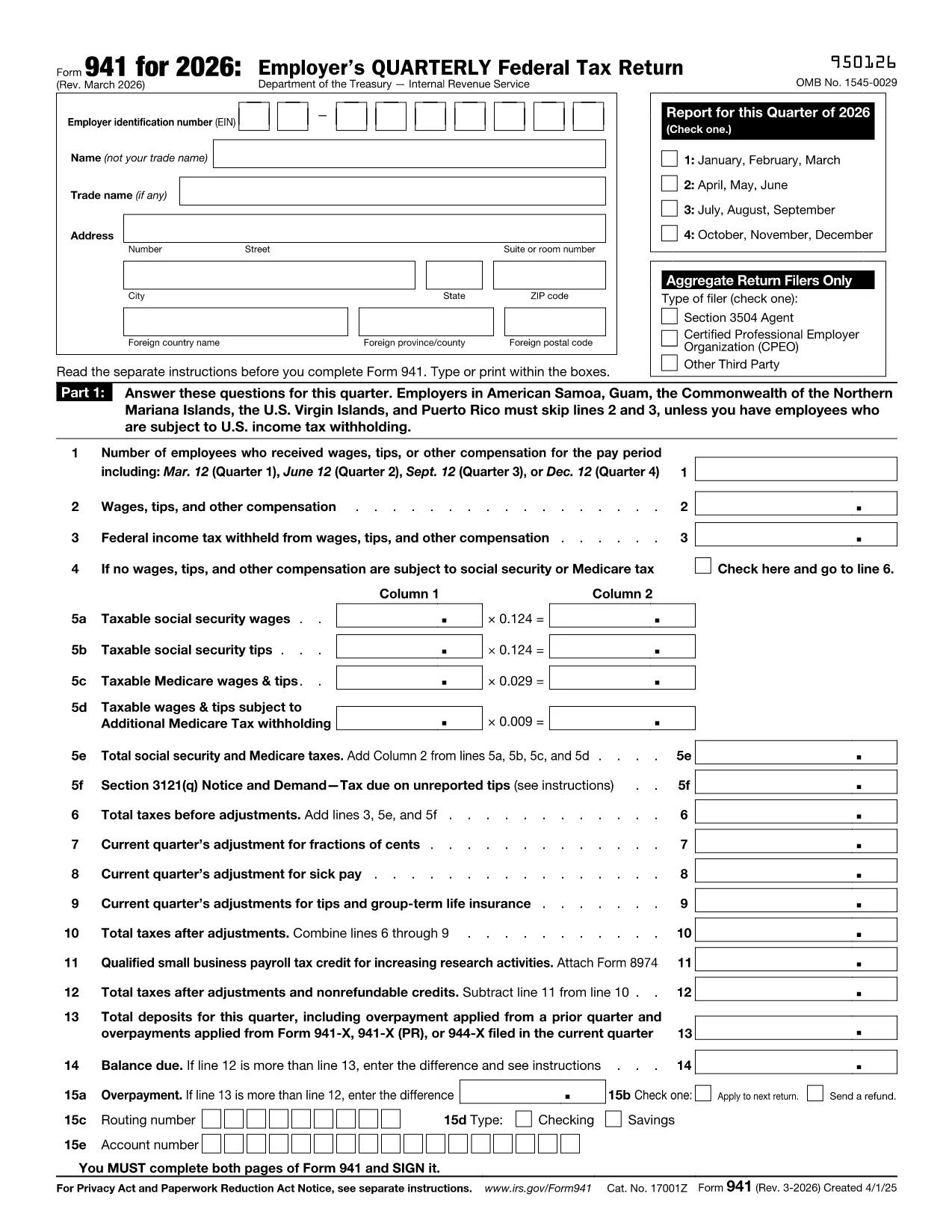
IRS Form 941 – Quarterly Payroll Tax Return (Due January 31)

  1. De campagne Etats-Unis
  2. Langue Anglais
  3. Activité Impôts
  4. département IRS
Remplissez ce formulaire
IRS Form 941 – Quarterly Payroll Tax Return (Due January 31)

Why Use a Fillable PDF for Form 941

Form 941 is the employer’s quarterly federal tax return. Using a fillable PDF saves time, reduces errors, and eliminates the need for a separate PDF editor. With Formize’s online PDF Filler you can complete the form directly in your browser and print or e‑file instantly.

How to Complete Form 941 Online

Instead of downloading the PDF and opening it in a desktop editor, simply click the "Fill out this form" button on this page. The Formize PDF Filler app will load in a few seconds. Follow the on‑screen prompts, save your progress, and export the finished document as a PDF.

Common Mistakes to Avoid

  • Entering the wrong tax period – double‑check the quarter you are reporting.
  • Mis‑calculating total wages and tips – use the worksheet on page 2 of the form.
  • Forgetting to include adjustments for sick or family‑leave credits.
  • Submitting an unsigned form – the filler lets you add an electronic signature.

Where to Submit Your Completed Form

After you have saved the completed PDF, you can e‑file through the IRS Modernized e‑File (MeF) system, mail it to the address listed in the form’s instructions, or upload it via your payroll service provider.

FAQ
  • What is the deadline for filing Form 941?

    Form 941 for the fourth quarter of the previous year is due by January 31 of the following year. If the 31st falls on a weekend or holiday, the deadline is the next business day.

  • Can I e‑file Form 941 with Formize?

    Formize creates a completed PDF that you can upload to the IRS MeF system or submit through your payroll software. Direct e‑filing from Formize is not available.

  • Do I need a digital signature?

    Yes. The PDF filler lets you add an electronic signature in the designated field, which the IRS accepts for paper submissions.

  • Is there a cost to use the Formize PDF Filler?

    Filling out the form on Formize is free. No subscription or download fees are required.

  • What if I make a mistake after I download the PDF?

    You can reopen the saved form in Formize, correct the error, and download a new PDF. Keep the original for your records.

  • Do I need to attach any supporting schedules?

    Only attach additional schedules if you have adjustments, credits, or special circumstances listed in the Form 941 instructions.

COMMENT

Comment remplir tax form january 31 gratuitement, en ligne en 3 étapes simples :

  1. 1
    Click the Fill button
    Press the "Fill out this form" button on the page. The Formize PDF Filler will open in a new tab.
  2. 2
    Enter your data
    Use the on‑screen fields to type in wages, taxes withheld, and any adjustments. The form validates numbers as you go.
  3. 3
    Save and download
    When all sections are complete, click "Save" to store a copy in your browser, then "Download PDF" to get the finished Form 941.
Formize l'application PDF Filler
À PROPOS

Les formulaires d'impôt

tax form january 31 est l'un des formulaires fiscaux qui sont des documents utilisés pour déclarer des informations relatives aux impôts à l'autorité fiscale compétente. Il existe différents types de formulaires fiscaux, y compris les formulaires fiscaux fédéraux, étatiques et locaux, qui peuvent varier en fonction de la situation et de l'emplacement du contribuable.

CARACTÉRISTIQUES

Remplisseur de PDF

Le moyen le plus simple de remplir des formulaires PDF en ligne

  • Remplissez rapidement tax form january 31
    Vous cherchez un moyen de remplir rapidement tax form january 31 en ligne ? Avec notre remplisseur de formulaire PDF gratuit en ligne, vous saurez comment éditer et remplir ce document pdf en moins d'une minute.
  • Éditeur PDF en ligne facile à utiliser
    Vous en avez assez d'imprimer des fichiers PDF pour pouvoir les modifier avant de les renumériser et de les renvoyer ? Modifiez des documents PDF gratuitement en ligne. Utilisez notre éditeur de pdf en ligne pour gagner du temps et du papier.
  • Excellents outils, toutes plateformes
    Vous vous demandez comment remplir tax form january 31 sur un Mac, ou peut-être comment utiliser un remplisseur PDF gratuit ? Nos outils PDF en ligne fonctionnent sur toutes les plateformes.
  • Stockage de fichiers sécurisé
    Les fichiers "tax form january 31" terminés sont stockés dans une base de données sécurisée gérée par l'hébergement Amazon Cloud. Vous pouvez supprimer vos fichiers de notre système à tout moment. Dans tous les cas, ces fichiers sont automatiquement supprimés après 24 heures.
  • Discutez avec tax form january 31
    Discutez avec "tax form january 31" sur Chatize qui est un assistant de lecture PDF gratuit. Posez des questions et obtenez des réponses de "tax form january 31". Cliquez simplement sur le bouton Discuter avec un document ci-dessus.

Supprimer la session de remplissage

Supprimer la session de remplissage sélectionnée ? Dans ce cas, votre progression dans le remplissage du formulaire sera perdue.

Supprimer la session d'édition

Supprimer la session de modification sélectionnée ? Dans ce cas, votre progression dans la création et la modification du formulaire sera perdue.