Choisir la langue

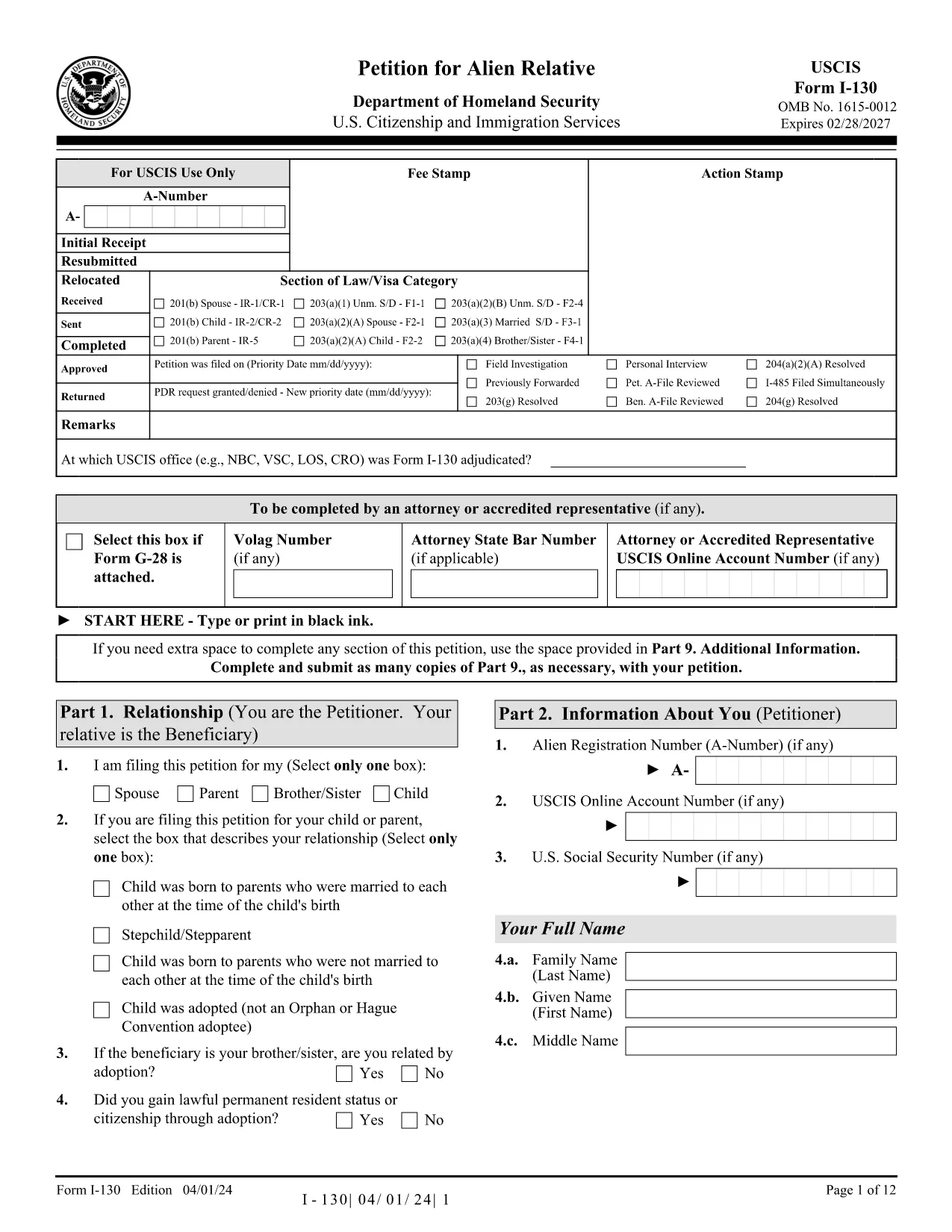
Fillable I-130 Petition for Alien Relative – Complete Online

  1. De campagne Etats-Unis
  2. Langue Anglais
  3. département USCIS
  4. Activité Immigration
Remplissez ce formulaire
Fillable I-130 Petition for Alien Relative – Complete Online

The I-130, Petition for Alien Relative is the first step for U.S. citizens and permanent residents who want to bring a family member to the United States. Historically you would download a static PDF, print it, hand‑write answers, and mail it to USCIS. With Formize’s Fillable I-130 PDF, you can complete the entire petition directly in your browser—no PDF editor required.

What Is the I-130 Form?

The I-130 establishes a qualifying relationship between the petitioner (U.S. citizen or green‑card holder) and the beneficiary (spouse, child, parent, or sibling). USCIS uses this form to verify eligibility before processing a visa or adjustment of status application.

How to Fill the I-130 Online with Formize

Follow the simple steps below to complete the form in minutes:

  • Click the "Fill out this form" button on this page.
  • Wait while the Formize PDF Filler app loads the official USCIS I-130 PDF.
  • Enter your information in the highlighted fields. The filler auto‑saves as you type.
  • Use the built‑in validation to catch missing or incorrectly formatted data.
  • When finished, download the completed PDF or print it for submission.

Common Mistakes to Avoid

Even with a fillable form, some errors can delay your case. Keep an eye out for:

  • Incorrect relationship wording – USCIS expects precise terms (e.g., "biological son" vs. "step‑son").
  • Missing signatures – The petitioner and, when required, the interpreter must sign.
  • Wrong dates – Use the MM/DD/YYYY format and double‑check birth dates.
  • Unclear photocopies – If you attach supporting documents, ensure they are legible.

Submission Tips & Next Steps

After downloading the completed I-130 PDF, you have two filing options:

  1. Online filing through USCIS myUSCIS – Upload the PDF, pay the filing fee, and track your case.
  2. Paper filing – Mail the PDF and supporting documents to the address listed in the form instructions.

Remember to keep a copy of the submitted form for your records. The Formize filler also lets you export a clean, searchable PDF for easy storage.

Frequently Asked Questions

Below are answers to the most common questions about the I-130 petition.

FAQ
  • Who can file an I-130 petition?

    U.S. citizens and lawful permanent residents (green‑card holders) can file an I-130 for spouses, children, parents, and siblings.

  • What is the filing fee for the I-130?

    As of 2024, the fee is $535. Fees are payable online through myUSCIS or by check when filing a paper petition.

  • Can I file the I-130 online instead of using a PDF?

    Yes. USCIS allows online filing through the myUSCIS portal, but many prefer the fillable PDF for offline review before uploading.

  • How long does USCIS take to process an I-130?

    Processing times vary by relationship and service center, ranging from 6 months for spouses to over 2 years for siblings.

  • Do I need to include supporting documents?

    Yes. Include proof of the qualifying relationship (marriage certificate, birth certificates, etc.) and any required translations.

  • What happens after the I-130 is approved?

    If the beneficiary is abroad, the case moves to the National Visa Center for consular processing. If already in the U.S., they may file for adjustment of status.

  • Can I edit the I-130 after I’ve submitted it?

    Once submitted, you cannot edit the form. If you discover an error, file a new I-130 and request a withdrawal of the original.

COMMENT

Comment remplir I-130 PDF gratuitement, en ligne en 5 étapes simples :

  1. 1
    Open the Fillable Form
    Click the "Fill out this form" button on this page. The Formize PDF Filler will open the official I-130 PDF in a new window.
  2. 2
    Load the Formize PDF Filler
    Wait a few seconds while the app loads. All fillable fields become highlighted for easy entry.
  3. 3
    Enter Your Information
    Type your answers directly into each field. The filler automatically saves your progress and checks for formatting errors.
  4. 4
    Validate and Review
    Use the built‑in validation to ensure every required field is completed and signatures are added.
  5. 5
    Download or Submit
    When the form is complete, click "Download PDF" to save a copy, or print it for mailing to USCIS.
Formize l'application PDF Filler
À PROPOS

modèle I-130 PDF

Avec l'ensemble traditionnel de fonctionnalités pour afficher et remplir un document PDF, combiné aux avantages d'une application Web et d'une mise en page réactive, vous pouvez compléter I-130 PDF en quelques minutes.

CARACTÉRISTIQUES

Remplisseur de PDF

Le moyen le plus simple de remplir des formulaires PDF en ligne

  • Remplissez rapidement I-130 PDF
    Vous cherchez un moyen de remplir rapidement I-130 PDF en ligne ? Avec notre remplisseur de formulaire PDF gratuit en ligne, vous saurez comment éditer et remplir ce document pdf en moins d'une minute.
  • Éditeur PDF en ligne facile à utiliser
    Vous en avez assez d'imprimer des fichiers PDF pour pouvoir les modifier avant de les renumériser et de les renvoyer ? Modifiez des documents PDF gratuitement en ligne. Utilisez notre éditeur de pdf en ligne pour gagner du temps et du papier.
  • Excellents outils, toutes plateformes
    Vous vous demandez comment remplir I-130 PDF sur un Mac, ou peut-être comment utiliser un remplisseur PDF gratuit ? Nos outils PDF en ligne fonctionnent sur toutes les plateformes.
  • Stockage de fichiers sécurisé
    Les fichiers "I-130 PDF" terminés sont stockés dans une base de données sécurisée gérée par l'hébergement Amazon Cloud. Vous pouvez supprimer vos fichiers de notre système à tout moment. Dans tous les cas, ces fichiers sont automatiquement supprimés après 24 heures.
  • Discutez avec I-130 PDF
    Discutez avec "I-130 PDF" sur Chatize qui est un assistant de lecture PDF gratuit. Posez des questions et obtenez des réponses de "I-130 PDF". Cliquez simplement sur le bouton Discuter avec un document ci-dessus.

Supprimer la session de remplissage

Supprimer la session de remplissage sélectionnée ? Dans ce cas, votre progression dans le remplissage du formulaire sera perdue.

Supprimer la session d'édition

Supprimer la session de modification sélectionnée ? Dans ce cas, votre progression dans la création et la modification du formulaire sera perdue.