
בחר שפה

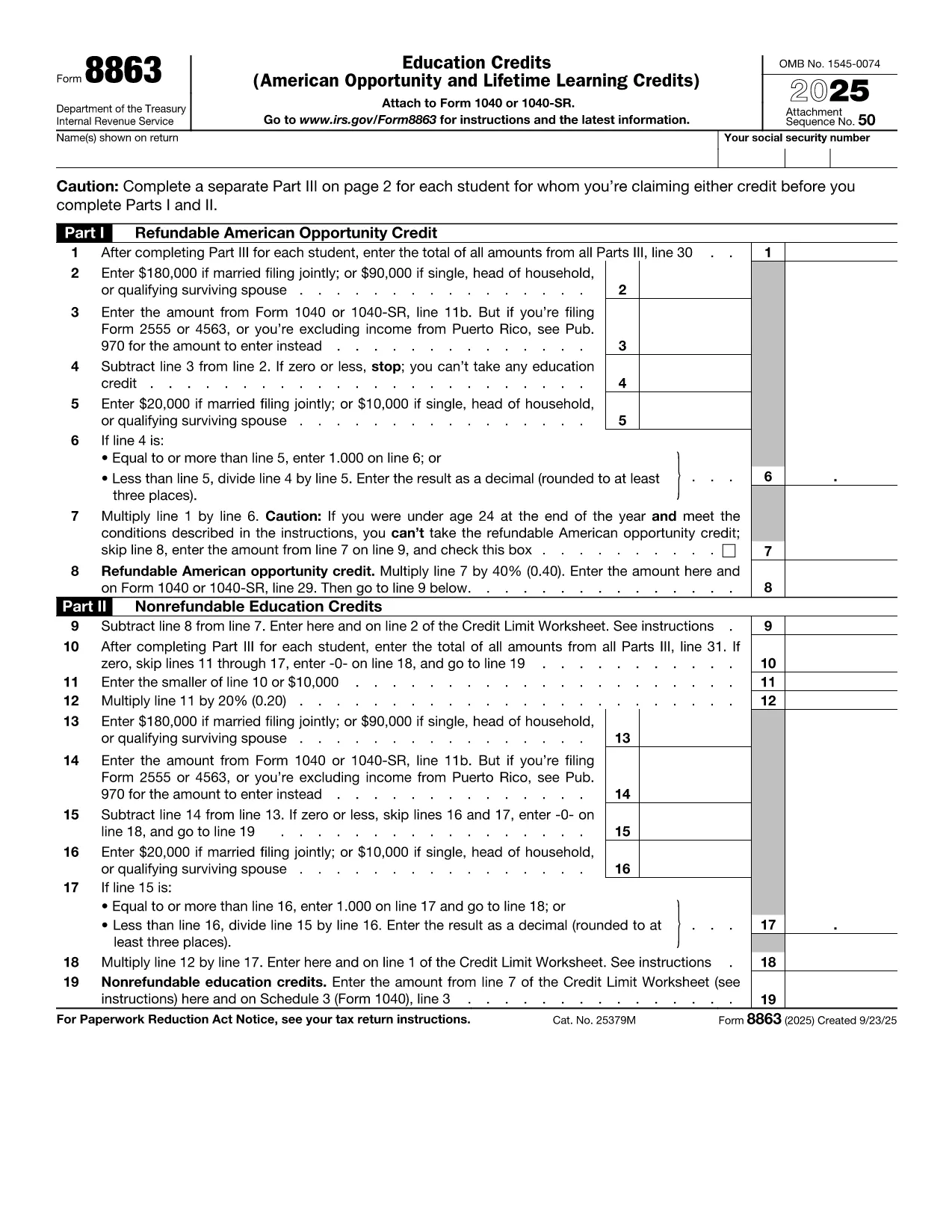
IRS Form 8863 – Education Credits for College Students

  1. מדינה ארה"ב
  2. שפה אנגלית
  3. פעילות מיסים
  4. מַחלָקָה IRS
IRS Form 8863 – Education Credits for College Students

College tuition can be a big expense, but the IRS offers tax credits that can put money back in your pocket. IRS Form 8863Education Credits (American Opportunity and Lifetime Learning) – is the official form you need to claim these credits. With Formize, you can fill out the PDF directly in your browser, save time, and avoid printing errors.

What Is IRS Form 8863?

Form 8863 is used to claim two major education tax credits:

  • American Opportunity Credit (AOC) – up to $2,500 per eligible student for the first four years of post‑secondary education.
  • Lifetime Learning Credit (LLC) – up to $2,000 per tax return for any level of post‑secondary education, including courses to improve job skills.

The form is required for both credits and must be attached to your Form 1040 when you file.

How to Fill Out the Form Using Formize

Instead of downloading the PDF and opening a separate editor, simply click the "Fill out this form" button on this page. The Formize PDF Filler app will load in seconds, letting you:

  1. Enter personal information, school details, and qualified expenses.
  2. Automatically calculate the credit amount.
  3. Save your progress or download a completed PDF to attach to your tax return.

The process is secure, free, and works on any device.

Eligibility Requirements for College Students

To qualify for the credits on Form 8863, you must meet these criteria:

  • Be enrolled at an eligible educational institution.
  • Be pursuing a degree or recognized credential (AOC) or taking any post‑secondary course (LLC).
  • Have qualified tuition and related expenses paid during the tax year.
  • Not have exceeded the income limits for the credit.

Common Mistakes to Avoid

  • Incorrect Social Security Number: Double‑check both yours and the student’s SSN.
  • Double‑claiming expenses: You can’t claim the same expenses for both the AOC and the Lifetime Learning Credit.
  • Leaving fields blank: Even if a question doesn’t apply, write “0” or “N/A” to avoid processing delays.
  • Missing signatures: Form 8863 requires the taxpayer’s signature; an unsigned form will be rejected.

Where to Submit the Completed Form

After you finish, download the filled PDF and attach it to your Form 1040 when filing electronically or by mail. If you e‑file, the PDF is automatically included with your return. For paper filing, mail the complete Form 1040 package to the IRS address listed in the IRS mailing instructions.

If you need additional help, consult the IRS Form 8863 instructions or contact your college’s financial aid office.

שאלות נפוצות
  • Which credit is better for me, the American Opportunity Credit or the Lifetime Learning Credit?

    The AOC offers a larger maximum credit ($2,500) but only for the first four years of college and requires at least half‑time enrollment. The LLC is smaller ($2,000) but can be used for any post‑secondary education, including part‑time courses.

  • Can I claim both credits in the same year?

    No. You must choose either the American Opportunity Credit or the Lifetime Learning Credit for each student in a tax year.

  • Do scholarships reduce the amount I can claim?

    Yes. Only qualified tuition and related expenses that are not covered by scholarships or grant money are eligible for the credit.

  • What if I make a mistake on the form after filing?

    You can file an amended return using Form 1040‑X. Attach a corrected Form 8863 and explain the changes.

  • Is there a deadline for submitting Form 8863?

    Form 8863 must be filed with your 2023 tax return, which is due April 15, 2024 (or the extended deadline if you filed for an extension).

  • Do I need a separate Form 8863 for each child in college?

    Yes. Each eligible student requires its own Form 8863 to claim the education credits.

  • Can I use Formize on a mobile device?

    Absolutely. The Formize PDF Filler works on smartphones and tablets, letting you complete the form anywhere.

  • Where can I find the official IRS instructions for Form 8863?

    Visit the IRS website at https://www.irs.gov/forms-pubs/about-form-8863 for the full instruction booklet.

איך ל

כיצד למלא את college student tax form בחינם, באינטרנט ב-5 שלבים פשוטים:

  1. 1
    Click the Fill‑out Button
    Press the blue “Fill out this form” button on this page. The Formize PDF Filler app will open in a new tab.
  2. 2
    Enter Your Information
    Complete every required field—personal data, school name, tuition paid, and any scholarships received.
  3. 3
    Review Calculations
    Formize automatically calculates the American Opportunity or Lifetime Learning credit based on the numbers you entered.
  4. 4
    Save or Download
    When you’re satisfied, click “Save” to store the form in your browser or “Download” to get a completed PDF ready for filing.
  5. 5
    Attach to Your Tax Return
    Include the filled Form 8863 with your Form 1040 when you e‑file or mail your paper return to the IRS.
Formize אפליקציית מילוי PDF
על אודות

טפסי מס

college student tax form הוא אחד מטפסי מס שהם מסמכים המשמשים לדיווח על מידע הקשור למיסים לרשות המס הרלוונטית. ישנם סוגים שונים של טפסי מס, כולל טפסי מס פדרליים, מדינתיים ומקומיים, שיכולים להשתנות בהתאם לנסיבות ולמיקומו של משלם המסים.

תכונות

מילוי PDF

הדרך הקלה ביותר למלא טפסי PDF באינטרנט

  • מלא במהירות את college student tax form
    מחפש דרך למלא במהירות את college student tax form באינטרנט? עם מילוי טופס ה-PDF המקוון שלנו בחינם, תדע כיצד לערוך ולמלא את מסמך ה-PDF הזה תוך פחות מדקה.
  • עורך PDF מקוון קל לשימוש
    נמאס לך להדפיס קבצי PDF כדי שתוכל לערוך אותם, לפני סריקה מחדש ושליחה חזרה? ערוך מסמכי PDF בחינם באינטרנט. השתמש בעורך ה-PDF המקוון שלנו כדי לחסוך בזמן ובנייר.
  • כלים מעולים, כל הפלטפורמות
    תוהה כיצד למלא את college student tax form ב-Mac, או אולי איך להשתמש בחומר מילוי PDF בחינם? כלי ה-PDF המקוונים שלנו פועלים בכל הפלטפורמות.
  • אחסון קבצים מאובטח
    קבצי "college student tax form" שהושלמו מאוחסנים במסד נתונים מאובטח המנוהל על ידי אירוח Amazon Cloud. אתה יכול למחוק את הקבצים שלך מהמערכת שלנו בכל עת. בכל מקרה, קבצים אלו נמחקים אוטומטית לאחר 24 שעות.
  • צ'אט עם college student tax form
    צ'אט עם "college student tax form" ב-Chatize שהוא עוזר לקורא PDF בחינם. שאל שאלות וקבל תשובות מ-"college student tax form". פשוט לחץ על הלחצן צ'אט עם מסמך למעלה.

מחק הפעלת מילוי

למחוק את הפעלת המילוי שנבחרה? במקרה זה, ההתקדמות שלך במילוי הטופס תאבד.

מחק סשן עריכה

למחוק את סשן העריכה שנבחר? במקרה זה, ההתקדמות שלך ביצירה ועריכה של הטופס תאבד.