
hamburger-menu icon
भाषा का चयन करें

Fillable Form K‑2 PDF – Complete Your Partnership Tax Schedule Online

  1. देश अमेरीका
  2. भाषा अंग्रेज़ी
  3. गतिविधि करों
  4. विभाग आंतरिक राजस्व सेवा
फार्म को भरो
Fillable Form K‑2 PDF – Complete Your Partnership Tax Schedule Online

Fillable Form K‑2 PDF – Complete Your Partnership Tax Schedule Online

What Is IRS Form K‑2?

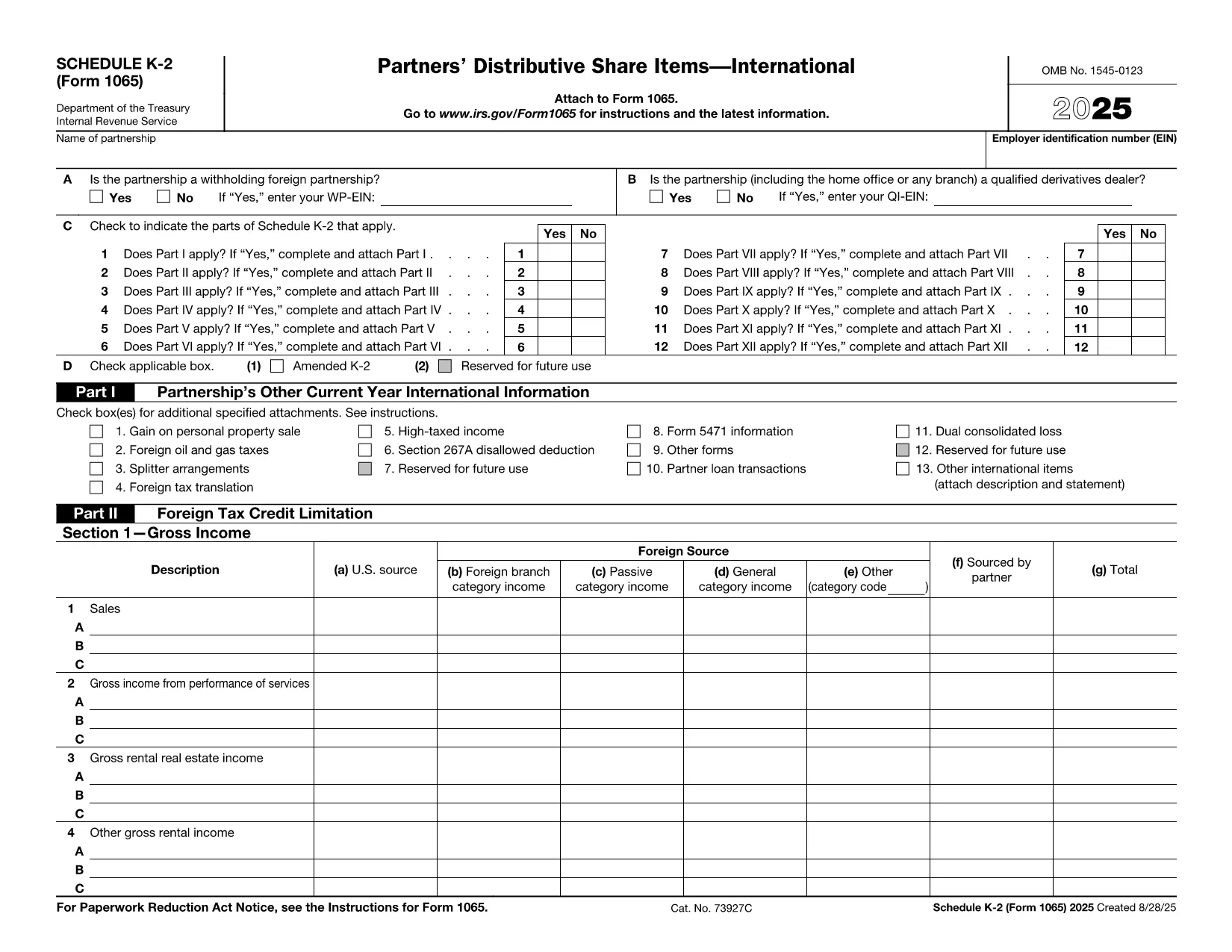
Form K‑2 (Schedule K‑2) is part of the U.S. partnership return (Form 1065) and reports international tax items that flow through to the partners. It is required for partnerships with foreign income, assets, or activities and must be filed together with Schedule K‑1.

How to Fill Out Form K‑2 with Formize

Instead of downloading the PDF and opening it in a separate editor, simply click the "Fill out this form" button on this page. The Formize PDF Filler app will load in your browser, giving you a fully fillable PDF form that you can complete in minutes.

Common Mistakes to Avoid on Form K‑2

  • Entering U.S. dollar amounts in foreign currency fields – always use the correct currency conversion column.
  • Omitting the required foreign tax credit details on Part III.
  • Leaving any schedule reference boxes blank; the IRS rejects incomplete schedules.

Where to Submit the Completed Form

After you finish, download the completed PDF and attach it to your Form 1065 filing in the e‑file system or mail it with the paper return to the IRS Service Center indicated in the Form 1065 instructions.

Benefits of Using the Formize PDF Filler

• No software installation – works in any modern browser.
• Automatic saving, so you never lose entered data.
• Built‑in validation helps you avoid common errors.
• Download or print the final PDF instantly.

Ready to start? Click the button below and let Formize handle the rest.

निर्देश

सामान्य प्रश्न
  • Do I need to install any software to use the Formize PDF Filler?

    No. The filler runs entirely in your web browser, so there’s nothing to install.

  • Is the Form K‑2 PDF on Formize secure?

    Yes. All data is processed locally in your browser and is not stored on our servers unless you choose to save it.

  • Can I edit the form after I download it?

    Absolutely. The downloaded PDF remains fully editable with any standard PDF editor if you need to make changes later.

  • What if I make a mistake while filling out the form?

    Use the "Undo" button or simply edit the field again. Formize also highlights fields that fail validation.

  • Do I need a separate Schedule K‑1 for each partner?

    Yes. Schedule K‑2 reports partnership‑level international items, while each partner receives a Schedule K‑1 reflecting their share.

  • Is there a fee to use the Formize filler for Form K‑2?

    Filling out the form on Formize is free for standard PDF forms like Form K‑2.

  • Can I submit the form directly to the IRS from Formize?

    Formize creates a finished PDF that you can upload to the IRS e‑file portal or attach to a paper return.

कैसे करें

Form K-2 PDF को मुफ़्त में, ऑनलाइन 5 आसान स्टेप्स में कैसे भरें:

  1. 1
    Open the Fillable Form
    Click the "Fill out this form" button on the page. The Formize PDF Filler will open directly in your browser.
  2. 2
    Load the Form
    Wait a few seconds while the Form K‑2 PDF loads into the online editor.
  3. 3
    Complete Each Field
    Enter the required information in every highlighted field. Use the built‑in help icons for guidance on complex items.
  4. 4
    Review and Validate
    Click the "Validate" button to let Formize check for missing or incorrectly formatted data.
  5. 5
    Save or Download
    When you’re satisfied, download the completed PDF or save it to your cloud storage for later submission.
पीडीएफ फिलर एप तैयार करें
के बारे में

कर प्रपत्र

Form K-2 PDF कर प्रपत्रों में से एक है, जो प्रासंगिक कर प्राधिकरण को करों से संबंधित जानकारी की रिपोर्ट करने के लिए उपयोग किए जाने वाले दस्तावेज़ हैं। संघीय, राज्य और स्थानीय कर रूपों सहित विभिन्न प्रकार के टैक्स फॉर्म हैं, जो करदाता की परिस्थितियों और स्थान के आधार पर भिन्न हो सकते हैं।

विशेषताएं

पीडीएफ भराव

पीडीएफ फॉर्म ऑनलाइन भरने का सबसे आसान तरीका

  • जल्दी से Form K-2 PDF भरें
    Form K-2 PDF को जल्दी से ऑनलाइन भरने का कोई तरीका खोज रहे हैं? हमारे ऑनलाइन नि:शुल्क पीडीएफ फॉर्म फिलर के साथ, आप एक मिनट से भी कम समय में इस पीडीएफ दस्तावेज़ को संपादित करने और भरने का तरीका जानेंगे।
  • ऑनलाइन पीडीएफ संपादक का उपयोग करना आसान है
    पीडीएफ फाइलों को प्रिंट करने से तंग आ गए हैं ताकि आप उन्हें फिर से स्कैन करने और उन्हें वापस भेजने से पहले संपादित कर सकें? PDF दस्तावेज़ों को निःशुल्क ऑनलाइन संपादित करें। समय और कागज बचाने के लिए हमारे ऑनलाइन पीडीएफ संपादक का प्रयोग करें।
  • महान उपकरण, सभी प्लेटफार्म
    आश्चर्य है कि मैक पर Form K-2 PDF कैसे भरें, या शायद पीडीएफ फिलर का मुफ्त में उपयोग कैसे करें? हमारे ऑनलाइन पीडीएफ टूल सभी प्लेटफॉर्म पर काम करते हैं।
  • सुरक्षित फ़ाइल भंडारण
    पूर्ण की गई "Form K-2 PDF" फ़ाइलें Amazon क्लाउड होस्टिंग द्वारा प्रबंधित एक सुरक्षित डेटाबेस में संग्रहीत की जाती हैं। आप कभी भी अपनी फाइलों को हमारे सिस्टम से हटा सकते हैं। किसी भी स्थिति में, ये फ़ाइलें 24 घंटे के बाद स्वतः हटा दी जाती हैं।
  • {कीवर्ड} से चैट करें
    Chatize पर "Form K-2 PDF" के साथ चैट करें, जो एक निःशुल्क पीडीएफ रीडर सहायक है। प्रश्न पूछें और "Form K-2 PDF" से उत्तर प्राप्त करें। बस ऊपर दस्तावेज़ के साथ चैट करें बटन पर क्लिक करें।

फ़िलिंग सत्र मिटाएँ

चयनित फ़िलिंग सत्र को मिटाएँ? इस स्थिति में, फ़ॉर्म को पूरा करने में आपकी प्रगति खो जाएगी।

संपादन सत्र हटाएँ

चयनित संपादन सत्र हटाएँ? इस स्थिति में, फ़ॉर्म बनाने और संपादित करने में आपकी प्रगति नष्ट हो जाएगी।