
hamburger-menu icon
भाषा का चयन करें

Request Extension Form – Fillable PDF

  1. देश अमेरीका
  2. भाषा अंग्रेज़ी
  3. गतिविधि करों
  4. विभाग IRS
फार्म को भरो
Request Extension Form – Fillable PDF

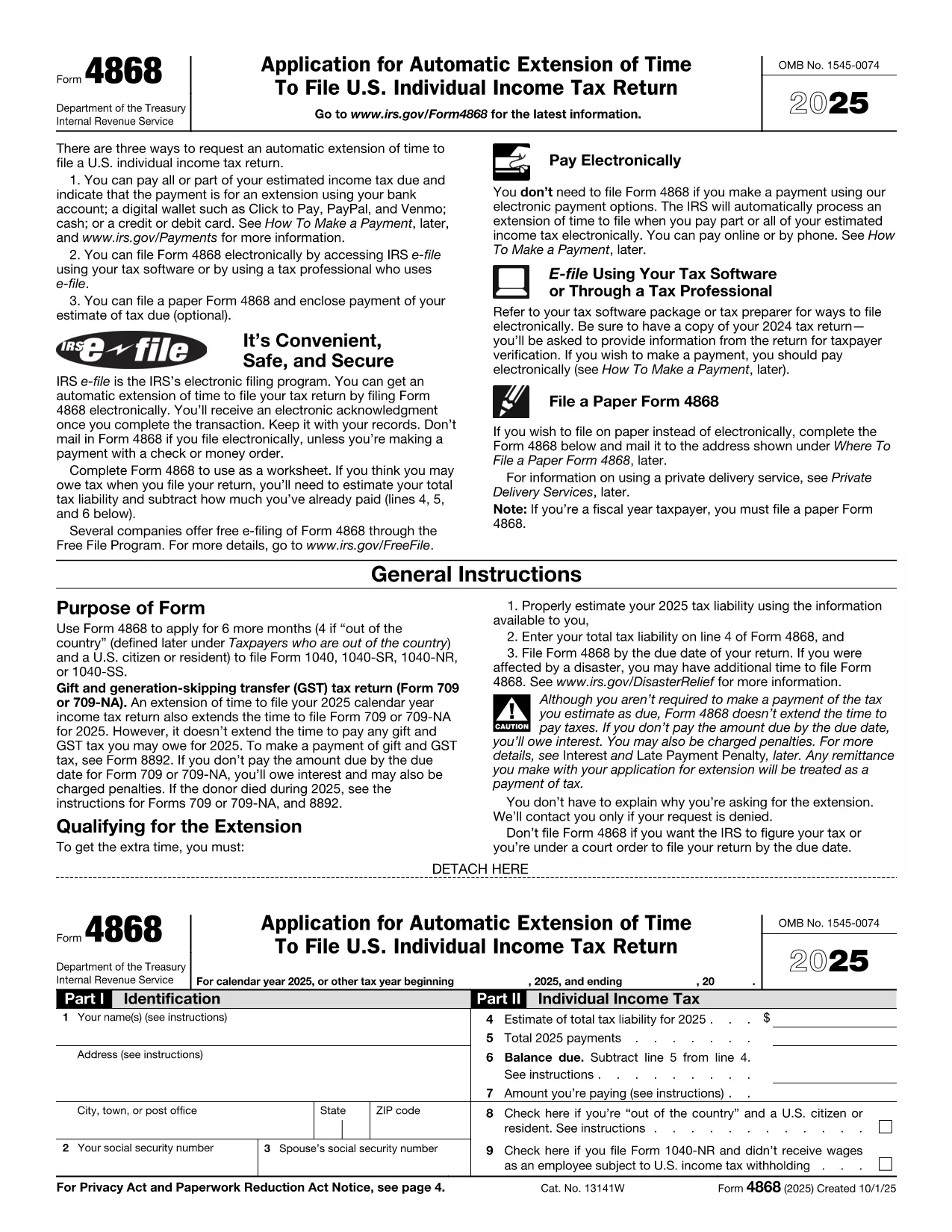
Need more time to file your tax return? The Request Extension Form (IRS Form 4868) gives you an automatic six‑month extension when filed correctly. With Formize’s fillable PDF you can complete the form directly in your browser—no Adobe Acrobat or other editor required.

What Is the Request Extension Form?

Form 4868 is the official IRS application for an automatic extension of time to file an individual income‑tax return (Form 1040). It is simple, consists of just a few fields, and can be filed electronically or mailed to the IRS.

How to Fill Out the Form Using Formize

Follow the step‑by‑step guide below. The process is fast, secure, and works on any device.

Common Mistakes to Avoid

  • Leaving the estimated tax liability blank – the IRS requires an estimate.
  • Entering an incorrect Social Security Number.
  • Forgetting to sign the form; an unsigned Form 4868 will be rejected.
  • Submitting after the original filing deadline; the extension must be filed by the due date.

Where to Submit the Completed Form

You have two options:

  1. Electronic filing: Use the IRS e‑file system or a tax‑software provider that supports Form 4868.
  2. Mail: Send the signed PDF to the address listed in the IRS mailing instructions for your state.

Need More Help?

Review the official IRS instructions for detailed guidance, or contact a qualified tax professional.

सामान्य प्रश्न
  • Do I need to pay my taxes when I file Form 4868?

    No. Form 4868 only extends the filing deadline. Any tax owed is still due by the original due date to avoid interest and penalties.

  • Can I file Form 4868 electronically?

    Yes. The IRS accepts electronic submissions through its e‑file system or via most tax‑software programs.

  • How long does the extension last?

    The automatic extension gives you six additional months, typically moving the deadline from April 15 to October 15.

  • What if I miss the extension deadline?

    If you file after the original deadline, the IRS may assess a failure‑to‑file penalty. It’s best to submit Form 4868 on or before the due date.

  • Is Form 4868 the same for businesses?

    No. Businesses use Form 7004 for a filing extension. Form 4868 is only for individual income‑tax returns (Form 1040).

  • Can I use the same extension form for state taxes?

    State tax extensions are separate. Check your state’s revenue department for the appropriate form.

  • Do I need to include a payment with the extension request?

    Including a payment is optional but recommended. If you underpay, interest and penalties may accrue on the unpaid balance.

  • What if I need more than six months?

    The IRS does not grant extensions beyond six months for individual returns. You would need to file an amended return after the extended deadline.

कैसे करें

request extension form को मुफ़्त में, ऑनलाइन 5 आसान स्टेप्स में कैसे भरें:

  1. 1
    Step 1 – Click the Fill‑out Button
    On this page, click the bright “Fill out this form” button. The Formize PDF Filler app will launch in a new tab.
  2. 2
    Step 2 – Wait for the Formize PDF Filler to Load
    The fillable PDF loads in seconds. No download or installation is required.
  3. 3
    Step 3 – Complete All Required Fields
    Enter your name, Social Security Number, address, and estimated tax liability. The form validates data in real time.
  4. 4
    Step 4 – Review and Sign
    Double‑check every entry, then add your electronic signature using the built‑in signature tool.
  5. 5
    Step 5 – Save or Submit
    When finished, download the completed PDF or use the “Submit to IRS” option if you prefer electronic filing.
पीडीएफ फिलर एप तैयार करें
के बारे में

संघीय कर प्रपत्र

request extension form संघीय कर प्रपत्रों में से एक है जो संयुक्त राज्य अमेरिका में आंतरिक राजस्व सेवा (आईआरएस) के साथ संघीय आय करों की रिपोर्ट करने और दाखिल करने के लिए उपयोग किए जाने वाले दस्तावेज़ हैं। इन फॉर्मों का उपयोग व्यक्तियों, व्यवसायों और संगठनों द्वारा उनकी संघीय कर देयता की गणना के लिए आवश्यक आय, कटौती और अन्य प्रासंगिक जानकारी की रिपोर्ट करने के लिए किया जाता है।

सबसे अधिक इस्तेमाल किया जाने वाला संघीय कर फॉर्म फॉर्म 1040 है, जिसका उपयोग व्यक्तिगत करदाताओं द्वारा अपने व्यक्तिगत आयकर की रिपोर्ट करने के लिए किया जाता है। आमतौर पर उपयोग किए जाने वाले अन्य फॉर्म में साझेदारी के लिए फॉर्म 1065, फॉर्म 1120, और कर-मुक्त संगठनों के लिए फॉर्म 990

संघीय कर फॉर्म में आम तौर पर करदाताओं को आय के विभिन्न स्रोतों, जैसे वेतन, वेतन और टिप्स, साथ ही निवेश, किराये की संपत्तियों और अन्य स्रोतों से आय की रिपोर्ट करने की आवश्यकता होती है। फॉर्म करदाताओं को धर्मार्थ योगदान, बंधक ब्याज और स्वास्थ्य देखभाल व्यय जैसे विभिन्न खर्चों के लिए कटौती और क्रेडिट का दावा करने की अनुमति भी देते हैं।

संघीय कर फॉर्म को सही ढंग से और समय पर दाखिल करना महत्वपूर्ण है, क्योंकि ऐसा करने में विफलता के परिणामस्वरूप आईआरएस से जुर्माना और ब्याज शुल्क लिया जा सकता है।

विशेषताएं

पीडीएफ भराव

पीडीएफ फॉर्म ऑनलाइन भरने का सबसे आसान तरीका

  • जल्दी से request extension form भरें
    request extension form को जल्दी से ऑनलाइन भरने का कोई तरीका खोज रहे हैं? हमारे ऑनलाइन नि:शुल्क पीडीएफ फॉर्म फिलर के साथ, आप एक मिनट से भी कम समय में इस पीडीएफ दस्तावेज़ को संपादित करने और भरने का तरीका जानेंगे।
  • ऑनलाइन पीडीएफ संपादक का उपयोग करना आसान है
    पीडीएफ फाइलों को प्रिंट करने से तंग आ गए हैं ताकि आप उन्हें फिर से स्कैन करने और उन्हें वापस भेजने से पहले संपादित कर सकें? PDF दस्तावेज़ों को निःशुल्क ऑनलाइन संपादित करें। समय और कागज बचाने के लिए हमारे ऑनलाइन पीडीएफ संपादक का प्रयोग करें।
  • महान उपकरण, सभी प्लेटफार्म
    आश्चर्य है कि मैक पर request extension form कैसे भरें, या शायद पीडीएफ फिलर का मुफ्त में उपयोग कैसे करें? हमारे ऑनलाइन पीडीएफ टूल सभी प्लेटफॉर्म पर काम करते हैं।
  • सुरक्षित फ़ाइल भंडारण
    पूर्ण की गई "request extension form" फ़ाइलें Amazon क्लाउड होस्टिंग द्वारा प्रबंधित एक सुरक्षित डेटाबेस में संग्रहीत की जाती हैं। आप कभी भी अपनी फाइलों को हमारे सिस्टम से हटा सकते हैं। किसी भी स्थिति में, ये फ़ाइलें 24 घंटे के बाद स्वतः हटा दी जाती हैं।
  • {कीवर्ड} से चैट करें
    Chatize पर "request extension form" के साथ चैट करें, जो एक निःशुल्क पीडीएफ रीडर सहायक है। प्रश्न पूछें और "request extension form" से उत्तर प्राप्त करें। बस ऊपर दस्तावेज़ के साथ चैट करें बटन पर क्लिक करें।

फ़िलिंग सत्र मिटाएँ

चयनित फ़िलिंग सत्र को मिटाएँ? इस स्थिति में, फ़ॉर्म को पूरा करने में आपकी प्रगति खो जाएगी।

संपादन सत्र हटाएँ

चयनित संपादन सत्र हटाएँ? इस स्थिति में, फ़ॉर्म बनाने और संपादित करने में आपकी प्रगति नष्ट हो जाएगी।