
Izaberi jezik

Schedule C – Profit or Loss from Business (Fillable PDF)

  1. Zemlja SAD
  2. Jezik Engleski
  3. Aktivnost Porezi
  4. Odjel Porezna uprava
Schedule C – Profit or Loss from Business (Fillable PDF)

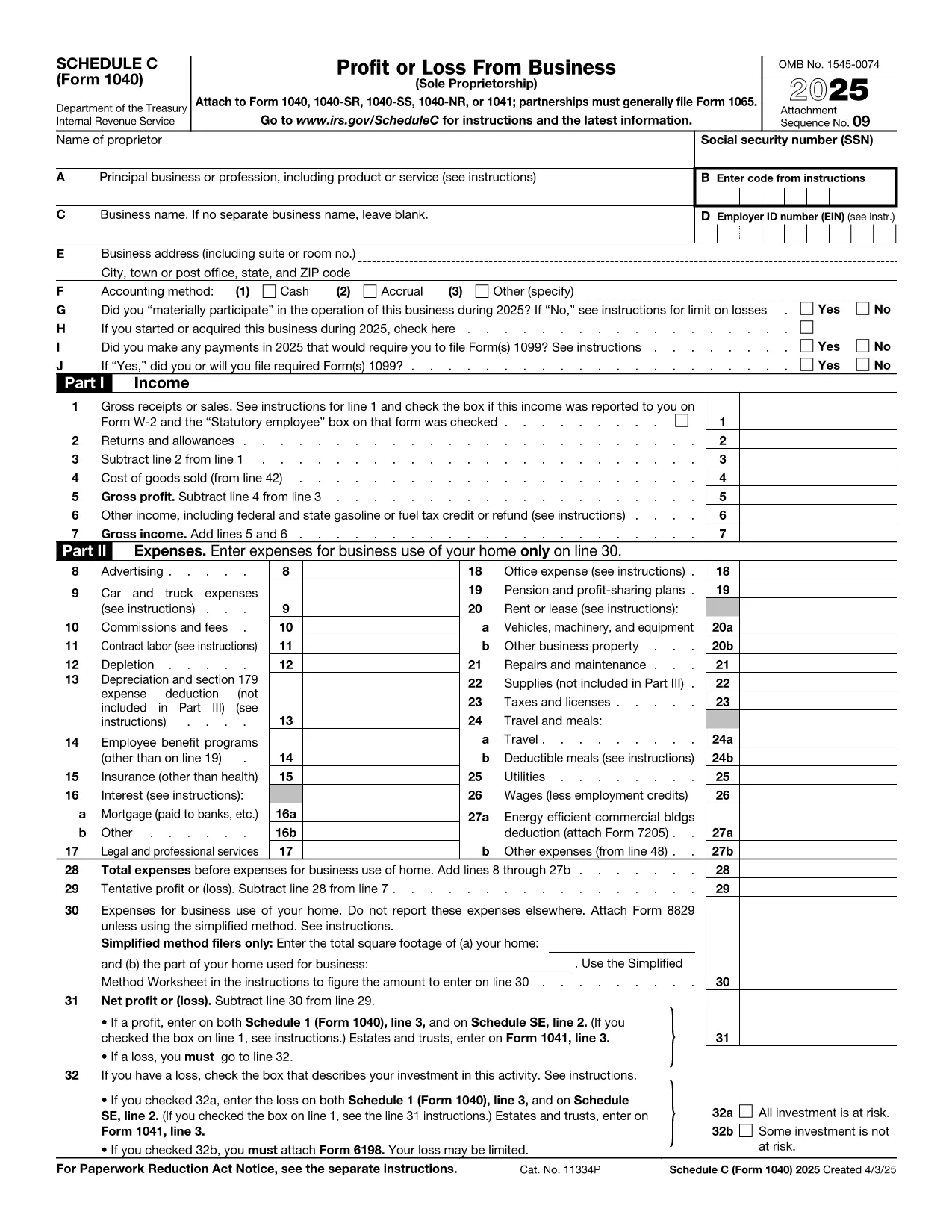
Schedule C (Form 1040) is the IRS form used by sole proprietors, single‑member LLCs, and independent contractors to report profit or loss from a business. Our fillable PDF lets you complete the form directly in your browser—no Adobe Acrobat or printer required.

What Is Schedule C and Who Needs It?

The Schedule C form captures income, expenses, cost of goods sold, and vehicle mileage for a trade or business. If you earned self‑employment income in the last tax year, you’ll likely need to file Schedule C with your Form 1040.

Key Sections of the Schedule C Form

  • Part I – Income: Gross receipts, returns, and other income.
  • Part II – Expenses: Advertising, car expenses, depreciation, supplies, and more.
  • Part III – Cost of Goods Sold: Beginning inventory, purchases, and ending inventory.
  • Part IV – Information About Your Vehicle: Mileage and expenses if you use a car for business.
  • Part V – Other Expenses: Any additional costs not listed in Part II.

How to Fill Out Schedule C Online

Instead of downloading the PDF and opening it in a desktop editor, simply click the “Fill out this form” button below. The Formize PDF Filler app will load in seconds, and you can start entering your numbers right away.

Common Mistakes & Tips

  • Double‑check that all income is reported—missed cash sales can trigger an audit.
  • Keep receipts for every expense; the IRS may request documentation.
  • Use the correct expense categories; mis‑classifying can reduce your deduction.
  • Don’t forget to fill out the vehicle information section if you claim mileage.
  • Review the totals in Part I and Part II to ensure they balance before attaching to Form 1040.

When you’re finished, you can download a completed PDF, print it, or submit it electronically with your tax return.

upute

PITANJA
  • Who must file Schedule C?

    Anyone who earned self‑employment income, operated a sole proprietorship, or had a single‑member LLC taxed as a disregarded entity must file Schedule C with their Form 1040.

  • Can I use Schedule C for multiple businesses?

    Yes. If you run more than one trade or profession, you file a separate Schedule C for each business and attach all of them to your return.

  • What expenses are deductible on Schedule C?

    Ordinary and necessary business expenses such as advertising, rent, utilities, supplies, vehicle costs, depreciation, home‑office expenses, and cost of goods sold are deductible.

  • Do I need a separate EIN for Schedule C?

    An EIN is not required; you can use your Social Security Number. However, an EIN is recommended if you have employees or want to keep personal and business IDs separate.

  • How do I report home‑office expenses?

    Complete Form 8829 to calculate the home‑office deduction, then transfer the amount to Schedule C, line 30.

  • What if I discover an error after filing?

    File Form 1040‑X, Amended U.S. Individual Income Tax Return, and attach a corrected Schedule C showing the updated numbers.

KAKO DA

Kako ispuniti Schedule C PDF besplatno, online u 5 jednostavnih koraka:

  1. 1
    Click the Fill Out Button
    Press the “Fill out this form” button on this page. The Formize PDF Filler will open in a new tab.
  2. 2
    Wait for the Filler to Load
    The app loads the fillable Schedule C PDF in seconds—no download required.
  3. 3
    Enter Your Information
    Complete each field, following the on‑screen prompts for income, expenses, and vehicle data.
  4. 4
    Review and Validate
    Use the built‑in calculator to verify totals and correct any errors before saving.
  5. 5
    Save, Print or E‑File
    Download the finished PDF, print a hard copy, or attach it to your electronic tax filing.
Aplikacija Formize PDF Filler
OKO

Porezni obrasci

Schedule C PDF je jedan od Poreznih obrazaca koji su dokumenti koji se koriste za prijavu informacija povezanih s porezima relevantnom poreznom tijelu. Postoje različite vrste poreznih obrazaca, uključujući savezne, državne i lokalne porezne obrasce, koji se mogu razlikovati ovisno o okolnostima i lokaciji poreznog obveznika.

ZNAČAJKE

PDF punilo

Najlakši način da ispunite Schedule C PDF online

  • Brzo ispunite Schedule C PDF
    Tražite način da brzo ispunite Schedule C PDF online? Uz naš online besplatni PDF obrazac za popunjavanje, znat ćete kako urediti i ispuniti ovaj pdf dokument za manje od minute.
  • Jednostavan za korištenje mrežni PDF uređivač
    Dosta vam je ispisivanja PDF datoteka kako biste ih mogli uređivati ​​prije ponovnog skeniranja i slanja natrag? Uređujte PDF dokumente besplatno na mreži. Upotrijebite naš online uređivač pdf-ova kako biste uštedjeli vrijeme i papir.
  • Sjajni alati, sve platforme
    Pitate se kako ispuniti Schedule C PDF na Macu ili možda kako koristiti PDF filer besplatno? Naši online PDF alati rade na svim platformama.
  • Sigurno skladištenje datoteka
    Dovršene datoteke "Schedule C PDF" pohranjuju se u zaštićenu bazu podataka kojom upravlja Amazon Cloud hosting. Svoje datoteke možete izbrisati iz našeg sustava bilo kada. U svakom slučaju, te se datoteke automatski brišu nakon 24 sata.
  • Chat s Schedule C PDF
    Razgovarajte s "Schedule C PDF" na Chatize koji je besplatni pomoćnik za čitanje PDF-ova. Postavljajte pitanja i dobivajte odgovore od "Schedule C PDF". Samo kliknite gornji gumb Chat with Document.

Izbriši sesiju punjenja

Izbrisati odabranu sesiju punjenja? U tom će slučaju vaš napredak u ispunjavanju obrasca biti izgubljen.

Izbriši sesiju uređivanja

Izbrisati odabranu sesiju uređivanja? U tom će slučaju vaš napredak u stvaranju i uređivanju obrasca biti izgubljen.