
Izaberi jezik

IRS Schedule D – Fillable PDF for Capital Gains & Losses

  1. Zemlja SAD
  2. Jezik Engleski
  3. Aktivnost Porezi
  4. Odjel Porezna uprava
IRS Schedule D – Fillable PDF for Capital Gains & Losses

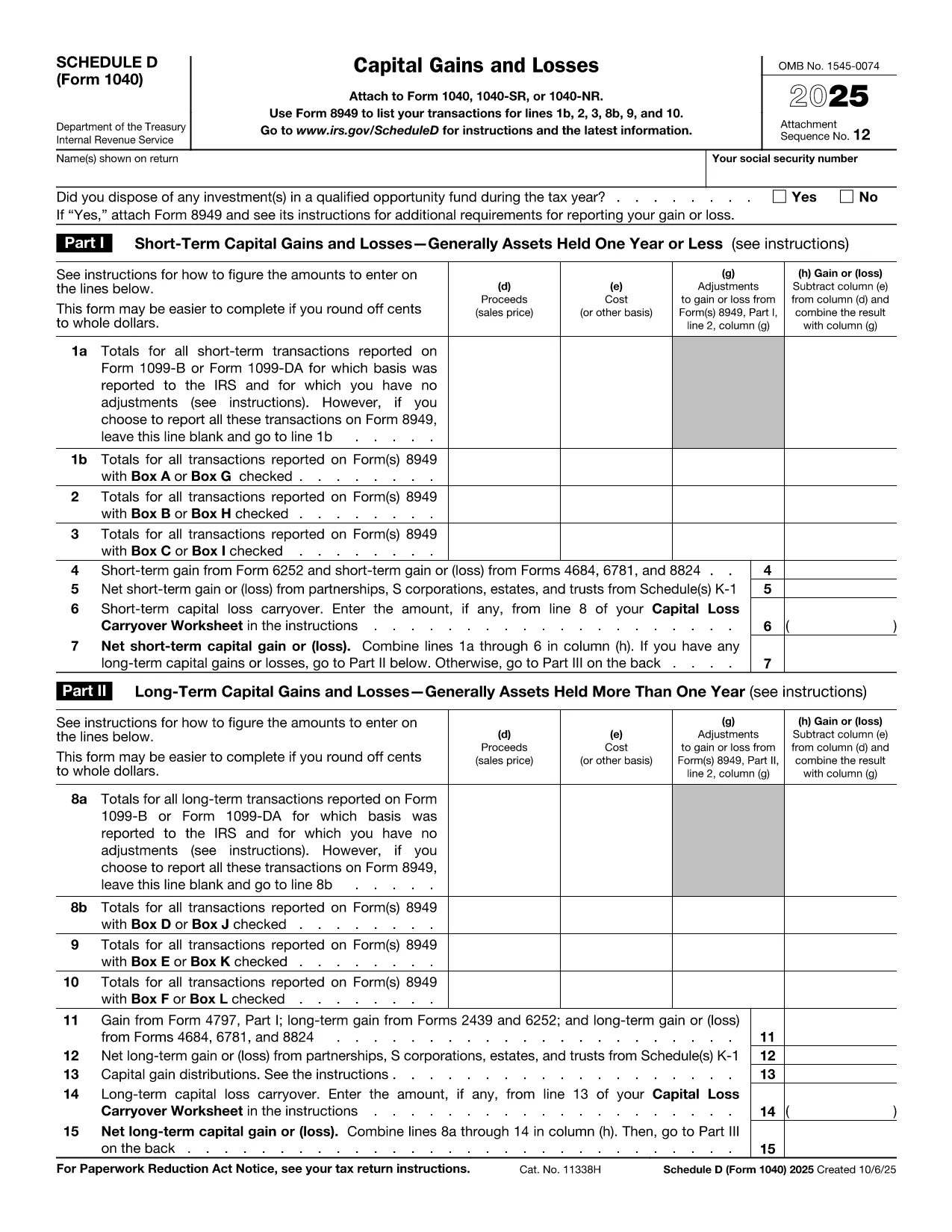
Schedule D (Form 1040SD) is the IRS worksheet used to report capital gains and losses from the sale of stocks, bonds, real estate, and other investment assets. Whether you’re a first‑time filer or a seasoned investor, a correctly completed Schedule D can lower your tax bill and keep the IRS happy.

Formize.com offers a fillable, web‑based PDF version of Schedule D. No need to download a PDF editor – simply click the Fill out this form button, wait for the Formize PDF Filler to load, and start entering your numbers.

What Is Schedule D and Who Needs It?

Schedule D is required when you have:

  • Capital gains from the sale of stocks, mutual funds, or other securities.
  • Capital losses that you want to deduct against gains.
  • Transactions involving collectibles, real estate, or crypto‑currency that are not reported on Form 8949.

If any of these apply to you, you must attach Schedule D to your Form 1040.

How to Fill Out Schedule D Using Formize

Follow the simple steps below to complete the form online. The Formize PDF Filler automatically saves your progress, validates numeric fields, and lets you download a printable PDF when you’re done.

Common Mistakes & Tips for a Clean Submission

Even small errors can delay processing. Keep these tips in mind:

  • Double‑check totals: The sum of short‑term and long‑term gains must match the totals on Form 8949.
  • Use the correct filing status: Your Schedule D totals feed into line 7 of Form 1040.
  • Don’t leave blanks: Enter “0” for any section that does not apply.
  • Review carry‑over losses: If you have a loss carryover from a previous year, include it on line 16.

When you’re ready, click the button below, fill the fields, review your entries, and download the completed Schedule D.

Fill out this form

upute

PITANJA
  • Do I need Schedule D if I only have a few stock trades?

    Yes. Any sale of capital assets that results in a gain or loss must be reported on Schedule D, even if you have only one transaction.

  • Can I use the Formize filler on a mobile device?

    Absolutely. The PDF Filler works in modern browsers on smartphones and tablets, so you can complete Schedule D on the go.

  • What if I made a mistake after downloading the PDF?

    You can reopen the same Formize link, re‑enter the corrected data, and download a new PDF. The filler does not store personal data after you close the session.

  • Is the fillable Schedule D free?

    Yes. Formize offers the PDF filler for Schedule D at no cost. There are no hidden fees or subscription requirements.

  • How do I report a capital loss carryover?

    Enter the carryover amount on line 16 of Schedule D. The Formize filler includes a dedicated field for this entry.

  • Do I still need to attach Form 8949?

    If you have detailed transactions, you must attach Form 8949. Schedule D summarizes the totals from Form 8949.

  • What if my broker provides a 1099‑B with totals already calculated?

    You can copy the totals directly into Schedule D. Ensure the amounts match the 1099‑B and reconcile any differences on Form 8949.

  • Can I e‑file Schedule D using the filled PDF?

    Most tax software accepts the PDF data when you import your return. If your software does not, you can manually enter the numbers from the completed Schedule D.

KAKO DA

Kako ispuniti Schedule D PDF besplatno, online u 5 jednostavnih koraka:

  1. 1
    Click the Fill Out Button
    Press the "Fill out this form" button on the page. This opens the Formize PDF Filler in a new tab.
  2. 2
    Wait for the Filler to Load
    The Formize app loads the Schedule D PDF and makes every field editable. No download or extra software is required.
  3. 3
    Enter Your Information
    Type your capital gains, losses, and other required numbers directly into the highlighted fields. The tool validates numbers as you type.
  4. 4
    Review and Confirm
    Use the built‑in summary to verify totals. Correct any highlighted errors before proceeding.
  5. 5
    Save or Print
    When everything looks good, click "Download PDF" to save a completed Schedule D or print it to attach to your tax return.
Aplikacija Formize PDF Filler
OKO

Obrasci Porezne uprave (IRS).

Schedule D PDF je jedan od službenih poreznih obrazaca koji se koriste u Sjedinjenim Državama za prijavu prihoda, traženje odbitaka i kredita, izračunavanje poreznih obveza i ispunjavanje drugih poreznih obveza. Porezna uprava savezna je agencija odgovorna za upravljanje i provedbu zakona o unutarnjim prihodima u Sjedinjenim Državama.

Evo nekoliko primjera obrazaca Porezne uprave:

Obrazac 1040: Ovo je primarni obrazac za prijavu poreza na dohodak pojedinaca koji koristi većina poreznih obveznika. Koristi se za prijavu različitih vrsta prihoda, traženje odbitaka i kredita, izračunavanje porezne obveze te utvrđivanje duguje li porezni obveznik dodatni porez ili ima pravo na povrat.

Obrazac 1099: Postoje različite varijacije obrasca 1099, kao što je 1099-MISC, 1099-INT, 1099-DIV, itd. Ovi se obrasci koriste za prijavu prihoda koje pojedinci ili tvrtke ostvaruju iz različitih izvora osim zaposlenja, kao što je samozapošljavanje prihod, prihod od kamata, prihod od dividende i prihod od najma.

Obrazac W-2: Ovaj obrazac koriste poslodavci za prijavu plaća zaposlenika i poreza zadržani od njihove plaće. Zaposlenici koriste informacije na obrascu W-2 za ispunjavanje svojih pojedinačnih poreznih prijava.

Obrazac 941: Poslodavci koriste ovaj obrazac za prijavu poreza na zaposlenje, uključujući savezni porez na dohodak po odbitku, porez na socijalno osiguranje i porez na Medicare za svoje zaposlenike.

Obrazac 1065: Ovaj obrazac koriste partnerstva za prijavu svojih prihoda, odbitaka i poreznih obveza. Sama partnerstva ne plaćaju porez na dohodak; umjesto toga, partneri prijavljuju svoj udio u prihodu od partnerstva u svojim pojedinačnim poreznim prijavama.

Obrazac 1120: Ovo je obrazac za prijavu poreza na dobit koju koriste C korporacije za prijavu svojih prihoda, odbitke i porezne obveze.

Obrazac 990: Ovaj obrazac koriste organizacije oslobođene plaćanja poreza, kao što su neprofitne i dobrotvorne organizacije, prijaviti svoje financijske podatke, aktivnosti i usklađenost s poreznim zakonima.

Obrazac 8862: Ovaj obrazac koriste porezni obveznici koji su prethodno zatražili olakšicu od poreza na zarađeni dohodak (EITC) ali ga je zabranio, a sada ga ponovno želim zatražiti.

Ovo je samo nekoliko primjera brojnih obrazaca porezne uprave koji postoje za ispunjavanje raznih poreznih obveza. Specifični obrasci potrebni za pojedinca ili tvrtku ovise o njihovim jedinstvenim okolnostima, izvorima prihoda i odbicima. Preporučljivo je konzultirati službenu web stranicu Porezne uprave (www.irs.gov) ili potražiti profesionalni porezni savjet kako biste dobili točne i ažurne informacije u vezi s određenom poreznom upravom obrasce relevantne za vašu poreznu situaciju.

ZNAČAJKE

PDF punilo

Najlakši način da ispunite Schedule D PDF online

  • Brzo ispunite Schedule D PDF
    Tražite način da brzo ispunite Schedule D PDF online? Uz naš online besplatni PDF obrazac za popunjavanje, znat ćete kako urediti i ispuniti ovaj pdf dokument za manje od minute.
  • Jednostavan za korištenje mrežni PDF uređivač
    Dosta vam je ispisivanja PDF datoteka kako biste ih mogli uređivati ​​prije ponovnog skeniranja i slanja natrag? Uređujte PDF dokumente besplatno na mreži. Upotrijebite naš online uređivač pdf-ova kako biste uštedjeli vrijeme i papir.
  • Sjajni alati, sve platforme
    Pitate se kako ispuniti Schedule D PDF na Macu ili možda kako koristiti PDF filer besplatno? Naši online PDF alati rade na svim platformama.
  • Sigurno skladištenje datoteka
    Dovršene datoteke "Schedule D PDF" pohranjuju se u zaštićenu bazu podataka kojom upravlja Amazon Cloud hosting. Svoje datoteke možete izbrisati iz našeg sustava bilo kada. U svakom slučaju, te se datoteke automatski brišu nakon 24 sata.
  • Chat s Schedule D PDF
    Razgovarajte s "Schedule D PDF" na Chatize koji je besplatni pomoćnik za čitanje PDF-ova. Postavljajte pitanja i dobivajte odgovore od "Schedule D PDF". Samo kliknite gornji gumb Chat with Document.

Izbriši sesiju punjenja

Izbrisati odabranu sesiju punjenja? U tom će slučaju vaš napredak u ispunjavanju obrasca biti izgubljen.

Izbriši sesiju uređivanja

Izbrisati odabranu sesiju uređivanja? U tom će slučaju vaš napredak u stvaranju i uređivanju obrasca biti izgubljen.