
Izaberi jezik

IRS Form 8863 – Education Credits for College Students

  1. Zemlja SAD
  2. Jezik Engleski
  3. Aktivnost Porezi
  4. Odjel IRS
IRS Form 8863 – Education Credits for College Students

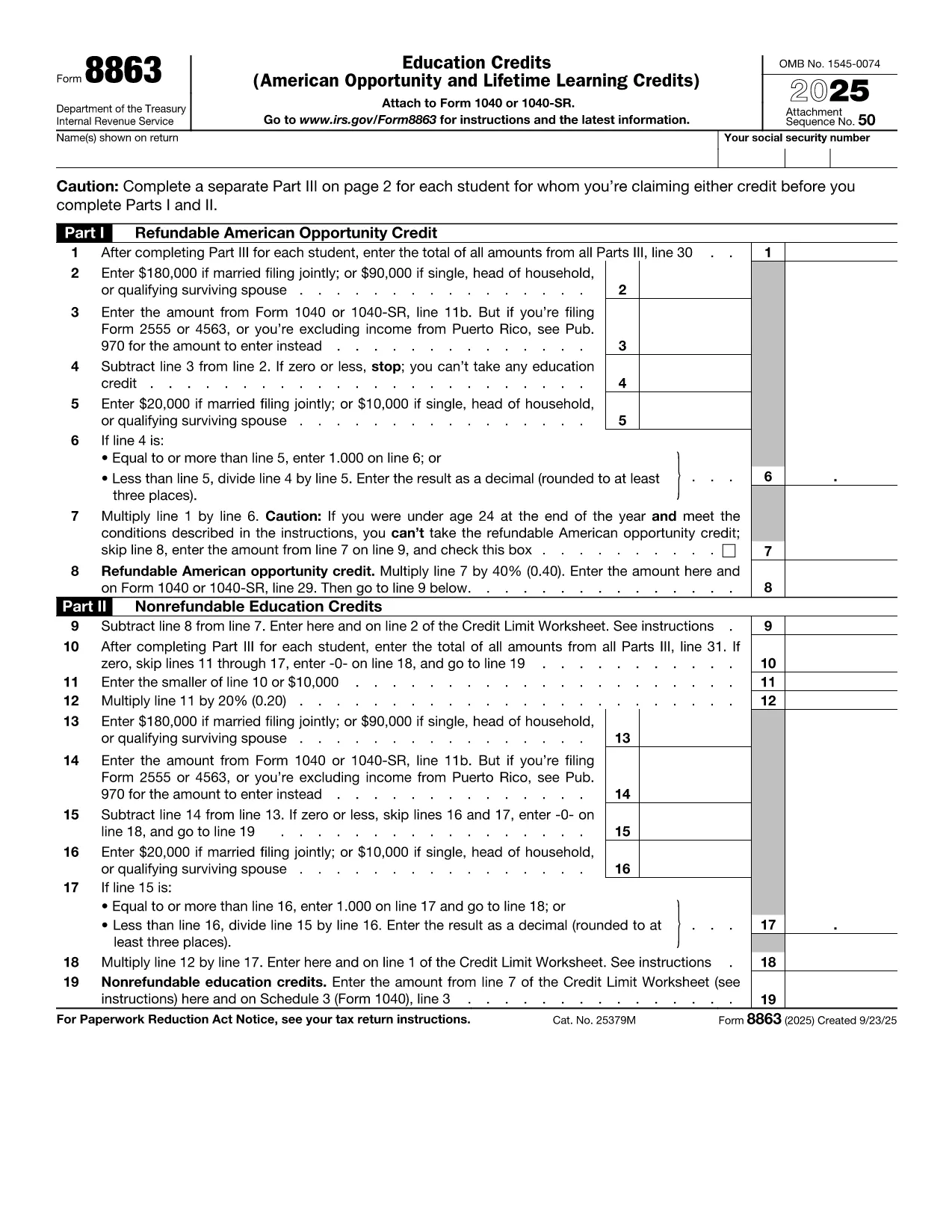
College tuition can be a big expense, but the IRS offers tax credits that can put money back in your pocket. IRS Form 8863Education Credits (American Opportunity and Lifetime Learning) – is the official form you need to claim these credits. With Formize, you can fill out the PDF directly in your browser, save time, and avoid printing errors.

What Is IRS Form 8863?

Form 8863 is used to claim two major education tax credits:

  • American Opportunity Credit (AOC) – up to $2,500 per eligible student for the first four years of post‑secondary education.
  • Lifetime Learning Credit (LLC) – up to $2,000 per tax return for any level of post‑secondary education, including courses to improve job skills.

The form is required for both credits and must be attached to your Form 1040 when you file.

How to Fill Out the Form Using Formize

Instead of downloading the PDF and opening a separate editor, simply click the "Fill out this form" button on this page. The Formize PDF Filler app will load in seconds, letting you:

  1. Enter personal information, school details, and qualified expenses.
  2. Automatically calculate the credit amount.
  3. Save your progress or download a completed PDF to attach to your tax return.

The process is secure, free, and works on any device.

Eligibility Requirements for College Students

To qualify for the credits on Form 8863, you must meet these criteria:

  • Be enrolled at an eligible educational institution.
  • Be pursuing a degree or recognized credential (AOC) or taking any post‑secondary course (LLC).
  • Have qualified tuition and related expenses paid during the tax year.
  • Not have exceeded the income limits for the credit.

Common Mistakes to Avoid

  • Incorrect Social Security Number: Double‑check both yours and the student’s SSN.
  • Double‑claiming expenses: You can’t claim the same expenses for both the AOC and the Lifetime Learning Credit.
  • Leaving fields blank: Even if a question doesn’t apply, write “0” or “N/A” to avoid processing delays.
  • Missing signatures: Form 8863 requires the taxpayer’s signature; an unsigned form will be rejected.

Where to Submit the Completed Form

After you finish, download the filled PDF and attach it to your Form 1040 when filing electronically or by mail. If you e‑file, the PDF is automatically included with your return. For paper filing, mail the complete Form 1040 package to the IRS address listed in the IRS mailing instructions.

If you need additional help, consult the IRS Form 8863 instructions or contact your college’s financial aid office.

PITANJA
  • Which credit is better for me, the American Opportunity Credit or the Lifetime Learning Credit?

    The AOC offers a larger maximum credit ($2,500) but only for the first four years of college and requires at least half‑time enrollment. The LLC is smaller ($2,000) but can be used for any post‑secondary education, including part‑time courses.

  • Can I claim both credits in the same year?

    No. You must choose either the American Opportunity Credit or the Lifetime Learning Credit for each student in a tax year.

  • Do scholarships reduce the amount I can claim?

    Yes. Only qualified tuition and related expenses that are not covered by scholarships or grant money are eligible for the credit.

  • What if I make a mistake on the form after filing?

    You can file an amended return using Form 1040‑X. Attach a corrected Form 8863 and explain the changes.

  • Is there a deadline for submitting Form 8863?

    Form 8863 must be filed with your 2023 tax return, which is due April 15, 2024 (or the extended deadline if you filed for an extension).

  • Do I need a separate Form 8863 for each child in college?

    Yes. Each eligible student requires its own Form 8863 to claim the education credits.

  • Can I use Formize on a mobile device?

    Absolutely. The Formize PDF Filler works on smartphones and tablets, letting you complete the form anywhere.

  • Where can I find the official IRS instructions for Form 8863?

    Visit the IRS website at https://www.irs.gov/forms-pubs/about-form-8863 for the full instruction booklet.

KAKO DA

Kako ispuniti college student tax form besplatno, online u 5 jednostavnih koraka:

  1. 1
    Click the Fill‑out Button
    Press the blue “Fill out this form” button on this page. The Formize PDF Filler app will open in a new tab.
  2. 2
    Enter Your Information
    Complete every required field—personal data, school name, tuition paid, and any scholarships received.
  3. 3
    Review Calculations
    Formize automatically calculates the American Opportunity or Lifetime Learning credit based on the numbers you entered.
  4. 4
    Save or Download
    When you’re satisfied, click “Save” to store the form in your browser or “Download” to get a completed PDF ready for filing.
  5. 5
    Attach to Your Tax Return
    Include the filled Form 8863 with your Form 1040 when you e‑file or mail your paper return to the IRS.
Aplikacija Formize PDF Filler
OKO

Porezni obrasci

college student tax form je jedan od Poreznih obrazaca koji su dokumenti koji se koriste za prijavu informacija povezanih s porezima relevantnom poreznom tijelu. Postoje različite vrste poreznih obrazaca, uključujući savezne, državne i lokalne porezne obrasce, koji se mogu razlikovati ovisno o okolnostima i lokaciji poreznog obveznika.

ZNAČAJKE

PDF punilo

Najlakši način da ispunite college student tax form online

  • Brzo ispunite college student tax form
    Tražite način da brzo ispunite college student tax form online? Uz naš online besplatni PDF obrazac za popunjavanje, znat ćete kako urediti i ispuniti ovaj pdf dokument za manje od minute.
  • Jednostavan za korištenje mrežni PDF uređivač
    Dosta vam je ispisivanja PDF datoteka kako biste ih mogli uređivati ​​prije ponovnog skeniranja i slanja natrag? Uređujte PDF dokumente besplatno na mreži. Upotrijebite naš online uređivač pdf-ova kako biste uštedjeli vrijeme i papir.
  • Sjajni alati, sve platforme
    Pitate se kako ispuniti college student tax form na Macu ili možda kako koristiti PDF filer besplatno? Naši online PDF alati rade na svim platformama.
  • Sigurno skladištenje datoteka
    Dovršene datoteke "college student tax form" pohranjuju se u zaštićenu bazu podataka kojom upravlja Amazon Cloud hosting. Svoje datoteke možete izbrisati iz našeg sustava bilo kada. U svakom slučaju, te se datoteke automatski brišu nakon 24 sata.
  • Chat s college student tax form
    Razgovarajte s "college student tax form" na Chatize koji je besplatni pomoćnik za čitanje PDF-ova. Postavljajte pitanja i dobivajte odgovore od "college student tax form". Samo kliknite gornji gumb Chat with Document.

Izbriši sesiju punjenja

Izbrisati odabranu sesiju punjenja? U tom će slučaju vaš napredak u ispunjavanju obrasca biti izgubljen.

Izbriši sesiju uređivanja

Izbrisati odabranu sesiju uređivanja? U tom će slučaju vaš napredak u stvaranju i uređivanju obrasca biti izgubljen.