
Izaberi jezik

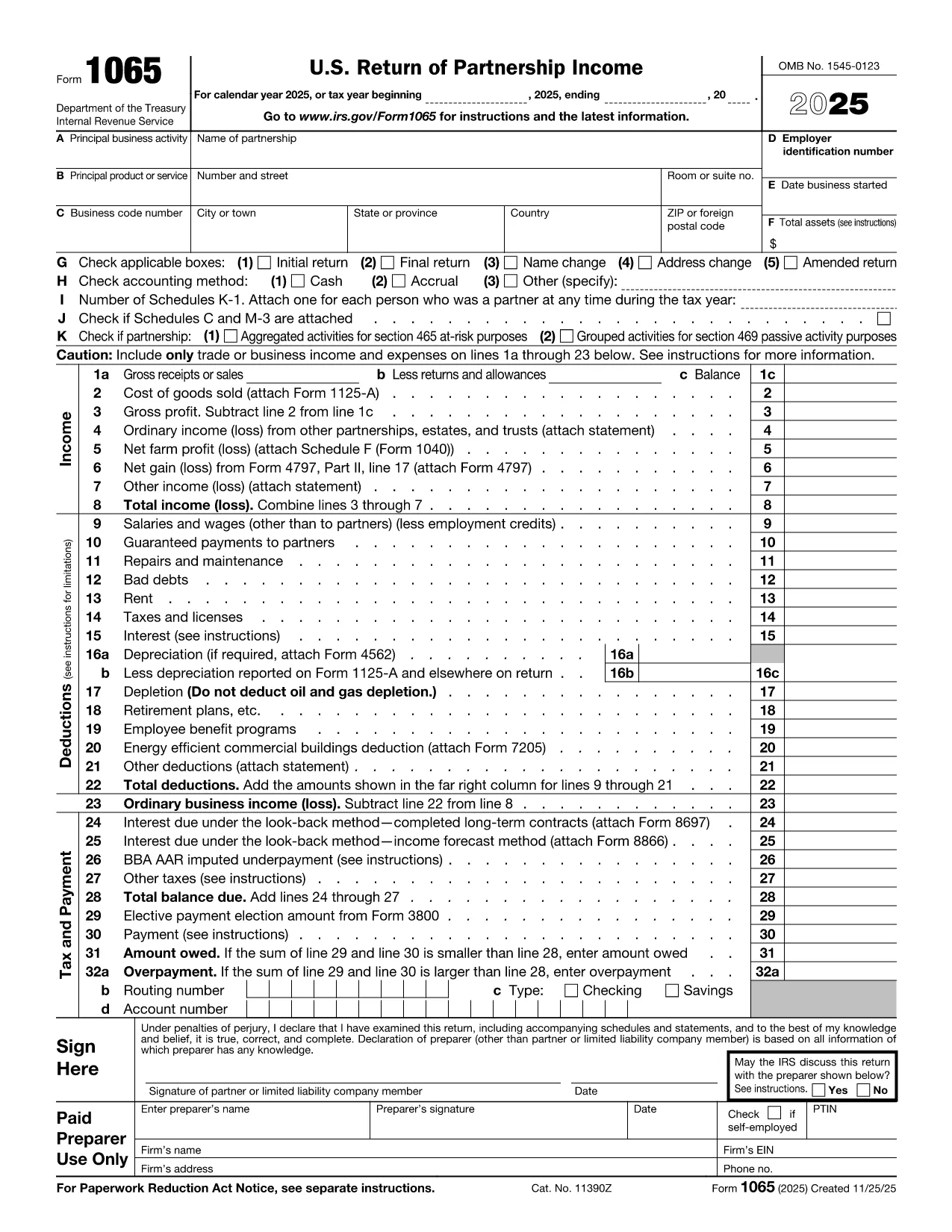
Fillable Legal Partnership Form (IRS Form 1065)

  1. Zemlja SAD
  2. Jezik Engleski
  3. Aktivnost Porezi
  4. Odjel IRS
Fillable Legal Partnership Form (IRS Form 1065)

When you form a partnership in the United States, the Internal Revenue Service requires you to file Form 1065 – U.S. Return of Partnership Income. Instead of printing, printing‑scanning, or using a bulky PDF editor, you can complete the official form directly in your browser with the Formize PDF Filler. This page provides everything you need to download, fill, and submit the legal partnership form quickly and accurately.

Why Use a Fillable PDF for Your Partnership Form?

  • Instant Access: The PDF is hosted by the IRS, ensuring you always have the latest version.
  • Online Editing: No need for Adobe Acrobat or other paid software – Formize loads the form in a secure web app.
  • Data Accuracy: Built‑in field validation reduces errors that could delay processing.
  • Secure Storage: Your data stays in your browser until you choose to download or submit.

How to Complete the Form with Formize PDF Filler

Follow the simple steps below to fill out the partnership form directly on this page:

  1. Click the "Fill out this form" button below.
  2. Wait a few seconds while the Formize PDF Filler app loads the IRS Form 1065.
  3. Enter the required information in each fillable field (partner names, EIN, income, deductions, etc.).
  4. Use the Save button to download a completed copy for your records.
  5. Print or e‑file the PDF according to IRS instructions.

Common Mistakes & Tips for a Error‑Free Submission

  • Incorrect EIN: Double‑check the Employer Identification Number for each partner.
  • Missing Signatures: The form requires a signature from the partnership representative; the filler lets you add a digital signature.
  • Wrong Tax Year: Ensure the tax year selected matches your partnership’s fiscal year.
  • Overlooking Schedule K‑1: Each partner needs a Schedule K‑1; the filler highlights required sections.

By following these guidelines, you’ll avoid the most common filing delays.

Fill out this form

PITANJA
  • Do I need Adobe Acrobat to fill out Form 1065?

    No. Formize PDF Filler works in any modern browser, so you can fill the form without installing any software.

  • Is the fillable PDF the official IRS version?

    Yes. The PDF is linked directly from the IRS website, ensuring you have the current, official form.

  • Can I sign the partnership form electronically?

    Formize includes a digital signature field. After signing, you can download a PDF that meets IRS electronic‑signature requirements.

  • What if I make a mistake after saving?

    Simply reopen the saved PDF in Formize, edit the field, and re‑save. The original file remains unchanged until you overwrite it.

  • Do I need to print the form before filing?

    The IRS accepts both printed and electronically filed versions. Follow the filing instructions on the last page of Form 1065.

  • Is my data safe while using Formize?

    All data stays in your browser until you download the file. Formize does not store or share your information.

  • Can I use this form for a limited‑liability partnership (LLP)?

    Yes. Form 1065 is used for all partnership types, including LLPs, as long as the partnership is taxed as a partnership.

  • How often is the PDF updated?

    The IRS releases a new version each tax year. The link on this page points to the latest version available on the IRS site.

KAKO DA

Kako ispuniti partnership agreement PDF besplatno, online u 4 jednostavnih koraka:

  1. 1
    Click the Fill‑out Button
    Press the "Fill out this form" button on the page. This launches the Formize PDF Filler in a secure overlay.
  2. 2
    Wait for the App to Load
    The PDF loads within a few seconds. You’ll see the official IRS Form 1065 with all fillable fields highlighted.
  3. 3
    Enter Your Partnership Data
    Type directly into each field—partner names, EIN, income, deductions, etc. Validation checks help you avoid mistakes.
  4. 4
    Save or Download the Completed Form
    When you’re finished, click the "Save" button to download a completed PDF or print it for e‑filing.
Aplikacija Formize PDF Filler
OKO

Porezni obrasci

partnership agreement PDF je jedan od poreznih obrazaca koji su dokumenti koji se koriste za prijavu informacija o prihodima pojedinca ili tvrtke, odbicima i poreznim obvezama relevantnim poreznim vlastima. Ovi su obrasci nužni za usklađivanje s poreznim zakonima i ispunjavanje poreznih obveza. Porezni obrasci razlikuju se ovisno o zemlji i posebnim poreznim zahtjevima. Evo nekih uobičajenih vrsta poreznih obrazaca:

Individualni porezni obrasci: Ove obrasce koriste pojedinačni porezni obveznici za prijavu osobnog dohotka i traženje odbitaka, kredita i izuzeća. Primjeri uključuju obrazac 1040 u Sjedinjenim Američkim Državama ili obrazac povrata poreza za samoprocjenu u Ujedinjenom Kraljevstvu.

Poslovni porezni obrasci: Poslovni porezni obrasci koriste se od strane tvrtki, partnerstava ili samozaposlenih pojedinaca za prijavu poslovnih prihoda, troškova i drugih podataka povezanih s porezom. Primjeri uključuju obrazac iz Priloga C (Dobit ili gubitak od poslovanja) u Sjedinjenim Državama ili obrazac CT600 (Povrat poreza tvrtke) u Ujedinjenom Kraljevstvu.

Obrasci za porez na plaće: Ove obrasce koriste poslodavci za prijavu plaća, nadnica i poreza zadržanih na plaćama svojih zaposlenika. Primjeri uključuju obrazac W-2 u Sjedinjenim Državama ili obrazac P60 u Ujedinjenom Kraljevstvu.

Obrasci za porez na promet: tvrtke koriste obrasce za porez na promet za prijavu i uplatu poreza na promet prikupljenog na oporezivu robu ili usluge. Posebni obrasci poreza na promet razlikuju se ovisno o jurisdikciji.

Obrasci za porez na dodanu vrijednost (PDV): PDV obrasci koriste se u zemljama koje nameću porez na dodanu vrijednost za prijavu i uplatu PDV-a prikupljenog od prodaje i traženje PDV kredita za kupnje. Primjeri uključuju obrasce za povrat PDV-a koji se koriste u mnogim zemljama.

Procijenjeni porezni obrasci: Procijenjeni porezni obrasci koriste se za prijavu i plaćanje procijenjenih poreza na prihod koji ne podliježe zadržavanju, kao što je prihod od samozapošljavanja ili prihod od ulaganja.

Ovo je samo nekoliko primjera od brojnih poreznih oblika koji mogu postojati. Konkretni potrebni obrasci ovise o poreznim zakonima i propisima u vašoj zemlji ili jurisdikciji. Važno je konzultirati se sa smjernicama porezne uprave ili potražiti stručni savjet kako biste utvrdili koji su obrasci primjenjivi u vašoj situaciji.

ZNAČAJKE

PDF punilo

Najlakši način da ispunite partnership agreement PDF online

  • Brzo ispunite partnership agreement PDF
    Tražite način da brzo ispunite partnership agreement PDF online? Uz naš online besplatni PDF obrazac za popunjavanje, znat ćete kako urediti i ispuniti ovaj pdf dokument za manje od minute.
  • Jednostavan za korištenje mrežni PDF uređivač
    Dosta vam je ispisivanja PDF datoteka kako biste ih mogli uređivati ​​prije ponovnog skeniranja i slanja natrag? Uređujte PDF dokumente besplatno na mreži. Upotrijebite naš online uređivač pdf-ova kako biste uštedjeli vrijeme i papir.
  • Sjajni alati, sve platforme
    Pitate se kako ispuniti partnership agreement PDF na Macu ili možda kako koristiti PDF filer besplatno? Naši online PDF alati rade na svim platformama.
  • Sigurno skladištenje datoteka
    Dovršene datoteke "partnership agreement PDF" pohranjuju se u zaštićenu bazu podataka kojom upravlja Amazon Cloud hosting. Svoje datoteke možete izbrisati iz našeg sustava bilo kada. U svakom slučaju, te se datoteke automatski brišu nakon 24 sata.
  • Chat s partnership agreement PDF
    Razgovarajte s "partnership agreement PDF" na Chatize koji je besplatni pomoćnik za čitanje PDF-ova. Postavljajte pitanja i dobivajte odgovore od "partnership agreement PDF". Samo kliknite gornji gumb Chat with Document.

Izbriši sesiju punjenja

Izbrisati odabranu sesiju punjenja? U tom će slučaju vaš napredak u ispunjavanju obrasca biti izgubljen.

Izbriši sesiju uređivanja

Izbrisati odabranu sesiju uređivanja? U tom će slučaju vaš napredak u stvaranju i uređivanju obrasca biti izgubljen.