
Izaberi jezik

Request Extension Form – Fillable PDF

  1. Zemlja SAD
  2. Jezik Engleski
  3. Aktivnost Porezi
  4. Odjel IRS
Request Extension Form – Fillable PDF

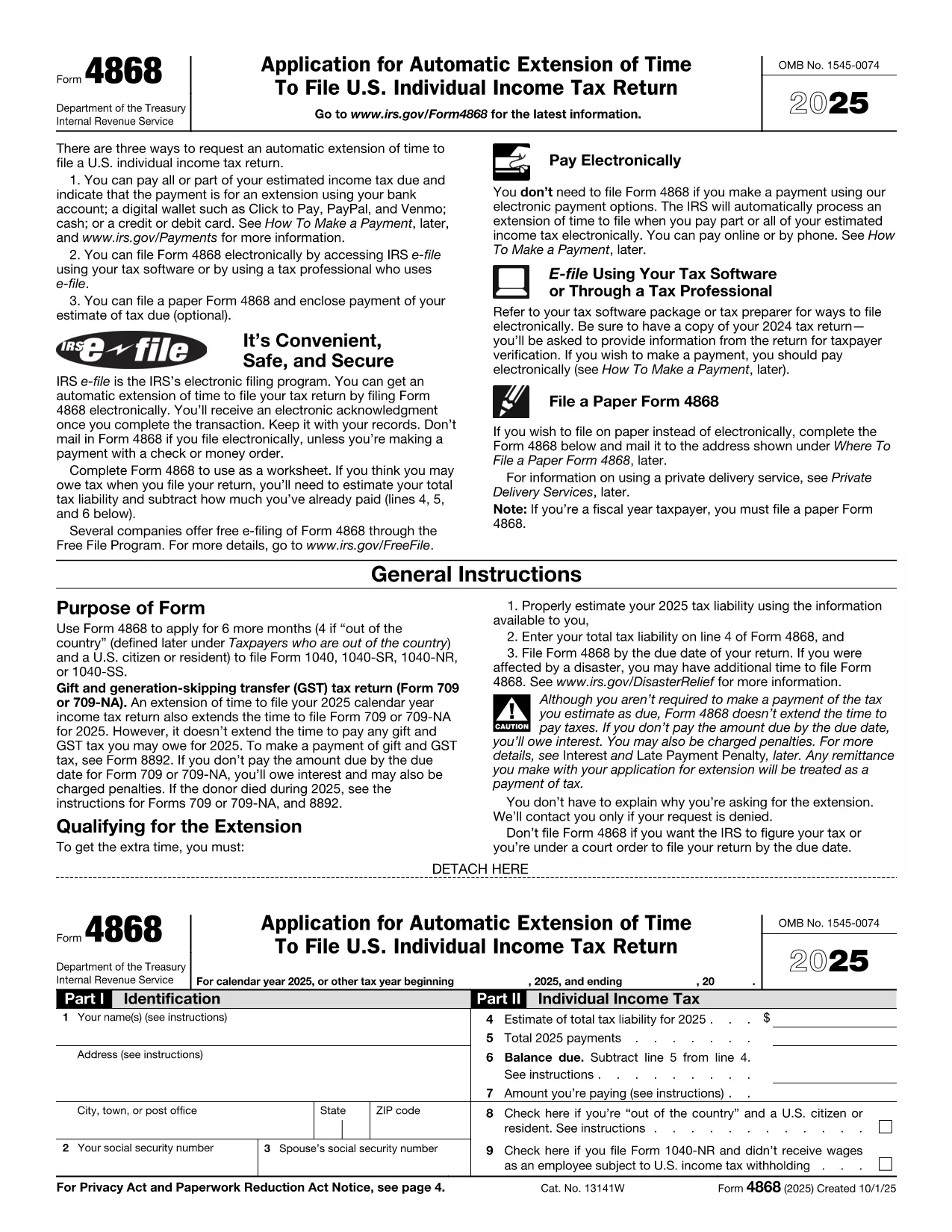
Need more time to file your tax return? The Request Extension Form (IRS Form 4868) gives you an automatic six‑month extension when filed correctly. With Formize’s fillable PDF you can complete the form directly in your browser—no Adobe Acrobat or other editor required.

What Is the Request Extension Form?

Form 4868 is the official IRS application for an automatic extension of time to file an individual income‑tax return (Form 1040). It is simple, consists of just a few fields, and can be filed electronically or mailed to the IRS.

How to Fill Out the Form Using Formize

Follow the step‑by‑step guide below. The process is fast, secure, and works on any device.

Common Mistakes to Avoid

  • Leaving the estimated tax liability blank – the IRS requires an estimate.
  • Entering an incorrect Social Security Number.
  • Forgetting to sign the form; an unsigned Form 4868 will be rejected.
  • Submitting after the original filing deadline; the extension must be filed by the due date.

Where to Submit the Completed Form

You have two options:

  1. Electronic filing: Use the IRS e‑file system or a tax‑software provider that supports Form 4868.
  2. Mail: Send the signed PDF to the address listed in the IRS mailing instructions for your state.

Need More Help?

Review the official IRS instructions for detailed guidance, or contact a qualified tax professional.

PITANJA
  • Do I need to pay my taxes when I file Form 4868?

    No. Form 4868 only extends the filing deadline. Any tax owed is still due by the original due date to avoid interest and penalties.

  • Can I file Form 4868 electronically?

    Yes. The IRS accepts electronic submissions through its e‑file system or via most tax‑software programs.

  • How long does the extension last?

    The automatic extension gives you six additional months, typically moving the deadline from April 15 to October 15.

  • What if I miss the extension deadline?

    If you file after the original deadline, the IRS may assess a failure‑to‑file penalty. It’s best to submit Form 4868 on or before the due date.

  • Is Form 4868 the same for businesses?

    No. Businesses use Form 7004 for a filing extension. Form 4868 is only for individual income‑tax returns (Form 1040).

  • Can I use the same extension form for state taxes?

    State tax extensions are separate. Check your state’s revenue department for the appropriate form.

  • Do I need to include a payment with the extension request?

    Including a payment is optional but recommended. If you underpay, interest and penalties may accrue on the unpaid balance.

  • What if I need more than six months?

    The IRS does not grant extensions beyond six months for individual returns. You would need to file an amended return after the extended deadline.

KAKO DA

Kako ispuniti request extension form besplatno, online u 5 jednostavnih koraka:

  1. 1
    Step 1 – Click the Fill‑out Button
    On this page, click the bright “Fill out this form” button. The Formize PDF Filler app will launch in a new tab.
  2. 2
    Step 2 – Wait for the Formize PDF Filler to Load
    The fillable PDF loads in seconds. No download or installation is required.
  3. 3
    Step 3 – Complete All Required Fields
    Enter your name, Social Security Number, address, and estimated tax liability. The form validates data in real time.
  4. 4
    Step 4 – Review and Sign
    Double‑check every entry, then add your electronic signature using the built‑in signature tool.
  5. 5
    Step 5 – Save or Submit
    When finished, download the completed PDF or use the “Submit to IRS” option if you prefer electronic filing.
Aplikacija Formize PDF Filler
OKO

Porezni obrasci

request extension form je jedan od Poreznih obrazaca koji su dokumenti koji se koriste za prijavu informacija povezanih s porezima relevantnom poreznom tijelu. Postoje različite vrste poreznih obrazaca, uključujući savezne, državne i lokalne porezne obrasce, koji se mogu razlikovati ovisno o okolnostima i lokaciji poreznog obveznika.

ZNAČAJKE

PDF punilo

Najlakši način da ispunite request extension form online

  • Brzo ispunite request extension form
    Tražite način da brzo ispunite request extension form online? Uz naš online besplatni PDF obrazac za popunjavanje, znat ćete kako urediti i ispuniti ovaj pdf dokument za manje od minute.
  • Jednostavan za korištenje mrežni PDF uređivač
    Dosta vam je ispisivanja PDF datoteka kako biste ih mogli uređivati ​​prije ponovnog skeniranja i slanja natrag? Uređujte PDF dokumente besplatno na mreži. Upotrijebite naš online uređivač pdf-ova kako biste uštedjeli vrijeme i papir.
  • Sjajni alati, sve platforme
    Pitate se kako ispuniti request extension form na Macu ili možda kako koristiti PDF filer besplatno? Naši online PDF alati rade na svim platformama.
  • Sigurno skladištenje datoteka
    Dovršene datoteke "request extension form" pohranjuju se u zaštićenu bazu podataka kojom upravlja Amazon Cloud hosting. Svoje datoteke možete izbrisati iz našeg sustava bilo kada. U svakom slučaju, te se datoteke automatski brišu nakon 24 sata.
  • Chat s request extension form
    Razgovarajte s "request extension form" na Chatize koji je besplatni pomoćnik za čitanje PDF-ova. Postavljajte pitanja i dobivajte odgovore od "request extension form". Samo kliknite gornji gumb Chat with Document.

Izbriši sesiju punjenja

Izbrisati odabranu sesiju punjenja? U tom će slučaju vaš napredak u ispunjavanju obrasca biti izgubljen.

Izbriši sesiju uređivanja

Izbrisati odabranu sesiju uređivanja? U tom će slučaju vaš napredak u stvaranju i uređivanju obrasca biti izgubljen.