
Válasszon nyelvet

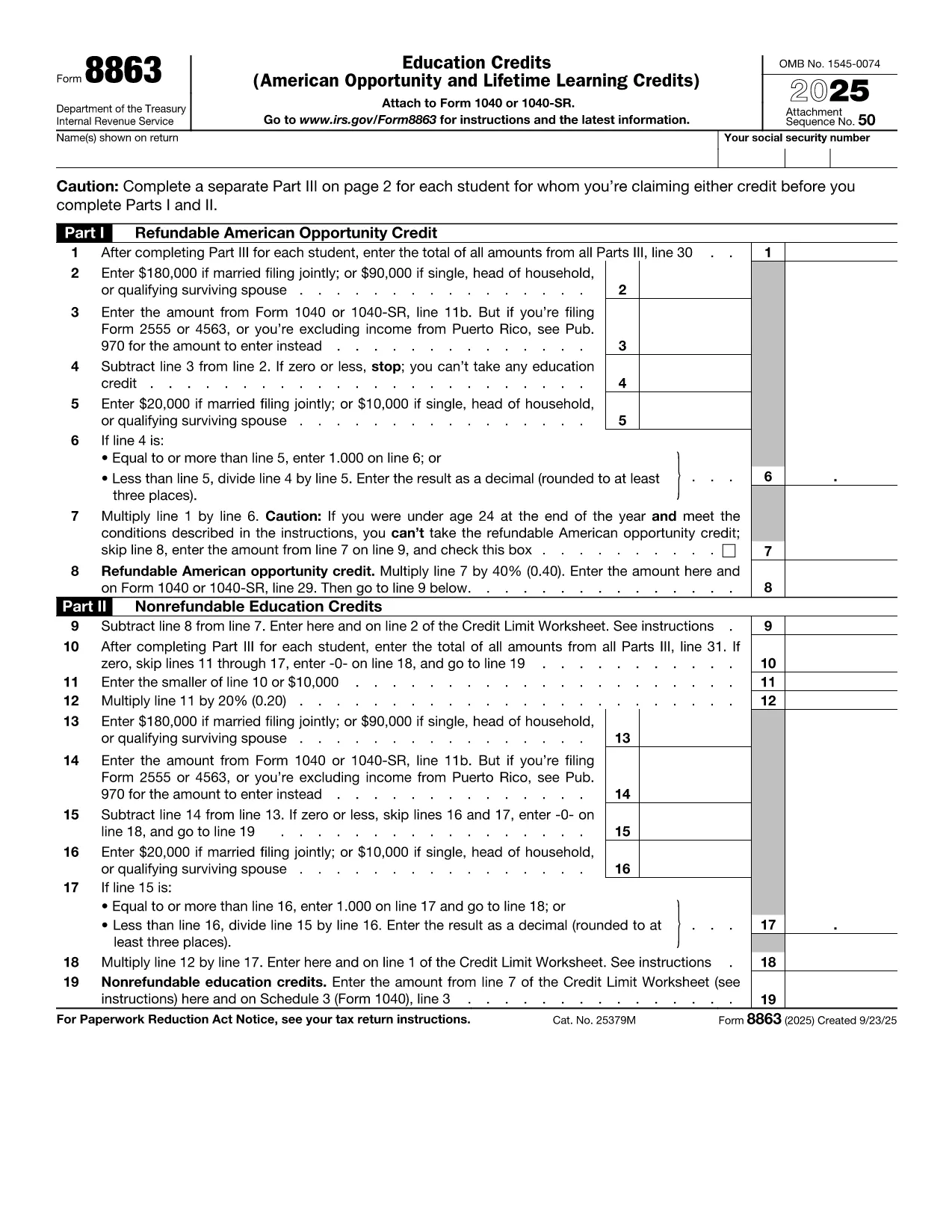
Fillable IRS Form 8863 – Tuition and Education Credits

  1. Ország USA
  2. Nyelv angol
  3. Tevékenység Adók
  4. Osztály IRS
Fillable IRS Form 8863 – Tuition and Education Credits

Students, parents, and educators often wonder how to claim the valuable education tax credits on their federal return. IRS Form 8863, also known as the Education Credits (American Opportunity and Lifetime Learning), is the official document you need to report qualified tuition and related expenses.

What Is IRS Form 8863?

Form 8863 is used to calculate two major tax benefits:

  • American Opportunity Credit (AOC) – up to $2,500 per eligible student.
  • Lifetime Learning Credit (LLC) – up to $2,000 per tax return.

The form requires basic information about the student, the educational institution, and the amount of qualified tuition and related expenses you paid during the tax year.

How to Fill Out the Tuition Tax Form Online

Instead of downloading the PDF and opening a separate editor, simply click the "Fill out this form" button below. The Formize PDF Filler app will load in your browser, letting you complete every field instantly.

Common Mistakes & Tips for Success

  • Incorrect school name or EIN – double‑check the information on your Form 1098‑T.
  • Mixing AOC and LLC on the same line – the credits are calculated separately; follow the worksheet on each page.
  • Leaving the "Amount of qualified expenses" blank – the IRS will reject the return if this field is empty.

Where to Submit Your Completed Form

After you finish, download the filled PDF and attach it to your e‑file or mail it with your Form 1040. Keep a copy for your records.

Ready to start? Click the button below and let Formize do the heavy lifting.

GYIK
  • Do I need a printed copy of Form 8863 to claim the credit?

    No. You can complete the fillable PDF online, download it, and attach it electronically when you e‑file.

  • Can I claim both the American Opportunity Credit and Lifetime Learning Credit on the same return?

    You can claim only one credit per student per year. Choose the credit that provides the larger benefit.

  • What qualifies as "qualified tuition" for Form 8863?

    Qualified tuition includes fees required for enrollment or attendance at an eligible educational institution, as shown on Form 1098‑T.

  • Is Form 8863 required for all students?

    Only if you are claiming the AOC or LLC. If you have no education expenses, you do not need to file this form.

  • How do I get my school’s EIN for the form?

    The school’s Employer Identification Number (EIN) is listed on your Form 1098‑T. If you didn’t receive a 1098‑T, contact the school’s financial office.

  • What if I make a mistake after filing?

    You can file an amended return using Form 1040‑X and attach a corrected Form 8863.

  • Is there a deadline to submit Form 8863?

    Form 8863 must be filed with your federal tax return, typically by April 15 of the year following the tax year.

  • Can I claim the credit for a student who is not a dependent?

    Yes, you may claim the Lifetime Learning Credit for yourself, your spouse, or a dependent, even if the student isn’t claimed as a dependent.

HOGYAN KELL

A(z) IRS Form 8863 ingyenes online kitöltése 5 egyszerű lépésben:

  1. 1
    Open the Fillable Form
    Click the "Fill out this form" button on the page. The Formize PDF Filler will launch directly in your browser.
  2. 2
    Enter Your Information
    Complete each section – student details, school EIN, qualified tuition, and select the appropriate credit (AOC or LLC).
  3. 3
    Review & Validate
    Use the built‑in validation to check for missing or incorrect entries. Correct any highlighted fields.
  4. 4
    Download the Completed PDF
    When all fields are filled, click "Download" to save the filled PDF to your device.
  5. 5
    Submit with Your Tax Return
    Attach the downloaded Form 8863 to your e‑filed return or include it with your mailed Form 1040.
PDF-kitöltő alkalmazás formázása
RÓL RŐL

Adónyomtatványok

A IRS Form 8863 egyike azon adóűrlapoknak, amelyek az adókkal kapcsolatos információk illetékes adóhatóság felé történő bejelentésére szolgálnak. Különféle adóformák léteznek, beleértve a szövetségi, állami és helyi adóformákat, amelyek az adófizető körülményeitől és helyétől függően változhatnak.

JELLEMZŐK

PDF kitöltő

A PDF űrlapok online kitöltésének legegyszerűbb módja

  • Gyorsan töltse ki a következőt: IRS Form 8863
    Módot keres a(z) IRS Form 8863 online gyors kitöltésére? Online ingyenes PDF űrlapkitöltőnkkel tudni fogja, hogyan kell szerkeszteni és kitölteni ezt a pdf dokumentumot kevesebb mint egy perc alatt.
  • Könnyen használható online PDF szerkesztő
    Eleged van abból, hogy kinyomtatja a PDF-fájlokat, hogy szerkeszthesse őket, mielőtt újra beolvassa és visszaküldi őket? PDF dokumentumok szerkesztése ingyen online. Használja online pdf-szerkesztőnket, hogy időt és papírt takarítson meg.
  • Remek eszközök, minden platformon
    Kíváncsi arra, hogyan töltse ki a IRS Form 8863 mezőt Mac számítógépen, vagy hogyan használhat ingyenes PDF-kitöltőt? Online PDF eszközeink minden platformon működnek.
  • Biztonságos fájltárolás
    A befejezett „IRS Form 8863” fájlokat az Amazon Cloud hosting által kezelt, biztonságos adatbázisban tároljuk. Fájljait bármikor törölheti rendszerünkből. Mindenesetre ezek a fájlok 24 óra elteltével automatikusan törlődnek.
  • Csevegés IRS Form 8863 felhasználóval
    Csevegés "IRS Form 8863" felhasználóval a Chatize oldalon, amely egy ingyenes PDF-olvasó segéd. Tegyen fel kérdéseket, és kapjon választ a következőtől: "IRS Form 8863". Csak kattintson a fenti Csevegés dokumentummal gombra.

Kitöltési munkamenet törlése

Törli a kiválasztott kitöltési munkamenetet? Ebben az esetben az űrlap kitöltésének előrehaladása elvész.

Szerkesztési munkamenet törlése

Törli a kiválasztott szerkesztési munkamenetet? Ebben az esetben az űrlap létrehozásának és szerkesztésének előrehaladása elvész.