
Válasszon nyelvet

IRS Form 8949 – Fillable PDF for Reporting House Sale Gains

  1. Ország USA
  2. Nyelv angol
  3. Tevékenység Adók
  4. Osztály IRS
IRS Form 8949 – Fillable PDF for Reporting House Sale Gains

When you sell a primary residence or an investment property, the IRS requires you to report the transaction on Form 8949. This fillable PDF makes it easy to capture capital‑gain details, calculate taxable amounts, and attach the form to your Schedule D filing.

Why You Need Form 8949 After Selling a Home

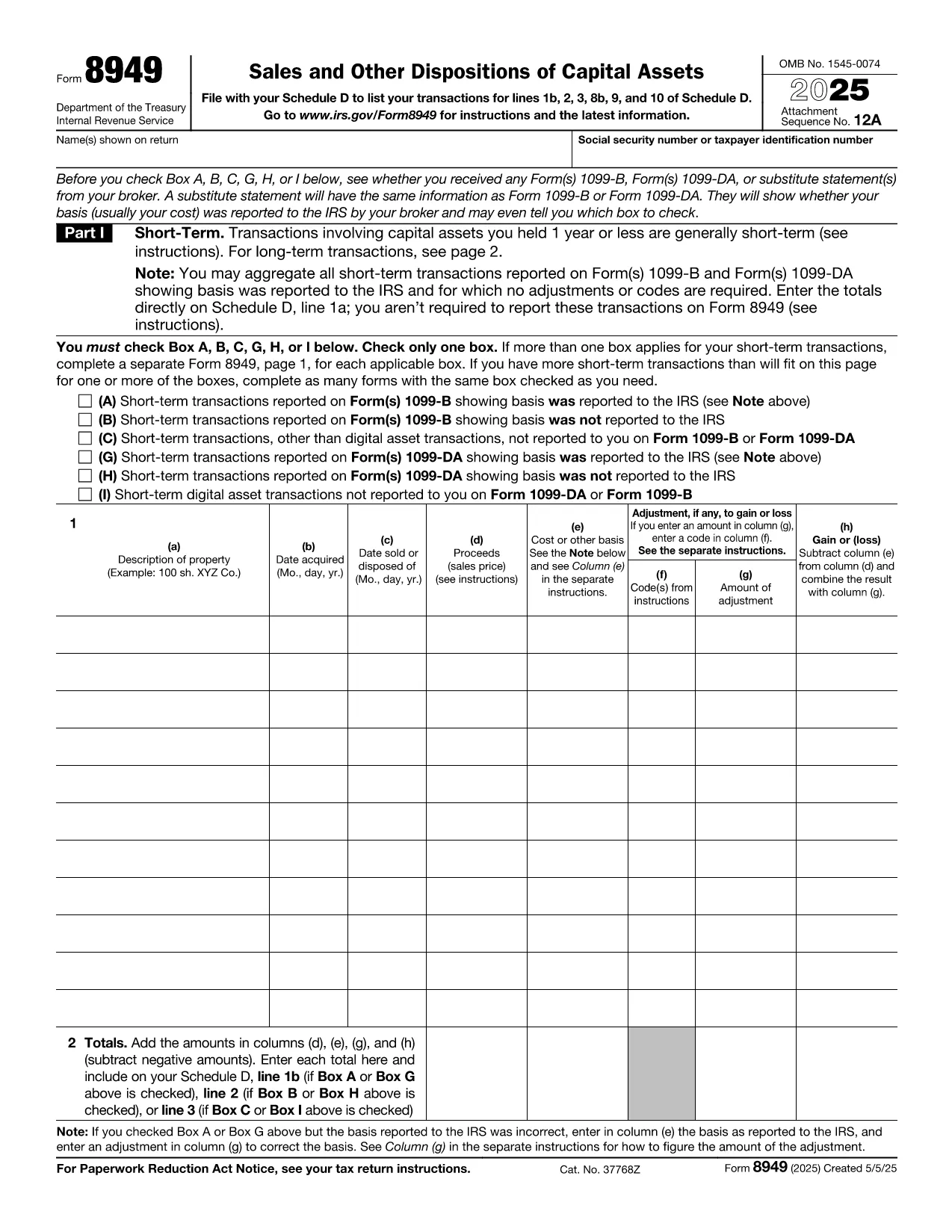
The IRS Form 8949 is the official document for reporting sales of capital assets, including real estate. Even if you qualify for the home‑sale exclusion, you must still list the transaction on Form 8949 and then transfer the net gain (or loss) to Schedule D.

Key Sections of the Form Explained

  • Part I – Short‑Term Transactions: Use this section if you owned the property for one year or less.
  • Part II – Long‑Term Transactions: Most home sales fall here because the ownership period exceeds one year.
  • Column (a) – Description of Property: Enter the address of the house sold.
  • Column (b) – Date Acquired: Provide the purchase date (or construction date).
  • Column (c) – Date Sold: The closing date of the sale.
  • Column (d) – Proceeds: Gross amount received (usually from Form 1099‑S).
  • Column (e) – Cost or Adjusted Basis: Purchase price plus improvements, minus depreciation.
  • Column (f) – Adjustments: Any codes for exclusions, like the $250,000 (or $500,000) home‑sale exclusion.
  • Column (g) – Gain or (Loss): The calculator will auto‑populate when you fill the previous columns.

Common Mistakes to Avoid

  • Leaving Column (f) blank when the exclusion applies.
  • Using the wrong acquisition date (e.g., the date of a major renovation instead of the original purchase).
  • Reporting the sale on the wrong part of the form (short‑term vs. long‑term).
  • Forgetting to attach Form 8949 to Schedule D, which can delay processing.

How to Submit Your Completed Form

After you finish the fillable PDF, save it as a PDF file and attach it to your tax return when you file electronically through approved tax‑software, or print and mail it with your paper return. The Formize PDF Filler ensures the data is saved correctly, so you won’t have to re‑type anything.

Ready to start? Just click the button below and the Formize PDF Filler will load the fillable version of IRS Form 8949 directly in your browser.

GYIK
  • Do I need to file Form 8949 if I qualify for the home‑sale exclusion?

    Yes. Even if the entire gain is excluded, the IRS still requires you to list the sale on Form 8949 and then mark the exclusion in Column (f).

  • What is the difference between Part I and Part II of Form 8949?

    Part I reports short‑term capital gains (property held ≤1 year). Part II reports long‑term gains (property held >1 year), which is most common for home sales.

  • Can I use the same Form 8949 for multiple property sales?

    Yes. List each property on a separate line within the appropriate part of the form.

  • How do I calculate the adjusted basis for my house?

    Start with the purchase price, add capital improvements, and subtract any depreciation claimed (if the home was partially rented).

  • What code should I use for the $250,000/$500,000 exclusion?

    Enter code “B” in Column (f) and write “Home‑sale exclusion” in the accompanying description.

  • Do I need to attach Form 1099‑S with my return?

    If you received Form 1099‑S from the closing agent, attach it. It provides the gross proceeds that you report on Form 8949.

  • Is the fillable PDF compatible with Mac and Windows?

    Yes. The Formize PDF Filler works in any modern browser on macOS, Windows, Linux, and mobile devices.

  • What should I do if I discover an error after filing?

    Amend your return using Form 1040‑X and attach a corrected Form 8949 with the proper figures.

HOGYAN KELL

A(z) tax form after selling house ingyenes online kitöltése 5 egyszerű lépésben:

  1. 1
    Click the Fill‑out Button
    Press the “Fill out this form” button on the page. The Formize PDF Filler app will open in a new tab.
  2. 2
    Wait for the Filler to Load
    The app loads the fillable IRS Form 8949 instantly. No download or extra software is needed.
  3. 3
    Enter Your Information
    Complete each column (description, dates, proceeds, basis, adjustments). The calculator auto‑fills the gain/loss column.
  4. 4
    Review and Save
    Double‑check for errors, then click “Save PDF”. Your completed form is ready to attach to Schedule D.
  5. 5
    Submit with Your Tax Return
    Upload the saved PDF to your e‑file software or print and mail it with your paper return.
PDF-kitöltő alkalmazás formázása
RÓL RŐL

Adónyomtatványok

A tax form after selling house egyike azon adóűrlapoknak, amelyek az adókkal kapcsolatos információk illetékes adóhatóság felé történő bejelentésére szolgálnak. Különféle adóformák léteznek, beleértve a szövetségi, állami és helyi adóformákat, amelyek az adófizető körülményeitől és helyétől függően változhatnak.

JELLEMZŐK

PDF kitöltő

A PDF űrlapok online kitöltésének legegyszerűbb módja

  • Gyorsan töltse ki a következőt: tax form after selling house
    Módot keres a(z) tax form after selling house online gyors kitöltésére? Online ingyenes PDF űrlapkitöltőnkkel tudni fogja, hogyan kell szerkeszteni és kitölteni ezt a pdf dokumentumot kevesebb mint egy perc alatt.
  • Könnyen használható online PDF szerkesztő
    Eleged van abból, hogy kinyomtatja a PDF-fájlokat, hogy szerkeszthesse őket, mielőtt újra beolvassa és visszaküldi őket? PDF dokumentumok szerkesztése ingyen online. Használja online pdf-szerkesztőnket, hogy időt és papírt takarítson meg.
  • Remek eszközök, minden platformon
    Kíváncsi arra, hogyan töltse ki a tax form after selling house mezőt Mac számítógépen, vagy hogyan használhat ingyenes PDF-kitöltőt? Online PDF eszközeink minden platformon működnek.
  • Biztonságos fájltárolás
    A befejezett „tax form after selling house” fájlokat az Amazon Cloud hosting által kezelt, biztonságos adatbázisban tároljuk. Fájljait bármikor törölheti rendszerünkből. Mindenesetre ezek a fájlok 24 óra elteltével automatikusan törlődnek.
  • Csevegés tax form after selling house felhasználóval
    Csevegés "tax form after selling house" felhasználóval a Chatize oldalon, amely egy ingyenes PDF-olvasó segéd. Tegyen fel kérdéseket, és kapjon választ a következőtől: "tax form after selling house". Csak kattintson a fenti Csevegés dokumentummal gombra.

Kitöltési munkamenet törlése

Törli a kiválasztott kitöltési munkamenetet? Ebben az esetben az űrlap kitöltésének előrehaladása elvész.

Szerkesztési munkamenet törlése

Törli a kiválasztott szerkesztési munkamenetet? Ebben az esetben az űrlap létrehozásának és szerkesztésének előrehaladása elvész.