
Válasszon nyelvet

Turn Your PDF into a Fillable Form in Seconds

  1. Ország USA
  2. Nyelv angol
  3. Tevékenység Adók
  4. Osztály IRS
Turn Your PDF into a Fillable Form in Seconds

Whether you need a contract, an application, or a simple questionnaire, turning a static PDF into an interactive, fillable form saves time and eliminates printing hassles. With Formize’s PDF Filler you can convert and complete any PDF directly in your browser – no Adobe Acrobat license required.

Why Use an Online Fillable PDF?

  • Accessible from any device – desktop, tablet, or smartphone.
  • Data is saved automatically, reducing the risk of lost information.
  • Easy to share via email or a secure link.
  • Compliant with PDF/A standards for long‑term archiving.

Step‑by‑Step: Convert and Fill Your PDF

Follow the quick guide below to turn your PDF into a fillable form and start entering data right away.

Common Mistakes & How to Avoid Them

  • Skipping field naming: Give each field a clear label so users know what information to enter.
  • Using low‑resolution PDFs: High‑quality source files ensure crisp, readable fields.
  • Forgetting to test: Preview the form in the Filler app before sharing.

Download the Sample PDF Form

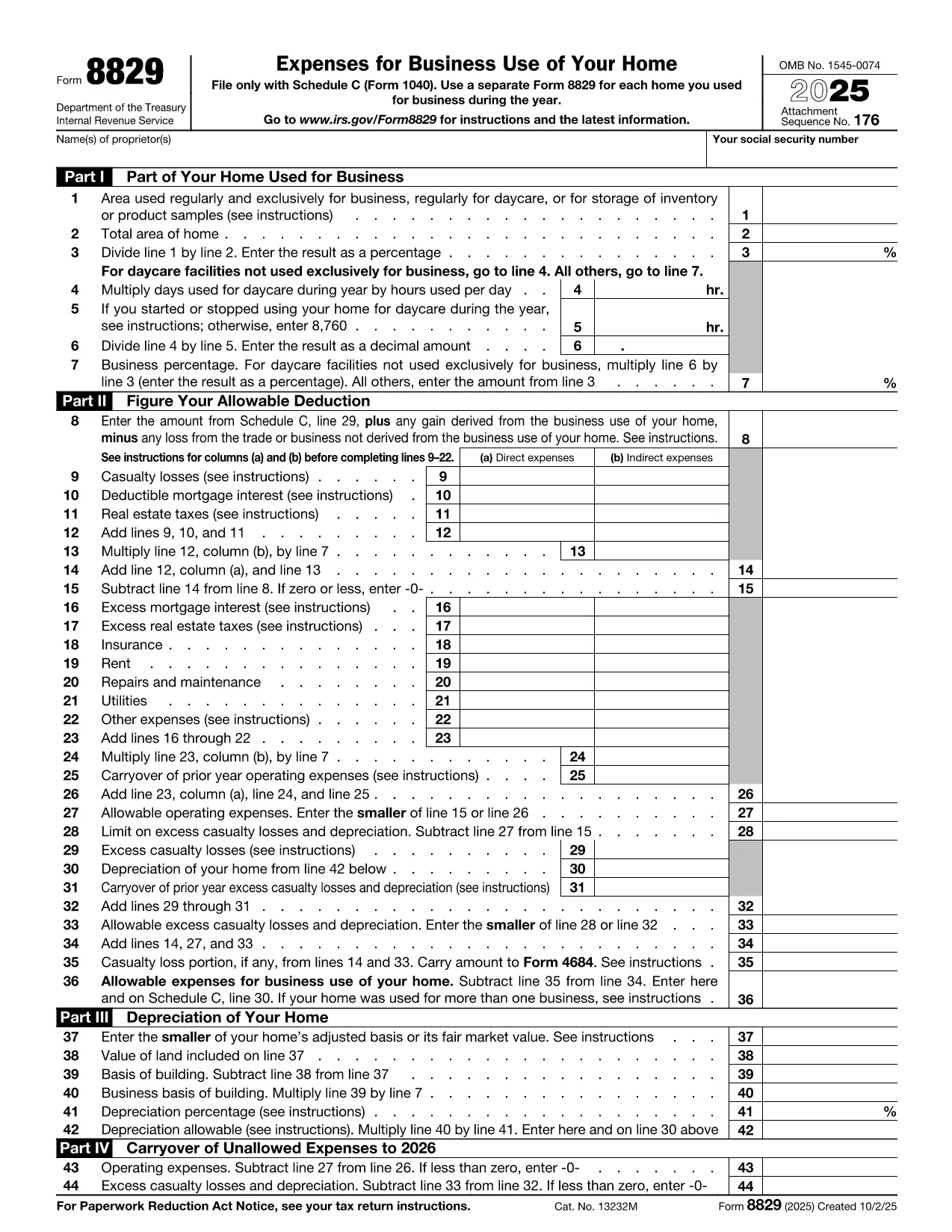
Use our sample IRS Form 8829 (Home Office Deduction) as a real‑world example. Click the button below to open it in the Formize PDF Filler and see how easy it is to turn a regular PDF into a fillable one.

Where to Get Help

If you run into any issues, the Formize help center offers step‑by‑step tutorials and troubleshooting tips.

GYIK
  • Do I need any software to turn a PDF into a fillable form?

    No. Formize PDF Filler runs entirely in your web browser, so you don’t need Adobe Acrobat or any other desktop software.

  • Can I convert a scanned PDF into a fillable form?

    Yes. Upload the scanned PDF, use Formize’s OCR tool to recognize text, then add fillable fields on top of the recognized content.

  • Is my data secure while I’m filling out the form?

    Formize uses SSL encryption for all data transmission and stores files on secure servers that comply with industry standards.

  • Can I share the fillable PDF with others?

    Absolutely. After saving, you can generate a shareable link or send the completed PDF via email directly from the app.

  • What if I make a mistake while filling the form?

    All changes are saved automatically, and you can use the “Undo” button or simply edit any field again before finalizing.

  • Do I need a Formize account to use the filler?

    You can fill out the form without an account, but creating an account lets you save progress, access history, and reuse templates.

  • Is there a limit to the size of PDF I can convert?

    Formize supports PDFs up to 50 MB. Larger files may need to be split or compressed before uploading.

HOGYAN KELL

A(z) turn PDF into form ingyenes online kitöltése 4 egyszerű lépésben:

  1. 1
    Click the “Fill out this form” button
    Locate the button on this page and press it. The Formize PDF Filler app will open in a new tab.
  2. 2
    Wait for the Formize PDF Filler to load
    The app loads the PDF automatically. You’ll see editable fields appear where you can type, check boxes, or select dates.
  3. 3
    Enter your information
    Click into each field and fill out the required data. All changes are saved in real time.
  4. 4
    Save or download the completed form
    When you’re finished, click “Save” to store the form in your Formize account or “Download” to get a copy on your device.
PDF-kitöltő alkalmazás formázása
RÓL RŐL

Adónyomtatványok

A turn PDF into form egyike azon adóűrlapoknak, amelyek az adókkal kapcsolatos információk illetékes adóhatóság felé történő bejelentésére szolgálnak. Különféle adóformák léteznek, beleértve a szövetségi, állami és helyi adóformákat, amelyek az adófizető körülményeitől és helyétől függően változhatnak.

JELLEMZŐK

PDF kitöltő

A PDF űrlapok online kitöltésének legegyszerűbb módja

  • Gyorsan töltse ki a következőt: turn PDF into form
    Módot keres a(z) turn PDF into form online gyors kitöltésére? Online ingyenes PDF űrlapkitöltőnkkel tudni fogja, hogyan kell szerkeszteni és kitölteni ezt a pdf dokumentumot kevesebb mint egy perc alatt.
  • Könnyen használható online PDF szerkesztő
    Eleged van abból, hogy kinyomtatja a PDF-fájlokat, hogy szerkeszthesse őket, mielőtt újra beolvassa és visszaküldi őket? PDF dokumentumok szerkesztése ingyen online. Használja online pdf-szerkesztőnket, hogy időt és papírt takarítson meg.
  • Remek eszközök, minden platformon
    Kíváncsi arra, hogyan töltse ki a turn PDF into form mezőt Mac számítógépen, vagy hogyan használhat ingyenes PDF-kitöltőt? Online PDF eszközeink minden platformon működnek.
  • Biztonságos fájltárolás
    A befejezett „turn PDF into form” fájlokat az Amazon Cloud hosting által kezelt, biztonságos adatbázisban tároljuk. Fájljait bármikor törölheti rendszerünkből. Mindenesetre ezek a fájlok 24 óra elteltével automatikusan törlődnek.
  • Csevegés turn PDF into form felhasználóval
    Csevegés "turn PDF into form" felhasználóval a Chatize oldalon, amely egy ingyenes PDF-olvasó segéd. Tegyen fel kérdéseket, és kapjon választ a következőtől: "turn PDF into form". Csak kattintson a fenti Csevegés dokumentummal gombra.

Kitöltési munkamenet törlése

Törli a kiválasztott kitöltési munkamenetet? Ebben az esetben az űrlap kitöltésének előrehaladása elvész.

Szerkesztési munkamenet törlése

Törli a kiválasztott szerkesztési munkamenetet? Ebben az esetben az űrlap létrehozásának és szerkesztésének előrehaladása elvész.