Válasszon nyelvet

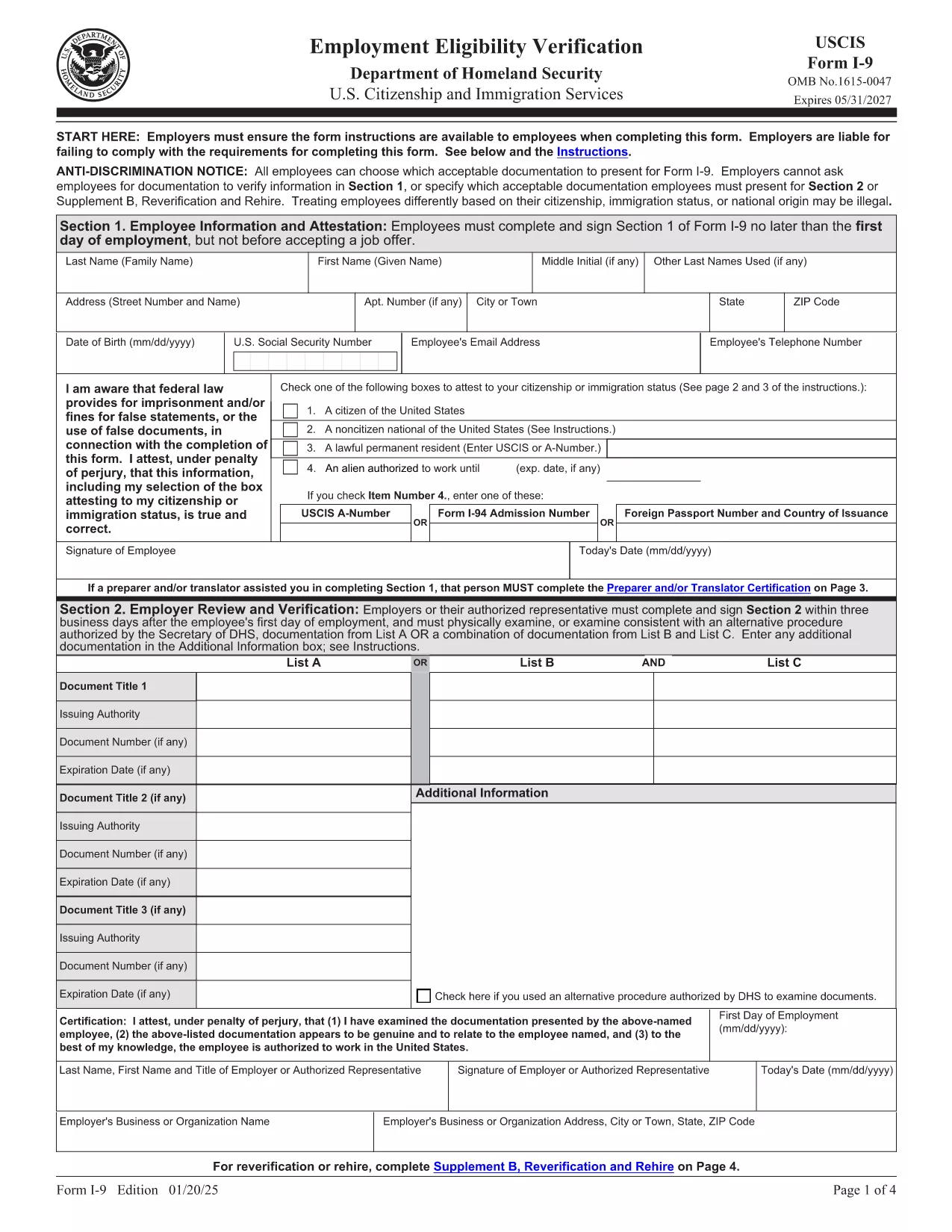
Fillable I‑9 Employment Eligibility Verification Form

  1. Ország USA
  2. Nyelv angol
  3. Osztály Amerikai Állampolgársági és Bevándorlási Szolgálat
Fillable I‑9 Employment Eligibility Verification Form

The Form I‑9 (Employment Eligibility Verification) is required for every new employee hired in the United States. Employers must verify both identity and work authorization within three business days of hiring. Our fillable PDF version lets you complete the form quickly, securely, and without the hassle of downloading a separate editor.

What Is the I‑9 Form and Why You Need It

The I‑9 is issued by the U.S. Citizenship and Immigration Services (USCIS). It ensures that all employees are legally authorized to work in the U.S. Failure to complete the form correctly can result in fines and penalties for both employer and employee.

How to Fill Out the I‑9 Form Online with Formize

Instead of downloading the PDF and opening it in a PDF editor, simply click the "Fill out this form" button on this page. The Formize PDF Filler app will load in your browser, allowing you to type, check boxes, and add signatures directly on the form.

Common Mistakes & Tips for a Perfect I‑9 Submission

  • Do not leave any required fields blank. Every box marked with an asterisk must be completed.
  • Use the correct document codes. Refer to the USCIS instructions for List A, B, and C documents.
  • Sign and date the form. Both employee and employer signatures are mandatory.
  • Keep the form on file for three years. Store it securely and separate from the employee’s personnel file.

When you’re ready, click the button below, fill the form, and download the completed PDF for your records.

GYIK
  • Is the I‑9 form required for all new hires?

    Yes. Every employee hired after November 6, 1986 must complete Form I‑9, regardless of citizenship or work status.

  • Can I use a scanned copy of a handwritten I‑9?

    No. The form must be completed electronically or on a legible, printable PDF. Handwritten forms that are scanned are not acceptable.

  • How long must I keep the I‑9 on file?

    Employers must retain the I‑9 for three years after the date of hire, or one year after employment ends, whichever is later.

  • What documents can I use for verification?

    You may present either one document from List A (identity + employment authorization) or a combination of one document from List B (identity) and one from List C (employment authorization).

  • Do I need to re‑verify an employee’s work authorization?

    Only if the employee’s work‑authorization document has an expiration date. Re‑verification must be done before the document expires.

  • Can I fill out the I‑9 on a mobile device?

    Yes. The Formize PDF Filler works on most modern browsers, including mobile Safari and Chrome, allowing you to complete the form on a phone or tablet.

  • Is there a fee to use Formize’s PDF filler?

    Formize offers a free basic filler for standard PDFs like the I‑9. No credit‑card information is required to complete the form.

  • What should I do if I make a mistake on the I‑9?

    Correct errors by striking through the incorrect entry, entering the correct information, and initialing the change. Do not erase or use white‑out.

  • Do I need to submit the I‑9 to USCIS?

    No. The I‑9 is kept by the employer for inspection by authorized government officials, such as the Department of Labor or ICE, upon request.

  • Is the PDF version of the I‑9 the same as the paper version?

    Yes. The official USCIS PDF is an exact replica of the paper form and meets all legal requirements when completed correctly.

HOGYAN KELL

A(z) I-9 form ingyenes online kitöltése 5 egyszerű lépésben:

  1. 1
    Open the Fillable I‑9 Form
    Click the "Fill out this form" button on the page. The Formize PDF Filler app loads in your browser.
  2. 2
    Enter Employee Information
    Complete Section 1 with the employee’s name, address, date of birth, and Social Security Number. Select the appropriate citizenship status.
  3. 3
    Upload or Type Document Details
    In Section 2, choose the document type (List A, B, or C) and enter the document numbers, expiration dates, and issuing authority.
  4. 4
    Add Signatures
    Both the employee and the employer must sign and date the form. Use the signature tool in the Formize app.
  5. 5
    Save and Download
    When all fields are completed, click "Save" then "Download" to store the finished PDF on your computer or cloud storage.
PDF-kitöltő alkalmazás formázása
RÓL RŐL

I-9 form sablon

A PDF-dokumentumok megtekintésére és kitöltésére szolgáló hagyományos funkciókkal, valamint a webalkalmazás és az adaptív elrendezés előnyeivel percek alatt teljesítheti a I-9 form.

JELLEMZŐK

PDF kitöltő

A PDF űrlapok online kitöltésének legegyszerűbb módja

  • Gyorsan töltse ki a következőt: I-9 form
    Módot keres a(z) I-9 form online gyors kitöltésére? Online ingyenes PDF űrlapkitöltőnkkel tudni fogja, hogyan kell szerkeszteni és kitölteni ezt a pdf dokumentumot kevesebb mint egy perc alatt.
  • Könnyen használható online PDF szerkesztő
    Eleged van abból, hogy kinyomtatja a PDF-fájlokat, hogy szerkeszthesse őket, mielőtt újra beolvassa és visszaküldi őket? PDF dokumentumok szerkesztése ingyen online. Használja online pdf-szerkesztőnket, hogy időt és papírt takarítson meg.
  • Remek eszközök, minden platformon
    Kíváncsi arra, hogyan töltse ki a I-9 form mezőt Mac számítógépen, vagy hogyan használhat ingyenes PDF-kitöltőt? Online PDF eszközeink minden platformon működnek.
  • Biztonságos fájltárolás
    A befejezett „I-9 form” fájlokat az Amazon Cloud hosting által kezelt, biztonságos adatbázisban tároljuk. Fájljait bármikor törölheti rendszerünkből. Mindenesetre ezek a fájlok 24 óra elteltével automatikusan törlődnek.
  • Csevegés I-9 form felhasználóval
    Csevegés "I-9 form" felhasználóval a Chatize oldalon, amely egy ingyenes PDF-olvasó segéd. Tegyen fel kérdéseket, és kapjon választ a következőtől: "I-9 form". Csak kattintson a fenti Csevegés dokumentummal gombra.

Kitöltési munkamenet törlése

Törli a kiválasztott kitöltési munkamenetet? Ebben az esetben az űrlap kitöltésének előrehaladása elvész.

Szerkesztési munkamenet törlése

Törli a kiválasztott szerkesztési munkamenetet? Ebben az esetben az űrlap létrehozásának és szerkesztésének előrehaladása elvész.