
Ընտրել լեզուն

Schedule C – Profit or Loss from Business (Fillable PDF)

  1. Երկիր ԱՄՆ
  2. Լեզու Անգլերեն
  3. Գործունեություն Հարկեր
  4. բաժին Ներքին եկամուտների ծառայություն
Schedule C – Profit or Loss from Business (Fillable PDF)

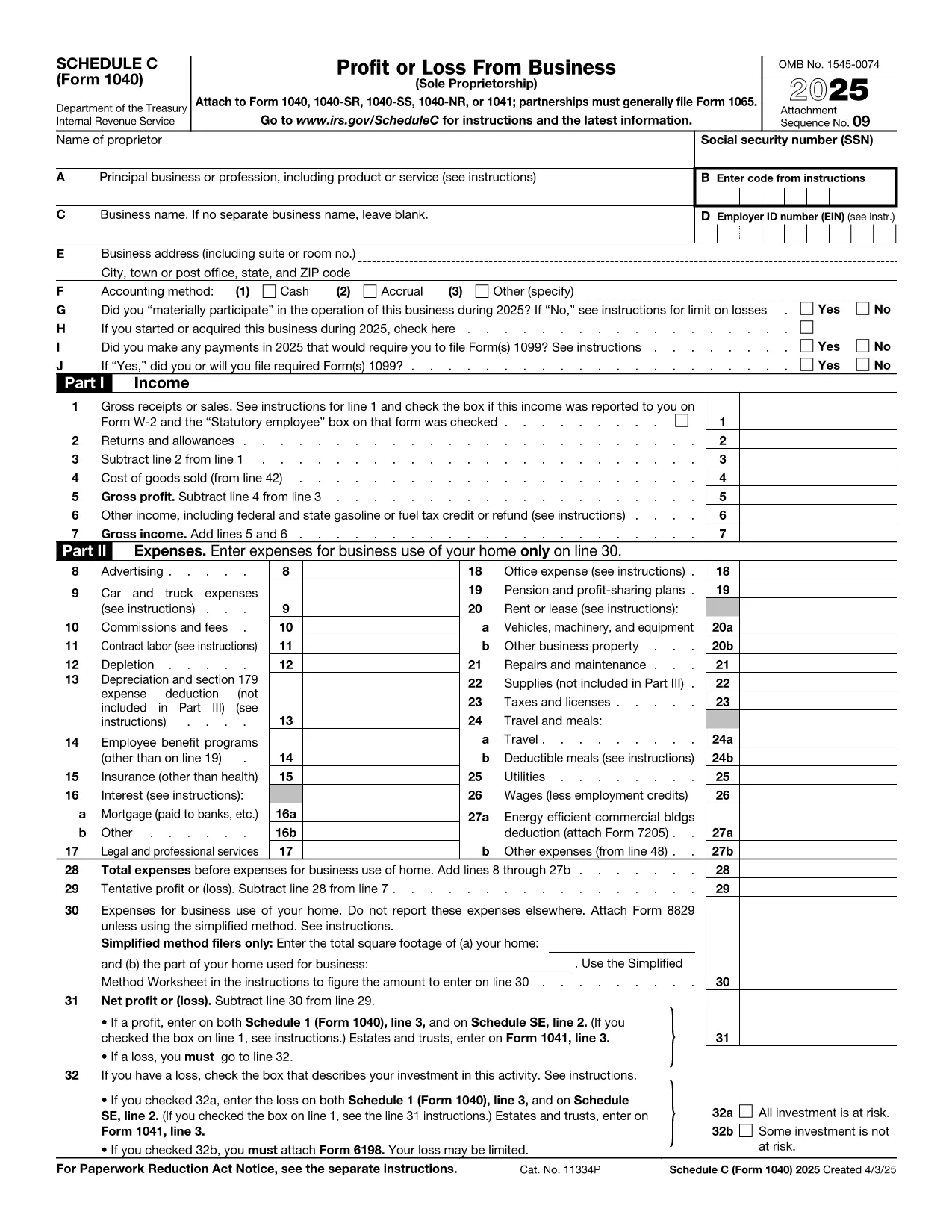
Schedule C (Form 1040) is the IRS form used by sole proprietors, single‑member LLCs, and independent contractors to report profit or loss from a business. Our fillable PDF lets you complete the form directly in your browser—no Adobe Acrobat or printer required.

What Is Schedule C and Who Needs It?

The Schedule C form captures income, expenses, cost of goods sold, and vehicle mileage for a trade or business. If you earned self‑employment income in the last tax year, you’ll likely need to file Schedule C with your Form 1040.

Key Sections of the Schedule C Form

  • Part I – Income: Gross receipts, returns, and other income.
  • Part II – Expenses: Advertising, car expenses, depreciation, supplies, and more.
  • Part III – Cost of Goods Sold: Beginning inventory, purchases, and ending inventory.
  • Part IV – Information About Your Vehicle: Mileage and expenses if you use a car for business.
  • Part V – Other Expenses: Any additional costs not listed in Part II.

How to Fill Out Schedule C Online

Instead of downloading the PDF and opening it in a desktop editor, simply click the “Fill out this form” button below. The Formize PDF Filler app will load in seconds, and you can start entering your numbers right away.

Common Mistakes & Tips

  • Double‑check that all income is reported—missed cash sales can trigger an audit.
  • Keep receipts for every expense; the IRS may request documentation.
  • Use the correct expense categories; mis‑classifying can reduce your deduction.
  • Don’t forget to fill out the vehicle information section if you claim mileage.
  • Review the totals in Part I and Part II to ensure they balance before attaching to Form 1040.

When you’re finished, you can download a completed PDF, print it, or submit it electronically with your tax return.

Հրահանգներ

ՀՏՀ
  • Who must file Schedule C?

    Anyone who earned self‑employment income, operated a sole proprietorship, or had a single‑member LLC taxed as a disregarded entity must file Schedule C with their Form 1040.

  • Can I use Schedule C for multiple businesses?

    Yes. If you run more than one trade or profession, you file a separate Schedule C for each business and attach all of them to your return.

  • What expenses are deductible on Schedule C?

    Ordinary and necessary business expenses such as advertising, rent, utilities, supplies, vehicle costs, depreciation, home‑office expenses, and cost of goods sold are deductible.

  • Do I need a separate EIN for Schedule C?

    An EIN is not required; you can use your Social Security Number. However, an EIN is recommended if you have employees or want to keep personal and business IDs separate.

  • How do I report home‑office expenses?

    Complete Form 8829 to calculate the home‑office deduction, then transfer the amount to Schedule C, line 30.

  • What if I discover an error after filing?

    File Form 1040‑X, Amended U.S. Individual Income Tax Return, and attach a corrected Schedule C showing the updated numbers.

ԻՆՉՊԵՍ

Ինչպես լրացնել Schedule C PDF-ն անվճար, առցանց՝ 5 հեշտ քայլերով.

  1. 1
    Click the Fill Out Button
    Press the “Fill out this form” button on this page. The Formize PDF Filler will open in a new tab.
  2. 2
    Wait for the Filler to Load
    The app loads the fillable Schedule C PDF in seconds—no download required.
  3. 3
    Enter Your Information
    Complete each field, following the on‑screen prompts for income, expenses, and vehicle data.
  4. 4
    Review and Validate
    Use the built‑in calculator to verify totals and correct any errors before saving.
  5. 5
    Save, Print or E‑File
    Download the finished PDF, print a hard copy, or attach it to your electronic tax filing.
Ձևավորել PDF Filler հավելվածը
ՄԱՍԻՆ

Դաշնային հարկային ձևեր

Schedule C PDF-ը դաշնային հարկային ձևերից մեկն է, որն օգտագործվում է Միացյալ Նահանգների Ներքին եկամուտների ծառայությանը (IRS) դաշնային եկամտահարկը զեկուցելու և ներկայացնելու համար: Այս ձևաթղթերն օգտագործվում են անհատների, ձեռնարկությունների և կազմակերպությունների կողմից՝ իրենց եկամուտները, պահումները և այլ համապատասխան տեղեկատվություն, որոնք անհրաժեշտ են իրենց դաշնային հարկային պարտավորությունը հաշվարկելու համար:

Ամենատարածված դաշնային հարկի ձևը Ձև 1040ն է, որն օգտագործվում է անհատ հարկատուների կողմից` իրենց անձնական եկամտահարկը հայտնելու համար: Այլ սովորաբար օգտագործվող ձևերը ներառում են Ձև 1065 գործընկերության համար, Ձև 1120 կորպորացիաների համար, և Ձև 990 հարկերից ազատված կազմակերպությունների համար:

Դաշնային հարկային ձևերը սովորաբար պահանջում են հարկ վճարողներից զեկուցել եկամտի տարբեր աղբյուրների մասին, ինչպիսիք են աշխատավարձերը, աշխատավարձերը և թեյավճարները, ինչպես նաև եկամուտները ներդրումներից, վարձակալած գույքից և այլ աղբյուրներից: Ձևաթղթերը նաև թույլ են տալիս հարկ վճարողներին պահանջել պահումներ և վարկեր տարբեր ծախսերի համար, ինչպիսիք են բարեգործական ներդրումները, հիփոթեքային տոկոսները և առողջապահական ծախսերը:

Կարևոր է ճշգրիտ և ժամանակին ներկայացնել դաշնային հարկային ձևերը, քանի որ դա չկատարելը կարող է հանգեցնել տույժերի և տոկոսների գանձման IRS-ից:

ՀԱՏԿՈՒԹՅՈՒՆՆԵՐ

PDF լցոնիչ

Առցանց Schedule C PDF-ը լրացնելու ամենահեշտ ձևը

  • Արագ լրացրեք Schedule C PDF
    Փնտրու՞մ եք միջոց՝ արագորեն լրացնելու Schedule C PDF առցանց: Մեր առցանց անվճար PDF ձևաթուղթ լրացնողի միջոցով դուք կիմանաք, թե ինչպես խմբագրել և լրացնել այս pdf փաստաթուղթը մեկ րոպեից պակաս ժամանակում:
  • Հեշտ օգտագործման առցանց PDF խմբագիր
    Հոգնե՞լ եք PDF ֆայլեր տպելուց, որպեսզի կարողանաք դրանք խմբագրել, նախքան նորից սկանավորելը և հետ ուղարկելը: Խմբագրել PDF փաստաթղթերը անվճար առցանց: Օգտագործեք մեր առցանց pdf խմբագրիչը ժամանակ և թուղթ խնայելու համար:
  • Հիանալի գործիքներ, բոլոր հարթակներ
    Զարմանում եք, թե ինչպես լրացնել Schedule C PDF-ը Mac-ում, կամ գուցե ինչպես անվճար օգտագործել PDF լցոնիչը: Մեր առցանց PDF գործիքներն աշխատում են բոլոր հարթակներում:
  • Անվտանգ ֆայլերի պահպանում
    Ավարտված «Schedule C PDF» ֆայլերը պահվում են պաշտպանված տվյալների բազայում, որը կառավարվում է Amazon Cloud հոսթինգի կողմից: Ցանկացած ժամանակ կարող եք ջնջել ձեր ֆայլերը մեր համակարգից: Ամեն դեպքում, այս ֆայլերը ավտոմատ կերպով ջնջվում են 24 ժամ հետո:
  • Զրուցեք Schedule C PDF-ի հետ
    Զրուցեք «Schedule C PDF»-ի հետ Chatize-ում, որը PDF ընթերցողի անվճար օգնական է: Հարցեր տվեք և ստացեք պատասխաններ «Schedule C PDF»-ից։ Պարզապես սեղմեք վերևում գտնվող Զրույց փաստաթղթի հետ կոճակը:

Ջնջել լրացման նիստը

Ջնջե՞լ ընտրված լրացման աշխատաշրջանը: Այս դեպքում ձևը լրացնելու ձեր առաջընթացը կկորչի:

Ջնջել խմբագրման նիստը

Ջնջե՞լ ընտրված խմբագրման աշխատաշրջանը: Այս դեպքում ձևը ստեղծելու և խմբագրելու ձեր առաջընթացը կկորչի: