
Ընտրել լեզուն

College Tuition Tax Form – Fillable PDF Online

  1. Երկիր ԱՄՆ
  2. Լեզու Անգլերեն
  3. Գործունեություն Հարկեր
  4. բաժին IRS
College Tuition Tax Form – Fillable PDF Online

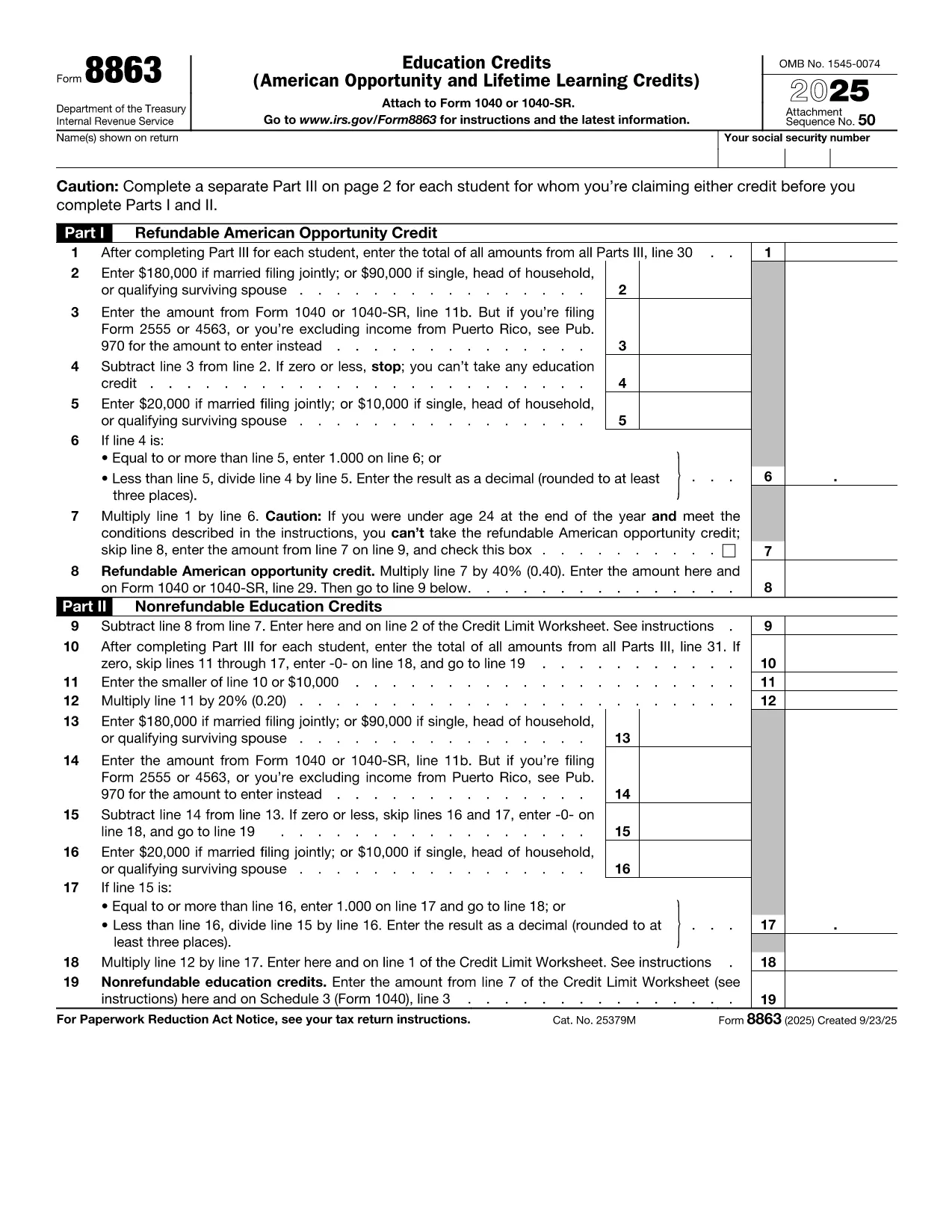
Paying for college can be expensive, but the IRS offers tax credits that can offset those costs. The most common form used to claim education credits is IRS Form 8863 – Education Credits (American Opportunity and Lifetime Learning). On this page you’ll find a fillable PDF version that works directly in the Formize PDF Filler app, so you never need a separate editor.

What Is the College Tuition Tax Form?

Form 8863 is used to claim the American Opportunity Credit and the Lifetime Learning Credit. You’ll need information from your Form 1098‑T (Tuition Statement) supplied by your school. The fillable PDF mirrors the official IRS layout, ensuring your submission meets all formatting requirements.

How to Fill Out the Form Using Formize

Instead of downloading the PDF and opening it in a separate editor, simply click the “Fill out this form” button below. The Formize PDF Filler app loads in your browser, letting you complete every field instantly.

Common Mistakes to Avoid

  • Incorrect Tax Year: The form must reflect the calendar year you paid tuition.
  • Missing 1098‑T Data: Double‑check the amounts in boxes 1 and 5 of your 1098‑T.
  • Eligibility Errors: The American Opportunity Credit is limited to the first four years of post‑secondary education.
  • Signature Omission: Even though the form is electronic, you still need to sign before filing.

Where to Submit the Completed Form

After you finish, download the completed PDF and attach it to your Form 1040 when you file your federal tax return. If you e‑file, you can upload the PDF directly through your tax‑software provider.

FAQs About the Tuition Tax Form

Below are quick answers to the most common questions. For any additional guidance, consult the IRS instructions for Form 8863.

ՀՏՀ
  • Who can claim the American Opportunity Credit?

    The credit is available to eligible students who are pursuing their first four years of post‑secondary education and who meet income limits.

  • Can I claim both the American Opportunity and Lifetime Learning credits on the same return?

    No. You must choose one credit per student per tax year.

  • Do I need a 1098‑T to complete Form 8863?

    Yes. The 1098‑T provides the tuition amounts you’ll report on Form 8863.

  • What is the maximum credit I can receive?

    The American Opportunity Credit can be up to $2,500 per student; the Lifetime Learning Credit can be up to $2,000 per return.

  • Is the fillable PDF accepted by the IRS?

    Yes. As long as the PDF retains the official IRS layout and includes your signature, it is accepted.

  • Can I amend the form after I’ve downloaded it?

    You can re‑open the saved PDF in Formize, make changes, and re‑download. Do not edit the file with non‑PDF software.

  • What if I make a mistake on the form?

    Correct the error in the Formize app, then re‑download. If you’ve already filed, you may need to file an amended return (Form 1040‑X).

  • Do I need to attach Form 8863 if I’m e‑filing?

    Most tax‑software programs automatically include Form 8863 when you answer the education‑credit questions. If not, you can manually upload the PDF.

ԻՆՉՊԵՍ

Ինչպես լրացնել college tuition tax form-ն անվճար, առցանց՝ 5 հեշտ քայլերով.

  1. 1
    Click the Fill‑Out Button
    Press the “Fill out this form” button on the page. The Formize PDF Filler app will open in a new tab.
  2. 2
    Wait for the App to Load
    The filler loads in seconds. A loading bar lets you know when the form is ready.
  3. 3
    Enter Your Information
    Complete each field – student name, SSN, tuition amounts, and credit calculations. The app validates numbers as you type.
  4. 4
    Review and Sign
    Use the built‑in review tool to check for missing data, then add your electronic signature.
  5. 5
    Download or Email the Completed PDF
    When you’re satisfied, click “Download PDF” or “Email to yourself.” Attach the file to your tax return.
Ձևավորել PDF Filler հավելվածը
ՄԱՍԻՆ

Հարկային ձևեր

college tuition tax form-ը հարկային ձևերից մեկն է, որն օգտագործվում է համապատասխան հարկային մարմնին հարկերի հետ կապված տեղեկատվությունը զեկուցելու համար: Կան տարբեր տեսակի հարկային ձևեր, ներառյալ դաշնային, նահանգային և տեղական հարկային ձևերը, որոնք կարող են տարբեր լինել՝ կախված հարկ վճարողի հանգամանքներից և գտնվելու վայրից:

ՀԱՏԿՈՒԹՅՈՒՆՆԵՐ

PDF լցոնիչ

Առցանց college tuition tax form-ը լրացնելու ամենահեշտ ձևը

  • Արագ լրացրեք college tuition tax form
    Փնտրու՞մ եք միջոց՝ արագորեն լրացնելու college tuition tax form առցանց: Մեր առցանց անվճար PDF ձևաթուղթ լրացնողի միջոցով դուք կիմանաք, թե ինչպես խմբագրել և լրացնել այս pdf փաստաթուղթը մեկ րոպեից պակաս ժամանակում:
  • Հեշտ օգտագործման առցանց PDF խմբագիր
    Հոգնե՞լ եք PDF ֆայլեր տպելուց, որպեսզի կարողանաք դրանք խմբագրել, նախքան նորից սկանավորելը և հետ ուղարկելը: Խմբագրել PDF փաստաթղթերը անվճար առցանց: Օգտագործեք մեր առցանց pdf խմբագրիչը ժամանակ և թուղթ խնայելու համար:
  • Հիանալի գործիքներ, բոլոր հարթակներ
    Զարմանում եք, թե ինչպես լրացնել college tuition tax form-ը Mac-ում, կամ գուցե ինչպես անվճար օգտագործել PDF լցոնիչը: Մեր առցանց PDF գործիքներն աշխատում են բոլոր հարթակներում:
  • Անվտանգ ֆայլերի պահպանում
    Ավարտված «college tuition tax form» ֆայլերը պահվում են պաշտպանված տվյալների բազայում, որը կառավարվում է Amazon Cloud հոսթինգի կողմից: Ցանկացած ժամանակ կարող եք ջնջել ձեր ֆայլերը մեր համակարգից: Ամեն դեպքում, այս ֆայլերը ավտոմատ կերպով ջնջվում են 24 ժամ հետո:
  • Զրուցեք college tuition tax form-ի հետ
    Զրուցեք «college tuition tax form»-ի հետ Chatize-ում, որը PDF ընթերցողի անվճար օգնական է: Հարցեր տվեք և ստացեք պատասխաններ «college tuition tax form»-ից։ Պարզապես սեղմեք վերևում գտնվող Զրույց փաստաթղթի հետ կոճակը:

Ջնջել լրացման նիստը

Ջնջե՞լ ընտրված լրացման աշխատաշրջանը: Այս դեպքում ձևը լրացնելու ձեր առաջընթացը կկորչի:

Ջնջել խմբագրման նիստը

Ջնջե՞լ ընտրված խմբագրման աշխատաշրջանը: Այս դեպքում ձևը ստեղծելու և խմբագրելու ձեր առաջընթացը կկորչի: