
Ընտրել լեզուն

IRS Form 8949 – Fillable PDF for Reporting House Sale Gains

  1. Երկիր ԱՄՆ
  2. Լեզու Անգլերեն
  3. Գործունեություն Հարկեր
  4. բաժին IRS
IRS Form 8949 – Fillable PDF for Reporting House Sale Gains

When you sell a primary residence or an investment property, the IRS requires you to report the transaction on Form 8949. This fillable PDF makes it easy to capture capital‑gain details, calculate taxable amounts, and attach the form to your Schedule D filing.

Why You Need Form 8949 After Selling a Home

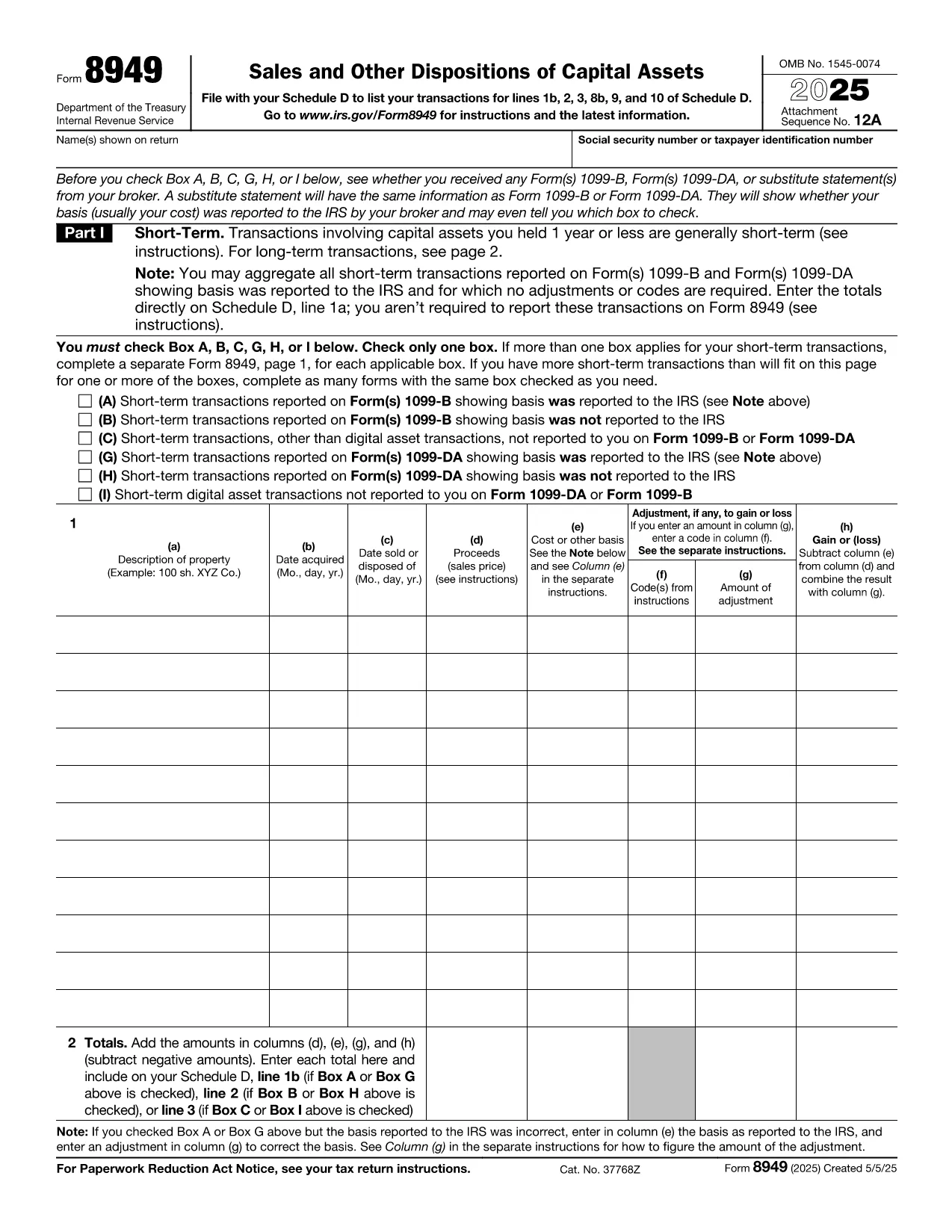
The IRS Form 8949 is the official document for reporting sales of capital assets, including real estate. Even if you qualify for the home‑sale exclusion, you must still list the transaction on Form 8949 and then transfer the net gain (or loss) to Schedule D.

Key Sections of the Form Explained

  • Part I – Short‑Term Transactions: Use this section if you owned the property for one year or less.
  • Part II – Long‑Term Transactions: Most home sales fall here because the ownership period exceeds one year.
  • Column (a) – Description of Property: Enter the address of the house sold.
  • Column (b) – Date Acquired: Provide the purchase date (or construction date).
  • Column (c) – Date Sold: The closing date of the sale.
  • Column (d) – Proceeds: Gross amount received (usually from Form 1099‑S).
  • Column (e) – Cost or Adjusted Basis: Purchase price plus improvements, minus depreciation.
  • Column (f) – Adjustments: Any codes for exclusions, like the $250,000 (or $500,000) home‑sale exclusion.
  • Column (g) – Gain or (Loss): The calculator will auto‑populate when you fill the previous columns.

Common Mistakes to Avoid

  • Leaving Column (f) blank when the exclusion applies.
  • Using the wrong acquisition date (e.g., the date of a major renovation instead of the original purchase).
  • Reporting the sale on the wrong part of the form (short‑term vs. long‑term).
  • Forgetting to attach Form 8949 to Schedule D, which can delay processing.

How to Submit Your Completed Form

After you finish the fillable PDF, save it as a PDF file and attach it to your tax return when you file electronically through approved tax‑software, or print and mail it with your paper return. The Formize PDF Filler ensures the data is saved correctly, so you won’t have to re‑type anything.

Ready to start? Just click the button below and the Formize PDF Filler will load the fillable version of IRS Form 8949 directly in your browser.

ՀՏՀ
  • Do I need to file Form 8949 if I qualify for the home‑sale exclusion?

    Yes. Even if the entire gain is excluded, the IRS still requires you to list the sale on Form 8949 and then mark the exclusion in Column (f).

  • What is the difference between Part I and Part II of Form 8949?

    Part I reports short‑term capital gains (property held ≤1 year). Part II reports long‑term gains (property held >1 year), which is most common for home sales.

  • Can I use the same Form 8949 for multiple property sales?

    Yes. List each property on a separate line within the appropriate part of the form.

  • How do I calculate the adjusted basis for my house?

    Start with the purchase price, add capital improvements, and subtract any depreciation claimed (if the home was partially rented).

  • What code should I use for the $250,000/$500,000 exclusion?

    Enter code “B” in Column (f) and write “Home‑sale exclusion” in the accompanying description.

  • Do I need to attach Form 1099‑S with my return?

    If you received Form 1099‑S from the closing agent, attach it. It provides the gross proceeds that you report on Form 8949.

  • Is the fillable PDF compatible with Mac and Windows?

    Yes. The Formize PDF Filler works in any modern browser on macOS, Windows, Linux, and mobile devices.

  • What should I do if I discover an error after filing?

    Amend your return using Form 1040‑X and attach a corrected Form 8949 with the proper figures.

ԻՆՉՊԵՍ

Ինչպես լրացնել tax form after selling house-ն անվճար, առցանց՝ 5 հեշտ քայլերով.

  1. 1
    Click the Fill‑out Button
    Press the “Fill out this form” button on the page. The Formize PDF Filler app will open in a new tab.
  2. 2
    Wait for the Filler to Load
    The app loads the fillable IRS Form 8949 instantly. No download or extra software is needed.
  3. 3
    Enter Your Information
    Complete each column (description, dates, proceeds, basis, adjustments). The calculator auto‑fills the gain/loss column.
  4. 4
    Review and Save
    Double‑check for errors, then click “Save PDF”. Your completed form is ready to attach to Schedule D.
  5. 5
    Submit with Your Tax Return
    Upload the saved PDF to your e‑file software or print and mail it with your paper return.
Ձևավորել PDF Filler հավելվածը
ՄԱՍԻՆ

Հարկային ձևեր

tax form after selling house-ը հարկային ձևերից մեկն է, որն օգտագործվում է համապատասխան հարկային մարմնին հարկերի հետ կապված տեղեկատվությունը զեկուցելու համար: Կան տարբեր տեսակի հարկային ձևեր, ներառյալ դաշնային, նահանգային և տեղական հարկային ձևերը, որոնք կարող են տարբեր լինել՝ կախված հարկ վճարողի հանգամանքներից և գտնվելու վայրից:

ՀԱՏԿՈՒԹՅՈՒՆՆԵՐ

PDF լցոնիչ

Առցանց tax form after selling house-ը լրացնելու ամենահեշտ ձևը

  • Արագ լրացրեք tax form after selling house
    Փնտրու՞մ եք միջոց՝ արագորեն լրացնելու tax form after selling house առցանց: Մեր առցանց անվճար PDF ձևաթուղթ լրացնողի միջոցով դուք կիմանաք, թե ինչպես խմբագրել և լրացնել այս pdf փաստաթուղթը մեկ րոպեից պակաս ժամանակում:
  • Հեշտ օգտագործման առցանց PDF խմբագիր
    Հոգնե՞լ եք PDF ֆայլեր տպելուց, որպեսզի կարողանաք դրանք խմբագրել, նախքան նորից սկանավորելը և հետ ուղարկելը: Խմբագրել PDF փաստաթղթերը անվճար առցանց: Օգտագործեք մեր առցանց pdf խմբագրիչը ժամանակ և թուղթ խնայելու համար:
  • Հիանալի գործիքներ, բոլոր հարթակներ
    Զարմանում եք, թե ինչպես լրացնել tax form after selling house-ը Mac-ում, կամ գուցե ինչպես անվճար օգտագործել PDF լցոնիչը: Մեր առցանց PDF գործիքներն աշխատում են բոլոր հարթակներում:
  • Անվտանգ ֆայլերի պահպանում
    Ավարտված «tax form after selling house» ֆայլերը պահվում են պաշտպանված տվյալների բազայում, որը կառավարվում է Amazon Cloud հոսթինգի կողմից: Ցանկացած ժամանակ կարող եք ջնջել ձեր ֆայլերը մեր համակարգից: Ամեն դեպքում, այս ֆայլերը ավտոմատ կերպով ջնջվում են 24 ժամ հետո:
  • Զրուցեք tax form after selling house-ի հետ
    Զրուցեք «tax form after selling house»-ի հետ Chatize-ում, որը PDF ընթերցողի անվճար օգնական է: Հարցեր տվեք և ստացեք պատասխաններ «tax form after selling house»-ից։ Պարզապես սեղմեք վերևում գտնվող Զրույց փաստաթղթի հետ կոճակը:

Ջնջել լրացման նիստը

Ջնջե՞լ ընտրված լրացման աշխատաշրջանը: Այս դեպքում ձևը լրացնելու ձեր առաջընթացը կկորչի:

Ջնջել խմբագրման նիստը

Ջնջե՞լ ընտրված խմբագրման աշխատաշրջանը: Այս դեպքում ձևը ստեղծելու և խմբագրելու ձեր առաջընթացը կկորչի: