Ընտրել լեզուն

Fillable I-130 Petition for Alien Relative – Complete Online

  1. Երկիր ԱՄՆ
  2. Լեզու Անգլերեն
  3. բաժին USCIS
  4. Գործունեություն Ներգաղթ
Fillable I-130 Petition for Alien Relative – Complete Online

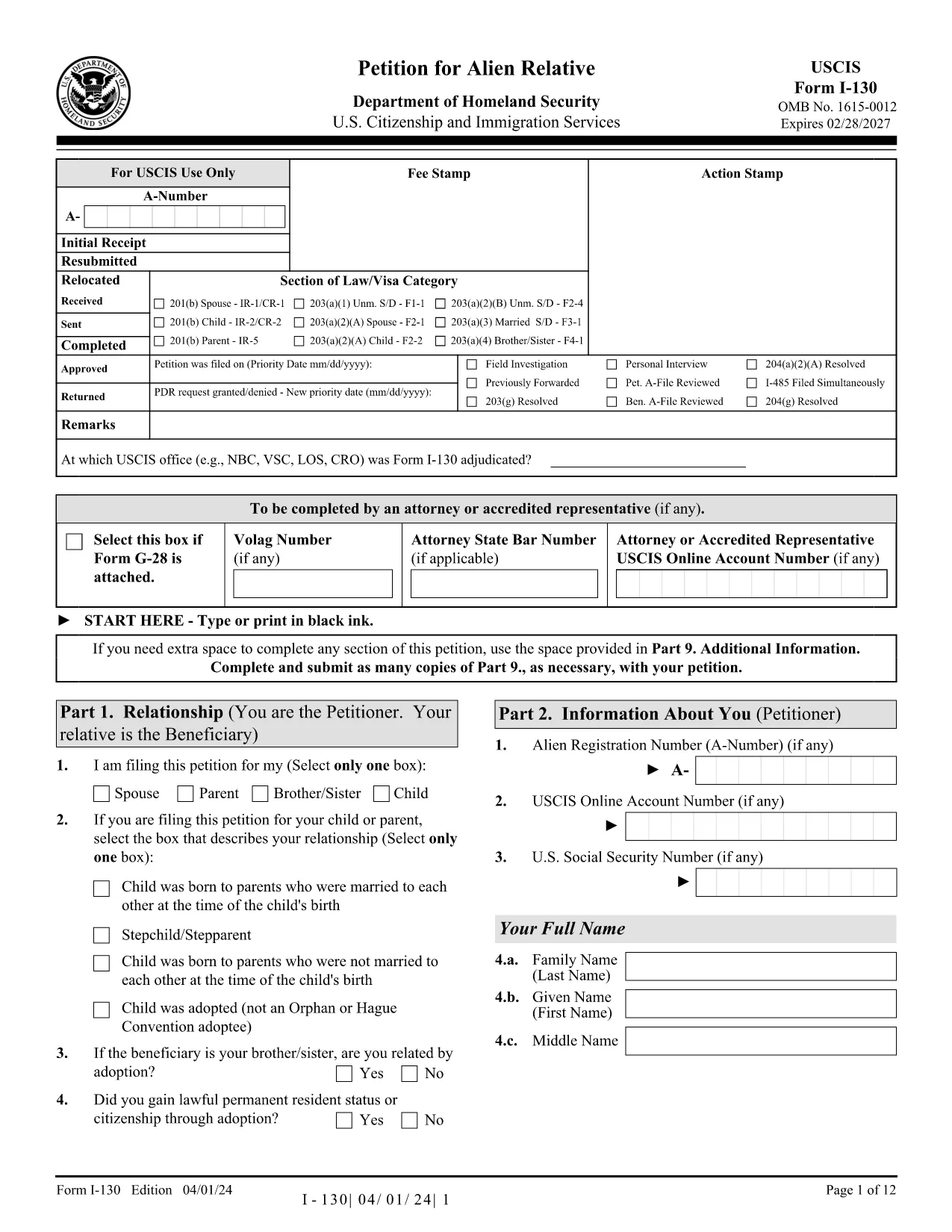
The I-130, Petition for Alien Relative is the first step for U.S. citizens and permanent residents who want to bring a family member to the United States. Historically you would download a static PDF, print it, hand‑write answers, and mail it to USCIS. With Formize’s Fillable I-130 PDF, you can complete the entire petition directly in your browser—no PDF editor required.

What Is the I-130 Form?

The I-130 establishes a qualifying relationship between the petitioner (U.S. citizen or green‑card holder) and the beneficiary (spouse, child, parent, or sibling). USCIS uses this form to verify eligibility before processing a visa or adjustment of status application.

How to Fill the I-130 Online with Formize

Follow the simple steps below to complete the form in minutes:

  • Click the "Fill out this form" button on this page.
  • Wait while the Formize PDF Filler app loads the official USCIS I-130 PDF.
  • Enter your information in the highlighted fields. The filler auto‑saves as you type.
  • Use the built‑in validation to catch missing or incorrectly formatted data.
  • When finished, download the completed PDF or print it for submission.

Common Mistakes to Avoid

Even with a fillable form, some errors can delay your case. Keep an eye out for:

  • Incorrect relationship wording – USCIS expects precise terms (e.g., "biological son" vs. "step‑son").
  • Missing signatures – The petitioner and, when required, the interpreter must sign.
  • Wrong dates – Use the MM/DD/YYYY format and double‑check birth dates.
  • Unclear photocopies – If you attach supporting documents, ensure they are legible.

Submission Tips & Next Steps

After downloading the completed I-130 PDF, you have two filing options:

  1. Online filing through USCIS myUSCIS – Upload the PDF, pay the filing fee, and track your case.
  2. Paper filing – Mail the PDF and supporting documents to the address listed in the form instructions.

Remember to keep a copy of the submitted form for your records. The Formize filler also lets you export a clean, searchable PDF for easy storage.

Frequently Asked Questions

Below are answers to the most common questions about the I-130 petition.

ՀՏՀ
  • Who can file an I-130 petition?

    U.S. citizens and lawful permanent residents (green‑card holders) can file an I-130 for spouses, children, parents, and siblings.

  • What is the filing fee for the I-130?

    As of 2024, the fee is $535. Fees are payable online through myUSCIS or by check when filing a paper petition.

  • Can I file the I-130 online instead of using a PDF?

    Yes. USCIS allows online filing through the myUSCIS portal, but many prefer the fillable PDF for offline review before uploading.

  • How long does USCIS take to process an I-130?

    Processing times vary by relationship and service center, ranging from 6 months for spouses to over 2 years for siblings.

  • Do I need to include supporting documents?

    Yes. Include proof of the qualifying relationship (marriage certificate, birth certificates, etc.) and any required translations.

  • What happens after the I-130 is approved?

    If the beneficiary is abroad, the case moves to the National Visa Center for consular processing. If already in the U.S., they may file for adjustment of status.

  • Can I edit the I-130 after I’ve submitted it?

    Once submitted, you cannot edit the form. If you discover an error, file a new I-130 and request a withdrawal of the original.

ԻՆՉՊԵՍ

Ինչպես լրացնել I-130 PDF-ն անվճար, առցանց՝ 5 հեշտ քայլերով.

  1. 1
    Open the Fillable Form
    Click the "Fill out this form" button on this page. The Formize PDF Filler will open the official I-130 PDF in a new window.
  2. 2
    Load the Formize PDF Filler
    Wait a few seconds while the app loads. All fillable fields become highlighted for easy entry.
  3. 3
    Enter Your Information
    Type your answers directly into each field. The filler automatically saves your progress and checks for formatting errors.
  4. 4
    Validate and Review
    Use the built‑in validation to ensure every required field is completed and signatures are added.
  5. 5
    Download or Submit
    When the form is complete, click "Download PDF" to save a copy, or print it for mailing to USCIS.
Ձևավորել PDF Filler հավելվածը
ՄԱՍԻՆ

I-130 PDF ձևանմուշ

PDF փաստաթուղթը դիտելու և լրացնելու գործառույթների ավանդական փաթեթով, որը զուգորդվում է վեբ հավելվածի առավելությունների և արձագանքող դասավորության հետ, դուք կարող եք լրացնել I-130 PDF-ը րոպեների ընթացքում:

ՀԱՏԿՈՒԹՅՈՒՆՆԵՐ

PDF լցոնիչ

Առցանց I-130 PDF-ը լրացնելու ամենահեշտ ձևը

  • Արագ լրացրեք I-130 PDF
    Փնտրու՞մ եք միջոց՝ արագորեն լրացնելու I-130 PDF առցանց: Մեր առցանց անվճար PDF ձևաթուղթ լրացնողի միջոցով դուք կիմանաք, թե ինչպես խմբագրել և լրացնել այս pdf փաստաթուղթը մեկ րոպեից պակաս ժամանակում:
  • Հեշտ օգտագործման առցանց PDF խմբագիր
    Հոգնե՞լ եք PDF ֆայլեր տպելուց, որպեսզի կարողանաք դրանք խմբագրել, նախքան նորից սկանավորելը և հետ ուղարկելը: Խմբագրել PDF փաստաթղթերը անվճար առցանց: Օգտագործեք մեր առցանց pdf խմբագրիչը ժամանակ և թուղթ խնայելու համար:
  • Հիանալի գործիքներ, բոլոր հարթակներ
    Զարմանում եք, թե ինչպես լրացնել I-130 PDF-ը Mac-ում, կամ գուցե ինչպես անվճար օգտագործել PDF լցոնիչը: Մեր առցանց PDF գործիքներն աշխատում են բոլոր հարթակներում:
  • Անվտանգ ֆայլերի պահպանում
    Ավարտված «I-130 PDF» ֆայլերը պահվում են պաշտպանված տվյալների բազայում, որը կառավարվում է Amazon Cloud հոսթինգի կողմից: Ցանկացած ժամանակ կարող եք ջնջել ձեր ֆայլերը մեր համակարգից: Ամեն դեպքում, այս ֆայլերը ավտոմատ կերպով ջնջվում են 24 ժամ հետո:
  • Զրուցեք I-130 PDF-ի հետ
    Զրուցեք «I-130 PDF»-ի հետ Chatize-ում, որը PDF ընթերցողի անվճար օգնական է: Հարցեր տվեք և ստացեք պատասխաններ «I-130 PDF»-ից։ Պարզապես սեղմեք վերևում գտնվող Զրույց փաստաթղթի հետ կոճակը:

Ջնջել լրացման նիստը

Ջնջե՞լ ընտրված լրացման աշխատաշրջանը: Այս դեպքում ձևը լրացնելու ձեր առաջընթացը կկորչի:

Ջնջել խմբագրման նիստը

Ջնջե՞լ ընտրված խմբագրման աշխատաշրջանը: Այս դեպքում ձևը ստեղծելու և խմբագրելու ձեր առաջընթացը կկորչի: