
Pilih bahasa

IRS Schedule D – Fillable PDF for Capital Gains & Losses

  1. Negara Amerika Serikat
  2. Bahasa Bahasa inggris
  3. Aktivitas Pajak
  4. Departemen Layanan Pendapatan Internal
IRS Schedule D – Fillable PDF for Capital Gains & Losses

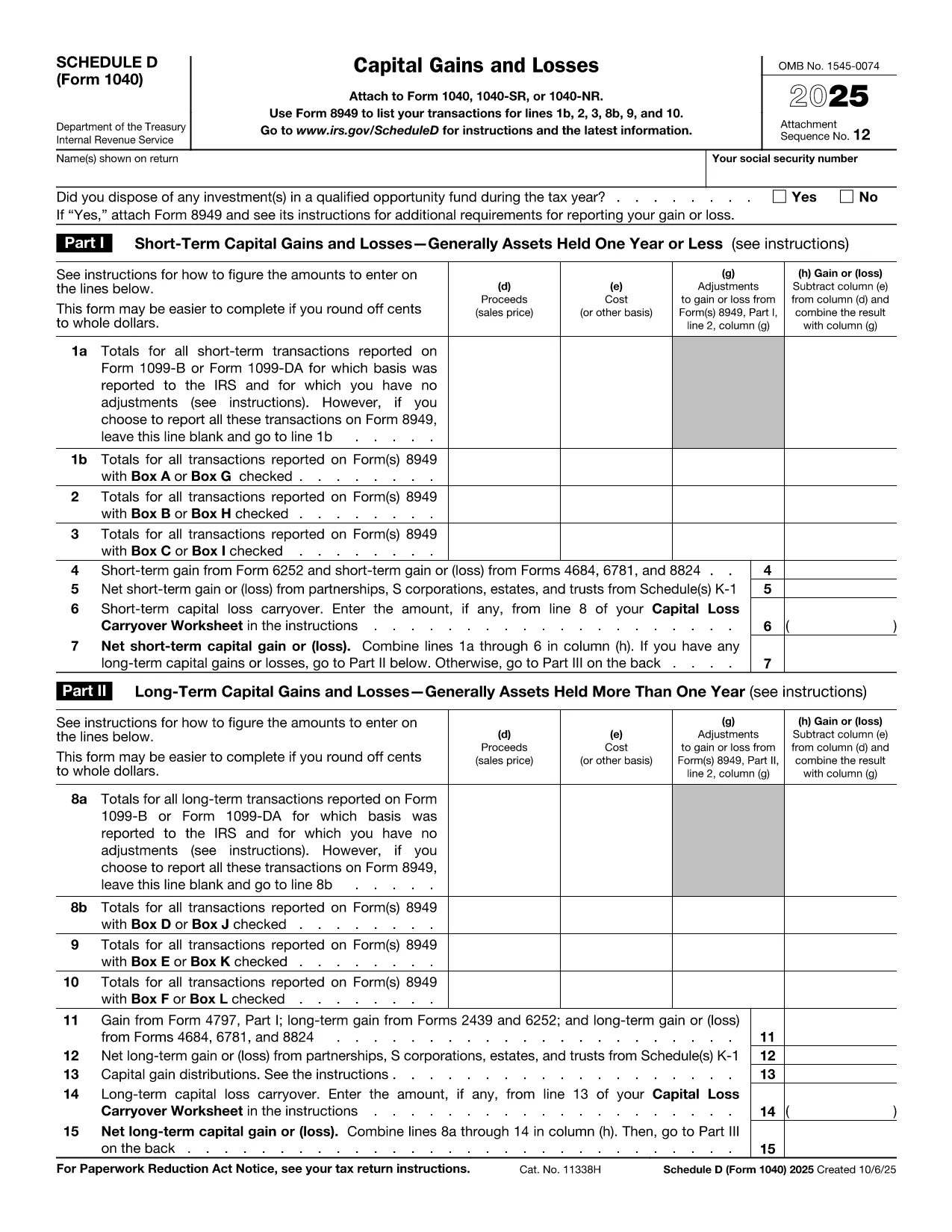
Schedule D (Form 1040SD) is the IRS worksheet used to report capital gains and losses from the sale of stocks, bonds, real estate, and other investment assets. Whether you’re a first‑time filer or a seasoned investor, a correctly completed Schedule D can lower your tax bill and keep the IRS happy.

Formize.com offers a fillable, web‑based PDF version of Schedule D. No need to download a PDF editor – simply click the Fill out this form button, wait for the Formize PDF Filler to load, and start entering your numbers.

What Is Schedule D and Who Needs It?

Schedule D is required when you have:

  • Capital gains from the sale of stocks, mutual funds, or other securities.
  • Capital losses that you want to deduct against gains.
  • Transactions involving collectibles, real estate, or crypto‑currency that are not reported on Form 8949.

If any of these apply to you, you must attach Schedule D to your Form 1040.

How to Fill Out Schedule D Using Formize

Follow the simple steps below to complete the form online. The Formize PDF Filler automatically saves your progress, validates numeric fields, and lets you download a printable PDF when you’re done.

Common Mistakes & Tips for a Clean Submission

Even small errors can delay processing. Keep these tips in mind:

  • Double‑check totals: The sum of short‑term and long‑term gains must match the totals on Form 8949.
  • Use the correct filing status: Your Schedule D totals feed into line 7 of Form 1040.
  • Don’t leave blanks: Enter “0” for any section that does not apply.
  • Review carry‑over losses: If you have a loss carryover from a previous year, include it on line 16.

When you’re ready, click the button below, fill the fields, review your entries, and download the completed Schedule D.

Fill out this form

instruksi

FAQ
  • Do I need Schedule D if I only have a few stock trades?

    Yes. Any sale of capital assets that results in a gain or loss must be reported on Schedule D, even if you have only one transaction.

  • Can I use the Formize filler on a mobile device?

    Absolutely. The PDF Filler works in modern browsers on smartphones and tablets, so you can complete Schedule D on the go.

  • What if I made a mistake after downloading the PDF?

    You can reopen the same Formize link, re‑enter the corrected data, and download a new PDF. The filler does not store personal data after you close the session.

  • Is the fillable Schedule D free?

    Yes. Formize offers the PDF filler for Schedule D at no cost. There are no hidden fees or subscription requirements.

  • How do I report a capital loss carryover?

    Enter the carryover amount on line 16 of Schedule D. The Formize filler includes a dedicated field for this entry.

  • Do I still need to attach Form 8949?

    If you have detailed transactions, you must attach Form 8949. Schedule D summarizes the totals from Form 8949.

  • What if my broker provides a 1099‑B with totals already calculated?

    You can copy the totals directly into Schedule D. Ensure the amounts match the 1099‑B and reconcile any differences on Form 8949.

  • Can I e‑file Schedule D using the filled PDF?

    Most tax software accepts the PDF data when you import your return. If your software does not, you can manually enter the numbers from the completed Schedule D.

BAGAIMANA CARANYA

Cara mengisi Schedule D PDF gratis secara online dalam 5 langkah mudah:

  1. 1
    Click the Fill Out Button
    Press the "Fill out this form" button on the page. This opens the Formize PDF Filler in a new tab.
  2. 2
    Wait for the Filler to Load
    The Formize app loads the Schedule D PDF and makes every field editable. No download or extra software is required.
  3. 3
    Enter Your Information
    Type your capital gains, losses, and other required numbers directly into the highlighted fields. The tool validates numbers as you type.
  4. 4
    Review and Confirm
    Use the built‑in summary to verify totals. Correct any highlighted errors before proceeding.
  5. 5
    Save or Print
    When everything looks good, click "Download PDF" to save a completed Schedule D or print it to attach to your tax return.
Bentuk aplikasi Pengisi PDF
TENTANG

Formulir pajak

Schedule D PDF adalah salah satu formulir Pajak yang merupakan dokumen yang digunakan untuk melaporkan informasi tentang pendapatan, pemotongan, dan kewajiban pajak seseorang atau bisnis kepada otoritas pajak terkait. Formulir ini diperlukan untuk mematuhi peraturan perpajakan dan memenuhi kewajiban perpajakan. Formulir pajak bervariasi tergantung negara dan persyaratan pajak spesifik yang berlaku. Berikut adalah beberapa jenis formulir pajak yang umum:

Formulir Pajak Perorangan: Formulir ini digunakan oleh wajib pajak orang pribadi untuk melaporkan penghasilan pribadinya dan pengurangan klaim, kredit, dan pengecualian. Contohnya mencakup formulir 1040 di Amerika Serikat atau formulir Pengembalian Pajak Self-Assessment di Inggris.

Formulir Pajak Bisnis: Formulir pajak bisnis digunakan oleh perusahaan, kemitraan, atau wiraswasta untuk melaporkan pendapatan bisnis, pengeluaran, dan informasi terkait pajak lainnya. Contohnya termasuk formulir Jadwal C (Laba atau Rugi dari Bisnis) di Amerika Serikat atau formulir CT600 (Pengembalian Pajak Perusahaan) di Inggris.

Formulir Pajak Penggajian: Formulir ini digunakan oleh pemberi kerja untuk melaporkan upah, gaji, dan pajak yang dipotong dari gaji karyawannya. Contohnya mencakup formulir W-2 di Amerika Serikat atau formulir P60 di Inggris.

Formulir Pajak Penjualan: Formulir pajak penjualan digunakan oleh bisnis untuk melaporkan dan menyetorkan pajak penjualan yang dipungut atas barang atau jasa kena pajak. Formulir pajak penjualan spesifik berbeda-beda di setiap yurisdiksi.

Formulir Pajak Pertambahan Nilai (PPN): Formulir PPN digunakan di negara-negara yang mengenakan pajak pertambahan nilai untuk melaporkan dan menyetorkan PPN yang dipungut atas penjualan dan mengklaim kredit PPN untuk pembelian. Contohnya termasuk formulir pengembalian PPN yang digunakan di banyak negara.

Formulir Perkiraan Pajak: Formulir perkiraan pajak digunakan untuk melaporkan dan membayar perkiraan pajak atas penghasilan yang tidak dikenakan pemotongan, seperti pendapatan wirausaha atau pendapatan investasi.

Ini hanyalah beberapa contoh dari berbagai formulir pajak yang mungkin ada. Formulir spesifik yang diperlukan bergantung pada undang-undang dan peraturan perpajakan di negara atau yurisdiksi Anda. Penting untuk berkonsultasi dengan pedoman otoritas pajak atau mencari nasihat profesional untuk menentukan formulir mana yang dapat diterapkan pada situasi Anda.

FITUR

Pengisi PDF

Cara termudah untuk mengisi formulir PDF secara online

  • Isi Schedule D PDF dengan cepat
    Mencari cara mengisi Schedule D PDF dengan cepat secara online? Dengan pengisi formulir PDF online gratis kami, Anda akan tahu cara mengedit dan mengisi dokumen pdf ini dalam waktu kurang dari satu menit.
  • Editor PDF online yang mudah digunakan
    Muak dengan mencetak file PDF sehingga Anda dapat mengeditnya, sebelum memindai ulang dan mengirimnya kembali? Edit dokumen PDF secara online gratis. Gunakan editor pdf online kami untuk menghemat waktu dan kertas.
  • Alat hebat, semua platform
    Ingin tahu cara mengisi Schedule D PDF di Mac, atau mungkin cara menggunakan pengisi PDF gratis? Alat PDF online kami berfungsi di semua platform.
  • Penyimpanan file yang aman
    File "Schedule D PDF" yang telah selesai disimpan dalam database aman yang dikelola oleh hosting Amazon Cloud. Anda dapat menghapus file Anda dari sistem kami kapan saja. Bagaimanapun, file-file ini secara otomatis dihapus setelah 24 jam.
  • Ngobrol dengan Schedule D PDF
    Ngobrol dengan "Schedule D PDF" di Chatize yang merupakan asisten pembaca PDF gratis. Ajukan pertanyaan dan dapatkan jawaban dari "Schedule D PDF". Cukup klik tombol Chat Dengan Dokumen di atas.

Hapus sesi pengisian

Hapus sesi pengisian yang dipilih? Dalam hal ini, kemajuan Anda dalam menyelesaikan formulir akan hilang.

Hapus sesi pengeditan

Hapus sesi pengeditan yang dipilih? Dalam hal ini, kemajuan Anda dalam membuat dan mengedit formulir akan hilang.