Pilih bahasa

California Small Claims Court Form SC‑100 – Fillable PDF

  1. Bahasa Bahasa inggris
  2. Negara Amerika Serikat
  3. Aktivitas Legal Forms
  4. Departemen California Courts
  5. Negara California
California Small Claims Court Form SC‑100 – Fillable PDF

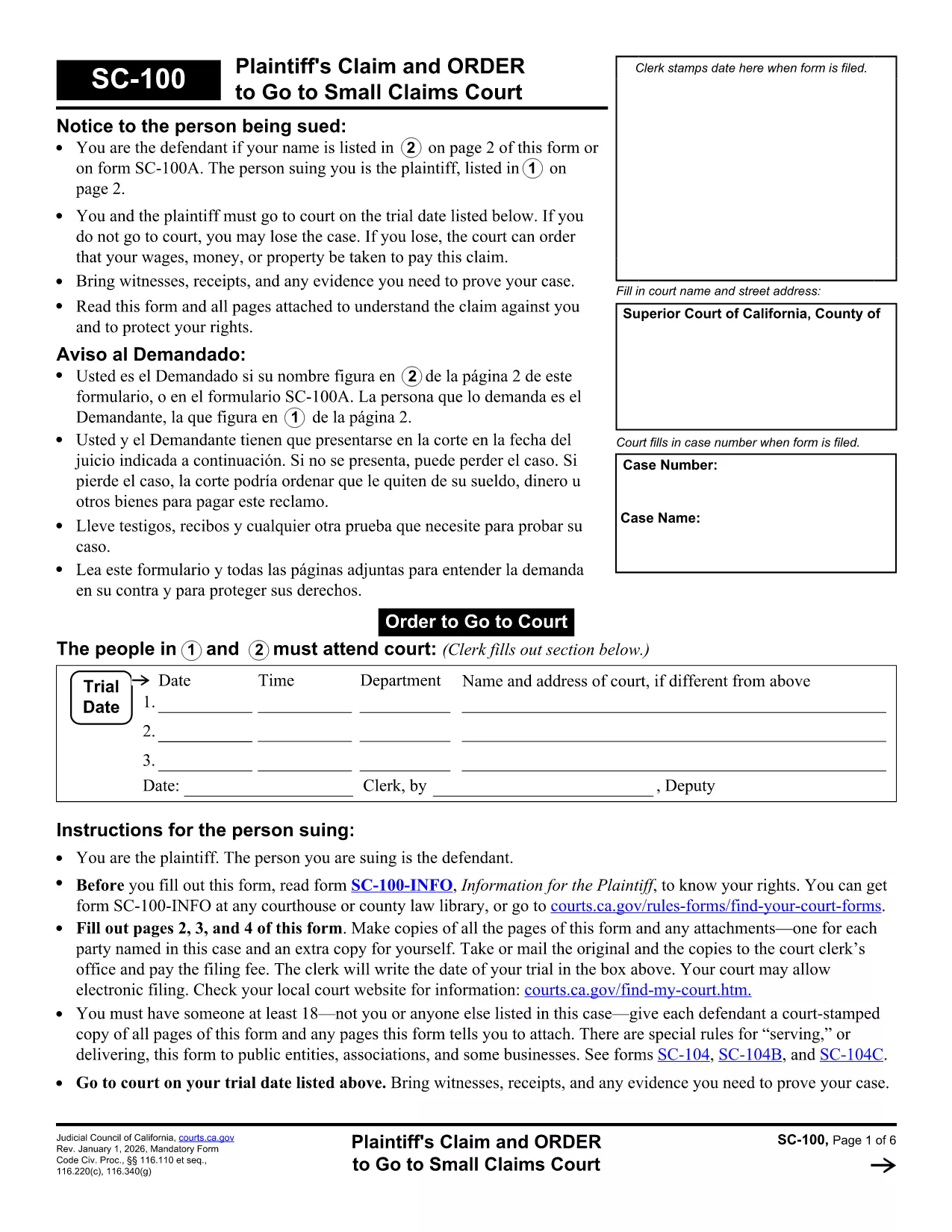
Looking for a reliable, fillable California legal form to start a small‑claims case? The SC‑100 Plaintiff’s Claim and Order to Go to Small Claims Court is the official document you need. With Formize’s online PDF filler you can complete the form in minutes—no extra software required.

What Is the SC‑100 Form?

The SC‑100 is the standard claim form used by the California Courts for small‑claims cases (up to $10,000). It captures the plaintiff’s details, the defendant’s information, a description of the dispute, and the amount you’re seeking.

How to Fill Out the SC‑100 Online

Follow the simple steps below to complete the form directly in your browser. All fields are interactive, and the form saves your progress automatically.

Common Mistakes to Avoid

  • Leaving any required field blank – the filler will highlight missing information.
  • Incorrectly spelling the defendant’s name or address – double‑check official records.
  • Exceeding the $10,000 limit – claims above this amount must be filed in a different court.

Where to Submit the Completed Form

Once you’ve saved and printed the completed SC‑100, deliver it to the clerk’s office of the appropriate California Superior Court. Some counties also accept electronic filings through their e‑filing portals.

Legal Help & Resources

If you need assistance, visit the California Courts Self‑Help Center or consult a qualified attorney. The form itself is free, and Formize provides the online filler at no cost.

FAQ
  • What is the purpose of the SC‑100 form?

    The SC‑100 is the official claim form for filing a small‑claims case in California Superior Courts. It starts the legal process and tells the court what you’re suing for.

  • Who can use the SC‑100 form?

    Any individual, business, or organization seeking monetary relief of $10,000 or less in a California small‑claims court can use the SC‑100.

  • Is there a filing fee for the SC‑100?

    Yes. Filing fees vary by county, typically ranging from $30 to $75. Check with your local clerk’s office for the exact amount.

  • Can I submit the SC‑100 electronically?

    Many California counties now accept electronic filings through their e‑filing portals. After completing the form, export it as a PDF and upload it according to your county’s guidelines.

  • Do I need a lawyer to fill out the SC‑100?

    No. The SC‑100 is designed for self‑represented litigants. However, if your case is complex, consulting an attorney can help ensure accuracy.

  • What happens if I make a mistake on the form?

    Mistakes can delay your case. Common errors include misspelling names, incorrect amounts, or leaving required fields blank. Review the form carefully before submitting.

  • How long does it take to complete the SC‑100 online?

    Most users finish in 5–10 minutes using the Formize fillable PDF, especially with the real‑time validation that prevents missing information.

  • Is the SC‑100 form free to download?

    Yes. The official PDF is provided by the California Courts at no cost, and Formize’s online filler is also free to use.

BAGAIMANA CARANYA

Cara mengisi California legal forms gratis secara online dalam 5 langkah mudah:

  1. 1
    Click the Fill Out Button
    On this page, click the bright “Fill out this form” button. The Formize PDF Filler app will open in a new tab.
  2. 2
    Wait for the Filler to Load
    The fillable PDF loads automatically. All fields become editable; you’ll see a progress bar while the document prepares.
  3. 3
    Enter Your Information
    Type directly into each field—name, address, claim amount, and case details. The filler validates required entries in real time.
  4. 4
    Save and Download
    When you’re finished, click “Save PDF”. The completed SC‑100 downloads to your computer ready for printing or electronic filing.
  5. 5
    Print or E‑File
    Print the saved PDF and bring it to the clerk’s office, or upload it through your county’s e‑filing portal if available.
Bentuk aplikasi Pengisi PDF
TENTANG

kerangka California legal forms

Dengan serangkaian fitur tradisional untuk melihat dan mengisi dokumen PDF, dipadukan dengan manfaat aplikasi web dan tata letak responsif, Anda dapat menyelesaikan California legal forms dalam hitungan menit.

FITUR

Pengisi PDF

Cara termudah untuk mengisi formulir PDF secara online

  • Isi California legal forms dengan cepat
    Mencari cara mengisi California legal forms dengan cepat secara online? Dengan pengisi formulir PDF online gratis kami, Anda akan tahu cara mengedit dan mengisi dokumen pdf ini dalam waktu kurang dari satu menit.
  • Editor PDF online yang mudah digunakan
    Muak dengan mencetak file PDF sehingga Anda dapat mengeditnya, sebelum memindai ulang dan mengirimnya kembali? Edit dokumen PDF secara online gratis. Gunakan editor pdf online kami untuk menghemat waktu dan kertas.
  • Alat hebat, semua platform
    Ingin tahu cara mengisi California legal forms di Mac, atau mungkin cara menggunakan pengisi PDF gratis? Alat PDF online kami berfungsi di semua platform.
  • Penyimpanan file yang aman
    File "California legal forms" yang telah selesai disimpan dalam database aman yang dikelola oleh hosting Amazon Cloud. Anda dapat menghapus file Anda dari sistem kami kapan saja. Bagaimanapun, file-file ini secara otomatis dihapus setelah 24 jam.
  • Ngobrol dengan California legal forms
    Ngobrol dengan "California legal forms" di Chatize yang merupakan asisten pembaca PDF gratis. Ajukan pertanyaan dan dapatkan jawaban dari "California legal forms". Cukup klik tombol Chat Dengan Dokumen di atas.

Hapus sesi pengisian

Hapus sesi pengisian yang dipilih? Dalam hal ini, kemajuan Anda dalam menyelesaikan formulir akan hilang.

Hapus sesi pengeditan

Hapus sesi pengeditan yang dipilih? Dalam hal ini, kemajuan Anda dalam membuat dan mengedit formulir akan hilang.