
Pilih bahasa

Fillable IRS Form 8863 – Education Credit (American Opportunity & Lifetime Learning)

  1. Negara Amerika Serikat
  2. Bahasa Bahasa inggris
  3. Aktivitas Pajak
  4. Departemen IRS
Fillable IRS Form 8863 – Education Credit (American Opportunity & Lifetime Learning)

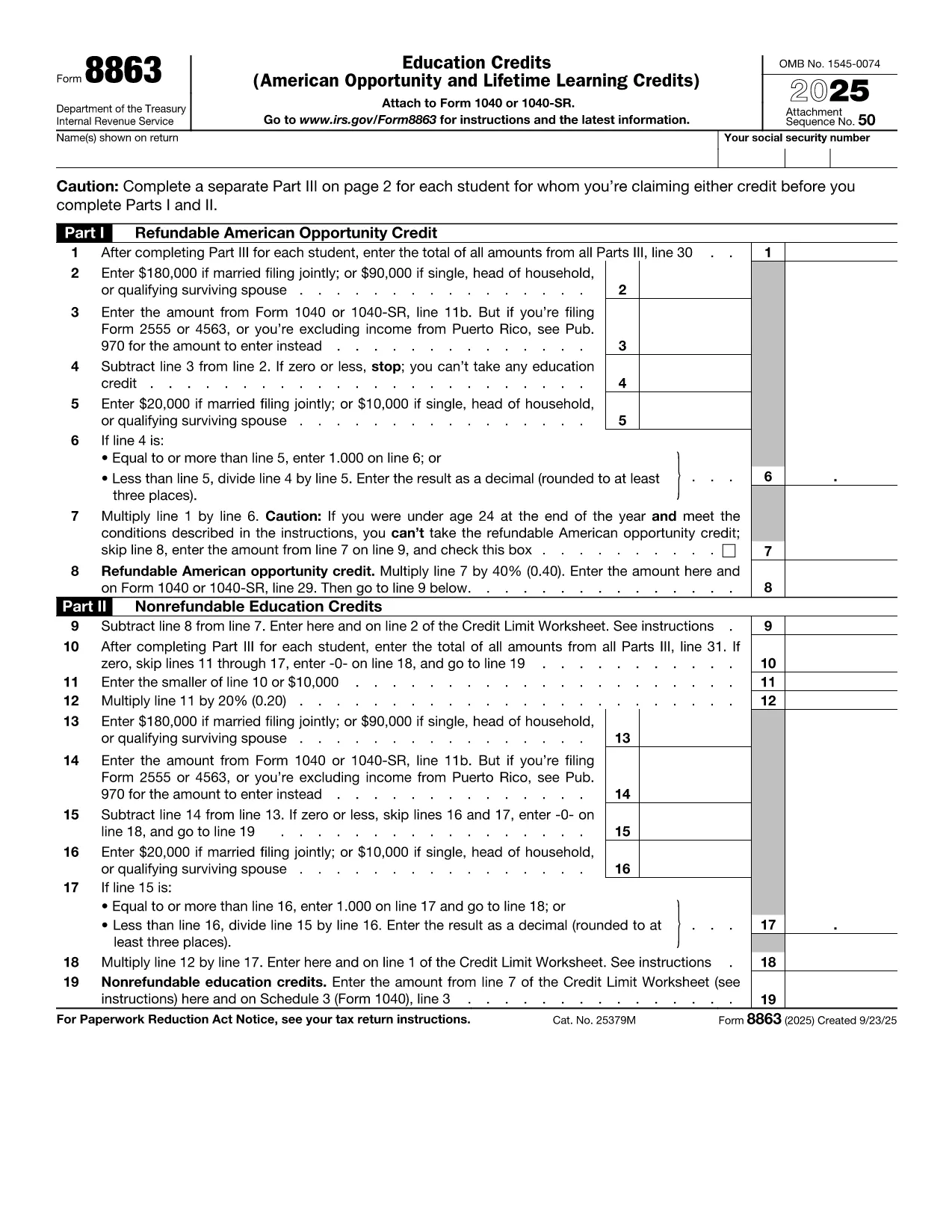
IRS Form 8863 is the official document used to claim the American Opportunity Credit and the Lifetime Learning Credit. Whether you’re a student, a parent, or a lifelong learner, this fillable PDF lets you enter the required information directly in your browser—no extra software needed.

What Is IRS Form 8863?

Form 8863 calculates the amount of education‑related tax credits you may be eligible for. The credit can reduce your tax bill by up to $2,500 per eligible student. The form is filed with your annual Form 1040 and requires details such as qualified tuition, required fees, and the student's enrollment status.

How to Complete the Form Using Formize

Instead of downloading the PDF and opening a separate editor, simply click the **"Fill out this form"** button below. The Formize PDF Filler app loads instantly, allowing you to type, save, and export the completed form in seconds.

Common Mistakes & Tips for a Smooth Submission

  • Incorrect Social Security Numbers: Double‑check each SSN; a single digit error can cause processing delays.
  • Missing Tuition Receipts: Keep Form 1098‑T or school statements handy while you fill out the credit sections.
  • Eligibility Overlap: You cannot claim both the American Opportunity Credit and the Lifetime Learning Credit for the same student in the same year.
  • Signature Requirement: The form must be signed. Use Formize’s electronic signature feature before downloading the final PDF.

When you’re ready, click the button, fill out each field, and download the completed PDF. Attach it to your tax return and enjoy the credit you deserve!

Fill out this form

FAQ
  • Can I claim both the American Opportunity Credit and the Lifetime Learning Credit for the same student?

    No. You must choose one credit per student per tax year. The American Opportunity Credit generally offers a higher amount, but the Lifetime Learning Credit can be used for a broader range of courses.

  • Do I need to attach Form 8863 if I’m filing electronically?

    When you e‑file, the information from Form 8863 is entered directly into the tax software. However, keeping a completed copy for your records is recommended.

  • What qualifies as “qualified tuition and related expenses”?

    Qualified expenses include tuition, required enrollment fees, and course materials needed for attendance. Room, board, and transportation are not eligible.

  • How many students can I claim credits for on a single Form 8863?

    You can claim credits for multiple eligible students on the same Form 8863, each listed on a separate line in Part I.

  • Is there a deadline to submit Form 8863?

    Form 8863 must be filed with your federal income tax return, typically by April 15 of the filing year, unless you obtain an extension.

  • What if I made a mistake after filing?

    You can file an amended return using Form 1040‑X and attach a corrected Form 8863.

BAGAIMANA CARANYA

Cara mengisi education tax credit form gratis secara online dalam 3 langkah mudah:

  1. 1
    Open the Fillable Form
    Click the **"Fill out this form"** button above. The Formize PDF Filler app will load directly in your browser.
  2. 2
    Enter Your Information
    Type in all required fields—student details, tuition amounts, and credit calculations. Use the navigation tabs to move between sections.
  3. 3
    Save, Sign, and Download
    When all fields are complete, add your electronic signature, then click **Download PDF**. Save the file and attach it to your tax return.
Bentuk aplikasi Pengisi PDF
TENTANG

Formulir pajak

education tax credit form adalah salah satu formulir Pajak yang merupakan dokumen yang digunakan untuk melaporkan informasi terkait pajak kepada otoritas pajak terkait. Ada berbagai jenis formulir pajak, termasuk formulir pajak federal, negara bagian, dan lokal, yang dapat bervariasi tergantung pada keadaan dan lokasi pembayar pajak.

FITUR

Pengisi PDF

Cara termudah untuk mengisi formulir PDF secara online

  • Isi education tax credit form dengan cepat
    Mencari cara mengisi education tax credit form dengan cepat secara online? Dengan pengisi formulir PDF online gratis kami, Anda akan tahu cara mengedit dan mengisi dokumen pdf ini dalam waktu kurang dari satu menit.
  • Editor PDF online yang mudah digunakan
    Muak dengan mencetak file PDF sehingga Anda dapat mengeditnya, sebelum memindai ulang dan mengirimnya kembali? Edit dokumen PDF secara online gratis. Gunakan editor pdf online kami untuk menghemat waktu dan kertas.
  • Alat hebat, semua platform
    Ingin tahu cara mengisi education tax credit form di Mac, atau mungkin cara menggunakan pengisi PDF gratis? Alat PDF online kami berfungsi di semua platform.
  • Penyimpanan file yang aman
    File "education tax credit form" yang telah selesai disimpan dalam database aman yang dikelola oleh hosting Amazon Cloud. Anda dapat menghapus file Anda dari sistem kami kapan saja. Bagaimanapun, file-file ini secara otomatis dihapus setelah 24 jam.
  • Ngobrol dengan education tax credit form
    Ngobrol dengan "education tax credit form" di Chatize yang merupakan asisten pembaca PDF gratis. Ajukan pertanyaan dan dapatkan jawaban dari "education tax credit form". Cukup klik tombol Chat Dengan Dokumen di atas.

Hapus sesi pengisian

Hapus sesi pengisian yang dipilih? Dalam hal ini, kemajuan Anda dalam menyelesaikan formulir akan hilang.

Hapus sesi pengeditan

Hapus sesi pengeditan yang dipilih? Dalam hal ini, kemajuan Anda dalam membuat dan mengedit formulir akan hilang.