
Pilih bahasa

Fillable IRS Form SS-4 – Apply for an Employer Identification Number (EIN)

  1. Negara Amerika Serikat
  2. Bahasa Bahasa inggris
  3. Aktivitas Pajak
  4. Departemen IRS
Fillable IRS Form SS-4 – Apply for an Employer Identification Number (EIN)

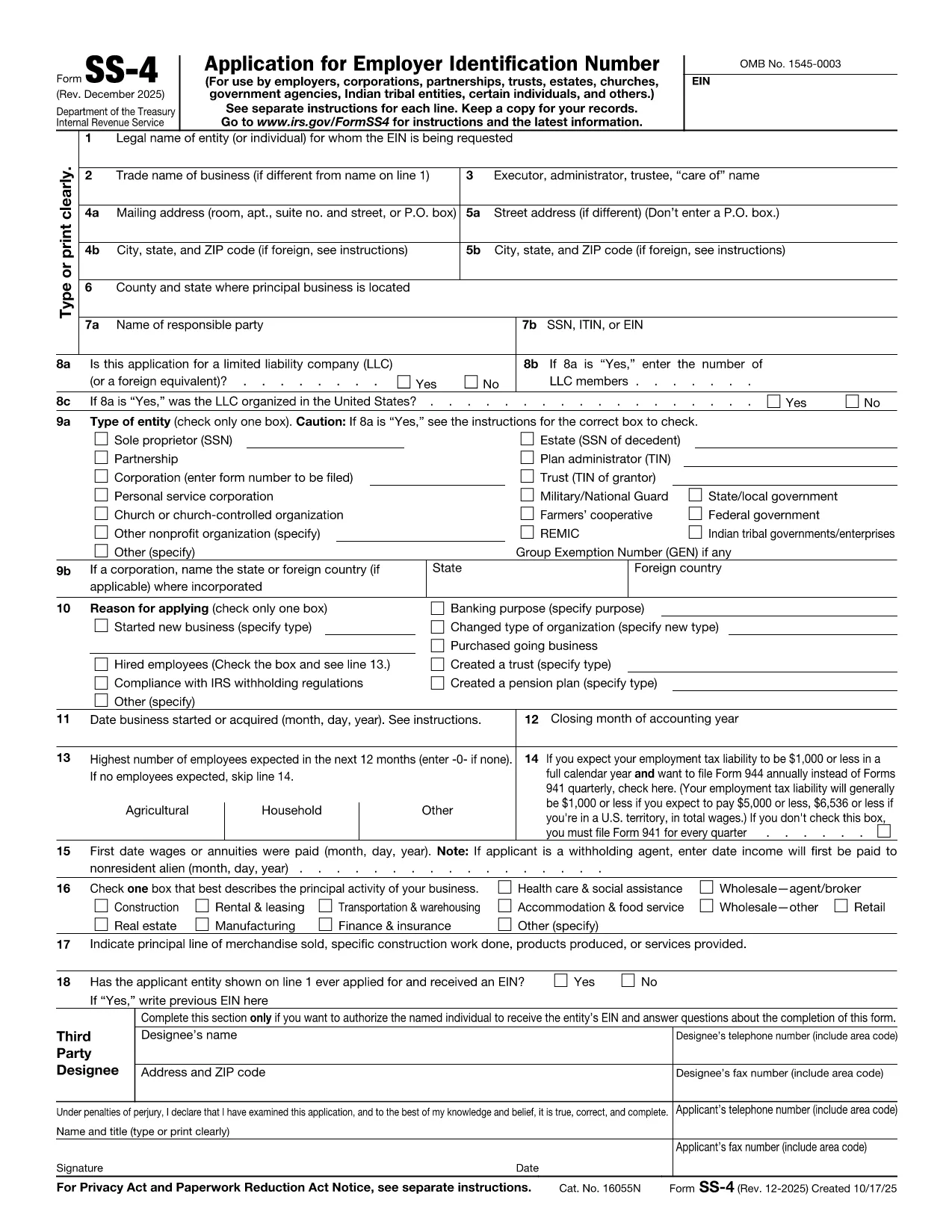
Starting a business, forming an LLC, corporation, partnership, or nonprofit? You’ll need an Employer Identification Number (EIN) from the Internal Revenue Service. The IRS Form SS-4 is the official legal form used to request an EIN for any type of legal entity in the United States.

Our fillable PDF version lets you complete the form directly in your browser—no download, no extra software. Simply click the "Fill out this form" button and the Formize PDF Filler app will load, guiding you through every required field.

Key benefits of using the fillable PDF:

  • Instant validation of numeric entries and required fields.
  • Automatic saving so you can pause and return later.
  • Export a completed PDF ready for electronic submission or printing.

Below you’ll find step‑by‑step instructions, common pitfalls to avoid, and resources for additional assistance.

FAQ
  • Do I need an EIN if I’m a sole proprietor?

    A sole proprietor without employees can use their Social Security Number, but an EIN is required for hiring staff, opening a business bank account, or filing certain tax forms.

  • Can I submit the SS-4 form online after filling it out?

    Yes. After completing the fillable PDF, you can upload the file through the IRS online EIN application portal or mail it to the address listed in the instructions.

  • What if I make a mistake after I’ve saved the PDF?

    The Formize filler lets you reopen the saved file, edit any field, and re‑save. If you’ve already submitted the EIN request, you’ll need to file an amendment with the IRS.

  • Is the fillable PDF compatible with Adobe Acrobat Reader?

    Absolutely. The PDF follows the official IRS layout, so it works perfectly in Adobe Acrobat, Foxit, or any PDF viewer that supports form fields.

  • How long does the IRS take to issue an EIN after I submit the form?

    If you apply online, you receive the EIN immediately. For mailed or faxed SS‑4 forms, processing typically takes 4‑6 weeks.

  • Do I need a separate form for a nonprofit organization?

    Nonprofits also use Form SS‑4 to obtain an EIN, but they must also file Form 1023 (or 1023‑EZ) for tax‑exempt status.

  • Is there a fee to obtain an EIN using Form SS‑4?

    No. The IRS provides EINs free of charge. Be wary of third‑party services that charge a fee.

  • Can I use the same EIN for multiple legal entities?

    No. Each distinct legal entity (LLC, corporation, partnership, etc.) requires its own EIN.

  • What if my business is located outside the United States?

    Foreign entities can still apply for an EIN using Form SS‑4. Follow the IRS instructions for foreign applicants and provide a U.S. mailing address or authorized third‑party designee.

  • Where can I find official instructions for Form SS‑4?

    The IRS publishes a detailed instruction booklet on the same page as the PDF. You can view it at https://www.irs.gov/instructions/si-ss-4.

BAGAIMANA CARANYA

Cara mengisi IRS Form SS-4 gratis secara online dalam 5 langkah mudah:

  1. 1
    Click the Fill‑out Button
    Locate the "Fill out this form" button on the page and click it. The Formize PDF Filler will open in a new tab.
  2. 2
    Wait for the Filler to Load
    Give the app a few seconds to initialize. All fields become interactive once the loader disappears.
  3. 3
    Enter Your Information
    Complete each section of the SS-4 form. Required fields are highlighted in red and validated in real time.
  4. 4
    Review and Validate
    Use the built‑in review tool to check for missing or incorrectly formatted entries before finalizing.
  5. 5
    Save or Download
    When you’re satisfied, click "Save" to store the PDF in your account or "Download" to get a copy for printing or electronic submission to the IRS.
Bentuk aplikasi Pengisi PDF
TENTANG

Formulir pajak

IRS Form SS-4 adalah salah satu formulir Pajak yang merupakan dokumen yang digunakan untuk melaporkan informasi tentang pendapatan, pemotongan, dan kewajiban pajak seseorang atau bisnis kepada otoritas pajak terkait. Formulir ini diperlukan untuk mematuhi peraturan perpajakan dan memenuhi kewajiban perpajakan. Formulir pajak bervariasi tergantung negara dan persyaratan pajak spesifik yang berlaku. Berikut adalah beberapa jenis formulir pajak yang umum:

Formulir Pajak Perorangan: Formulir ini digunakan oleh wajib pajak orang pribadi untuk melaporkan penghasilan pribadinya dan pengurangan klaim, kredit, dan pengecualian. Contohnya mencakup formulir 1040 di Amerika Serikat atau formulir Pengembalian Pajak Self-Assessment di Inggris.

Formulir Pajak Bisnis: Formulir pajak bisnis digunakan oleh perusahaan, kemitraan, atau wiraswasta untuk melaporkan pendapatan bisnis, pengeluaran, dan informasi terkait pajak lainnya. Contohnya termasuk formulir Jadwal C (Laba atau Rugi dari Bisnis) di Amerika Serikat atau formulir CT600 (Pengembalian Pajak Perusahaan) di Inggris.

Formulir Pajak Penggajian: Formulir ini digunakan oleh pemberi kerja untuk melaporkan upah, gaji, dan pajak yang dipotong dari gaji karyawannya. Contohnya mencakup formulir W-2 di Amerika Serikat atau formulir P60 di Inggris.

Formulir Pajak Penjualan: Formulir pajak penjualan digunakan oleh bisnis untuk melaporkan dan menyetorkan pajak penjualan yang dipungut atas barang atau jasa kena pajak. Formulir pajak penjualan spesifik berbeda-beda di setiap yurisdiksi.

Formulir Pajak Pertambahan Nilai (PPN): Formulir PPN digunakan di negara-negara yang mengenakan pajak pertambahan nilai untuk melaporkan dan menyetorkan PPN yang dipungut atas penjualan dan mengklaim kredit PPN untuk pembelian. Contohnya termasuk formulir pengembalian PPN yang digunakan di banyak negara.

Formulir Perkiraan Pajak: Formulir perkiraan pajak digunakan untuk melaporkan dan membayar perkiraan pajak atas penghasilan yang tidak dikenakan pemotongan, seperti pendapatan wirausaha atau pendapatan investasi.

Ini hanyalah beberapa contoh dari berbagai formulir pajak yang mungkin ada. Formulir spesifik yang diperlukan bergantung pada undang-undang dan peraturan perpajakan di negara atau yurisdiksi Anda. Penting untuk berkonsultasi dengan pedoman otoritas pajak atau mencari nasihat profesional untuk menentukan formulir mana yang dapat diterapkan pada situasi Anda.

FITUR

Pengisi PDF

Cara termudah untuk mengisi formulir PDF secara online

  • Isi IRS Form SS-4 dengan cepat
    Mencari cara mengisi IRS Form SS-4 dengan cepat secara online? Dengan pengisi formulir PDF online gratis kami, Anda akan tahu cara mengedit dan mengisi dokumen pdf ini dalam waktu kurang dari satu menit.
  • Editor PDF online yang mudah digunakan
    Muak dengan mencetak file PDF sehingga Anda dapat mengeditnya, sebelum memindai ulang dan mengirimnya kembali? Edit dokumen PDF secara online gratis. Gunakan editor pdf online kami untuk menghemat waktu dan kertas.
  • Alat hebat, semua platform
    Ingin tahu cara mengisi IRS Form SS-4 di Mac, atau mungkin cara menggunakan pengisi PDF gratis? Alat PDF online kami berfungsi di semua platform.
  • Penyimpanan file yang aman
    File "IRS Form SS-4" yang telah selesai disimpan dalam database aman yang dikelola oleh hosting Amazon Cloud. Anda dapat menghapus file Anda dari sistem kami kapan saja. Bagaimanapun, file-file ini secara otomatis dihapus setelah 24 jam.
  • Ngobrol dengan IRS Form SS-4
    Ngobrol dengan "IRS Form SS-4" di Chatize yang merupakan asisten pembaca PDF gratis. Ajukan pertanyaan dan dapatkan jawaban dari "IRS Form SS-4". Cukup klik tombol Chat Dengan Dokumen di atas.

Hapus sesi pengisian

Hapus sesi pengisian yang dipilih? Dalam hal ini, kemajuan Anda dalam menyelesaikan formulir akan hilang.

Hapus sesi pengeditan

Hapus sesi pengeditan yang dipilih? Dalam hal ini, kemajuan Anda dalam membuat dan mengedit formulir akan hilang.